The short answer
A WordPress to Next.js migration pays off when slow pages, plugin upkeep or custom features are costing you money, and it's rarely worth it when editors publish daily on a site that already works. Most of the risk sits in the URLs: map every old address, give each one a permanent 308 redirect to its closest new page or a 410 Gone if you removed it on purpose, and keep those redirects for at least a year. Google says to expect temporary ranking movement during any site move, so settle the redirect map and the plan for plugins and store data before anyone writes code.
On this page
If your WordPress site is slow, breaks after plugin updates or got hacked last year, someone has probably told you to move it to Next.js. Sometimes that's the right call. It's also how a business ends up with a fast new site that Google can't connect to the old one, because nobody mapped the old URLs.
We've made this move for client sites such as Maneel Club and North Bengal Agro Farms (both on our work page), and for arrowbin.com itself, which replaced an older WordPress site. Below is the process we follow, including the cases where I'd tell you to stay put.
It's written for owners, with a deeper redirect section for whoever does the build.
Should you move from WordPress to Next.js?
Move when speed, security upkeep or custom features are costing you money. Stay on WordPress when non-technical editors publish every day, the site works and the budget is tight.
WordPress isn't a bad tool. W3Techs counts it on 40.0% of all websites, and on 58.5% of the sites whose CMS it can identify. When one platform runs that much of the web, it gets blamed for problems that really come from how a particular site was built.
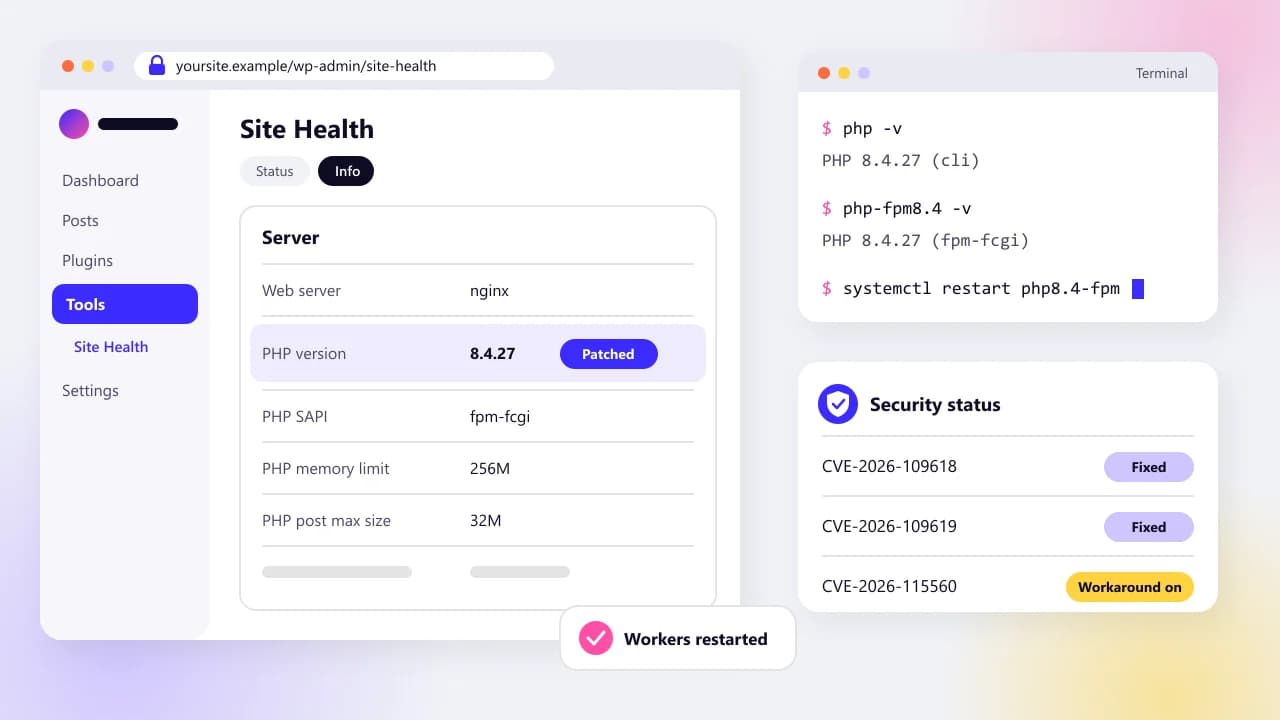
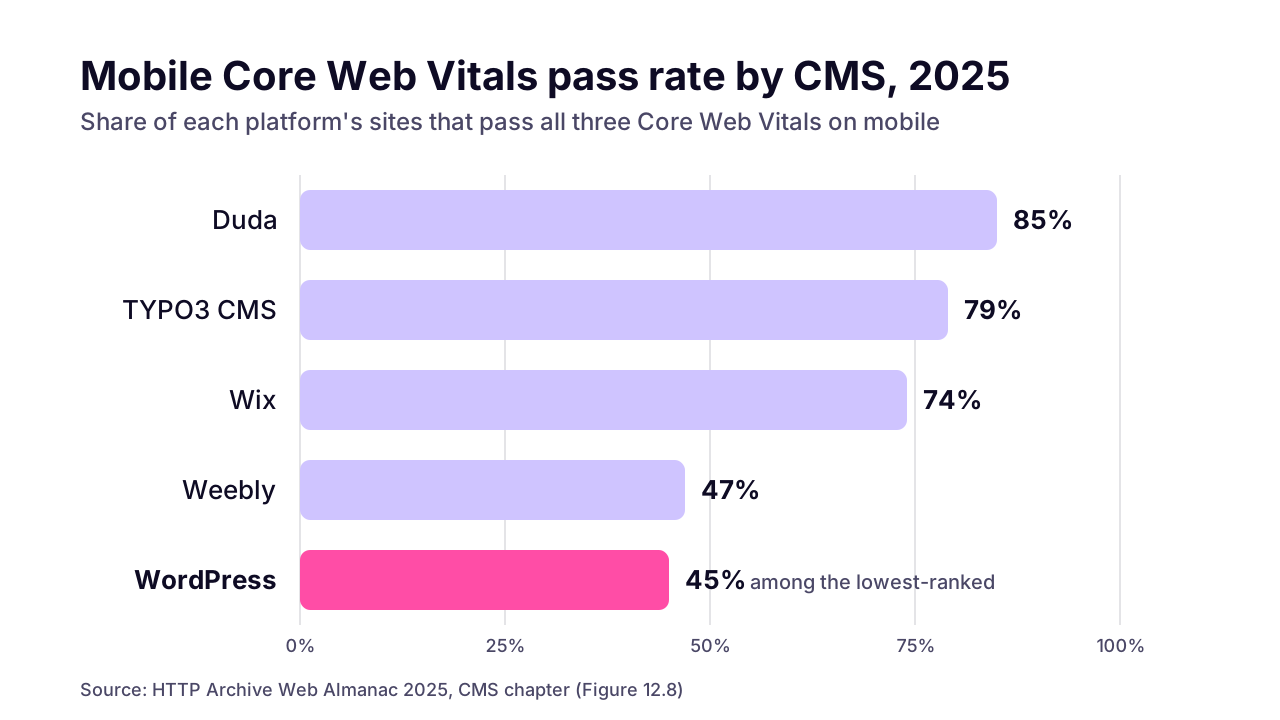
Speed is where the gap shows. In the HTTP Archive's 2025 Web Almanac CMS chapter, 45% of WordPress sites passed Core Web Vitals on mobile, among the lowest-ranked platforms, against 85% for Duda and 74% for Wix. That chapter also estimates that around 60% of WordPress sites use a page builder. When we audit a slow WordPress site, a page builder plus a stack of plugins that each load their own scripts is the pattern we usually find.
 (opens the full-size chart in a new tab)
Those figures describe WordPress sites as a group. They don't prove your rebuild will pass, and a careless Next.js build can be slow too.
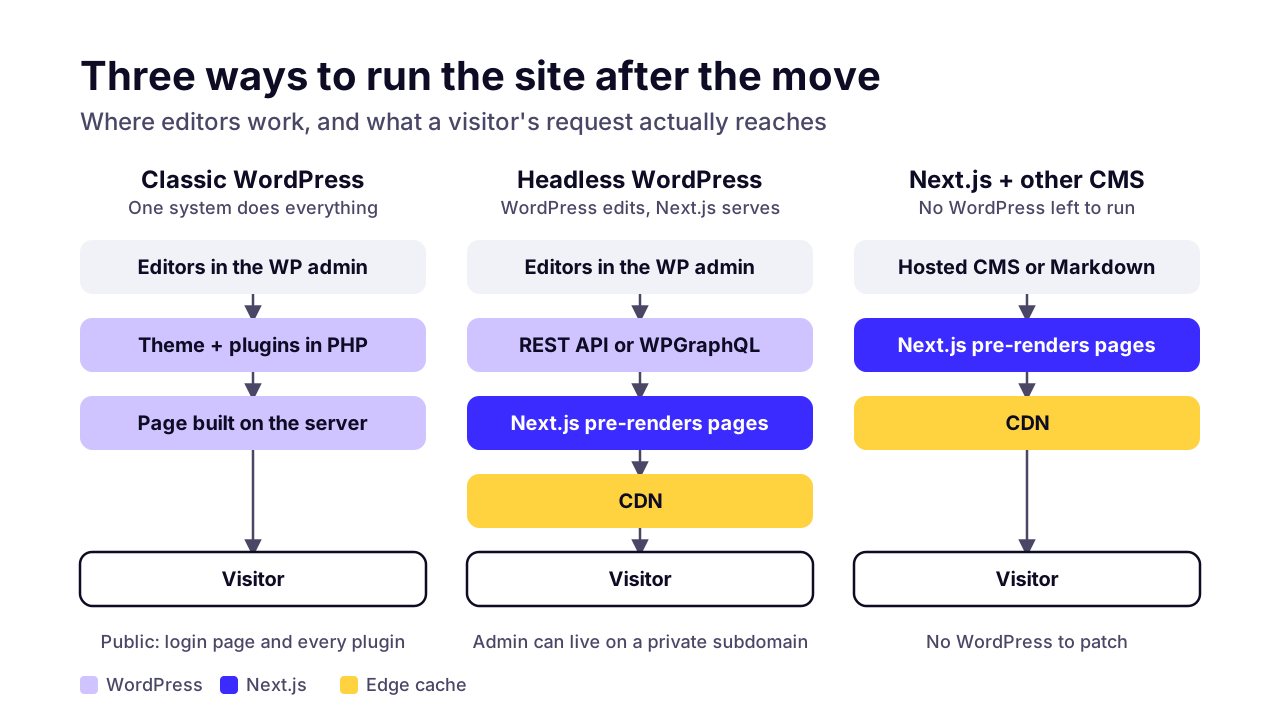
There are three realistic setups, and the middle one is the one people forget.
WordPress as is
- Editing experience
- The admin your team already knows
- Plugin dependency
- High: most features are plugins
- Security upkeep
- Frequent updates across core and plugins
- Speed work needed
- Caching plugins plus a lighter theme
- Who can maintain it
- Any WordPress developer
- Best for
- Content-heavy sites with daily publishing and a small budget
Headless WordPress + Next.js
- Editing experience
- Same WordPress admin; preview needs extra setup
- Plugin dependency
- Low: content plugins only
- Security upkeep
- Still patched, but the admin can sit off the main domain
- Speed work needed
- Mostly handled by pre-rendering and a CDN
- Who can maintain it
- A Next.js developer plus WordPress know-how
- Best for
- Teams who like the WordPress editor but need a faster front end
Next.js + another CMS or Markdown
- Editing experience
- A hosted CMS, or files in Git for developer-run sites
- Plugin dependency
- None from WordPress
- Security upkeep
- Dependency updates and the CMS vendor's security
- Speed work needed
- Mostly handled by pre-rendering and a CDN, as with headless
- Who can maintain it
- A Next.js developer
- Best for
- Mostly static marketing sites, or sites where plugins are the problem
I'd tell you not to migrate if your editors publish several times a day, lean on plugins for their workflow, and the site already loads quickly on a phone. A rebuild there buys you a developer dependency and not much else. Spend the money on a lighter theme and fewer plugins instead.
What are the steps in a WordPress to Next.js migration?
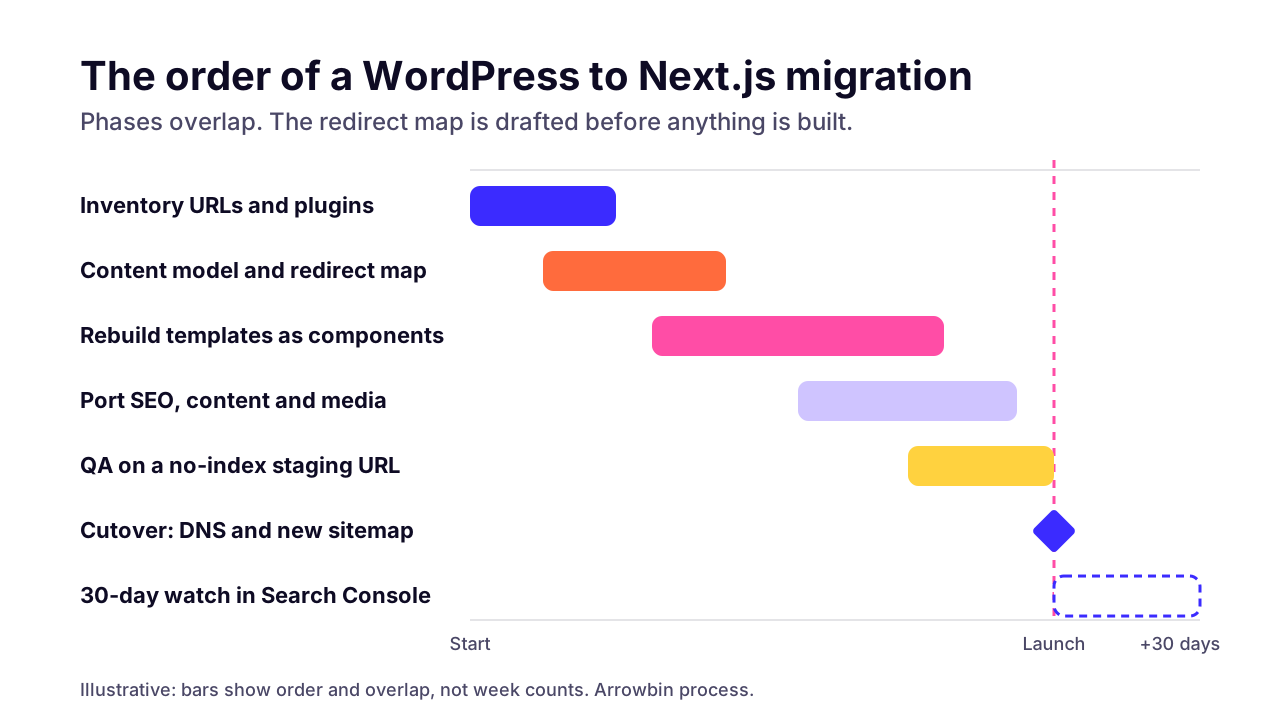
Inventory every URL and plugin, decide where content will live, map old URLs to new ones, rebuild the templates as components, port the SEO metadata, test on staging, then switch DNS and watch Search Console. People tend to skip the inventory and the redirect map. Those two steps are what protect your rankings.
- Crawl the live site and export every URL, archive pages included, plus anything listed in the sitemap. Pull top landing pages from Search Console too, because old URLs with backlinks often aren't in the sitemap anymore. Your developer runs the crawl; you say which pages still matter.
- List every active plugin and write down what it actually does on your site, not what its name says.
- Decide where content will live: WordPress as a headless CMS, a hosted CMS, or Markdown files in the code repository. You decide, with your developer's advice.
- Build the redirect map, one row per old URL, ending in a new URL, a 308 or a 410. Your developer drafts it and you sign it off.
- Rebuild each template as a Next.js component: home, page, post, archive, product. Count templates, not pages.
- Port the SEO layer: titles, descriptions, canonical tags, Open Graph images, structured data, the XML sitemap and robots rules.
- Move the content and media, then spot-check formatting. Shortcodes and page-builder markup rarely survive an export cleanly.
- Test on a staging URL that search engines can't index, including checkout emails and every row of the redirect map.
- Switch DNS, submit the new sitemap, and watch Search Console daily for two weeks while you watch leads and sales.
 (opens the full-size chart in a new tab)
Counting templates instead of pages matters more than it sounds. Say you have a blog with 400 posts that all share one post template, and a 30-page site where every page was hand-built in Elementor. Of the two, the blog is the smaller job. Each of those hand-built pages is its own template in disguise.
Should you keep WordPress as a headless CMS or move the content out?
Keep WordPress headless if your editors rely on its admin and revision history every week. Move the content out when the site is mostly static, or when the plugins are the very thing you're trying to escape.
Headless means WordPress stops rendering pages. Editors still log in to the same admin, and Next.js fetches the content and builds the public site. You can fetch it two ways:
- WordPress's built-in REST API returns posts and pages as JSON, with no extra plugin to install.
- WPGraphQL, a free, open-source plugin, adds a GraphQL API, so a page can ask for exactly the fields it needs in one request.
We default to REST on small sites, since it's one fewer plugin to keep updated. WPGraphQL earns its place when a page pulls from many related content types at once.
Headless breaks a few things editors are used to. Budget for fixing them:
- Preview. The Preview button points at the old theme, so it has to be wired to Next.js draft mode before editors can see unpublished posts.
- Publishing delay. Pre-rendered pages need a webhook that tells Next.js to revalidate when a post changes, or editors will wonder why their fix isn't live.
- Front-end plugins. Anything that injects HTML into the theme, like a slider or a page-builder layout, never reaches the Next.js site.
- Roles and revisions keep working as before, because they live in the admin.
The real cost is running two systems: a WordPress install that still needs updates, and a Next.js app that needs deploys. Headless shrinks what the public can reach. It doesn't remove WordPress maintenance. If nobody on your team actually likes the WordPress editor, move the content out and stop paying for both.
 (opens the full-size chart in a new tab)
How do you keep your Google rankings during the move?
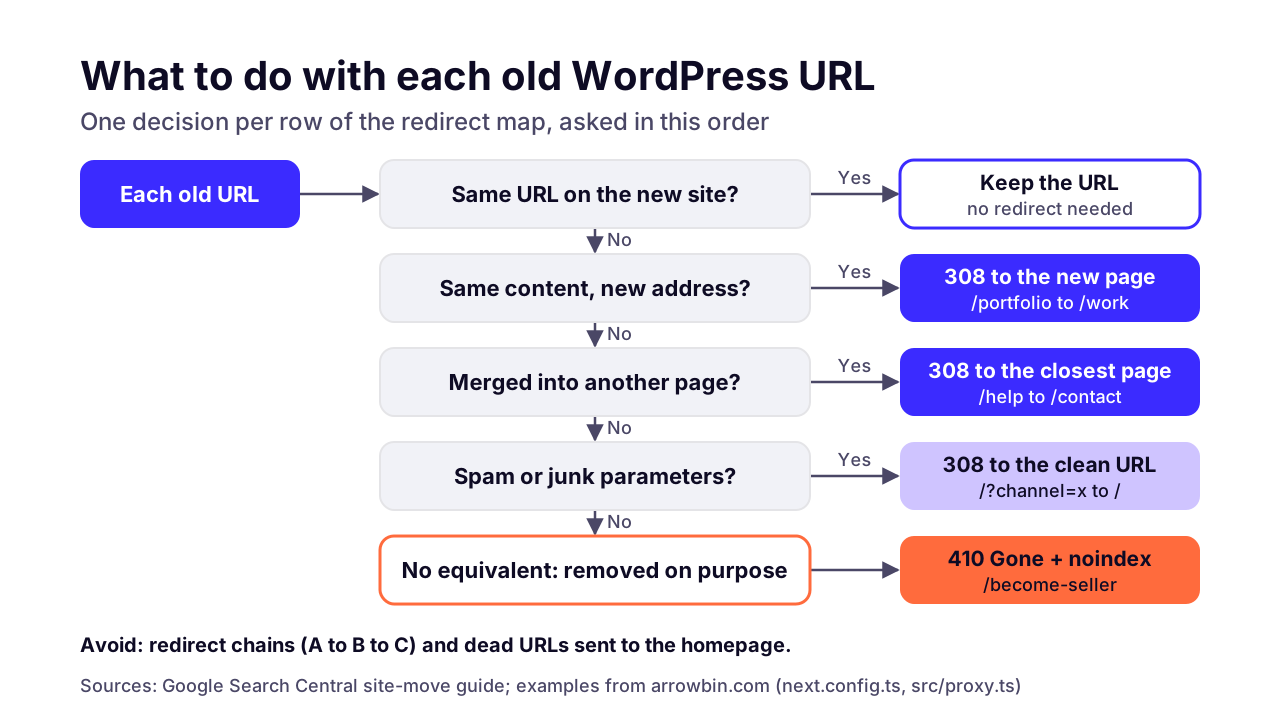
Give every old URL a server-side permanent redirect to its closest new page, return 410 Gone for pages you're deleting on purpose, and keep the redirects for at least a year. Even when you do all of that, expect some ranking movement for a few weeks.
That's Google's own advice. Its site-move guide says to keep redirects for at least a year as a general rule and to expect temporary fluctuation in rankings. It also warns against sending lots of old URLs to one irrelevant page such as the homepage, and against chains of redirects.
301 or 308?
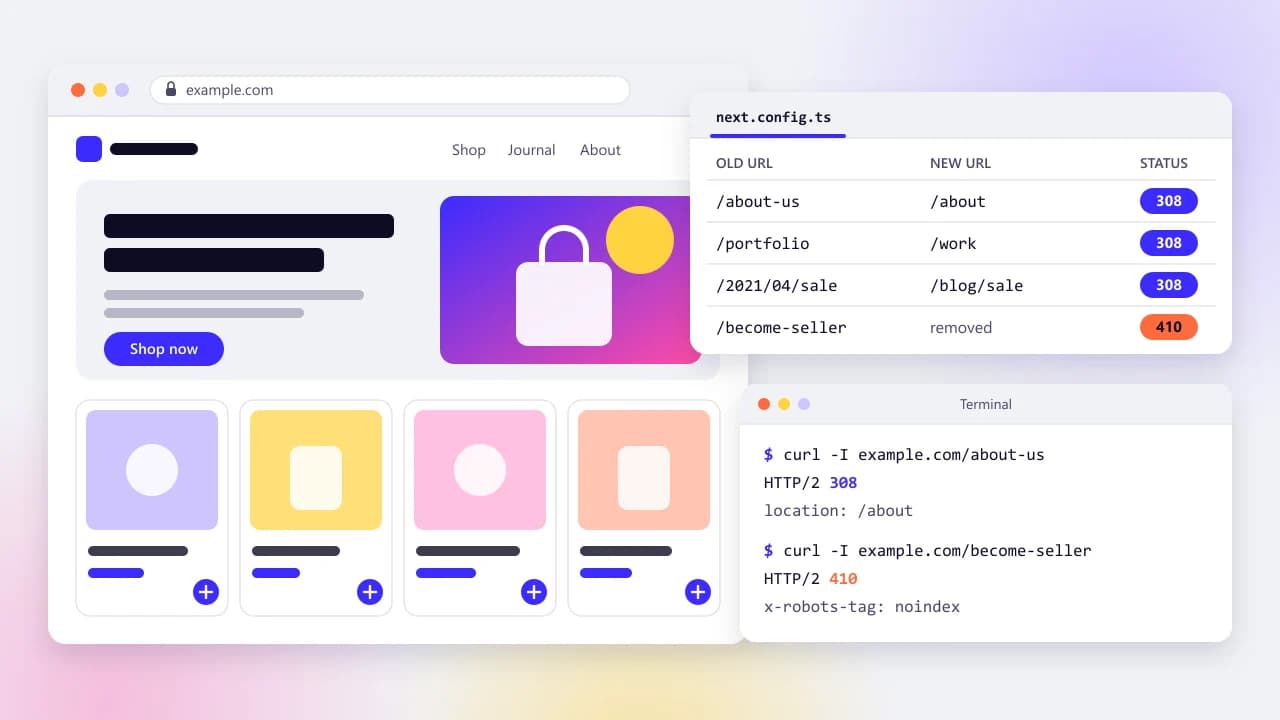
In Next.js, a rule in the redirects list of next.config.ts with permanent set to true returns a 308, per the Next.js redirecting guide. Google's HTTP status code documentation treats 308 as equivalent to 301. So don't let anyone sell you a '301 fix' for a Next.js site. It's the same signal.
What if you have thousands of old URLs?
The same Next.js guide notes that Vercel caps config redirects at 1,024 and points you to Proxy for anything past about a thousand. A WordPress site with years of posts and date archives can pass that easily.
Two habits keep the list short. Use patterns first: if old posts lived at /2021/04/post-name, one rule that matches /:year/:month/:slug (with year and month limited to digits) and sends it to /blog/:slug covers all of them. Then put the long tail in a lookup that runs in Proxy, the file Next.js 16 calls proxy.ts now that middleware has been renamed.
How Arrowbin handles its own old URLs
Our own domain had two earlier lives: a WordPress site and, later, a marketplace. Our cleanup splits their leftover URLs into two groups. Pages with a real equivalent, like /contact-us, /about-us and /portfolio, get a permanent redirect in next.config.ts to /contact, /about and /work. Pages with nothing to replace them, such as the old /become-seller page, are matched in src/proxy.ts and answer 410 Gone with an x-robots-tag: noindex header.
Spam links that tacked a ?channel= parameter onto the homepage get their own rule in the same proxy file: a 308 to the clean homepage, so the junk variant drops out of the index. One ordering detail matters. Next.js runs config redirects before Proxy, so if a URL sits in both lists, the redirect wins.
Is a 410 better than a 404?
Not for Google, going by its documentation. Google says all 4xx errors except 429 are treated the same, and indexed URLs that return one are removed from the index. We still use 410 for deliberate removals because it records a decision.
RFC 9110, the HTTP standard, describes 410 as a resource that's no longer available and likely gone for good. A 404 could just as easily be a typo or a broken deploy. When someone audits the site next year, a 410 says the page was removed on purpose; a 404 sends them off to investigate.
Redirects are half the job. Porting what your SEO plugin did, pointed at the new URLs, is the other half. On a store, the Product schema in the table below is also what AI shopping assistants read, and our guide to getting products into ChatGPT shopping covers it.
SEO title and meta description (Yoast, Rank Math)
- Where it lives in Next.js 16
- The metadata export or generateMetadata in each route
Canonical URL
- Where it lives in Next.js 16
- alternates.canonical in the same metadata, using the new URL
XML sitemap
- Where it lives in Next.js 16
- app/sitemap.ts, generated from your content, new URLs only
robots.txt
- Where it lives in Next.js 16
- app/robots.ts or a static file
Open Graph image
- Where it lives in Next.js 16
- An opengraph-image file per route, or openGraph.images
Schema (Article, Product, BreadcrumbList)
- Where it lives in Next.js 16
- A JSON-LD script rendered in the page
Redirects (Redirection plugin)
- Where it lives in Next.js 16
- redirects in next.config.ts, or Proxy for large maps
Internal links inside old content
- Where it lives in Next.js 16
- Rewritten to point straight at new URLs, not through redirects
 (opens the full-size chart in a new tab)
What happens to plugins, forms and WooCommerce?
Each plugin's job gets rebuilt as code, replaced with a service, or dropped. Write down what every plugin actually does before you start, because some do more than their name suggests.
A classic surprise is an SEO plugin that was also running your redirects, or a forms plugin that stored every lead in the database your sales team checks each morning. Neither looks critical in a plugin list. Both break quietly.
SEO (Yoast, Rank Math)
- What it did
- Titles, meta, sitemap, schema
- Next.js replacement
- Metadata API, sitemap.ts, JSON-LD
- Watch-out
- It may also have run your redirects
Forms (Contact Form 7, Gravity Forms)
- What it did
- Fields, email, stored entries
- Next.js replacement
- A route handler plus an email service
- Watch-out
- Export old entries before WordPress goes away
Caching (WP Rocket, W3 Total Cache)
- What it did
- Page cache, minified files
- Next.js replacement
- Static rendering and a CDN
- Watch-out
- Pages rendered per request need a cache plan
Security (Wordfence)
- What it did
- Firewall, login protection
- Next.js replacement
- Host or CDN firewall; no public admin
- Watch-out
- A headless admin still needs it
Page builder (Elementor, Divi)
- What it did
- Layout for every page
- Next.js replacement
- React components
- Watch-out
- Layouts get rebuilt by hand, not exported
WooCommerce
- What it did
- Catalog, cart, orders, accounts
- Next.js replacement
- Headless WooCommerce, custom checkout or Shopify
- Watch-out
- Order history and customer logins
Payments (Stripe, SSLCommerz, bKash)
- What it did
- Checkout and payment callbacks
- Next.js replacement
- Server-side gateway integration
- Watch-out
- Callback URLs must point at new routes
Multilingual (WPML, Polylang)
- What it did
- Translations, hreflang
- Next.js replacement
- Locale routes and hreflang in metadata
- Watch-out
- Each language needs its own redirect rows
WooCommerce stores
A store has three realistic routes, and the right one depends on how much of WordPress you want to keep.
- Keep WooCommerce as the back end and build a Next.js storefront on top. WooCommerce's Store API offers public endpoints for cart and checkout. Products and orders stay where they are. You still patch WordPress and WooCommerce, and checkout extensions that inject their own front-end UI won't show up. Our headless commerce guide weighs whether that split pays off.
- Move to a custom storefront and checkout. Products and orders move to your own database or a commerce back end, and you own the checkout flow end to end, including local gateways like bKash and Nagad. It's the most work, and it gives you the most control.
- Move to Shopify. If you'd rather not run commerce infrastructure at all, a hosted platform is a sensible answer, and it doesn't have to involve Next.js. Our Shopify vs custom store comparison runs the fee maths for that choice.
Whichever route you take, plan order history and customer accounts first. Customers expect to log in and see past orders. WordPress stores passwords as hashes that can't be turned back into passwords, so you either keep WordPress handling logins, import the hashes into an auth system that can verify them, or send every customer a reset link. Decide before launch, not when the first complaint arrives.
Payment gateways need the same care. Each one has callback or webhook URLs pointing at the old WooCommerce endpoints, and those have to move with the checkout. It's the part we test hardest when we move a WooCommerce store to a custom storefront. For bKash and SSLCommerz, our Bangladesh payment gateway guide walks through the callback and validation flow.
How long does a WordPress to Next.js migration take?
It depends mostly on how many distinct page templates you have, how many plugins need replacing, and whether there's a store. A brochure site with a handful of templates is a small project. A WooCommerce store with local payment gateways and years of order history is a big one.
We don't publish a standard week count, because two sites with the same number of pages can be completely different jobs. What we can tell you is which way each driver pushes.
Page templates
- Keeps it small
- A handful, mostly text and images
- Makes it bigger
- Dozens, each built in a page builder
Content
- Keeps it small
- Clean posts and pages
- Makes it bigger
- Thousands of posts full of shortcodes and embeds
Store
- Keeps it small
- No store
- Makes it bigger
- WooCommerce with variants and order history
Integrations
- Keeps it small
- One contact form
- Makes it bigger
- Payment gateways, courier APIs, a CRM
Languages
- Keeps it small
- One
- Makes it bigger
- Several, each with its own URLs
Redirect map
- Keeps it small
- Same URL structure kept
- Makes it bigger
- New structure and thousands of old URLs
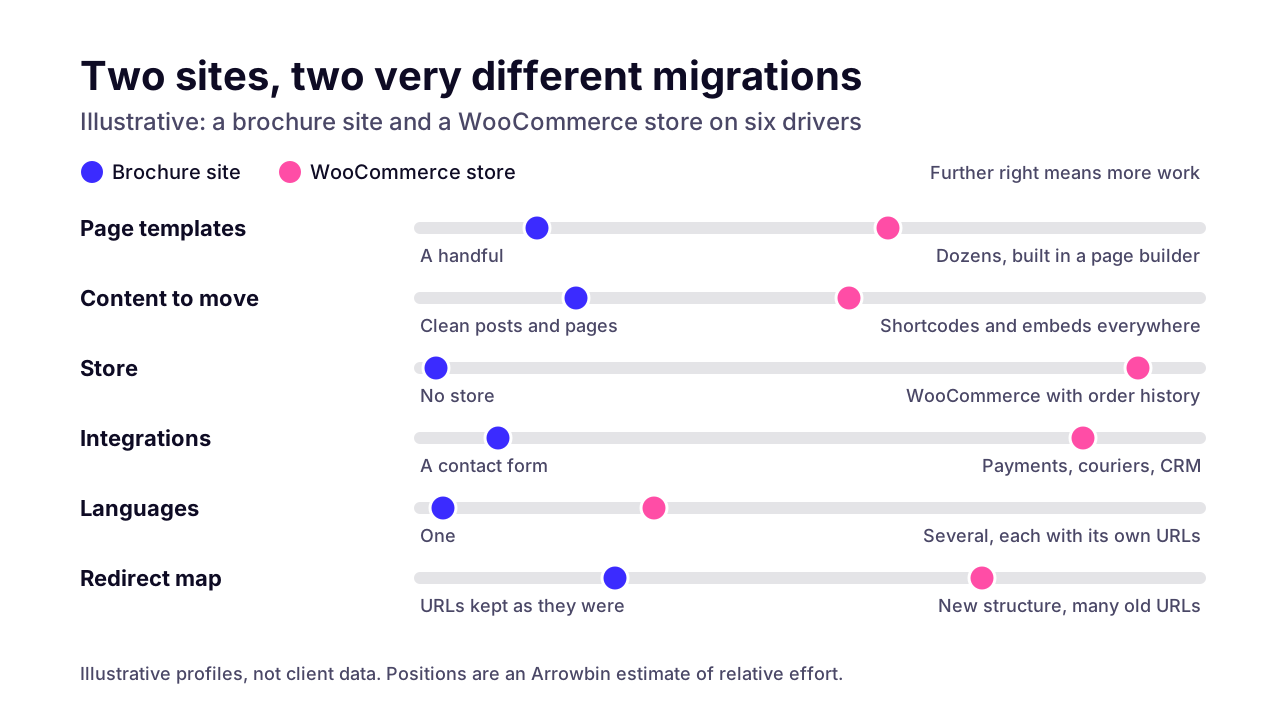 (opens the full-size chart in a new tab)
There's also a clock you don't control. After launch, Google has to recrawl and reprocess your old URLs, and its site-move guide puts that at a few weeks for most pages on a small to medium site. Bigger sites take longer. Don't launch the week before your biggest sale.
What does a WordPress to Next.js migration cost, and what drives it?
Cost follows the same drivers as the timeline: templates, plugin replacements, e-commerce and the redirect work. After launch, hosting can cost less or more than your WordPress hosting did, depending on traffic and how many pages are rendered for each visitor instead of served from a cache.
I won't put a typical price on it here, because it would be a guess about your site. Rates are the other half of the number, and our guide to what custom development costs breaks those down by region and project type.
Inventory and redirect map
- One-off or ongoing
- One-off
- What makes it bigger
- Many old URLs, a changed structure
Content and media migration
- One-off or ongoing
- One-off
- What makes it bigger
- Shortcodes, builder markup, embeds
Plugin replacements
- One-off or ongoing
- One-off
- What makes it bigger
- Forms, search, memberships
Store and checkout
- One-off or ongoing
- One-off
- What makes it bigger
- Gateways, order history, accounts
Hosting
- One-off or ongoing
- Ongoing
- What makes it bigger
- Server rendering, high traffic
Hosted CMS, if you use one
- One-off or ongoing
- Ongoing
- What makes it bigger
- Editor seats, content volume
Maintenance
- One-off or ongoing
- Ongoing
- What makes it bigger
- Dependency updates, a headless WordPress
Hosting surprises people in both directions. Pages that are pre-rendered and served from a CDN are cheap to host. Pages rendered on the server for every visitor use compute, and a headless setup means paying for WordPress hosting and Next.js hosting at the same time.
You don't need Vercel, either. The Next.js deployment docs list a Node.js server and a Docker container as options that support every feature, so a VPS you already pay for can run it. If you'd rather hand that side off, it's what our hosting and deploys for Next.js work covers.
The most expensive way to migrate, in my view, is copying every page-builder layout pixel for pixel. Rebuilding into a small set of well-made templates costs less now, and less every time you change the site later.
Is Next.js more secure than WordPress?
A Next.js site has a smaller public attack surface, because by default there's no public admin login and no plugin code running on every request. It still needs patched dependencies, careful handling of secrets and secure hosting.
Owners ask this for good reason. Patchstack's State of WordPress Security in 2026 counted 11,334 new vulnerabilities in the WordPress ecosystem in 2025, 42% more than in 2024. 91% were in plugins and 9% in themes. WordPress core had only 6, all low priority.
Two other figures from that report matter more to a small business. 46% of those vulnerabilities had no fix from the developer by the time they were publicly disclosed, and Patchstack puts the weighted median time to first exploit at 5 hours. If you run 30 plugins and check for updates once a month, that math isn't on your side. In October 2026 the risk even came from underneath WordPress: the PHP2Shell bugs let attackers run code on servers with unpatched PHP before WordPress loaded at all.
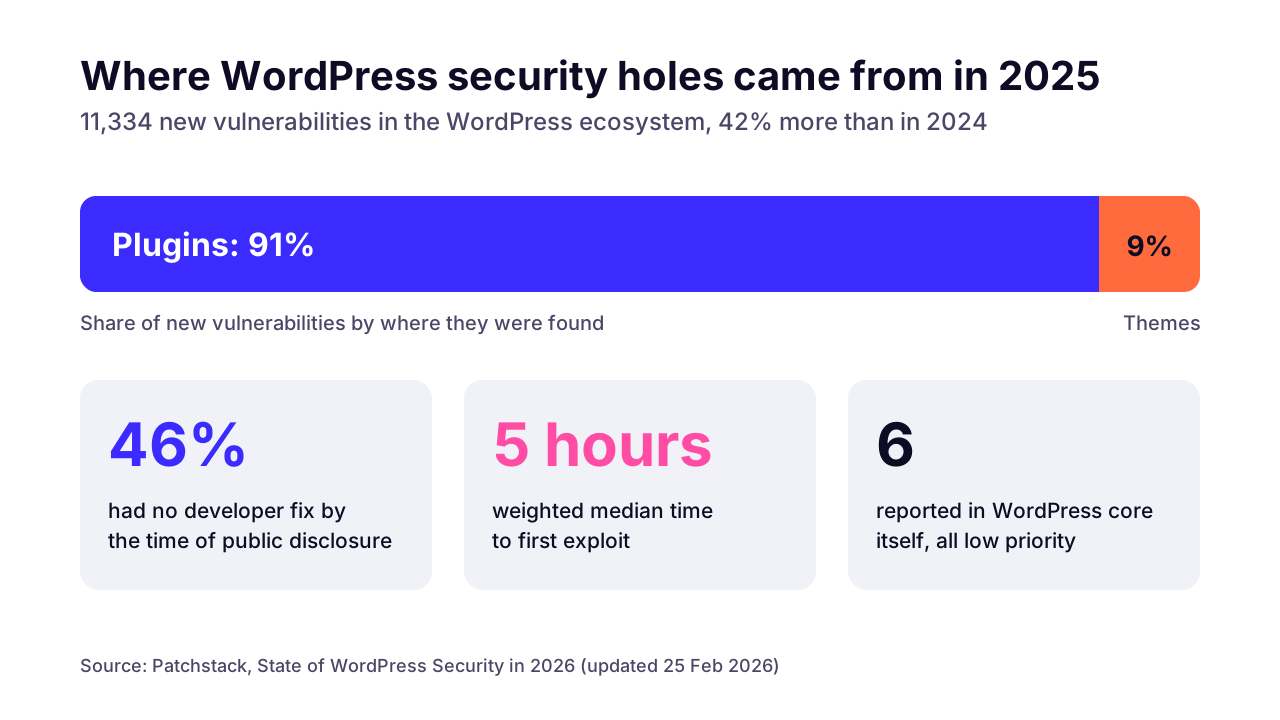 (opens the full-size chart in a new tab)
So WordPress core is in decent shape. The risk is the plugins you add, and a Next.js site removes most of that layer. It doesn't make the site hack-proof. These still need care on a Next.js site:
- npm dependencies, Next.js included. A security release only protects you once it's deployed.
- Secrets. Only environment variables prefixed with NEXT_PUBLIC_ reach the browser, so an API key must never carry that prefix.
- Route handlers and server functions. They're public endpoints, and the Next.js Proxy docs advise checking authentication inside each server function rather than relying on Proxy alone.
- Forms. A contact form without spam protection and rate limits is an open invitation to bots.
- A headless WordPress admin. It still needs updates and login protection, and it's safer on a separate, restricted subdomain.
On either platform, security comes down to someone owning the updates. If that won't be you, arrange for someone to keep the new site patched from day one. Our maintenance cost guide shows how to size the yearly upkeep budget after the move.
What should you check in the first 30 days after launch?
Watch Search Console's Page indexing report daily for the first two weeks, especially its 'Not found (404)' list, re-crawl your full list of old URLs against the live site, and fix any redirect that lands on the wrong page. Then test the money paths again, from forms to checkout to analytics tags.
- Launch day: run your inventory of old URLs through a crawler and confirm each one returns its planned 308 or 410 in a single hop.
- Launch day: submit the new sitemap in Search Console and request indexing for your most important pages.
- Days 1–14: check the Page indexing report every morning. Old URLs listed as 'Page with redirect' are expected; a jump in 'Not found (404)' means a gap in the map.
- Days 1–14: place a real order and send a real form, then confirm the emails and payment callbacks arrive.
- Week 2: compare conversions and analytics events with the old site's numbers, so a missing tag shows up before the monthly report does.
- Weeks 3–4: open the Core Web Vitals report. It's built from real-user data gathered over several weeks, so lean on lab tests until it fills in.
- Day 30: confirm backups of the new content store, and keep a full export of the old WordPress database somewhere safe.
Then leave the redirects alone. Google asks for at least a year. We keep them indefinitely, since a line in a config file costs nothing and old backlinks don't expire.
What can you do now if the move is a year away?
Start with the inventory, even if you don't move for a year. Export every URL, list every plugin with what it does, and mark the pages that bring in leads or sales. That one spreadsheet tells you if this is a small rebuild or a store migration, and it's what any honest quote should be built on.
If it says you should move, we rebuild WordPress sites on Next.js the way this guide describes, redirect map first. Have that spreadsheet open and we can go through it with you on a 30-minute call.
Key takeaways
- 01Move to Next.js when speed, plugin upkeep or custom features cost you money; stay on WordPress when editors publish daily and the site works.
- 02The redirect map is the migration: every old URL gets a 308 to its closest new page, or a 410 if it was removed on purpose.
- 03Next.js returns 308 for permanent redirects, and Google treats 308 the same as 301.
- 04Keep redirects for at least a year, and expect rankings to move for a few weeks even when the move is done right.
- 05List what every plugin actually does before you start; SEO and form plugins often carry hidden jobs like redirects and stored leads.
- 06For a WooCommerce store, decide how order history and customer logins will move before choosing a storefront.
- 07Next.js removes the public admin and plugin layer, but its dependencies and API routes still need patching and care.

Written by
Md. Shishir Ahmed
Founder, Arrowbin
Founder of Arrowbin. Writes about shipping software, what it costs, and the decisions that decide whether a product works.