The short answer
For most Bangladeshi online stores, the right setup is cash on delivery plus one aggregator such as SSLCommerz, which takes cards and the main mobile wallets through a single integration. SSLCommerz lists a Tk 25,500 Basic plan (non-refundable) and 2.5% per successful transaction, 3.5% for AMEX, as of October 15, 2026. Add a direct bKash integration once bKash carries most of your online payments. Whichever you pick, mark an order paid only after your server has validated the payment with the gateway.
On this page
This guide is for two people. One is a Bangladeshi brand owner moving off Facebook inbox orders or a template site onto a proper store, who needs to pick a পেমেন্ট গেটওয়ে and know what it will cost. Then there's the developer who has to wire it up and keep it working. If you're an overseas brand selling into Bangladesh, most of it applies to you as well.
We rebuild Bangladeshi e-commerce stores, mostly WordPress sites moved to Next.js, so we work on these checkouts from the inside. Every fee and API detail below comes from the providers' own pages and developer docs, opened on October 15, 2026. Fees change. Check them again before you sign anything.
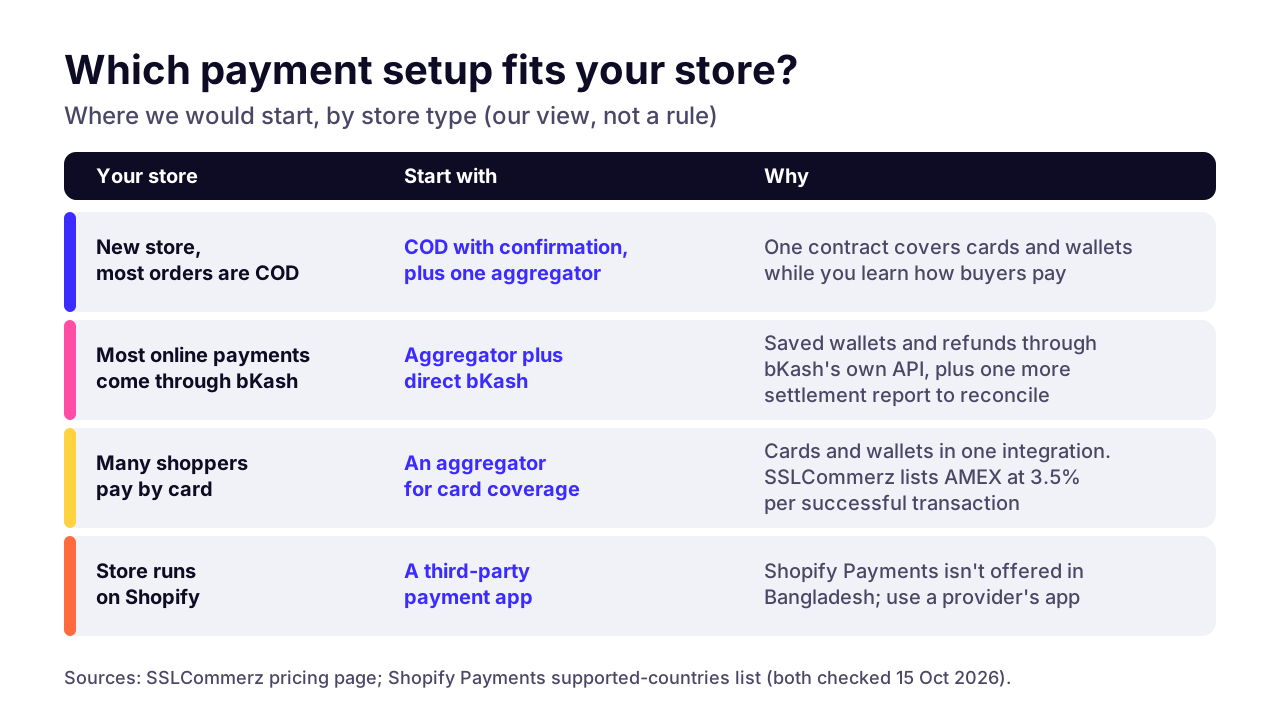
This table is the short answer: where we'd start, by store type. The sections below explain each row.
New store, most orders cash on delivery
- Start with
- Cash on delivery plus one aggregator, such as SSLCommerz
- Why
- One contract and one integration cover cards and the main wallets, and real orders show which method buyers prefer
bKash carries most online payments
- Start with
- Add a direct bKash integration
- Why
- Saved wallets and auth-and-capture through bKash's own API
Many card buyers
- Start with
- An aggregator
- Why
- Cards plus bKash, Nagad and Rocket in one checkout
Store on Shopify
- Start with
- A third-party payment app, such as SSLCOMMERZ's
- Why
- Shopify Payments isn't offered in Bangladesh
Store on WooCommerce
- Start with
- SSLCommerz's own WooCommerce plugin
- Why
- Hosted or popup checkout, and the IPN handled without extra setup
Which payment methods do online shoppers in Bangladesh expect?
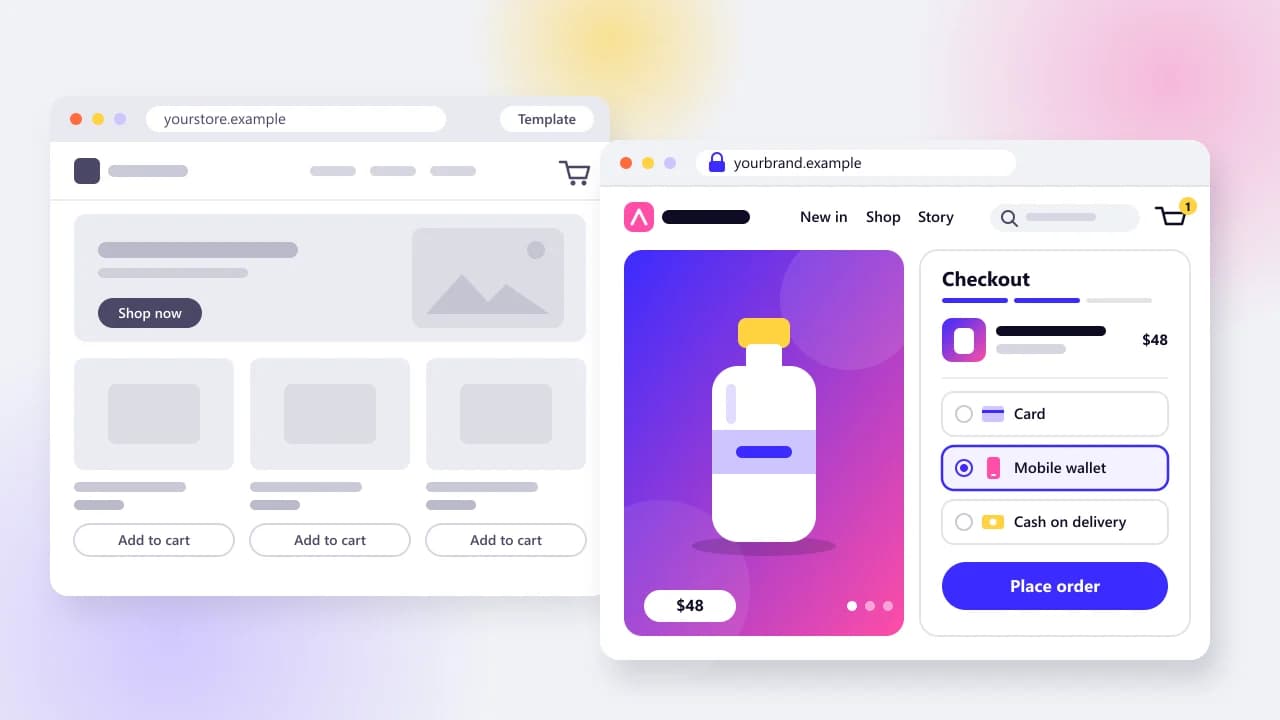
Plan for cash on delivery plus bKash and Nagad as the minimum, then add cards and Rocket for shoppers who prefer them. We wouldn't launch a Bangladeshi store without cash on delivery, and we wouldn't launch one without a wallet option either.
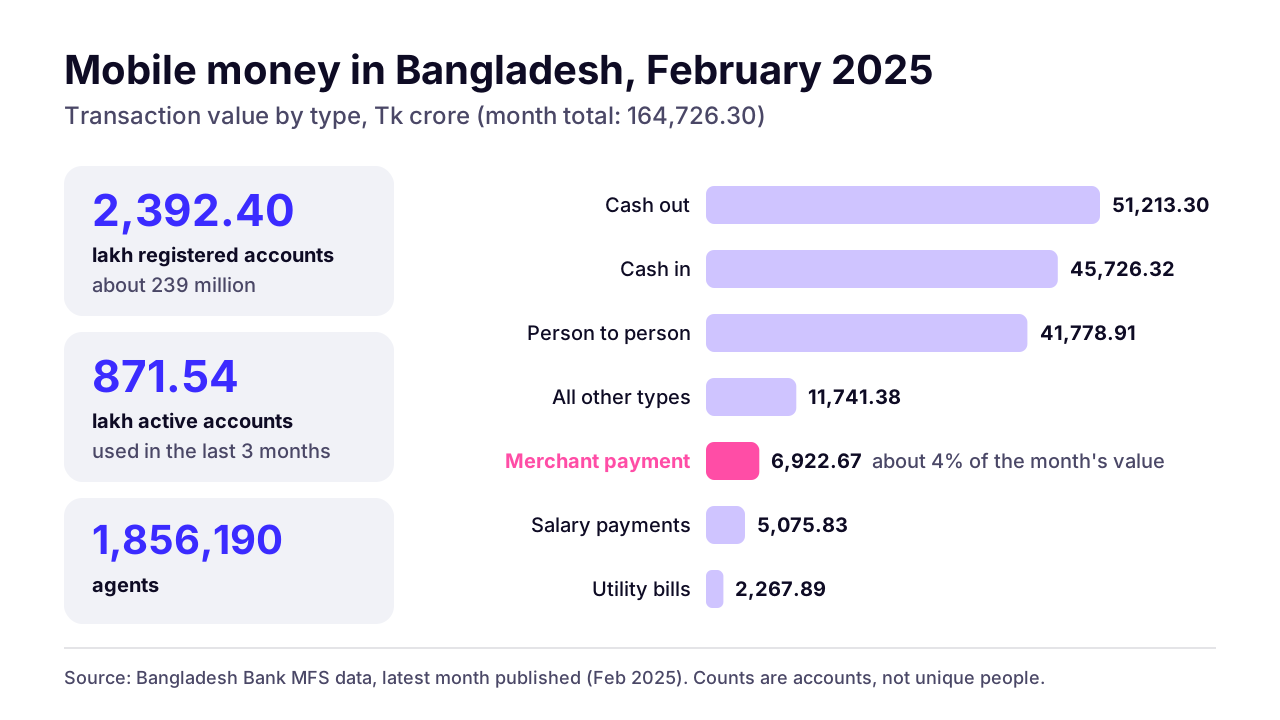
Mobile wallets are everywhere. Bangladesh Bank's mobile financial services data for February 2025, the latest month on the page when we checked, counts 2,392.40 lakh registered accounts (about 239 million) and 871.54 lakh active ones. Active means used in the last three months. Those are accounts, not people: one shopper can hold both a bKash and a Nagad account, so don't read 239 million as a head count.
Where the money goes tells you more. Of Tk 164,726.30 crore that moved through mobile financial services that month, merchant payments were Tk 6,922.67 crore, about 4%. Most of the rest was cash going in and out of wallets, plus person-to-person transfers. Our read is that shoppers have the wallet, but paying a business from it is still a smaller habit than sending money home. That's why a wallet button doesn't make cash on delivery go away.
 (opens the full-size chart in a new tab)
Stores we've built show the same mix at checkout. Silent Lifestyle BD's footer reads "Pay on delivery • bKash • Nagad • Card". FlexOver BD lists six options under "We accept", with Rocket, Visa and Mastercard among them. গ তে গয়না puts "Cash On Delivery Available" in its header. You can browse them among the Bangladeshi stores we have built.
Should you use an aggregator like SSLCommerz or integrate bKash and Nagad directly?
Use an aggregator when you want one contract and one integration that covers cards and wallets together. Integrate bKash directly when most of your online payments are bKash and you want features such as saved wallets or auth-and-capture through bKash's own API.
An aggregator holds the merchant relationships with banks and wallets and puts one API in front of them. SSLCommerz is one; its pricing page says its rate applies to "Visa, Mastercard, bKash, Nagad, Rocket, and more". Others, including aamarPay and shurjoPay, work on the same model. Going direct means a separate merchant account per wallet, each with its own API and its own settlement report.
SSLCommerz or another aggregator
- Methods covered
- Cards plus bKash, Nagad, Rocket and other wallets in one checkout
- Contracts
- One
- Build effort
- One integration: session, IPN, validation
- Refunds
- Refund API in the SSLCommerz v4 docs
- Best for
- Most new stores, and any store with card buyers
Direct bKash
- Methods covered
- bKash only
- Contracts
- One with bKash
- Build effort
- Token, create, execute and query, with more edge cases
- Refunds
- Full or partial, within 60 days of payment
- Best for
- Stores where bKash carries most online payments
Direct Nagad
- Methods covered
- Nagad only
- Contracts
- One with Nagad
- Build effort
- API documents and keys arrive after onboarding
- Refunds
- Check with provider
- Best for
- Adding Nagad next to a direct bKash setup
Cash on delivery only
- Methods covered
- Cash at the door
- Contracts
- Your courier
- Build effort
- No payment API, but you still need order confirmation
- Refunds
- Manual, in cash or by wallet transfer
- Best for
- Testing demand in the first few weeks
For a new store, I'd start with an aggregator plus cash on delivery. There's one contract to sign and one integration to maintain, and real orders tell you which method your buyers prefer. Go direct with bKash later, when your own numbers say it carries most online payments, and accept the price: a second integration to maintain and a second report to reconcile daily.
Running both, an aggregator plus a direct bKash button, is a fair end state for a busy store. As a starting point it doubles your payment code before you know you need it.
 (opens the full-size chart in a new tab)
How does an SSLCommerz integration work?
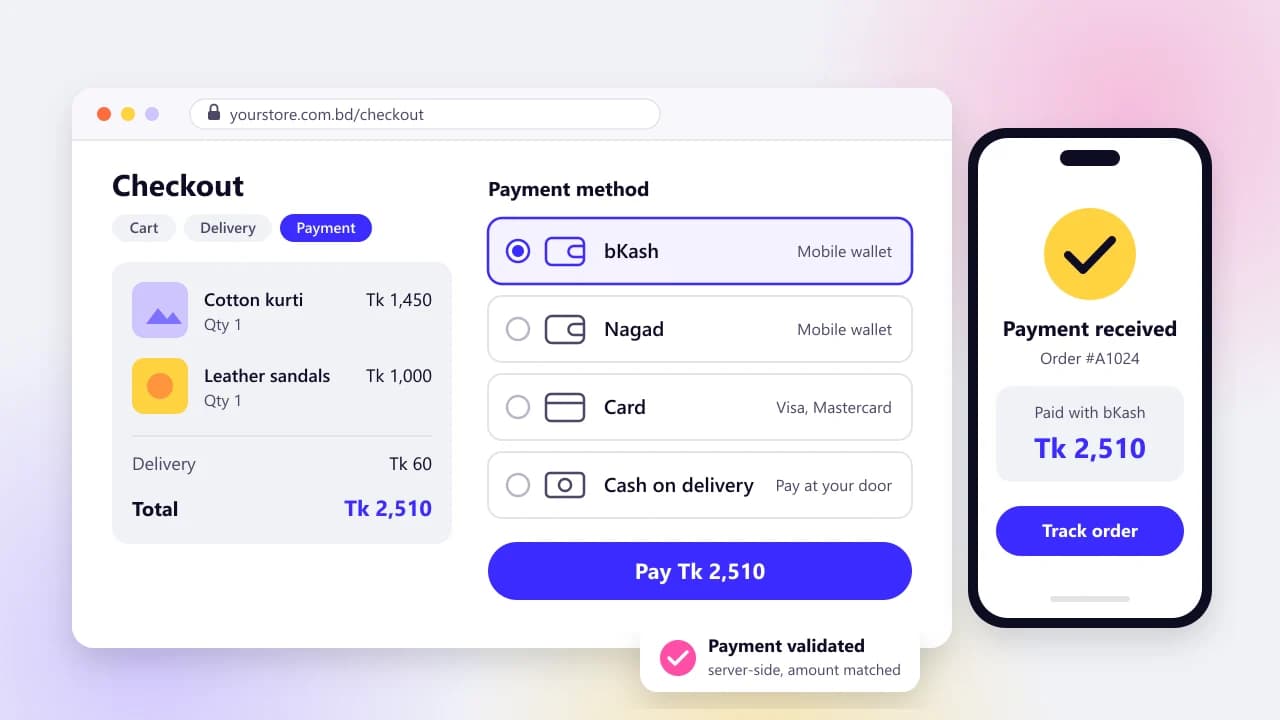
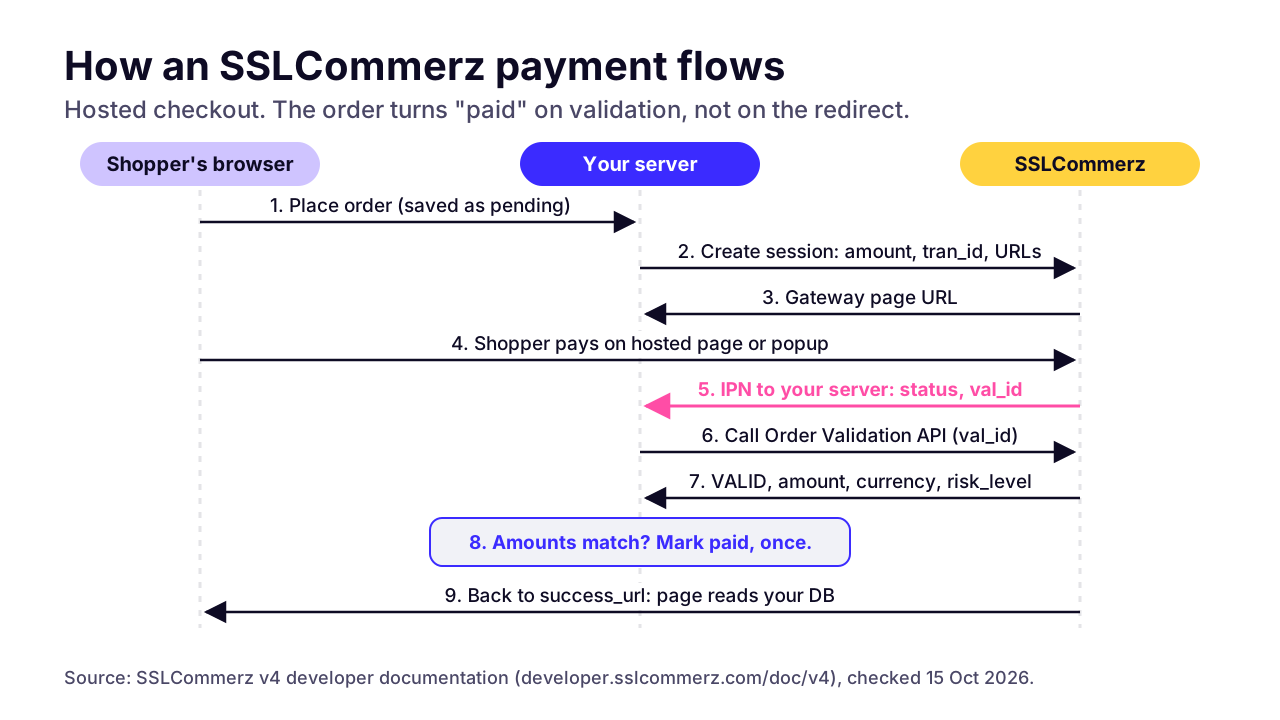
Your server creates a payment session, the shopper pays on SSLCommerz's hosted page or popup, SSLCommerz notifies your server through an IPN, and your server calls the Order Validation API before it marks the order paid. Skip that last call and your store will believe anything that looks like a successful redirect.
SSLCommerz's v4 developer docs are blunt: "You must call the SSLCOMMERZ APIs from your server", and "You must validate your transaction and amount by calling our Order Validation API." They also accept only TLS 1.2 or higher. In practice the flow runs in five steps.
- Your server saves the order as pending, then posts the amount, currency and a unique tran_id to the session API, along with four URLs: three pages the shopper returns to (success, fail, cancel) plus an IPN listener. You get the gateway page URL back.
- Your customer pays on SSLCommerz's hosted page, or in the Easy Checkout popup on your own page.
- SSLCommerz sends the IPN, a server-to-server POST carrying a status (VALID, FAILED, CANCELLED, EXPIRED or UNATTEMPTED) and a val_id.
- Your server calls the Order Validation API with that val_id. It checks the status, compares the amount and currency with the saved order, and finds that order by its tran_id.
- Only then does the order become paid. When the shopper lands on your success URL, that page reads the order status from your database instead of trusting what the browser posted.
Two details catch people out. A validation status of VALIDATED means the payment was fine but you've already validated it once, so treat it as already handled, not as an error. And a risk_level of 1 marks a risky transaction: SSLCommerz's advice is to "hold the service" and collect verification documents from the customer before you ship.
Your IPN listener has rules of its own. It must be reachable from the internet on port 80 or 443, and the docs ask you to whitelist SSLCommerz's IPs on your firewall. Test cards and mobile OTPs for the sandbox are in the same docs, and the sandbox page lets you create a test account yourself.
Between the hosted page and Easy Checkout, we'd pick hosted on a first build. Shoppers leave your site for a page SSLCommerz maintains, so less of your own front end can break mid-payment. Easy Checkout keeps the shopper on your page, which feels smoother, but it's one more script running inside your checkout.
 (opens the full-size chart in a new tab)
How does a direct bKash integration work?
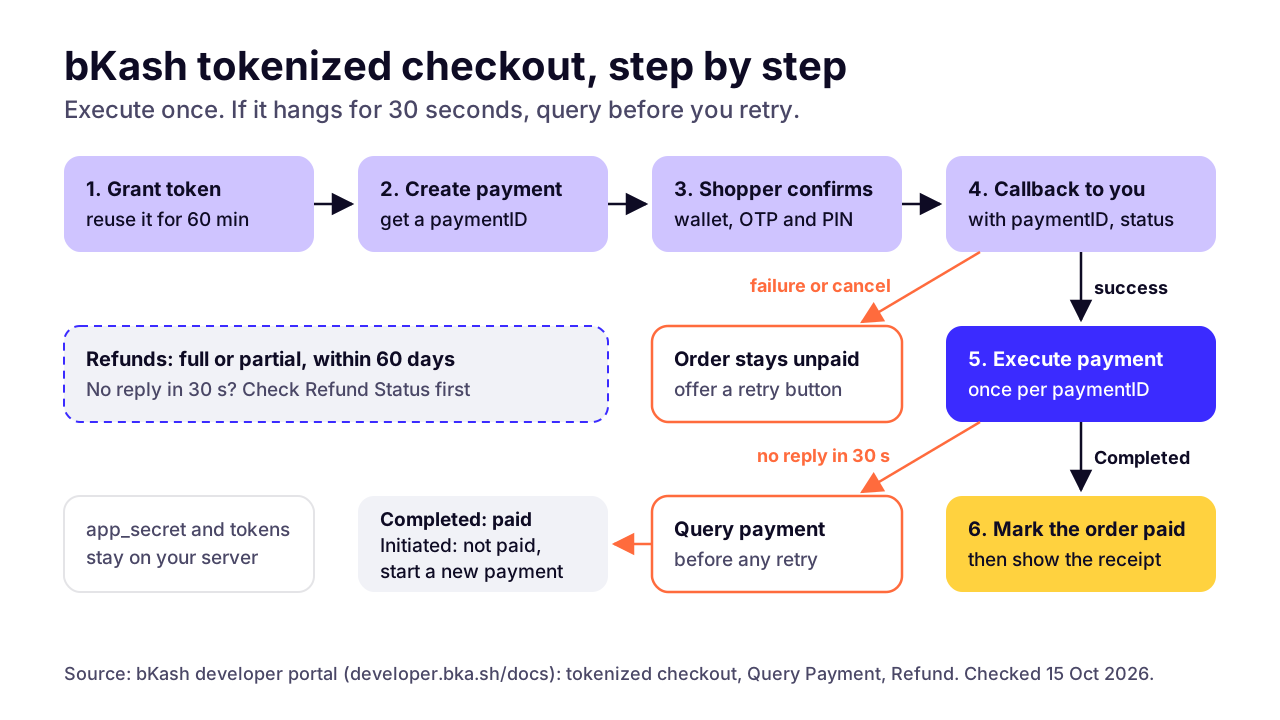
Your server gets a grant token, creates a payment, and sends the shopper to bKash to confirm with an OTP and their PIN. When bKash calls you back with a success status, your server executes the payment. If Execute doesn't answer within 30 seconds, query the payment before you try anything else.
If you've searched for a বিকাশ পেমেন্ট গেটওয়ে, this is the integration you were after. bKash documents it publicly on its developer portal, and the docs are clear. For a one-off payment, which bKash calls Tokenized Without Agreement, the sequence goes like this.
- Grant Token. Your server trades the four credentials bKash issues (an app key and secret, plus a username and password) for a token. A token lasts 3,600 seconds by default; bKash asks you to refresh it around minute 50 to 55 and not to call Grant or Refresh more than twice an hour, so cache it.
- Create Payment. You send the amount in BDT, your invoice number and a callback URL. bKash returns a paymentID, valid for 24 hours, plus a bkashURL to send the shopper to.
- Confirmation. On bKash's page the shopper enters their wallet number, then the OTP and their PIN.
- Callback. bKash redirects the shopper to your callback URL with the paymentID and a status of success, failure or cancel.
- Execute Payment, on success only. bKash's docs say it "should be called only after customer verification is successful and the success callback is received". A paymentID can be executed once; a repeat call on a completed payment returns error 2062.
- If Execute hasn't replied in 30 seconds, call Query Payment. Completed means the money moved, so mark the order paid. Initiated means it didn't, and you start again from Create Payment.
Step 6 is the one to test hardest. A developer who retries Execute after a timeout gets an error at best. One who marks the order failed may have just told a customer who paid that they didn't.
bKash offers more than one-off payments. Tokenized With Agreement links a shopper's bKash account to your store for repeat payments. Auth and Capture holds the amount first and charges or releases it later, which we think suits made-to-order items you can't confirm until stock is checked. Refunds can be full or partial, with up to 10 partial refunds per transaction, within 60 days of the payment, according to the bKash refund docs.
bKash also sends an IPN webhook for completed payments. You build a listener, share its URL with bKash's technical team during onboarding, acknowledge a one-time subscription message, then check the signature on every notification. We'd set it up even with Query Payment in place. It tells your server about a payment when the shopper's browser never makes it back to your callback.
 (opens the full-size chart in a new tab)
Nagad is less open to developers. We couldn't find a public Nagad developer portal on October 15, 2026; its website offers a merchant sign-up form, and the API documents and keys come through onboarding. Open-source libraries describe an initialise, redirect, then verify flow signed with a key pair. Build against the documents Nagad sends you, not a GitHub README.
How do you add local payments to WooCommerce, Shopify or a custom Next.js store?
WooCommerce uses gateway plugins. Shopify needs a third-party provider, because Shopify Payments isn't offered in Bangladesh. A custom store calls the gateway APIs from server-side code, such as Next.js route handlers.
WooCommerce
SSLCommerz publishes its own WooCommerce plugin. Its listing says it supports hosted and popup checkout, handles the IPN without extra setup, and creates the order as Pending before the shopper reaches the payment page, which is the right order of events.
For bKash and Nagad you'll find plenty of third-party plugins, and quality varies. Check who maintains one, when it was last updated, whether WordPress.org warns it hasn't been tested with recent releases, and which bKash flow it calls. Some run in a manual mode with no API credentials at all, so someone checks each payment by hand. That's a form, not an integration.
Shopify
Shopify's supported-countries list for Shopify Payments doesn't include Bangladesh. It adds that if your country isn't listed, you "need to use a third-party payment provider". SSL Wireless publishes a free SSLCOMMERZ app on the Shopify App Store for exactly this.
If you're still deciding whether Shopify suits a Bangladeshi store at all, our comparison with a custom build works through Shopify's extra transaction fee here and the three-year cost of each.
A custom Next.js store
On a custom build we keep every payment call in server-side route handlers: one creates the session, one receives the IPN, one handles the shopper's return. Credentials sit in server-only environment variables. Anything prefixed NEXT_PUBLIC_ is inlined into the browser bundle at build time, so a store password with that prefix is public.
Two rules cover most of it. Never put a gateway secret in client code. Never let the browser tell your server what the amount was. If you're weighing a rebuild anyway, our guide to moving a WooCommerce store to Next.js covers what changes when the checkout moves with it.
What goes wrong with payments in production, and how do you prevent it?
The common failures are orders marked paid without validation, duplicate callbacks that create duplicate orders, payments lost when the shopper closes the tab, and gateway timeouts. Each one has a standard fix. None of them shows up when you test only the happy path.
Unvalidated success redirect
- What the customer sees
- Nothing; you ship orders nobody paid for
- Cause
- Server trusts the browser's return to the success URL
- Prevention
- Mark paid only after the IPN and a validation call
Tampered amount
- What the customer sees
- Nothing; you're paid Tk 10 for a Tk 2,000 order
- Cause
- Amount taken from the browser, not your database
- Prevention
- Compare the validated amount and currency with the saved order
Duplicate IPN or callback
- What the customer sees
- Two confirmation messages, or stock taken twice
- Cause
- Handler isn't idempotent
- Prevention
- Unique transaction ID; apply each payment once and ignore repeats
Shopper closes the tab before the redirect
- What the customer sees
- Paid, but the order still says unpaid
- Cause
- Only the redirect updates the order
- Prevention
- Act on the IPN and query the status of stuck orders
bKash Execute times out
- What the customer sees
- An error page after paying
- Cause
- No reply treated as failure, or Execute retried
- Prevention
- Call Query Payment after 30 seconds, then decide
Refund not reflected
- What the customer sees
- A refund promised but no money back
- Cause
- Refund call timed out and nobody confirmed it
- Prevention
- Check refund status before retrying, and store refund IDs
Daily reconciliation gaps
- What the customer sees
- Nothing yet, while your books drift
- Cause
- Nobody matches orders to the settlement report
- Prevention
- Match every paid order to the gateway report each day
Tampered amounts deserve a second look. If your checkout page posts the price to your server and your server forwards it to the gateway, anyone with browser dev tools can pay Tk 10 for a Tk 2,000 order, and the gateway will report a perfectly valid Tk 10 payment. Read the amount from your own database, every time.
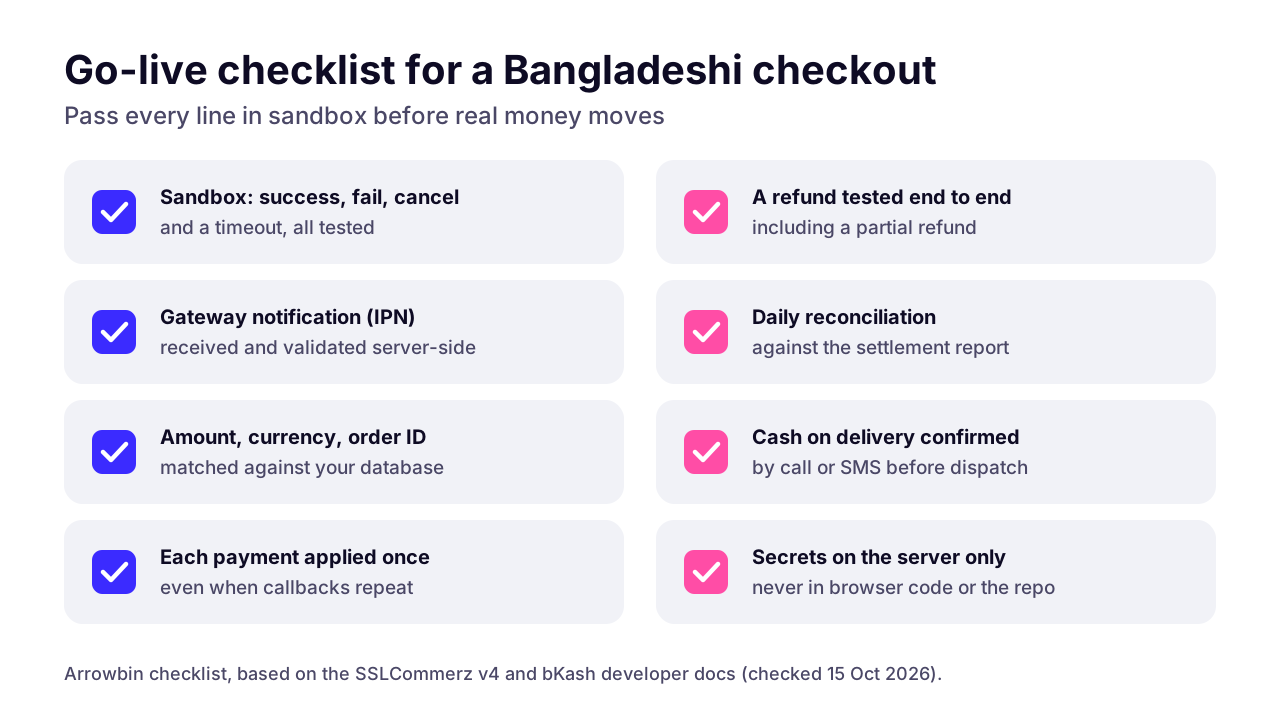
A go-live checklist
- Test in sandbox: a success, a failure, a cancel, plus a forced timeout.
- Confirm the IPN reaches your server from the public internet, and that you validate it before changing the order.
- Check amount and currency against the saved order on every payment.
- Make each handler idempotent, so the same IPN arriving twice changes nothing the second time.
- Issue a full refund and a partial one, then confirm both in the gateway dashboard.
- Set up daily reconciliation: every paid order matched to a line in the settlement report.
- Confirm cash on delivery orders by call or SMS before they go to the courier.
- Keep every key and secret in server-only environment variables.
 (opens the full-size chart in a new tab)
Server-side validation prevents most of these failures. Daily reconciliation catches whatever slips through, because each one eventually shows up as an order and a payment that don't match.
How much do payment gateways cost in Bangladesh?
SSLCommerz publishes its price: a Tk 25,500 Basic plan, marked non-refundable, plus 2.5% per successful transaction and 3.5% for AMEX, as listed on October 15, 2026. bKash, Nagad and the other aggregators don't publish e-commerce merchant rates on the pages we checked, so ask for the current rate in writing.
Be wary of fee tables in listicles. Some still quote SSLCommerz setup and annual fees that don't match its own pricing page. Plan around the provider's page or a written quote, nothing else.
SSLCommerz
- Setup cost
- Tk 25,500 Basic plan, non-refundable
- Per transaction
- 2.5%, or 3.5% for AMEX
- Methods
- Visa, Mastercard, bKash, Nagad, Rocket and more
- Settlement
- Check with provider
- Developer docs
- Public v4 docs, sandbox and test cards
Other aggregators (aamarPay, shurjoPay, EPS)
- Setup cost
- Check with provider
- Per transaction
- Check with provider
- Methods
- Cards and wallets; confirm the list
- Settlement
- Check with provider
- Developer docs
- Ask for sandbox access first
bKash direct
- Setup cost
- Check with provider
- Per transaction
- Check with provider
- Methods
- bKash only
- Settlement
- Check with provider
- Developer docs
- Public developer portal
Nagad direct
- Setup cost
- Check with provider
- Per transaction
- Check with provider
- Methods
- Nagad only
- Settlement
- Check with provider
- Developer docs
- Shared after onboarding
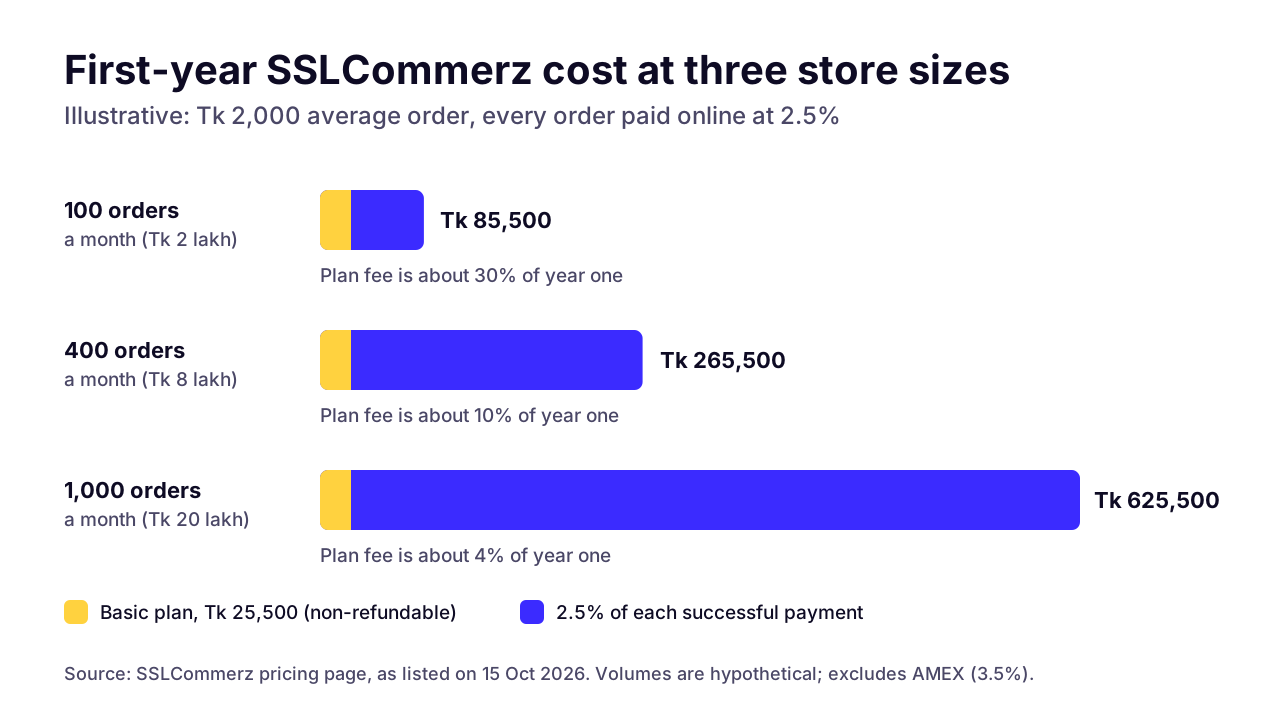
On SSLCommerz's published rate, the maths is simple. A Tk 2,000 order costs Tk 50 in fees at 2.5%, or Tk 70 on an AMEX card.
Now say you sell 400 orders a month at that average, all paid online. That's Tk 8 lakh a month in sales and Tk 20,000 a month in fees, or Tk 2.4 lakh a year. Add the Tk 25,500 plan and year one comes to Tk 265,500.
 (opens the full-size chart in a new tab)
The pattern matters more than the totals. At 100 orders a month the plan fee is about 30% of your first-year gateway cost; at 1,000 orders it's about 4%. Past a few hundred online orders a month, the per-transaction rate is the number to ask about; SSLCommerz's page says rates start at 2.5%. Before you sign with anyone, get answers to these:
- What is the setup or plan fee, and is any part of it refundable?
- What's the rate for each method, including AMEX?
- How many days until a settlement reaches your bank?
- Does the fee come back when you refund an order?
- Are there annual, renewal or minimum fees?
- How are chargebacks handled, and who carries the cost?
How should cash on delivery work alongside online payments?
Keep cash on delivery for trust, and use order confirmation and clear online payment options to cut the orders that fail at the door. A refused COD parcel has already cost you the packing, the courier run and days with that stock off your shelf.
We can't promise results from any of these. They're the levers you have; pick the ones your margins can carry.
- Confirm every COD order by phone call or SMS before it goes to the courier.
- Ask for the delivery charge up front by bKash or Nagad, and collect the rest in cash.
- Offer a small discount or free delivery for paying online, if your margins allow it.
- List the online methods first at checkout, with cash on delivery clearly available below them.
- Flag phone numbers with repeat refusals, so the next order from that number gets a call first.
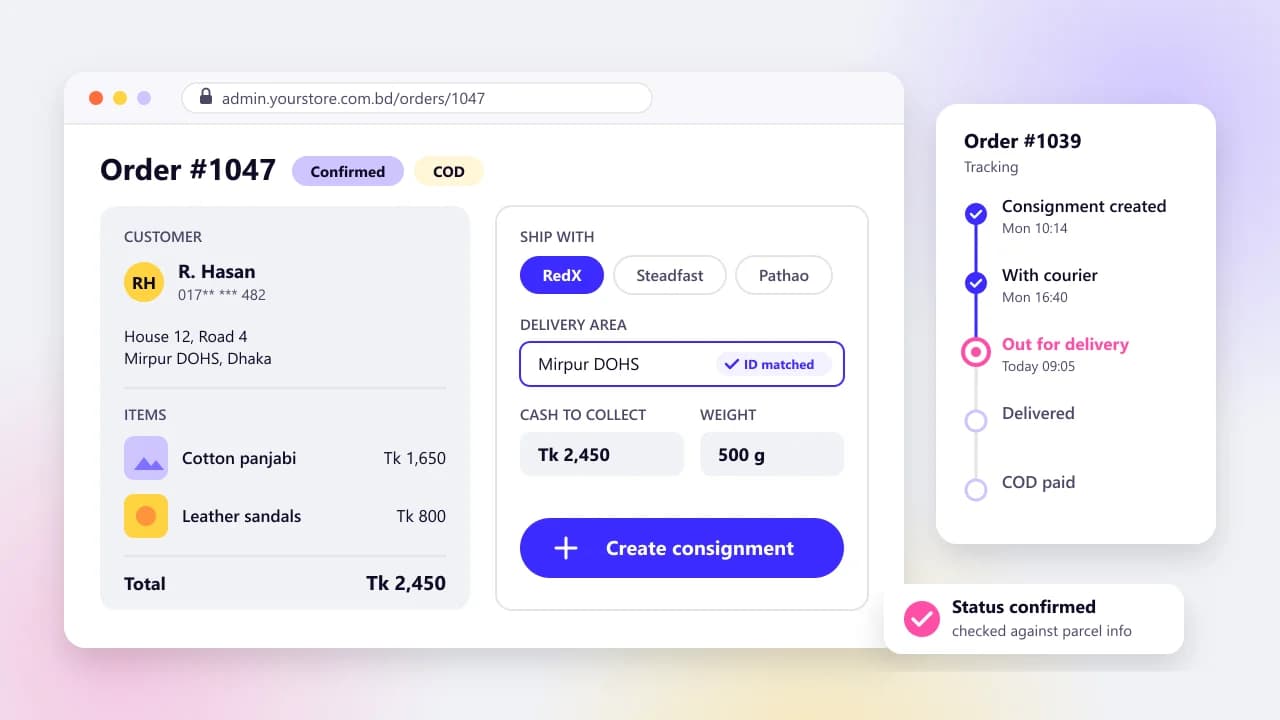
Treat COD as its own payment flow in your system. An order moves from pending confirmation to confirmed, then dispatched, then delivered with cash collected, and finally reconciled when the courier's payout arrives. If your store can't tell you which delivered orders the courier hasn't paid you for yet, you're running on trust. Our courier API integration guide shows how to match those payouts line by line.
We wouldn't remove cash on delivery to push people online. We'd make paying online the easier choice and let shoppers move over at their own pace.
What do you need before you apply for a merchant account?
You need a live site on your own domain with HTTPS, clear prices and policies, and the business documents the provider asks for. Check each provider's current list before you start, because the lists differ by business type.
SSLCommerz's onboarding requirements page is a good example. For a proprietorship, its summary and detailed checklist include:
- A trade license and a TIN.
- VAT and DBID documents.
- The NID of the person signing.
- A company bank account, with a cheque leaf.
- SSLCommerz's own merchant form, listed as MEF.
Private limited companies need more, including the MOA/AOA and a certificate of incorporation. Every document list we read was written for Bangladeshi entity types. If you're an overseas brand, ask each provider at the very start whether it can onboard a business registered outside Bangladesh.
Get the site ready first: product pages with prices in Taka, refund, delivery and privacy policies, terms, and real contact details. We put these live before any application goes in, since they're the first thing a reviewer can check.
Then the technical basics. Callback and IPN URLs must sit on a public domain, because localhost can't receive a server-to-server call. SSLCommerz needs TLS 1.2 or higher. Ask for test credentials first, so the build can start while the paperwork is processed.
Which payment setup should you launch with?
Start with cash on delivery plus one aggregator, and get server-side validation right before you add anything else. Run the checklist above in sandbox. After a couple of months of real orders, look at which methods people actually pay with, then decide whether a direct bKash integration earns its keep.
Our e-commerce development for Bangladeshi brands covers this work, checkout included, if you'd rather not build it in-house. Building an app rather than a website? Our app budget guide for Bangladesh adds store fees and upkeep.
We also do monitoring and fixing payment issues after launch, which is where reconciliation gaps get caught. Gateways also change their APIs over time, and following them costs money; our maintenance guide covers budgeting for gateway upkeep in its yearly figure.
Send us a short brief to get help integrating payments. Tell us your platform and how your orders are paid today, and we'll come back with a plan and a fixed quote.
Key takeaways
- 01Most Bangladeshi stores need cash on delivery plus bKash and Nagad at checkout, with cards for shoppers who want them.
- 02An aggregator such as SSLCommerz gives you cards and wallets through one contract and one integration.
- 03SSLCommerz lists a Tk 25,500 non-refundable Basic plan and 2.5% per successful transaction (3.5% for AMEX), as of October 15, 2026.
- 04Go direct with bKash when it carries most of your online payments and you want saved wallets or auth-and-capture.
- 05Never mark an order paid from the redirect; validate the payment on your server and check the amount against your database.
- 06On bKash, never retry Execute after a timeout; call Query Payment first and act on its status.
- 07Reconcile every paid order against the gateway's settlement report each day.

Written by
Md. Shishir Ahmed
Founder, Arrowbin
Founder of Arrowbin. Writes about shipping software, what it costs, and the decisions that decide whether a product works.