The short answer
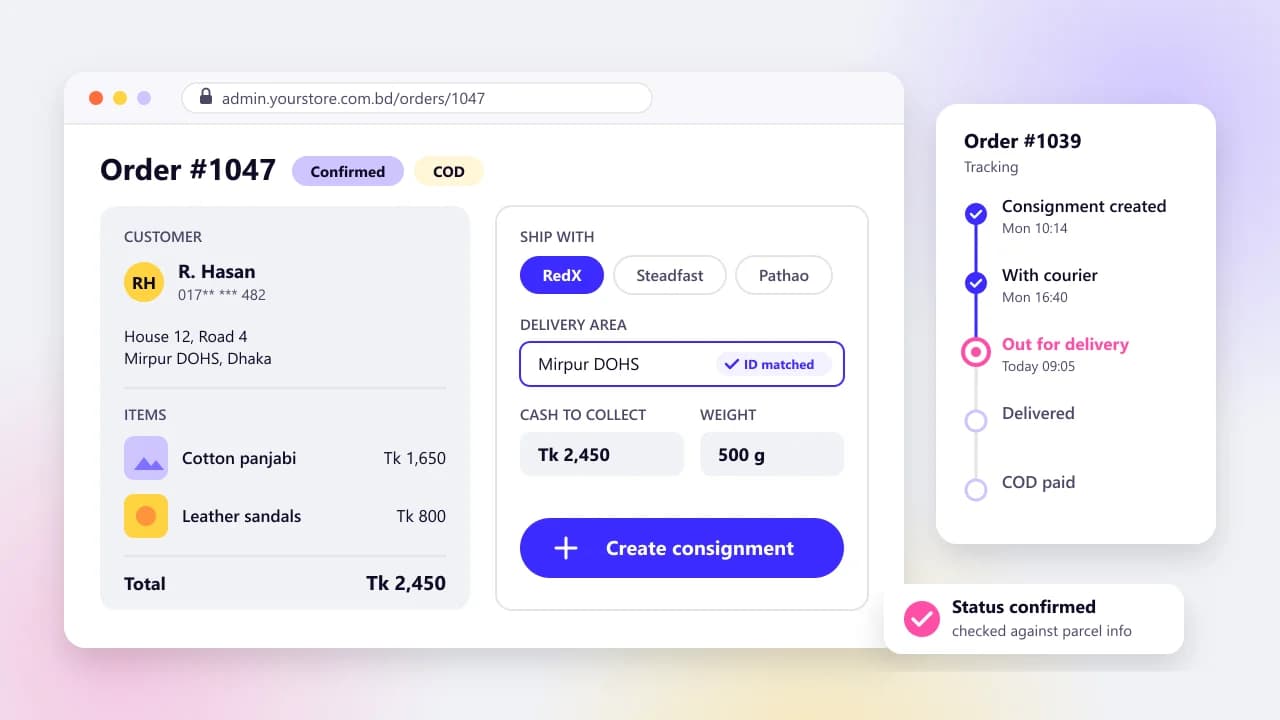
A courier API integration books a parcel with Steadfast, Pathao or RedX straight from each confirmed order, saves the tracking ID on the order and brings delivery status and cash-on-delivery data back into your admin, so nobody retypes addresses into a merchant panel. RedX publishes its full API openly with a sandbox and webhooks, Steadfast offers API keys and an official WooCommerce plugin, and Pathao's API docs sit behind its merchant login. A plugin is enough for one courier on WooCommerce or Shopify; build custom when you run several couriers or need your own status and COD reconciliation logic. Either way, confirm each webhook through the courier's API before you mark an order delivered or paid.
On this page
If someone on your team spends the afternoon copying orders into a courier's merchant panel, you already know where it goes wrong. A digit slips in a phone number. An order gets booked twice. At month end the COD payout doesn't match the spreadsheet, and nobody can say which parcels are missing.
Store owners in Bangladesh who want that step automated will find their questions answered first. The second half is for the developer who'll build it. We build and rebuild online stores for Bangladeshi brands, and courier integrations are part of that work.
RedX is our worked example because its API documentation is public. For Steadfast and Pathao we stick to what their own pages say.
For the quick answer, this is what each courier publishes for developers, as checked on October 15, 2026. The details and sources follow.
RedX
- Public API docs
- Yes, open on redx.com.bd
- Test sandbox
- Yes, sandbox.redx.com.bd
- Status webhooks
- Yes, posted to your callback URL
- Ready-made plugins
- Official WordPress plugin and a free Shopify app
Steadfast
- Public API docs
- No public reference; API keys come from the merchant dashboard
- Test sandbox
- Not published; ask Steadfast
- Status webhooks
- Not described on its public pages
- Ready-made plugins
- Official SteadFast API plugin for WooCommerce
Pathao
- Public API docs
- Behind the merchant login
- Test sandbox
- Not public; ask Pathao
- Status webhooks
- Not public; ask Pathao
- Ready-made plugins
- Check the merchant panel
What does a courier API integration do for an online store?
A courier API integration books a parcel with the courier as soon as an order is confirmed, saves the courier's tracking ID on that order and pulls status updates back into your admin. It also gives you the data to match cash-on-delivery payouts to orders, which is where manual setups quietly lose money.
Booking a parcel
- By hand in the merchant panel
- Someone copies each order's details into the courier's form
- With an integration
- Created from the order, in one click or automatically
Tracking ID
- By hand in the merchant panel
- Pasted back into the order if someone remembers
- With an integration
- Saved on the order the moment the parcel exists
Delivery status
- By hand in the merchant panel
- Checked in the courier panel, or the customer calls
- With an integration
- Arrives by webhook and shows on the order
COD payout
- By hand in the merchant panel
- Matched by eye against a spreadsheet
- With an integration
- Matched line by line to tracking IDs
Who needs one? I won't give you a magic order count. A fair test: if one person spends a real chunk of every day booking parcels and answering 'where's my order?' calls, price an integration. If you send a handful of parcels a week, the courier's own panel is fine.
There's also a middle step. Steadfast's business page describes uploading 500 orders in one spreadsheet, with every row coming back with an ID and a tracking link. That won't sync status or reconcile money, but it kills most of the typing.
Which Bangladeshi couriers have APIs, and where are the docs?
RedX, Steadfast and Pathao all give merchants API access, but only RedX publishes its full API documentation openly. Steadfast offers API keys and an official WooCommerce plugin without a public API reference. Pathao keeps its developer docs behind the merchant login.
RedX
- Where the docs are
- Public OpenAPI page on redx.com.bd
- Auth
- API-ACCESS-TOKEN header carrying a bearer JWT
- Sandbox
- Yes: sandbox.redx.com.bd
- Webhooks
- Yes: POST to your callback URL
- Official plugins or apps
- WordPress plugin and Shopify app
- Published COD charge
- Quoted per parcel by its charge calculator
Steadfast
- Where the docs are
- No public API reference; the plugin page lists example endpoints
- Auth
- API key and secret key from the merchant dashboard
- Sandbox
- Not published; ask Steadfast
- Webhooks
- Not described on its public pages; ask
- Official plugins or apps
- SteadFast API plugin for WooCommerce
- Published COD charge
- 1% cash on delivery and risk management charge
Pathao
- Where the docs are
- Inside the merchant panel (login required)
- Auth
- Ask Pathao
- Sandbox
- Ask Pathao
- Webhooks
- Ask Pathao
- Official plugins or apps
- Check the merchant panel
- Published COD charge
- Ask Pathao for the current rate card
RedX's developer API page is the most complete public reference of the three. It documents a sandbox base URL (sandbox.redx.com.bd/v1.0.0-beta), a production one (openapi.redx.com.bd/v1.0.0-beta) and endpoints for tracking, parcels, delivery areas, pickup stores and a charge calculator. Webhooks are switched on from the same page.
Steadfast publishes an official WordPress plugin, SteadFast API, by SteadFast Courier LTD. It books parcels from WooCommerce orders, one at a time or in bulk, and checks status and balance with an API key and secret key from your merchant dashboard. The listing showed 8,000+ active installations and version 1.1.0 when we checked, and it names example endpoints on portal.packzy.com, including a status lookup by consignment ID. Request and response formats beyond that aren't public, so get Steadfast's documentation before anyone quotes a custom build.
Pathao's developer API link sent us to the merchant sign-in page on October 15, 2026, so its docs are for account holders only. You'll find unofficial Pathao packages on GitHub and Packagist. They may well work, but there's nothing public to check them against. Build from the docs in your own merchant account.
How do you choose a courier, and should you use more than one?
Pick on how well the courier delivers where your customers live, what it charges for your parcel sizes, how fast COD money reaches you, how it handles returns and how good its API is. Running two couriers, a main one plus a second for areas where the first is weaker, is sensible. Only if the integration was built for it, though.
Only some charges are published. Steadfast's pricing page lists a 1% cash on delivery and risk management charge and a ৳80 minimum for its pick and drop service. Delivery charges depend on route and weight and may change with parcel size. Its charges exclude VAT and tax, and merchants on negotiated rates are billed on those instead.
RedX doesn't put a rate card on its API page. Its charge calculator takes a pickup area, a delivery area, the COD amount and the weight in grams, and returns a deliveryCharge and a codCharge. So your system can price a parcel before it books one. For Pathao, ask for the current rate card.
Get rates in writing, then price last month's orders with every courier you're considering and compare the totals. It takes an afternoon. It's also the only comparison that reflects your own mix of districts and parcel weights.
If you go with two couriers, put a routing step between your orders and the couriers instead of hard-coding one. This is the order we'd apply the checks in.
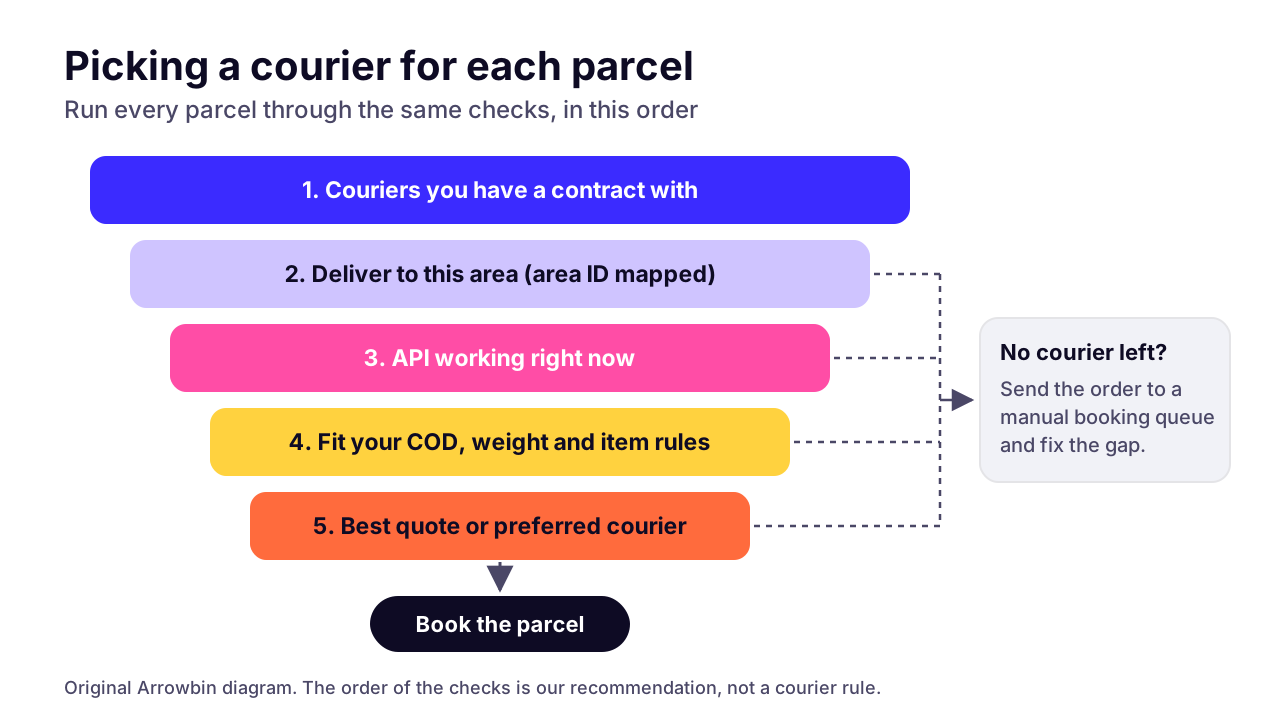 (opens the full-size chart in a new tab)
How does an order become a courier consignment, step by step?
Map the customer's address to the courier's own area ID, work out the cash to collect, create the parcel with the order's details and save the tracking ID the courier sends back. With RedX that means a lookup on the areas endpoint, an optional charge check, and a POST to /parcel that returns a tracking_id.
- Wait for the order to be confirmed. If you confirm COD orders by phone or SMS, booking follows that step.
- Map the delivery address to the courier's area ID (more on this below).
- Work out the cash to collect on the server: the order total minus anything already paid online.
- Choose the pickup point. RedX lets you create pickup stores over the API and pass a pickup_store_id with each parcel.
- Optionally quote the charge with GET /charge/charge_calculator and save the quote on the order for reconciliation.
- Create the parcel with POST /parcel. RedX requires customer_name, customer_phone, delivery_area, delivery_area_id, customer_address, cash_collection_amount, parcel_weight and value.
- Send your order number as merchant_invoice_id. RedX includes it as invoice_number in every webhook, so each callback traces back to its order.
- Save the returned tracking_id on the order and print the label.
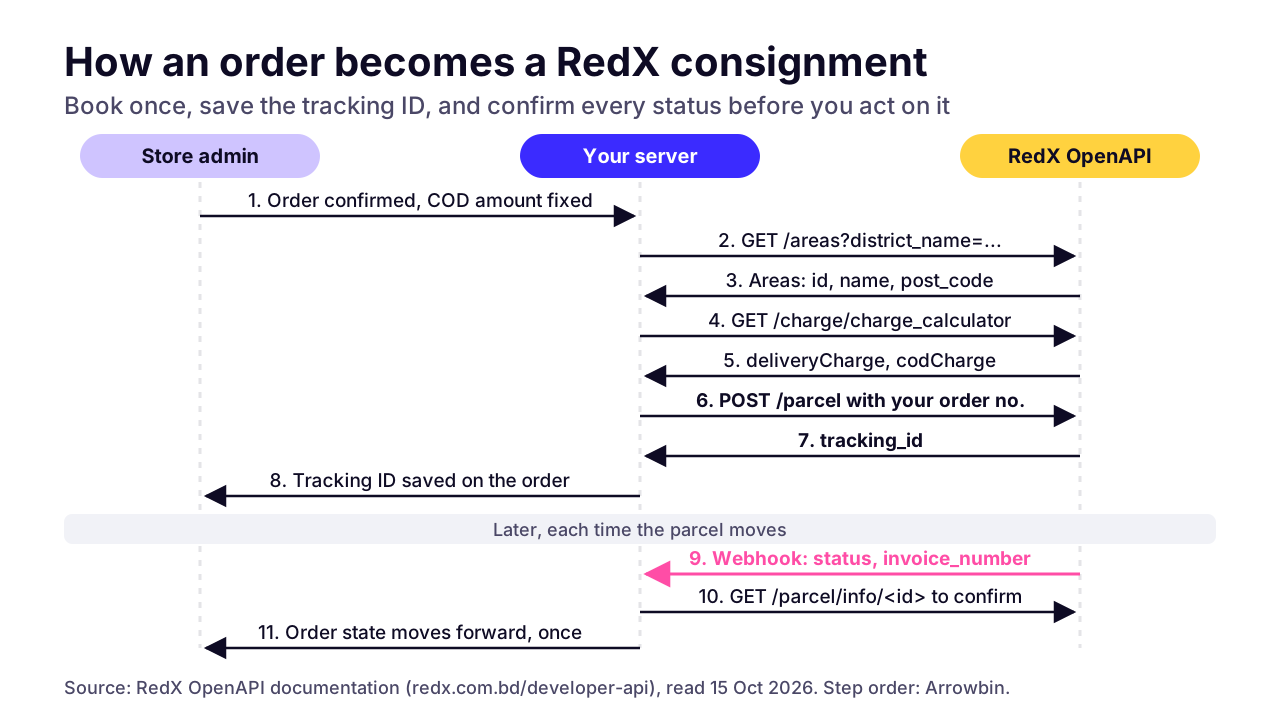 (opens the full-size chart in a new tab)
Address mapping is the hard part
Customers type addresses as free text. Couriers want an ID from their own area list. RedX's /areas endpoint returns each area's id, name, post_code, division_name and zone_id, and you can filter it by post_code or district_name.
Don't map on post code alone. RedX's own example for post code 1206 returns two different areas, Kochukhet and Ibrahimpur. This works better:
- At checkout, ask for the district first, then the area or thana from a list, and only then the house and road as free text.
- Keep your own location table, plus one mapping table per courier that links your area to that courier's area ID.
- Send anything without an exact match to a review queue. A person picks the area once. The mapping table remembers it.
- Refresh each courier's area list on a schedule and flag mappings whose IDs have disappeared.
Phone numbers need the same care. RedX's samples show a customer number as 01987654321 and a pickup store number as 8801898000999. Pick one format, normalise every number before it's stored, and reject invalid mobile numbers at checkout rather than at the courier.
Check the COD amount before you send it
The cash_collection_amount is what a rider will ask your customer for, so treat it like a payment. Calculate it on the server from the saved order, never from anything the browser sends. RedX takes the amount as a string, so format it deliberately instead of letting a float like 1499.9999 slip through.
If the order changes after booking, the parcel has to change too. RedX's PATCH /parcels call updates a parcel property, and its example cancels a parcel with a reason. Any edit to a booked order should either update the parcel or cancel and rebook it.
Watch the weight unit as well. RedX's create-parcel table describes parcel_weight in 'appropriate units (e.g., kg, g)', while its charge calculator and parcel details use grams, so confirm it in the sandbox. For fake orders, Steadfast's business page describes a Delivery Risk Check: type a buyer's number and see how many parcels that buyer took and returned. Use whatever your courier offers before booking a large COD order.
How do you keep order status in sync with the courier?
Receive the courier's webhook, confirm the new status through the courier's API, map it to your own order state, and run a sweep for parcels that go quiet. A webhook tells you something changed. It shouldn't be your only proof.
RedX sends a POST with a JSON body to your callback URL whenever a parcel's status changes. The payload carries tracking_number, timestamp, status, message_en, message_bn, invoice_number and delivery_type. Its docs say any credentials 'should be included in the query parameters of the URL', as in ?token=<token>.
Do that, with a long random token. But query strings end up in access logs and error trackers, so assume the token can leak. Before you mark an order delivered or paid, call GET /parcel/info/<tracking_id> and check its status field. The track endpoint returns messages rather than a status, so the info call is the one to trust.
- Answer the webhook with a 200 straight away and do the work in a background job.
- Give each event a unique key (tracking number plus status plus timestamp), so a repeat delivery does nothing.
- Only move orders forward. If delivery-in-progress arrives after delivered, log it and leave the order alone.
- Alert on statuses you don't recognise. RedX's sample parcel-details response shows pickup-pending, which isn't in the webhook list.
- Once or twice a day, poll the info endpoint for parcels with no recent update. Webhook endpoints go down.
Then map each courier status to an order state your team understands. Here's our mapping for RedX's eight published statuses: the first two columns come from RedX's docs, the other two are our recommendation.
ready-for-delivery
- Meaning (per RedX)
- Parcel received from merchants
- Store order state
- With courier
- Customer message
- Your order is with the courier
delivery-in-progress
- Meaning (per RedX)
- Parcels have been dispatched to rider
- Store order state
- Out for delivery
- Customer message
- Out for delivery today, please keep your phone on
delivered
- Meaning (per RedX)
- Parcels delivered by rider
- Store order state
- Delivered, payout pending
- Customer message
- Delivered. Thank you for your order
agent-hold
- Meaning (per RedX)
- Parcels are on hold to agent
- Store order state
- On hold: call the customer
- Customer message
- None automatic; your team calls first
agent-returning
- Meaning (per RedX)
- Parcel return-in-progress
- Store order state
- Return in transit
- Customer message
- We couldn't deliver your order and will be in touch
returned
- Meaning (per RedX)
- Parcels returned
- Store order state
- Returned: inspect and restock
- Customer message
- None, or a refund notice if prepaid
agent-area-change
- Meaning (per RedX)
- Area change requested & in progress
- Store order state
- Address update in progress
- Customer message
- We're updating your delivery area
paid
- Meaning (per RedX)
- Parcel amount is paid
- Store order state
- COD received, ready to reconcile
- Customer message
- None (internal only)
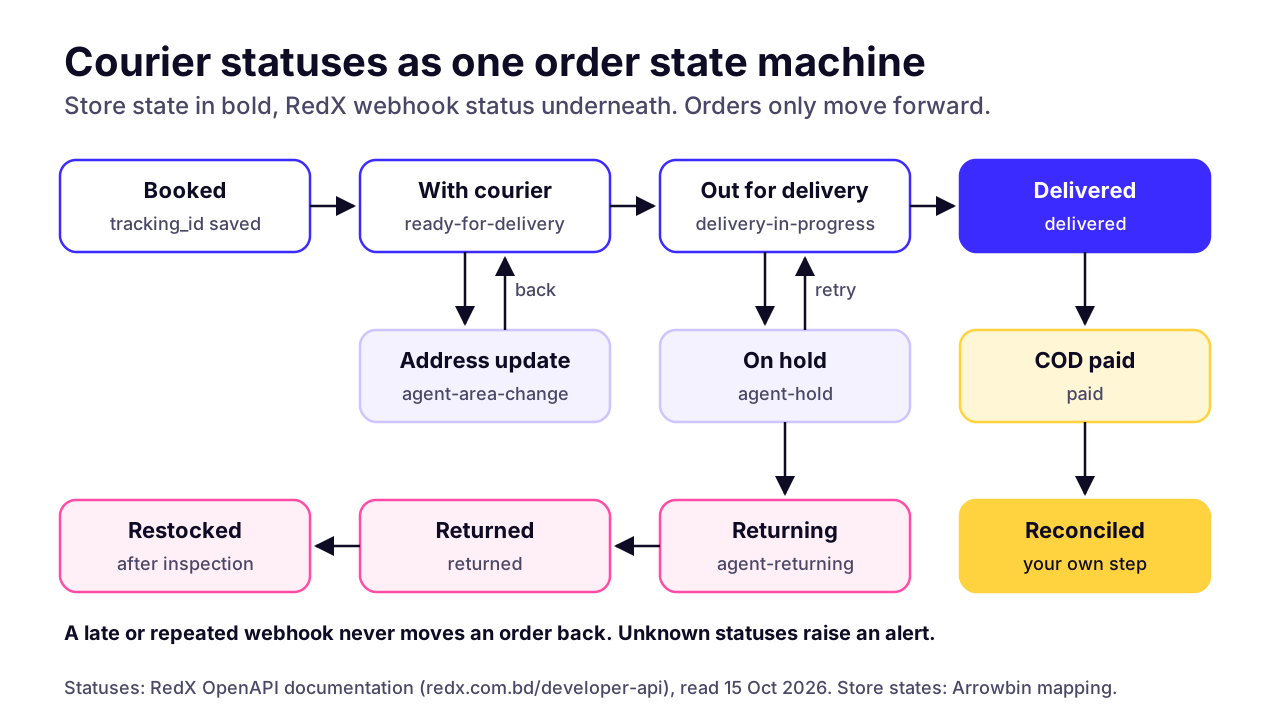 (opens the full-size chart in a new tab)
One opinion on customer messages: send them for two or three of these states, not all eight. 'Out for delivery' is the one I'd never skip, because it's the moment the customer needs to be reachable.
How do you handle returns, exchanges and partial deliveries?
Treat each one as its own parcel type with its own rules, because the couriers do. RedX's docs list six delivery types: regular, reverse, exchange-delivery, exchange-return, partial-delivery and partial-return.
- Returned parcel (refused or undeliverable): no cash is expected, and stock goes back only after someone has opened the parcel and checked it. Steadfast's business page notes that return charges apply separately.
- Reverse pickup, where the customer sends something back: book it as a new parcel linked to the original order. RedX's create-parcel call has an optional type field, mainly used for reverse shipments.
- Exchange: two legs on one order. Link both tracking IDs to the order and collect only the price difference, if there is one.
- Partial delivery: the customer keeps some items and refuses the rest, so the cash collected drops. RedX's public docs don't show how that amount is reported. Ask before you build the refund logic.
Your part as the owner is a written rule. Who checks returned parcels, within how many days, and who decides whether each item goes back on sale or gets written off? Parcels sitting in 'returned' for weeks are stock you've paid for and can't sell.
How do you reconcile cash on delivery payouts?
To reconcile cash on delivery payouts, match every payout line to a tracking ID and an order, then compare it with the expected amount: the cash collected, minus the delivery charge, minus the COD charge, minus any VAT the courier adds. With the 1% COD and risk management charge on Steadfast's pricing page (October 15, 2026), a ৳2,000 parcel carries a ৳20 COD charge before VAT and delivery.
The delivery charge depends on route and weight, so don't estimate it after the fact. RedX's charge calculator gives you both charges at booking; save them, because they become your expected figures.
Steadfast's business page says you request a payout from the dashboard once parcels are delivered, and that the dashboard reconciles every parcel line by line. Its month-end report downloads as a sheet. Import that sheet instead of checking it by eye. On the RedX side, the paid status tells your system when to move an order on.
After matching, every parcel lands in one of three buckets:
- Matched: the paid amount equals the expected amount. Close it.
- Delivered but unpaid after your cut-off: raise it with the courier, listing the tracking IDs. We'd start with seven days and adjust to your courier's real payout cycle.
- Amount differs, or a payout line matches no order: investigate before you close the month. Partial deliveries and return charges are the first things to check.
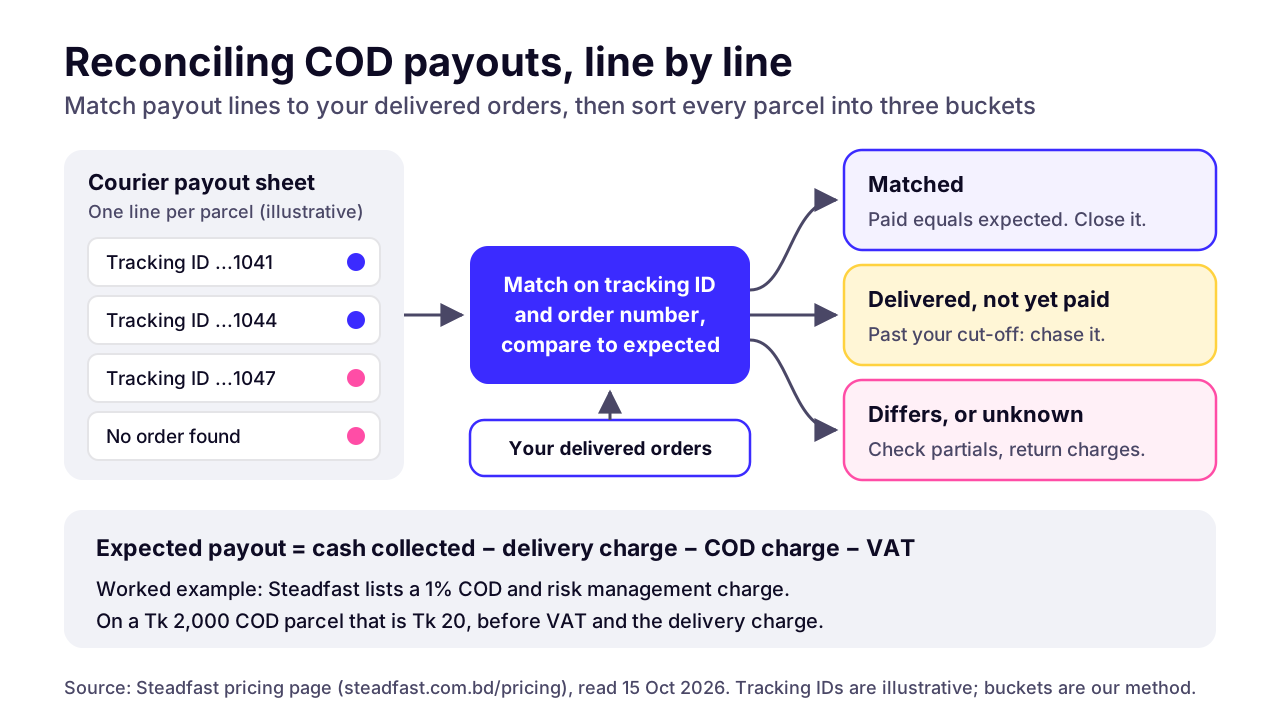 (opens the full-size chart in a new tab)
Prepaid orders are reconciled against the payment gateway, not the courier. Our guide to bKash, Nagad and SSLCommerz integration covers that side, including validating a payment on the server before an order counts as paid.
Should you use a plugin or build a custom courier integration?
A plugin is fine for a WooCommerce or Shopify store with one courier and standard flows. Build custom when you use more than one courier, run a custom storefront, or need your own status logic and COD reports.
Steadfast's official plugin covers WooCommerce. RedX's docs page links its own WordPress plugin and an official Shopify app, RedX Delivery, which the Shopify App Store listing shows as free. Third-party plugins that cover several couriers exist too; check who maintains one and when it was last updated before you install it. If your WooCommerce store already leans on a long list of plugins, read when a WooCommerce plugin stack is worth replacing before you add another.
A single-courier plugin keeps that courier's idea of status. Add a second courier, or want reports across both, and you're stitching plugins together. A custom integration gives you:
- One status model, so your team reads 'Out for delivery' whichever courier has the parcel.
- A booking queue, so a courier outage delays bookings instead of freezing your admin.
- Idempotent booking keyed on your order number, so retries and double clicks can't create a second parcel.
- Webhook verification, area mapping tables and routing rules in one place.
- COD reconciliation reports that span every courier you use.
What a multi-courier setup looks like
Each courier sits behind the same small interface in your code: quote, create, get status, cancel. Your order logic never calls a courier directly. It asks the router, and the router picks an adapter. Adding a third courier means one new adapter and one mapping table. Checkout doesn't change.
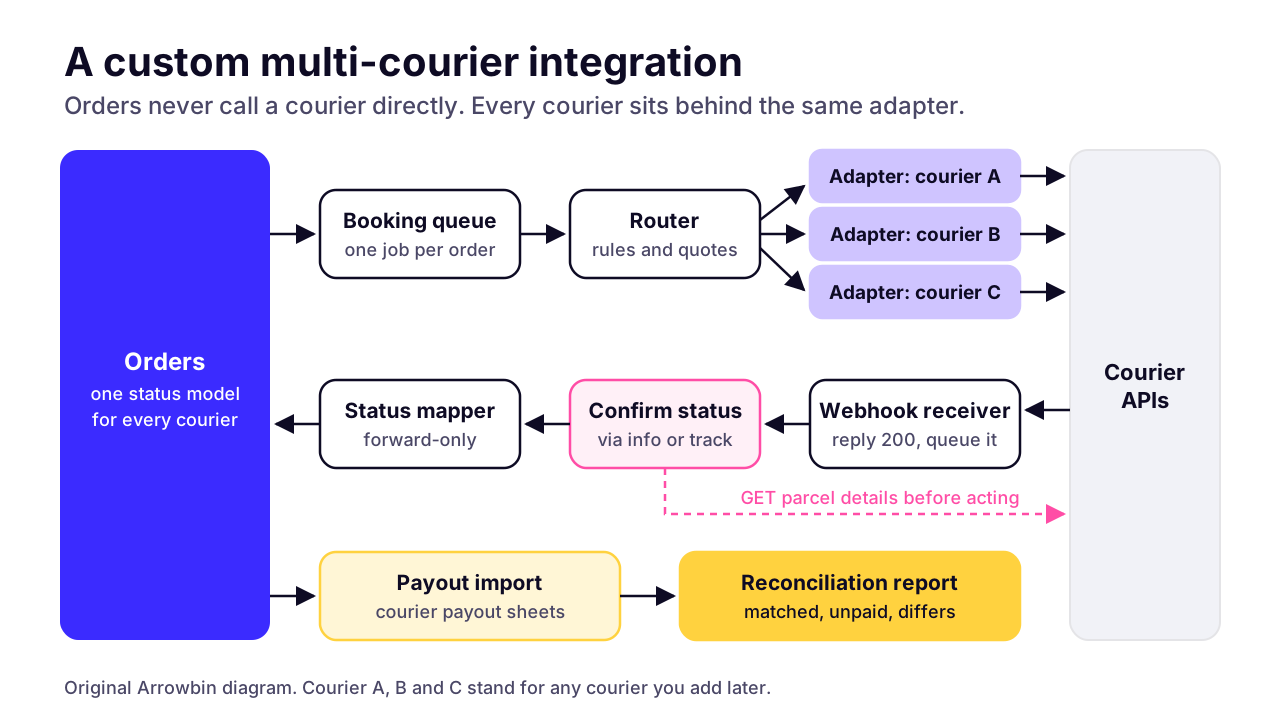 (opens the full-size chart in a new tab)
Retries need care. Retry read calls (status, details, areas) on timeouts, with a backoff. Don't blindly retry a create call that timed out, because the courier may have created the parcel anyway. Mark the order 'booking uncertain', check the merchant panel or wait for a webhook carrying your invoice number, and only then rebook.
That's the kind of custom order and courier workflow we build. If the platform itself is still open, our comparison of Shopify or a custom store covers that decision first.
What goes wrong with courier integrations, and how do you prevent it?
The failures we design against are wrong area mapping, duplicate bookings after retries, missed or spoofed status callbacks, wrong COD amounts and payouts that don't match orders. None needs clever code. Each needs a rule someone wrote down before launch.
Wrong area mapping
- Symptom
- Late delivery, or the courier raises an area change
- Cause
- Free-text address matched by guesswork
- Prevention
- Area lists from the courier and a review queue for misses
Duplicate booking
- Symptom
- Two tracking IDs on one order; two riders turn up
- Cause
- A retry after a timeout, or a double click on the booking button
- Prevention
- One booking per order number, a lock while booking, no blind retries
Spoofed callback
- Symptom
- Order marked delivered or paid when it wasn't
- Cause
- Webhook token leaked from a log
- Prevention
- Confirm delivered and paid through the courier's API before acting
Missed callback
- Symptom
- Order stuck at 'with courier' for days
- Cause
- Your webhook endpoint was down or erroring
- Prevention
- A daily polling sweep for parcels with no recent update
Wrong COD amount
- Symptom
- Rider asks for the wrong amount and the customer refuses
- Cause
- Order edited after booking, or an online payment not subtracted
- Prevention
- Server-side COD calculation, and an update or rebook on every edit
Payout mismatch
- Symptom
- The deposit doesn't match the orders it should cover
- Cause
- Charges, returns or partial deliveries left out
- Prevention
- Match on tracking ID against charges saved at booking
Put monitoring on top: alert when a booking fails and when no webhooks arrive for several working hours. Courier APIs change too, and RedX's base URL still says v1.0.0-beta. Someone has to own the integration once it's live, which is why we treat keeping integrations working after launch as part of the job from day one. To budget for it, our maintenance guide explains what integration upkeep costs per year and why each extra integration pushes the number up.
What should you settle before anyone writes courier code?
Settle four things before any courier code is written: each courier's rates and API access in writing, a checkout that collects district and area from a list, a mapping from each courier's statuses to your order states, and who handles returned parcels. RedX alone lists six delivery types, from regular to partial-return, so returns need their own rules from day one. With those settled, the choice between a plugin and a custom build is usually obvious.
If custom is the answer, we build courier booking and status sync into the store as part of our e-commerce development work, with COD reconciliation your accountant can follow. Last month's order export is the most useful thing to have open when you book a 30-minute call.
Key takeaways
- 01A courier integration books parcels from confirmed orders, saves the tracking ID and brings delivery status and COD data back into your admin.
- 02RedX publishes its full API with a sandbox and webhooks; Steadfast offers API keys and an official WooCommerce plugin; Pathao's docs need a merchant login.
- 03Address mapping is the hardest part: collect district and area from a list and keep one mapping table per courier.
- 04Treat every webhook as a hint, and confirm delivered or paid through the courier's API before you change the order.
- 05Book once per order number, and never blindly retry a create call that timed out.
- 06Reconcile COD payouts line by line against tracking IDs, using the charges you saved at booking.
- 07One courier on WooCommerce or Shopify suits a plugin; several couriers or a custom storefront justify a custom build.

Written by
Md. Shishir Ahmed
Founder, Arrowbin
Founder of Arrowbin. Writes about shipping software, what it costs, and the decisions that decide whether a product works.