The short answer
Choose Shopify if you want to launch fast with a standard catalog and checkout: for most stores it's the cheaper option, and where Shopify Payments is available its platform cost is just the subscription. Choose a custom store when your checkout, pricing, integrations or local payment flows don't fit Shopify. On fees alone, a custom build (our estimate: $30,000 to $90,000, plus 15–20% a year to run) only catches the best Shopify plan at about $152,000 a month in gateway-paid sales. In Bangladesh, where Shopify Payments isn't available, Shopify adds 2% on Basic or 1% on Grow to every gateway-paid order, on top of the gateway's own fee.
On this page
If you're about to launch an online store, or you're tired of the one you have, the choice usually comes down to two paths. Pay Shopify every month, or pay someone to build a store you own. This post is for founders who need to make that call with real numbers, in the US or the UK as much as in Bangladesh.
Some context on where I'm coming from. At Arrowbin we've built both. Most of our stores are custom Next.js builds, such as Maneel Club (moved off WordPress) and FlexOver BD (built from scratch), and we built গ তে গয়না's first store on Shopify. Custom is the bigger project for us, so you'd expect me to push it.
For most new stores, I won't.
Shopify or a custom ecommerce website: which should you choose?
Choose Shopify if you want to launch fast with standard products and a standard checkout. Choose a custom store when your checkout, pricing, integrations or local payment needs don't fit Shopify, or when Shopify's fees start to cost more than running your own platform would.
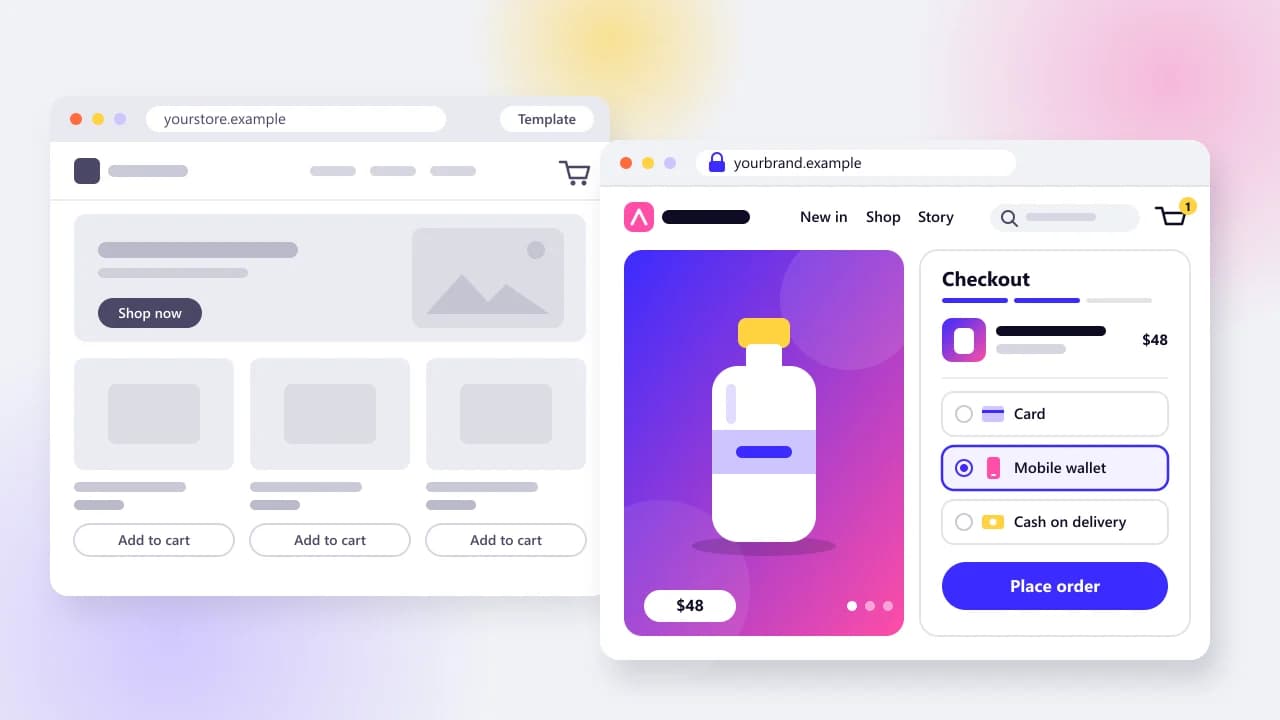
For a new brand selling physical products in one country, Shopify is the sensible default. Custom earns its cost when the store itself is part of what makes the business different, or when Shopify's rules start costing you sales or margin. WooCommerce sits between the two, and I'll come back to it.
Monthly platform cost
- Shopify
- $25 Basic, $65 Grow, $399 Advanced (billed monthly); Plus from $2,300
- Custom (e.g. Next.js)
- No platform fee; you pay for hosting and upkeep
- WooCommerce
- Free plugin; you pay for hosting plus any paid plugins
Extra fee with a third-party gateway
- Shopify
- 2% Basic, 1% Grow, 0.6% Advanced, 0.2% Plus
- Custom (e.g. Next.js)
- None
- WooCommerce
- None from WooCommerce itself
Design freedom
- Shopify
- Wide inside Shopify themes (Liquid templates)
- Custom (e.g. Next.js)
- Anything you can build
- WooCommerce
- Wide inside WordPress themes
Checkout control
- Shopify
- Shopify's hosted checkout; custom UI in the main checkout steps is Plus only
- Custom (e.g. Next.js)
- Full: you design the flow
- WooCommerce
- Full, through plugins or code
Local payments (bKash, Nagad, COD)
- Shopify
- Third-party payment apps; COD as a manual method
- Custom (e.g. Next.js)
- Direct integration with any gateway's API
- WooCommerce
- Gateway plugins, of mixed quality
Apps or plugins
- Shopify
- Large app store, mostly monthly subscriptions
- Custom (e.g. Next.js)
- Built in, or wired to services you pick
- WooCommerce
- Huge plugin library, which is also the main security risk
Speed control
- Shopify
- Shopify runs hosting; theme and app scripts are on you
- Custom (e.g. Next.js)
- You decide every script and render path
- WooCommerce
- Depends on your host and your plugin count
Maintenance burden
- Shopify
- Low: Shopify patches the platform
- Custom (e.g. Next.js)
- Highest: you own the code and the servers
- WooCommerce
- High: constant core and plugin updates
Data ownership and export
- Shopify
- CSV exports; the platform stays Shopify's
- Custom (e.g. Next.js)
- Your database, your schema
- WooCommerce
- Your database, on your host
AI shopping channels
- Shopify
- Built in: ChatGPT, Copilot, Google AI Mode, Gemini
- Custom (e.g. Next.js)
- You build the feeds and structured data
- WooCommerce
- Plugins plus your own feed work
Time to launch
- Shopify
- 3–6 weeks (Arrowbin estimate)
- Custom (e.g. Next.js)
- 8–12 weeks headless, 12+ fully custom (Arrowbin estimate)
- WooCommerce
- Close to Shopify with a stock theme (our view)
Who you need on the team
- Shopify
- A store manager; a Shopify developer for theme work
- Custom (e.g. Next.js)
- A developer or partner on call
- WooCommerce
- A WordPress developer who keeps plugins patched
Three rows settle most cases. The gateway fee tells you what Shopify really costs. Checkout control and local payments tell you whether your customers can pay the way they want to, which matters more than any fee.
What does Shopify really cost per month and per order?
Shopify costs a monthly subscription, plus an extra 2% (Basic), 1% (Grow), 0.6% (Advanced) or 0.2% (Plus) of each order if a third-party provider takes the payment instead of Shopify Payments. That fee sits on top of whatever your payment provider charges.
These are the prices Shopify's pricing page showed on October 22, 2026, in US dollars. The same page says pricing and payment options can differ by country, so check it from where your business is registered.
Basic
- Billed monthly
- $25
- Billed yearly (per month)
- $19
- Fee with a third-party gateway
- 2%
Grow
- Billed monthly
- $65
- Billed yearly (per month)
- $49
- Fee with a third-party gateway
- 1%
Advanced
- Billed monthly
- $399
- Billed yearly (per month)
- $299
- Fee with a third-party gateway
- 0.6%
Plus
- Billed monthly
- From $2,300
- Billed yearly (per month)
- Not shown
- Fee with a third-party gateway
- 0.2%
Most of the bad Shopify math online comes from mixing up two different fees. Card processing is what Stripe, SSLCommerz or Shopify Payments charges to move the money, and you pay it on any platform. The third-party fee is Shopify's own cut, and you only pay it when Shopify Payments isn't processing the order.
A worked example. Say your store takes $10,000 a month through a third-party gateway. On Basic you pay Shopify $25 + $200 = $225 a month. On Grow it's $65 + $100 = $165. Grow costs more on paper and less in practice.
You can find your own crossover points with one formula: plan price + (fee rate × monthly sales through the gateway). Set two plans equal and solve. On monthly billing, Grow beats Basic once those sales pass $4,000 a month, and Advanced beats Grow above $83,500. On yearly billing the points drop to $3,000 and $62,500.
Then there are apps. Most stores add a few for reviews, subscriptions or search, and many bill monthly. There's no honest average to quote, so price the apps you'd actually need before comparing anything.
What does a custom store cost to build and run?
A custom store has no platform fee and no cut of your sales, but you pay to build it and then pay to keep it running. Our published estimate for a store of this size is $30,000 to $90,000 to build, plus roughly 15–20% of that each year for hosting and maintenance.
That build range comes from our guide on what a custom build costs, where an online store sits in the mid-size tier. The 15–20% yearly figure is an Arrowbin planning rule, not an industry statistic; our guide to what keeping a store running costs each year explains what it pays for. The running costs break down like this:
- Hosting: a Next.js store runs on a managed platform or a VPS. For a small store it's usually the smallest line on the bill.
- Payment processing: you still pay your gateway. Stripe's US pricing is 2.9% + 30¢ per successful domestic card charge, with no platform fee on top.
- Maintenance: framework upgrades and security patches. Add monitoring, and backups you've actually restored at least once.
- Services you'd otherwise get as apps, such as transactional email or reviews. You swap Shopify app bills for SaaS bills, or for code you own.
How do the two compare over three years?
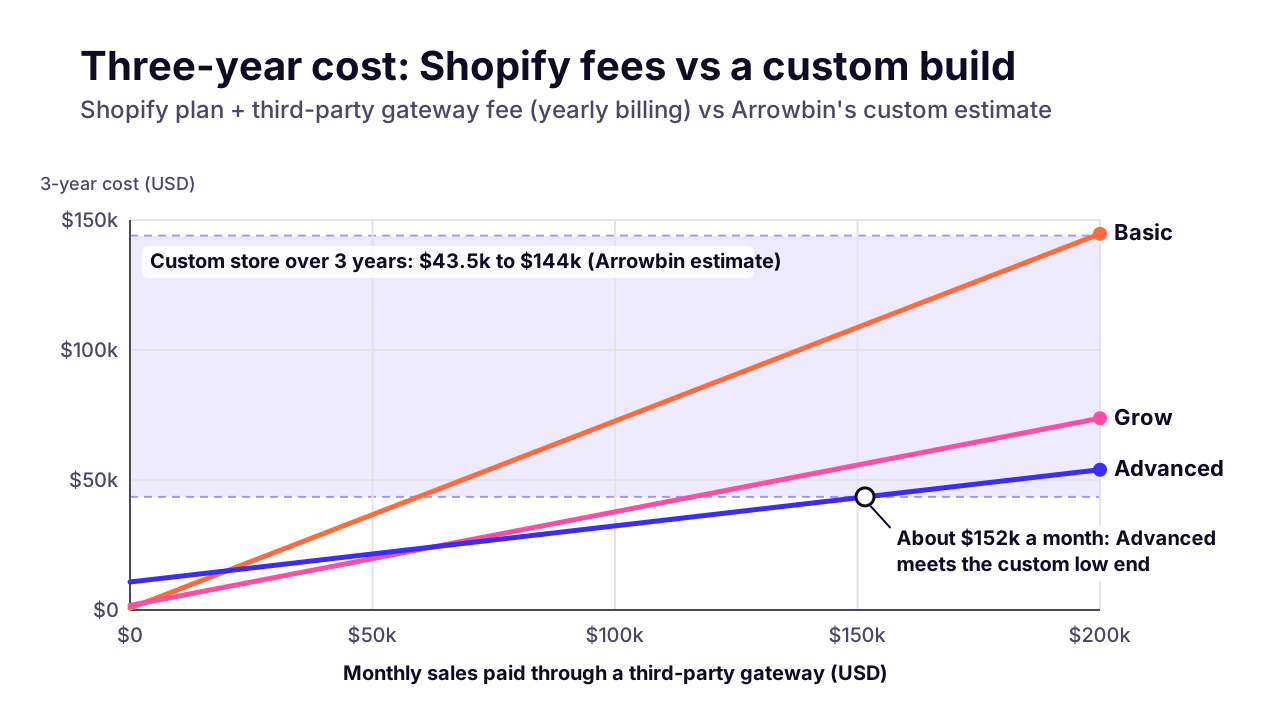
Over three years, Shopify costs less unless your gateway-paid sales pass about $152,000 a month. These are the assumptions, so you can swap in your own:
- Shopify on yearly billing at the October 22, 2026 prices above, for 36 months.
- Every online order is paid through a third-party gateway, so Shopify's extra fee applies. That's the Bangladesh case, or any store that can't use Shopify Payments.
- Card processing is left out of both columns, because you pay it either way.
- Apps and themes are left out too. They'd add to Shopify's side, though some of that cost comes back on the custom side as SaaS bills.
- Custom uses our published estimate: $30,000 to $90,000 to build, plus 15–20% of the build cost per year.
Shopify Basic, third-party gateway
- $10k a month in sales
- $7,884
- $50k a month in sales
- $36,684
- $150k a month in sales
- $108,684
Shopify Grow, third-party gateway
- $10k a month in sales
- $5,364
- $50k a month in sales
- $19,764
- $150k a month in sales
- $55,764
Shopify Advanced, third-party gateway
- $10k a month in sales
- $12,924
- $50k a month in sales
- $21,564
- $150k a month in sales
- $43,164
Shopify Grow, with Shopify Payments
- $10k a month in sales
- $1,764
- $50k a month in sales
- $1,764
- $150k a month in sales
- $1,764
Custom store (Arrowbin estimate)
- $10k a month in sales
- $43,500–$144,000
- $50k a month in sales
- $43,500–$144,000
- $150k a month in sales
- $43,500–$144,000
Read that table honestly and Shopify wins most cells. With Shopify Payments, the platform costs you the subscription and nothing else, so a custom build never pays for itself on platform fees. Without Shopify Payments, the cheapest custom build only catches the best Shopify plan at about $152,000 a month in gateway-paid sales. That's roughly $1.8 million a year.
So fees are rarely a good reason to leave Shopify. Capability is.
 (opens the full-size chart in a new tab)
Where does Shopify clearly win?
Shopify wins on speed to launch, on a hosted checkout you never have to secure yourself, on its app ecosystem, and on built-in sales channels that now include AI assistants. For a store with a normal catalog and a normal checkout, that's a lot of work you never do.
Launch time is the obvious one. Our own planning estimate is 3–6 weeks for a Shopify store, against 8–12 weeks for a headless storefront and 12 or more for a fully custom platform. When you don't yet know whether the product sells, those extra weeks are expensive.
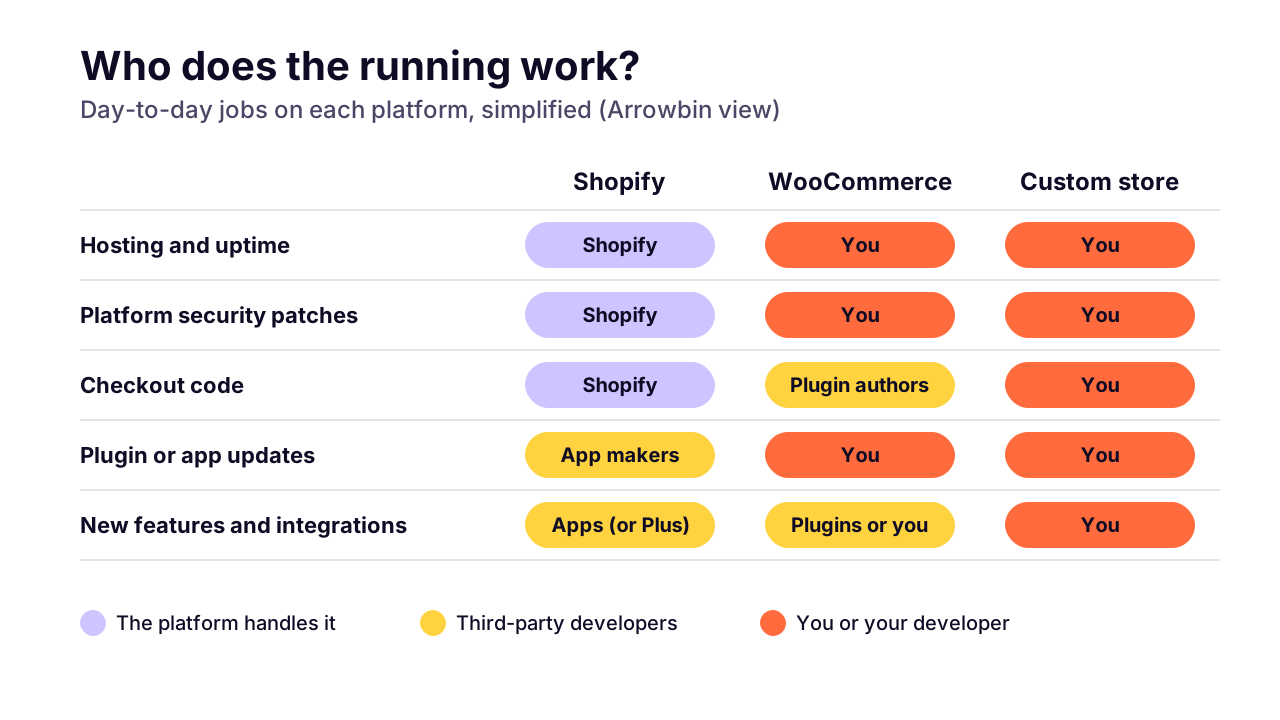
The quieter win is everything you don't own. Shopify hosts the store and patches the platform, and its checkout is Shopify's code to secure. Nobody on your team gets paged about a server. On a custom store, every one of those jobs is yours or your developer's, and checkout bugs cost money by the hour.
Then there's the app store. Most things a growing store wants, from reviews to loyalty points, already exist as an app you can try this afternoon. Some are clunky and the bills add up, but trying a feature in an hour beats commissioning it while you're still finding out what sells.
 (opens the full-size chart in a new tab)
Where does a custom store win?
A custom store wins when your business needs something Shopify can't express cleanly: unusual product logic, wholesale pricing beyond Shopify's plans, deep integration with your own systems, or full control of checkout and page speed. It also wins where Shopify's payment options are limited.
Checkout is the big one. Shopify's developer docs say checkout UI extensions for the information, shipping and payment steps 'are available only to stores on a Shopify Plus plan'. Below Plus, you're configuring Shopify's checkout rather than designing your own. If your conversion problem lives inside checkout, that matters.
Wholesale pricing is closer than it used to be. Shopify's changelog says that since April 2, 2026, plans from Basic to Advanced get native B2B features, including up to 3 active B2B catalogs plus company profiles and payment terms. Plus keeps unlimited customer-specific catalogs, along with partial payments and deposits. If your price lists need more than that, custom starts to make sense.
Integrations are where I see stores outgrow apps. When we take over a WordPress store to rebuild it, the first thing we map is every place where money or stock changes hands: checkout, refunds, stock sync with an ERP, courier booking. When those rules are yours rather than an app's settings, owning the code beats stacking apps that each half-solve it. The homepage is the easy bit.
Speed is real but often oversold. On a custom Next.js store you decide every script that loads; on Shopify, speed mostly comes down to your theme and the apps you install. I won't promise a percentage uplift from going custom, and I'd be wary of anyone who does.
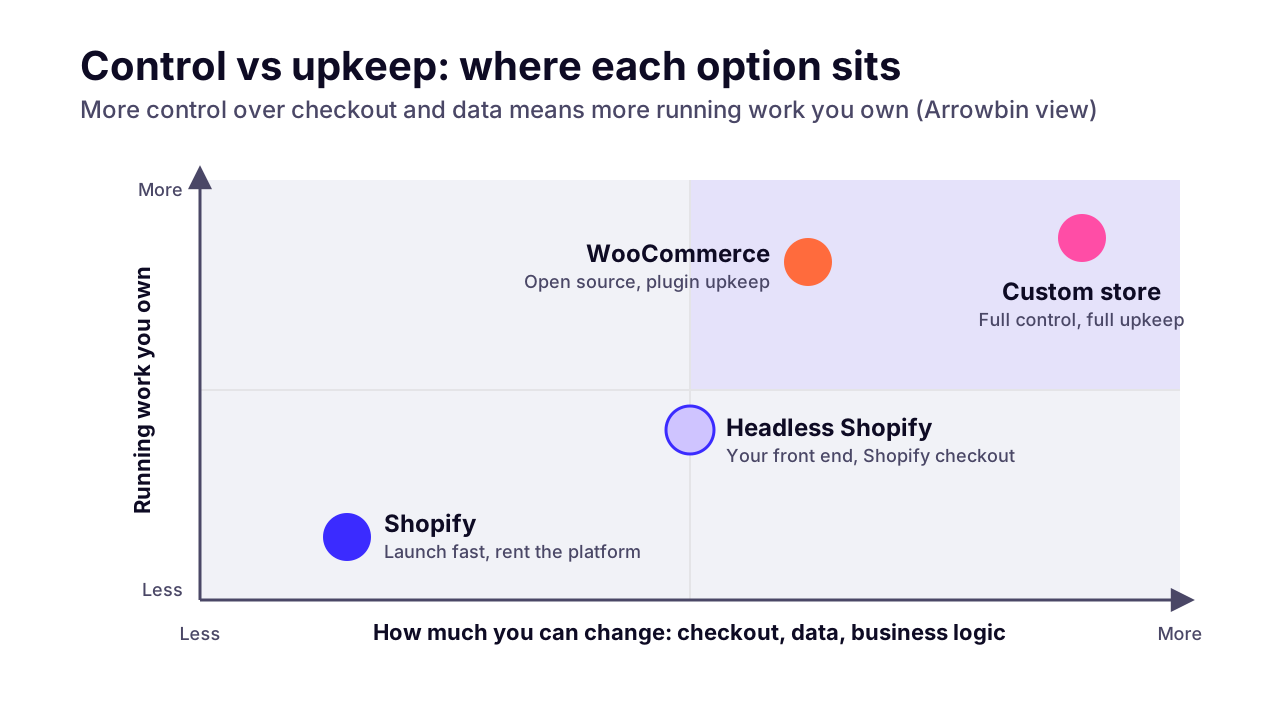
There's also a middle route people forget: headless Shopify. You keep Shopify's back office and checkout and build your own front end on its Storefront API, which Shopify says serves your catalog and the cart, then hands customers off to checkout. You get design freedom without owning payments. Our guide to whether headless commerce is worth it covers what it costs and who it suits.
 (opens the full-size chart in a new tab)
What about WooCommerce?
WooCommerce sits in between. It's open source and flexible with no monthly platform fee, but you own the hosting and the updates, plus plugin security. It suits teams already on WordPress who have someone to keep it patched.
WordPress runs 40.0% of all websites, according to W3Techs data from October 14, 2026, so WooCommerce developers are easy to find. WooCommerce pitches itself as open source with no 'monthly platform fees', and that part is true.
The catch is plugins. Patchstack's State of WordPress Security in 2026 counted 11,334 new vulnerabilities in the WordPress ecosystem in 2025, and 91% of them were in plugins. A typical store runs plugins for payments and shipping, plus more for SEO and caching. Each one is code you're trusting with customer data.
Most of our e-commerce work is moving stores off exactly this setup. If that's where you are, our guide to moving off WooCommerce safely covers the redirect plan.
My view: WooCommerce is a fine choice if WordPress is already your home and you budget for maintenance. As a fresh start for a non-technical founder in 2026, I'd pick Shopify over it.
Does the answer change for stores in Bangladesh?
Yes. Shopify Payments isn't available in Bangladesh, so every order paid through a gateway carries Shopify's third-party fee on top of the gateway's own fee, and local wallets and cash on delivery need extra setup.
Shopify's list of supported countries for Shopify Payments has 41 entries. The US is on it, as are the UK and Australia. Bangladesh isn't, so a Bangladeshi store has to use a third-party payment provider.
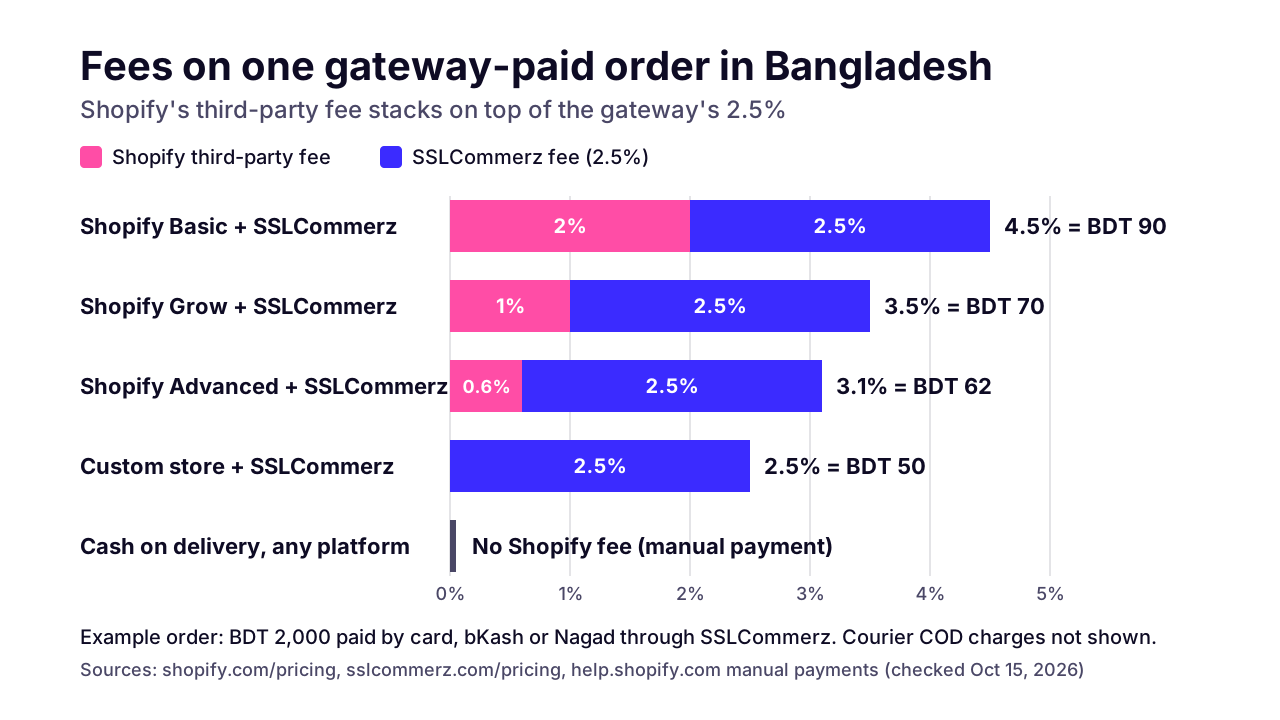
Take one common gateway. SSLCommerz lists 2.5% per successful transaction (3.5% for AMEX), and says that rate also applies to bKash and Nagad payments. On Shopify Basic, a gateway-paid order costs 2% + 2.5% = 4.5% in fees. On Grow it's 1% + 2.5% = 3.5%, and on Advanced 0.6% + 2.5% = 3.1%. On a custom store with the same gateway, it's the 2.5% alone.
On a ৳2,000 order, that's ৳90 on Basic, ৳70 on Grow and ৳50 on a custom store. SSLCommerz also lists a ৳25,500 non-refundable charge on its Basic plan, which you pay whichever platform you choose.
 (opens the full-size chart in a new tab)
Cash on delivery changes the picture. Shopify's help center says 'You aren't charged third-party transaction fees for manual payments', and cash on delivery is one of those manual methods. If most of your orders are COD, the extra fee only touches the slice paid online.
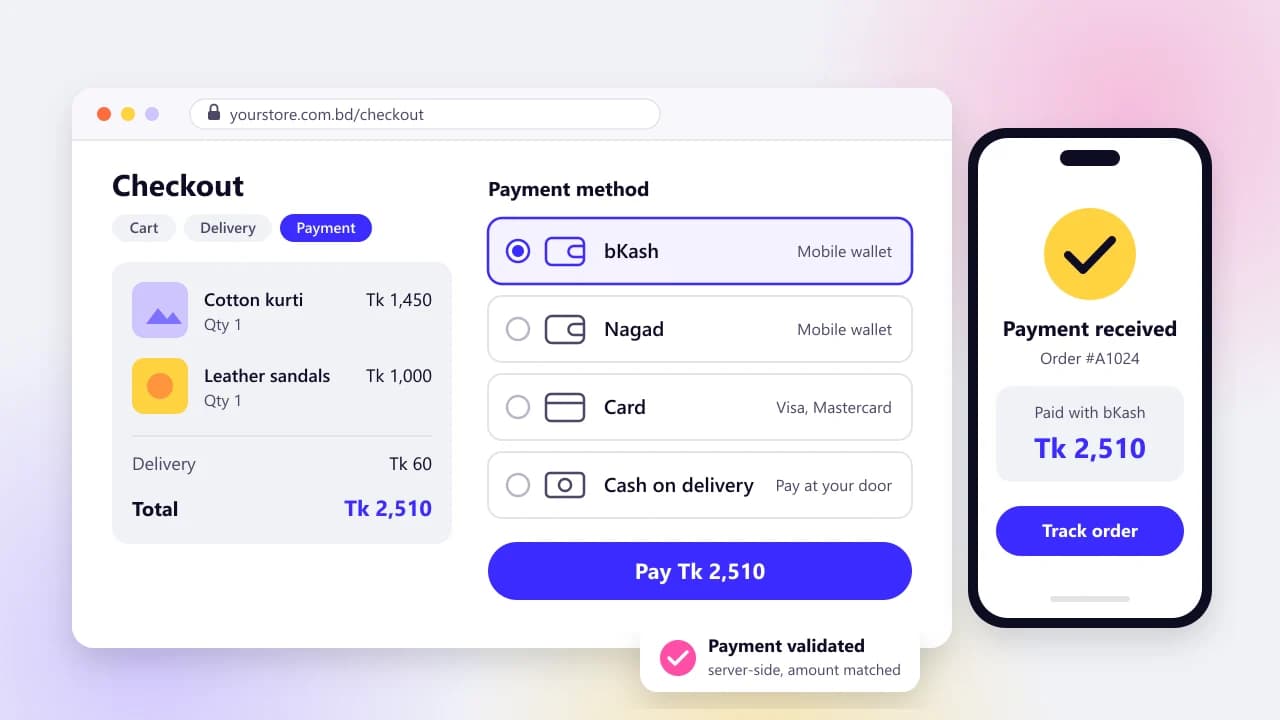
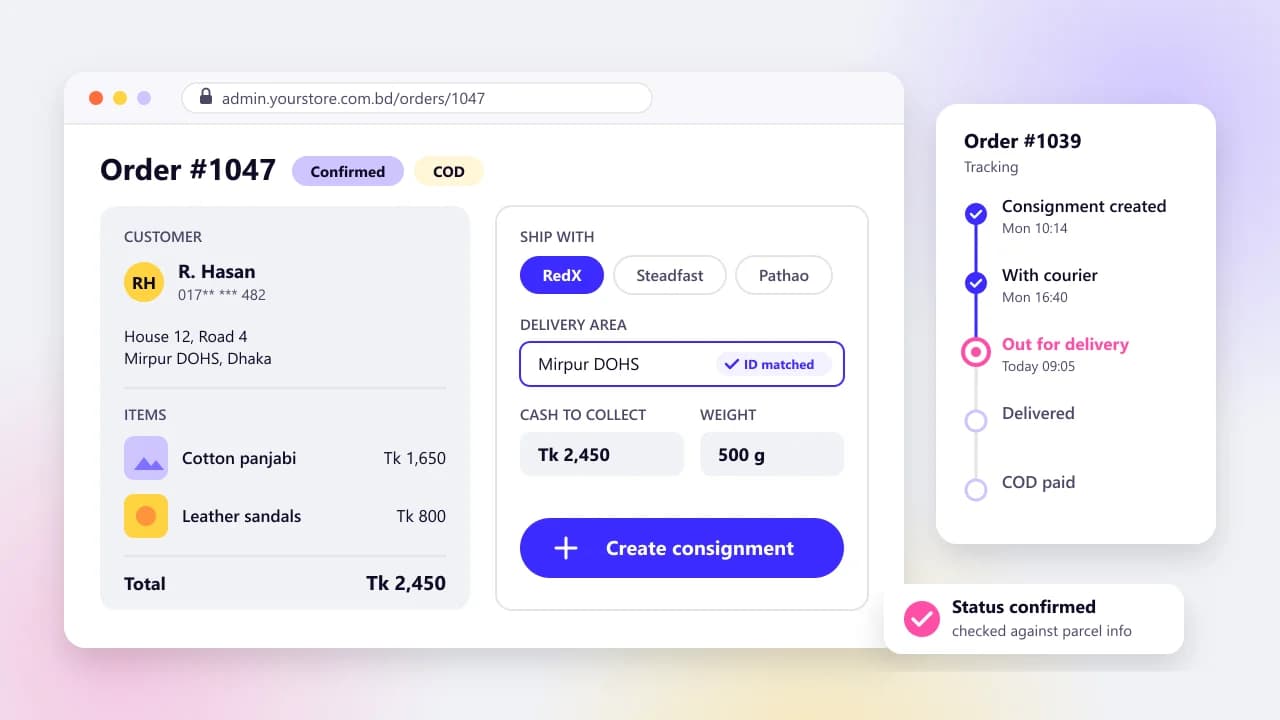
Where custom earns its keep in Bangladesh is the work around COD: phone or SMS confirmation before dispatch, courier booking from the order screen, a small advance payment to filter out orders nobody plans to collect, and bKash or Nagad as real options instead of a redirect. Silent Lifestyle BD, one of our builds, is set up around cash on delivery with phone confirmation.
If you go with Shopify, check before you commit that your gateway's Shopify app supports the wallets you need. SSLCommerz has a free one, and our guide to payment gateways in Bangladesh compares it with the other options.
Which works better with AI shopping assistants in 2026?
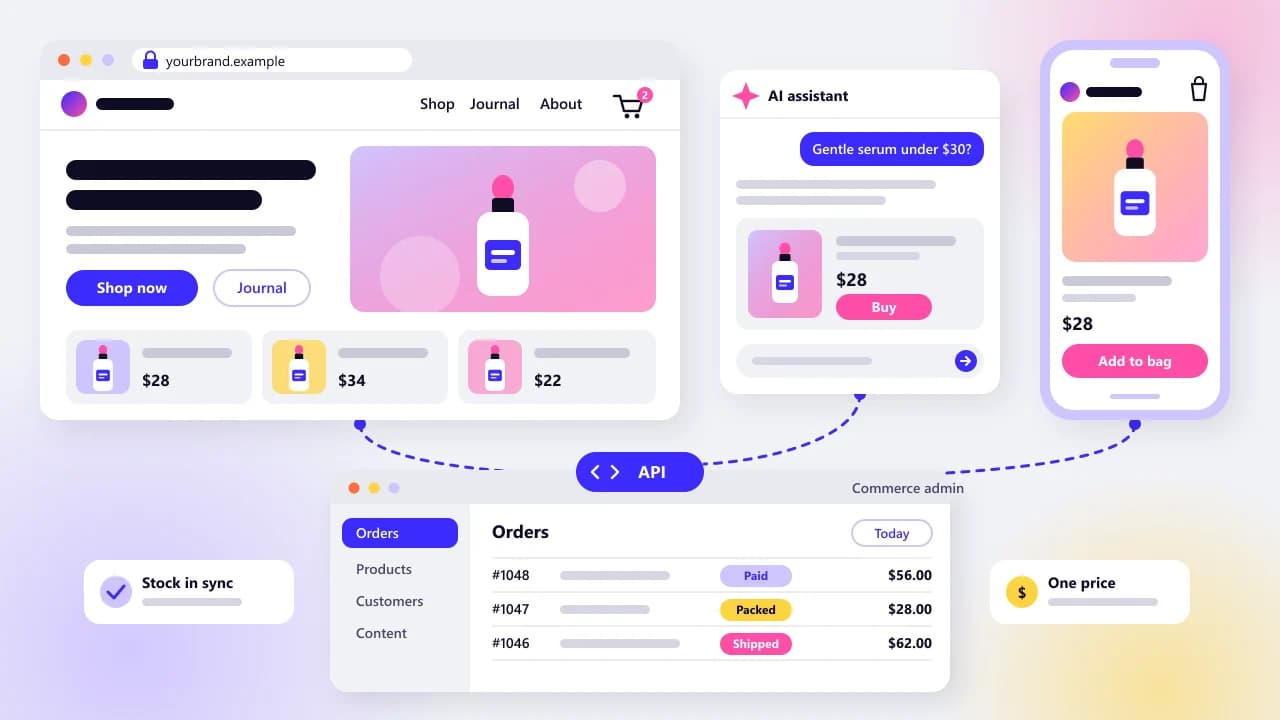
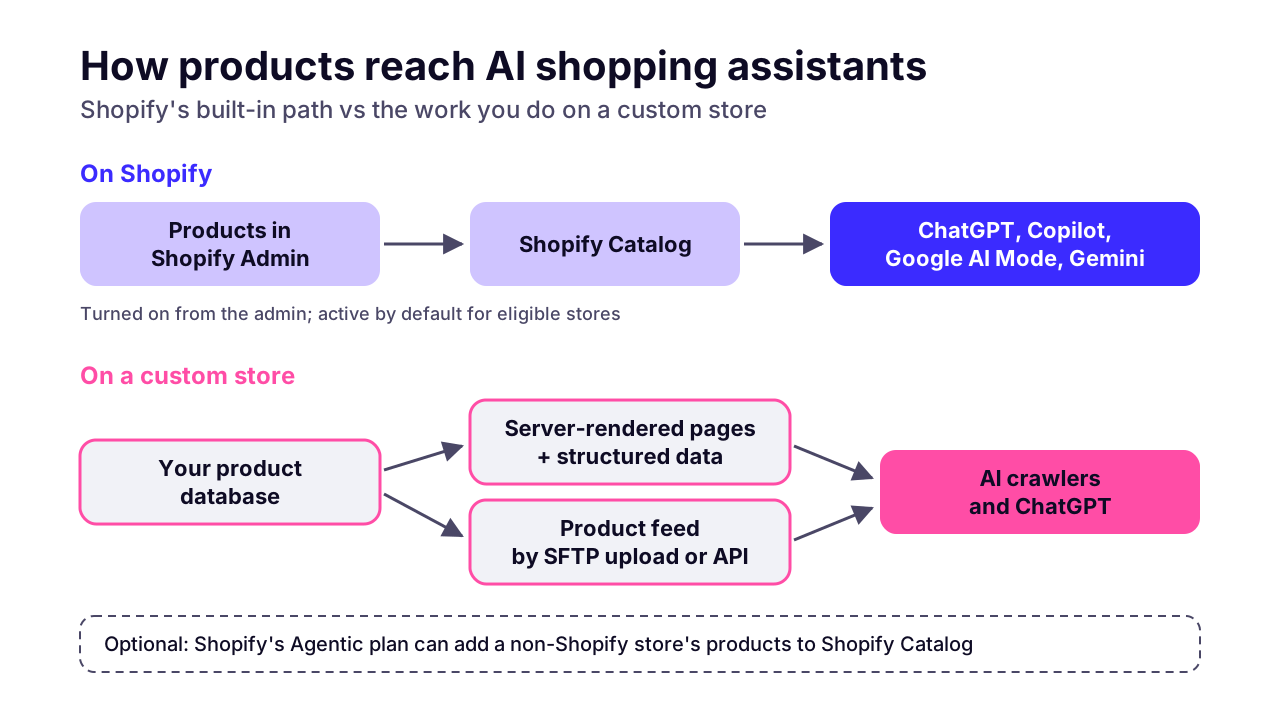
Shopify does, out of the box. Shopify connects products to ChatGPT, Microsoft Copilot, AI Mode in Google Search and the Gemini app from its admin; a custom store can be found by the same assistants, but you do the product data and crawler work yourself.
Shopify announced Agentic Storefronts on March 24, 2026. It says sales in ChatGPT carry 'no transaction fees beyond standard processing rates', and its help page says the feature is active by default for eligible stores. For a small team, that's a real head start.
One detail people miss: the same help page describes an Agentic plan that lets you keep your existing online store. So a custom store isn't locked out of Shopify's catalog.
On your own custom store, the work looks like this:
- Render product pages on the server so price and stock are in the HTML. Vercel's crawler study found that 'none of the major AI crawlers currently render JavaScript' (December 2024).
- Add product structured data with price and availability for every variant, matching what the page shows.
- Publish a product feed. OpenAI's merchant docs accept one by SFTP file upload or by API.
- Keep feed prices and stock in sync with the store, because a stale feed is worse than none.
None of that is hard on a well-built Next.js store, but it's work Shopify merchants skip. Our guide to getting a custom store into ChatGPT shopping walks through it step by step.
 (opens the full-size chart in a new tab)
How hard is it to switch later?
Moderately hard, and very manageable with a plan. Products and customers export reasonably well in either direction. URLs and app data take planning, as does order history, and permanent (301 or 308) redirects are what protect your search rankings.
URLs come first. Shopify puts every product under /products/ and every collection under /collections/. Moving off Shopify means mapping each old URL to its new home, and moving onto it means bending your old URLs into Shopify's shape. Miss a few hundred and you'll see it in Search Console within weeks.
Apps are the sticky part. Each one holds a slice of your data, such as reviews or subscription schedules, and each needs its own export or a rebuild. Expect customers to set new passwords after any platform move, and write that email before launch day.
The order we follow: freeze catalog changes, export, map every URL, build the redirects, test on staging, switch DNS, then watch for 404s for a few weeks. It's dull work. It's also the difference between a migration and a traffic drop.
This is also why starting on Shopify isn't a trap. A clean Shopify store with sensible URLs is one of the easier things to move later.
What do we recommend for most startups and small brands?
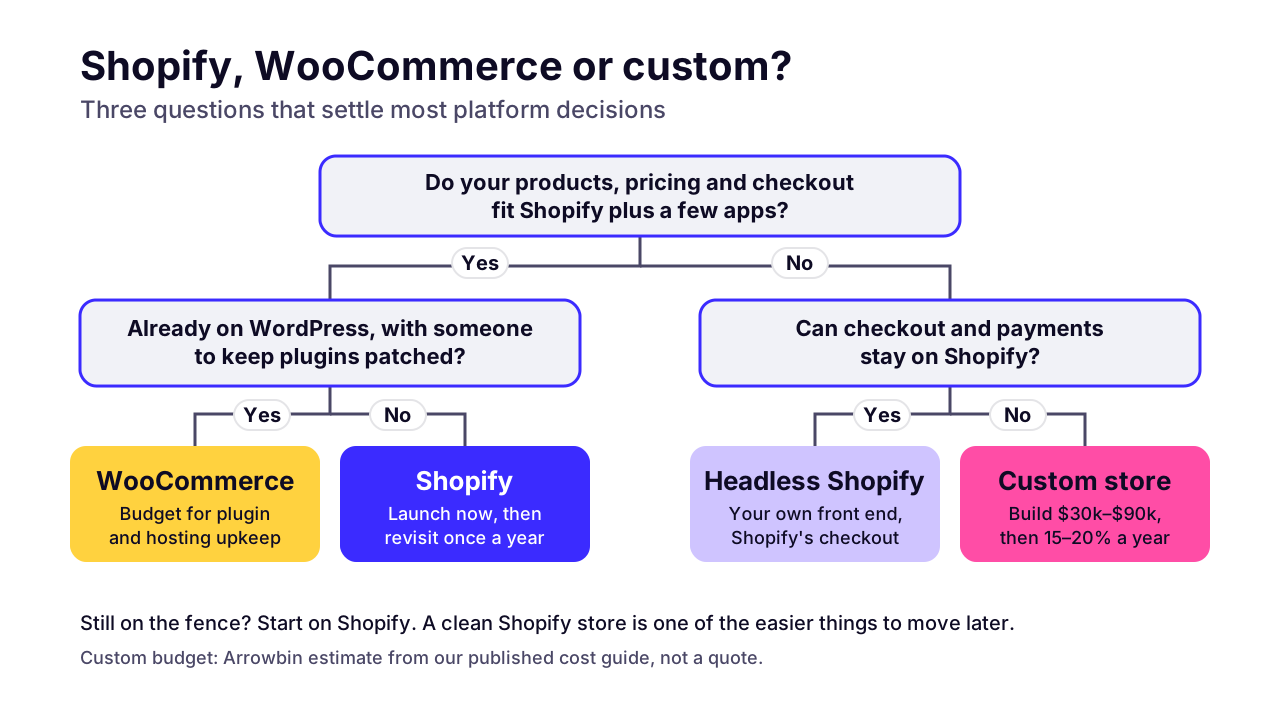
Start on Shopify unless a specific requirement rules it out. Plan a custom build when fees, checkout limits or integrations cost you more than running your own store would.
This is the checklist I'd use. If two or more of these are true, a custom or headless build deserves a proper look:
- You can't use Shopify Payments, and your gateway-paid sales are heading towards $152,000 a month.
- You need changes inside checkout that Shopify only allows on Plus.
- Your pricing logic has outgrown Shopify's B2B tools and the apps you've tried.
- The store has to sync in real time with your own ERP, warehouse or courier systems.
- Most customers pay in ways Shopify only handles through workarounds, like COD with confirmation or local wallets.
- You can fund the build and about 15–20% of its cost every year to keep it healthy.
If none of those apply, launch on Shopify, keep your URLs tidy and ask the question again in a year. You'll be deciding with real sales data instead of guesses.
 (opens the full-size chart in a new tab)
If you're on the custom side of that list, we build custom e-commerce stores on Next.js, mostly for brands leaving WordPress and WooCommerce.
Want a second opinion on your numbers first? Book a 30-minute call and bring your monthly sales and payment mix. If Shopify is the right answer for you, you'll hear it from us.
Key takeaways
- 01Shopify is the right start for most new stores: it launches fast, runs a hosted checkout and leaves you no servers to patch.
- 02Shopify's third-party fee (2% Basic, 1% Grow, 0.6% Advanced, 0.2% Plus) only applies when Shopify Payments doesn't process the order.
- 03Card processing is paid on every platform, so don't count it as a Shopify cost when you compare.
- 04On fees alone, the cheapest custom build in our estimate only catches the best Shopify plan at about $152,000 a month in gateway-paid sales.
- 05Go custom for capability: checkout changes, complex pricing, deep integrations or local payment flows Shopify handles poorly.
- 06In Bangladesh, gateway-paid orders on Shopify carry its fee plus the gateway's, while cash on delivery orders carry no Shopify fee.
- 07Shopify leads on AI shopping channels today; a custom store needs server-rendered pages and a product feed, plus structured data, to match it.

Written by
Md. Shishir Ahmed
Founder, Arrowbin
Founder of Arrowbin. Writes about shipping software, what it costs, and the decisions that decide whether a product works.