The short answer
To get your products into ChatGPT shopping answers, make your product pages readable to OpenAI's search crawler, OAI-SearchBot, and get your catalog into a feed ChatGPT uses: directly through OpenAI's merchant program (approved partners only as of October 15, 2026) or through a platform such as Shopify Catalog. You don't need Shopify. Server-rendered product pages with complete Product and Offer markup work for WooCommerce and custom stores too, as do a clean Google Merchant Center feed and sensible crawler rules. Since OpenAI's March 2026 change, merchants can use their own checkout, so the job is to be found and to be right about price and stock.
On this page
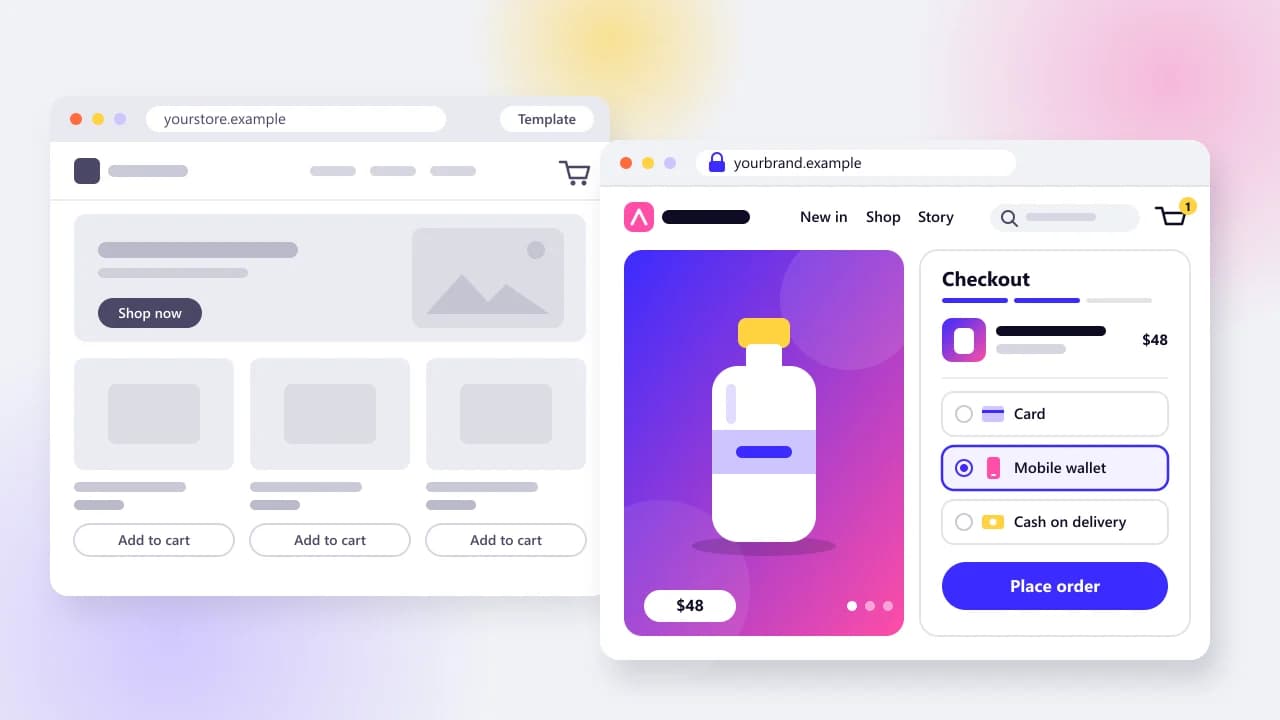
Shoppers now ask ChatGPT, Gemini or Copilot what to buy, and the assistant answers with product cards that show prices and link to a store. Most advice on getting into those answers assumes you sell on Shopify. This one covers Shopify too, but it's written for stores on WooCommerce, a custom build or a headless setup.
We build and rebuild online stores, mostly moving WordPress and WooCommerce sites to server-rendered Next.js. So we spend our days on the plumbing behind this topic, like what a crawler actually receives and what your CDN quietly blocks. We checked every program detail below against official pages on October 15, 2026, and dated it, because this area changes monthly.
What is agentic commerce, and what changed in 2026?
Agentic commerce is when an AI assistant finds, compares and sometimes buys products for a shopper. The big change in 2026 came in March, when OpenAI stepped back from checkout inside ChatGPT to focus on product discovery. For most stores, the practical goal is now to be found by the assistant and to receive the buyer on their own checkout.
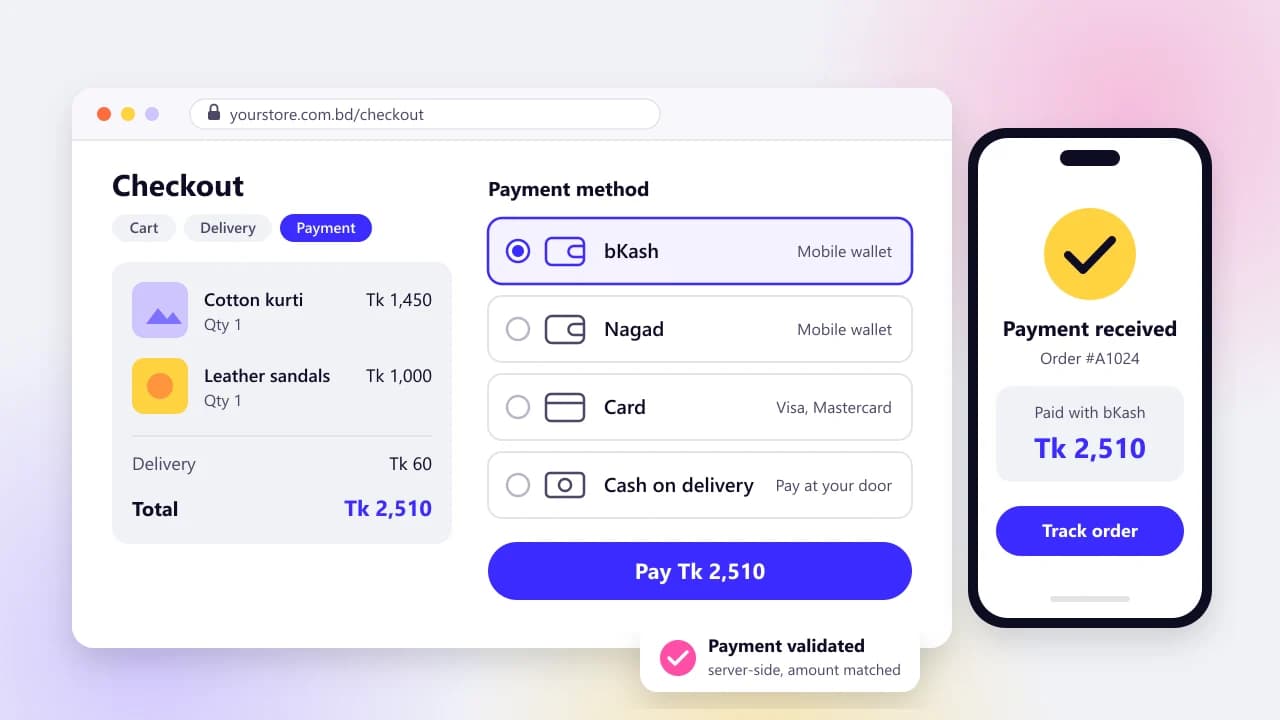
ChatGPT's Instant Checkout launched in September 2025. On March 24, 2026, OpenAI told TechCrunch it was "allowing merchants to use their own checkout experiences" while it focused on product discovery, and that it was deprioritizing Instant Checkout as a stand-alone feature. Merchants can still offer checkout through apps inside ChatGPT for now. So in-chat buying hasn't vanished. It just stopped being the main road.
The same day, Shopify announced Agentic Storefronts, which put Shopify merchants' products into ChatGPT, Microsoft Copilot, AI Mode in Google Search and the Gemini app. Back on January 11, Google launched the Universal Commerce Protocol, an open standard for checkout run by an agent.
Then came a quieter shift. Profound, a company that tracks AI answers for its clients, found that the share of ChatGPT Shopping recommendations coming from product feeds jumped from 8.26% to 61.54% on July 10 and sat around 65% by September 3, as Search Engine Journal reported. That's one vendor's observational data, and OpenAI hasn't explained the change. If it holds, though, stores that rely only on being crawled are losing ground in ChatGPT.
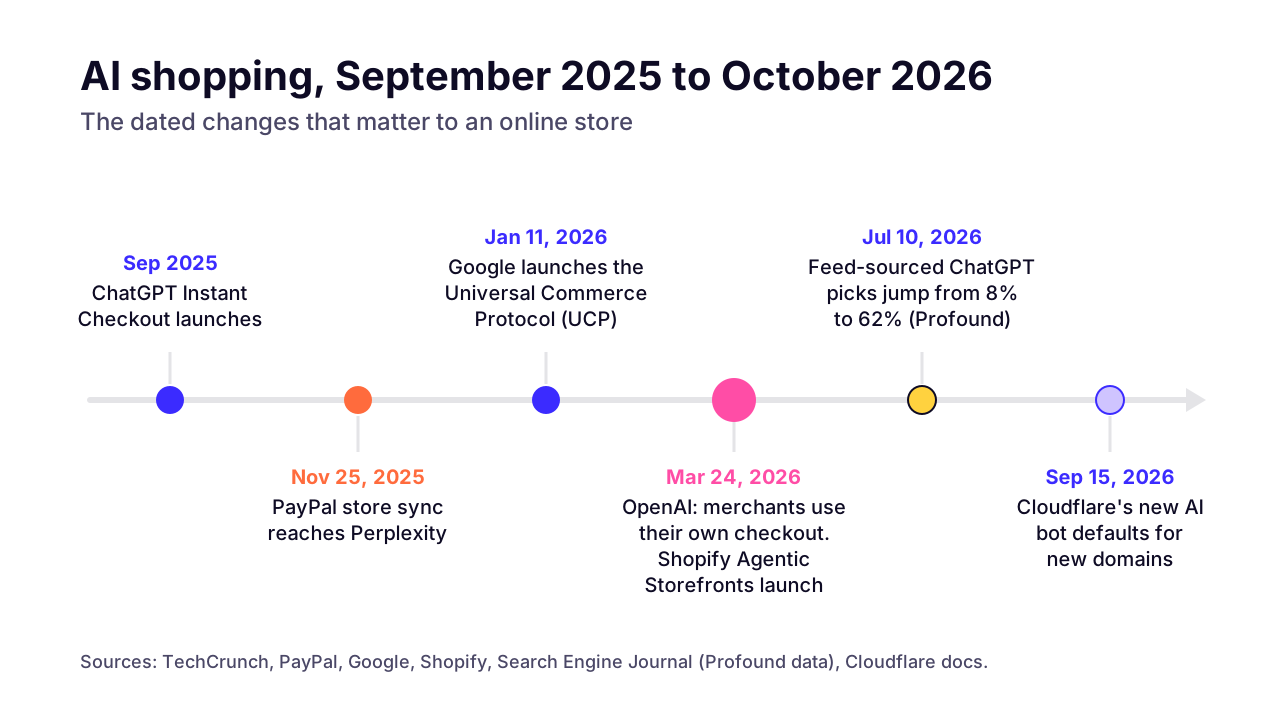 (opens the full-size chart in a new tab)
How do products get into ChatGPT and other AI shopping answers?
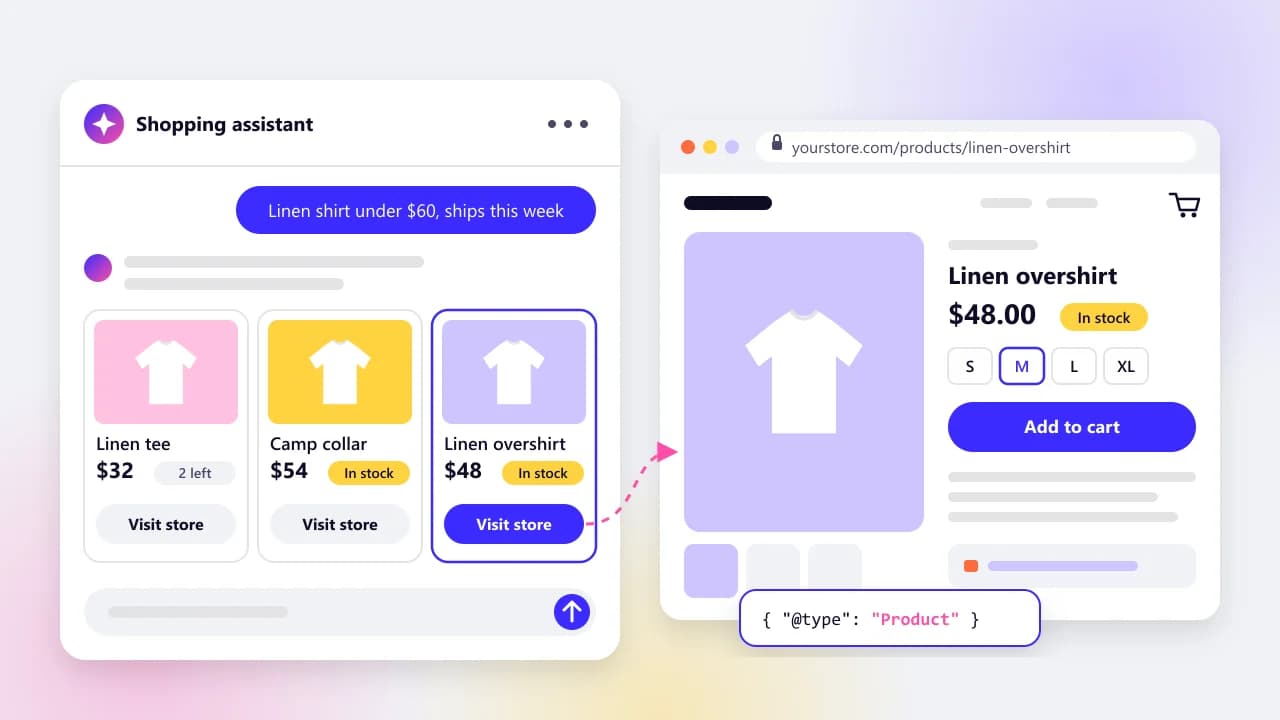
Products get in three ways: an AI search crawler reads your product pages, you send the assistant a structured product feed, or a platform you already use passes your catalog along. Each assistant mixes the three differently, and none of them publishes how it ranks products.
For ChatGPT, the crawler is OAI-SearchBot. OpenAI's crawler documentation says it's used "to surface websites in search results in ChatGPT's search features." The feed route is narrower. OpenAI's commerce guide takes a feed by SFTP file upload or by API, recommends a full file once a day plus API updates during the day, and says feed onboarding is "currently available to approved partners." You apply at chatgpt.com/merchants.
Search Engine Journal's September report says OpenAI's merchant page puts applicants on a waitlist. It also says Shopify and Etsy catalogs are already connected, and that OpenAI plans a self-serve way to connect feeds later this year. OpenAI's merchant page wouldn't load for us when we checked on October 15, so treat the waitlist as reported rather than confirmed.
Other assistants use the same three routes, each with its own limits:
ChatGPT
- How products get in
- OAI-SearchBot crawling; a direct feed for approved merchants; Shopify Catalog
- Checkout today
- The merchant's own site, or an app inside ChatGPT
- Limits as of Oct 15, 2026
- Direct feed onboarding is approval-only
Google AI Mode and Gemini
- How products get in
- Normal Search crawling by Googlebot; Merchant Center product data
- Checkout today
- Your site, or Google Pay checkout through UCP for select merchants
- Limits as of Oct 15, 2026
- UCP checkout covers products eligible in the US, Canada or Australia
Microsoft Copilot
- How products get in
- Microsoft Merchant Center with a UCP-ready feed; Shopify stores enrolled automatically
- Checkout today
- Copilot Checkout inside Copilot, or your site
- Limits as of Oct 15, 2026
- Checkout only for English-language merchants selling to US buyers
Perplexity
- How products get in
- PerplexityBot crawling; the Merchant Program; PayPal store sync
- Checkout today
- Instant Buy with PayPal for US users, or your site
- Limits as of Oct 15, 2026
- Its Merchant Program was pitched at large retailers
Google says there are no additional requirements to appear in AI Mode beyond being indexed and eligible for a snippet in Search, and it asks merchants to keep Merchant Center details current. Checkout through UCP is a separate opt-in, which Google's Merchant Center help limits to select merchants for now.
Microsoft's agentic commerce page says Copilot Checkout runs off Microsoft Merchant Center, that you stay the merchant of record, and that Microsoft takes no commission today.
Perplexity's merchant route is older. Its Merchant Program launched in November 2024 as a free program aimed at large retailers. In November 2025, PayPal's store sync made PayPal merchants' catalogs discoverable inside Perplexity, with checkout for US users.
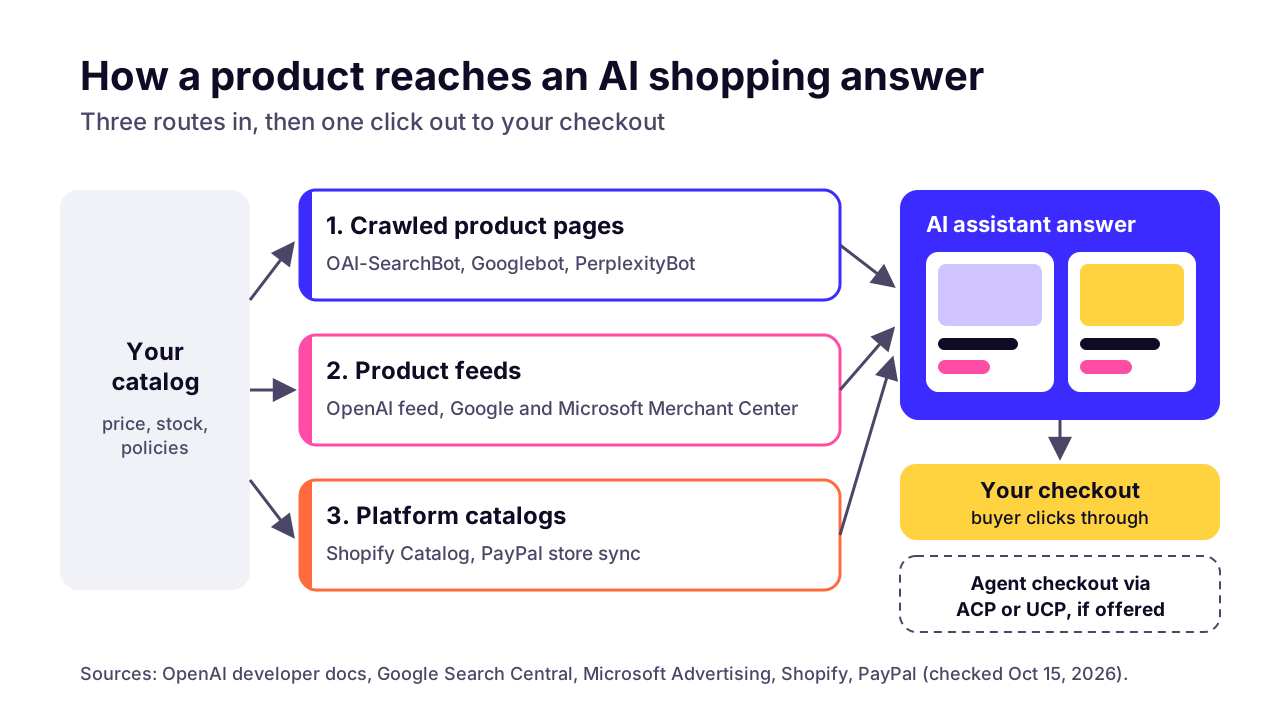 (opens the full-size chart in a new tab)
Do you need Shopify to sell through AI assistants?
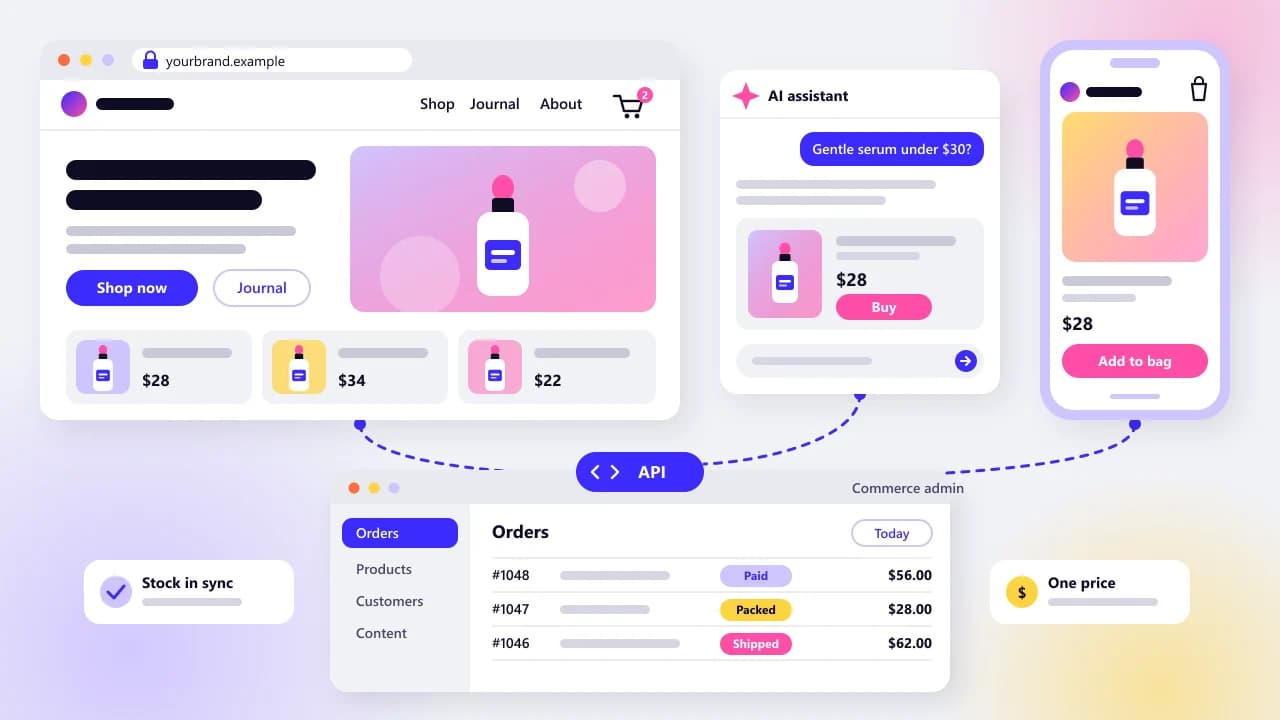
No. Shopify makes it easiest, because Agentic Storefronts already wire Shopify stores into ChatGPT and Copilot as well as Google's AI Mode and Gemini. A WooCommerce or custom store can reach the same assistants through crawlable pages, Merchant Center feeds for Google and Microsoft, and OpenAI's feed program once it's accepted.
Shopify also offers a way in for brands that don't use it. The Agentic plan lets brands that run their store elsewhere add products to Shopify Catalog, and Shopify says it has rolled out globally. It's a sensible bridge if you want ChatGPT coverage this quarter without first settling whether to move to Shopify or build custom. You are, however, handing a copy of your catalog to another company and adding one more thing to keep in sync, and the announcement doesn't state a price. Read the terms first.
For most stores off Shopify, the cheapest first move is a clean Google feed. OpenAI's product feed spec accepts a Google-compatible file, tab or comma delimited, and says "accepted Google-compatible products have search enabled and checkout disabled." On WooCommerce, Google for WooCommerce syncs your catalog to Google Merchant Center for free. Build that feed properly once and it does double duty.
Crawlable product pages
- Who it suits
- Every store
- What you maintain
- Server-rendered pages, structured data, crawler access
- Where checkout happens
- Your site
- Cost notes
- No platform fee; developer time
Direct OpenAI product feed
- Who it suits
- Stores OpenAI accepts
- What you maintain
- A daily feed plus updates during the day
- Where checkout happens
- Your site, or an app inside ChatGPT
- Cost notes
- No fee listed in the docs we read
Shopify Agentic Storefronts
- Who it suits
- Stores already on Shopify
- What you maintain
- Product data in Shopify Admin
- Where checkout happens
- ChatGPT's in-app browser (a new tab on desktop)
- Cost notes
- No extra transaction fees on ChatGPT sales, per Shopify
Shopify Agentic plan
- Who it suits
- Brands on other platforms
- What you maintain
- A copy of your catalog in Shopify Catalog
- Where checkout happens
- Not stated in Shopify's announcement
- Cost notes
- Price not stated in the announcement
Google Merchant Center, plus UCP
- Who it suits
- Any store with a Merchant Center account
- What you maintain
- A Merchant Center feed
- Where checkout happens
- Your site, or Google Pay checkout for select UCP merchants
- Cost notes
- Free Merchant Center sync with Google for WooCommerce
Microsoft Merchant Center
- Who it suits
- Stores selling to US buyers
- What you maintain
- A UCP-ready feed
- Where checkout happens
- Copilot Checkout, or your site
- Cost notes
- Microsoft says it takes no commission today
What does an AI assistant need to read on your product pages?
An assistant needs a product page that arrives complete in the first HTML response. That means the name, the price and its currency, stock status, images, brand, identifiers, shipping cost and the return policy. The Product and Offer structured data on that page has to say the same thing as the visible text.
Google's merchant listing documentation, last updated September 8, 2026, is the most detailed public spec for this. A Product needs a name and an image, plus an Offer. The Offer needs a price above zero and a priceCurrency, and it has to be an Offer rather than an AggregateOffer, because the merchant must be the seller. Availability, shipping details, a return policy, GTIN, brand and ratings are recommended.
Google's rules are worth following even if ChatGPT is the target. OpenAI's feed asks for the same facts, so one clean product model can feed both. OpenAI is stricter in one place: its feed requires brand, which Google only recommends.
Product name
- Schema.org property
- name
- Google's status
- Required
- Where it must appear
- Page, markup and feed
Main photo
- Schema.org property
- image
- Google's status
- Required
- Where it must appear
- Page, markup, feed
Price
- Schema.org property
- offers.price, above zero
- Google's status
- Required
- Where it must appear
- Page, markup and feed, identical
Currency
- Schema.org property
- offers.priceCurrency
- Google's status
- Required
- Where it must appear
- Markup and feed, next to the price
Stock status
- Schema.org property
- offers.availability
- Google's status
- Recommended
- Where it must appear
- Page, markup and feed, kept current
Brand
- Schema.org property
- brand.name
- Google's status
- Recommended (required in OpenAI's feed)
- Where it must appear
- Page, markup, feed (same spelling)
Barcode
- Schema.org property
- gtin (8, 12, 13 or 14 digits)
- Google's status
- Recommended
- Where it must appear
- Markup and feed
Shipping cost and time
- Schema.org property
- shippingDetails, or a site-wide policy under Organization
- Google's status
- Recommended
- Where it must appear
- Page or policy page, markup, feed
Return window
- Schema.org property
- hasMerchantReturnPolicy, or under Organization
- Google's status
- Recommended
- Where it must appear
- Policy page, markup, feed
Star rating
- Schema.org property
- aggregateRating and review
- Google's status
- Recommended
- Where it must appear
- Page and markup, only if reviews are shown
Site-wide shipping and return policies can sit in your Organization markup instead of on every product. That's tidier for most small stores, as long as your policy page states the same numbers.
WooCommerce owners should check one thing in particular. WooCommerce's built-in structured data describes a variable product whose variations have different prices as an AggregateOffer, a price range. In current code the exception is a URL that names one exact variation. Google's merchant listing docs ask for an Offer instead. If most of your catalog is variable products, have a developer look at it.
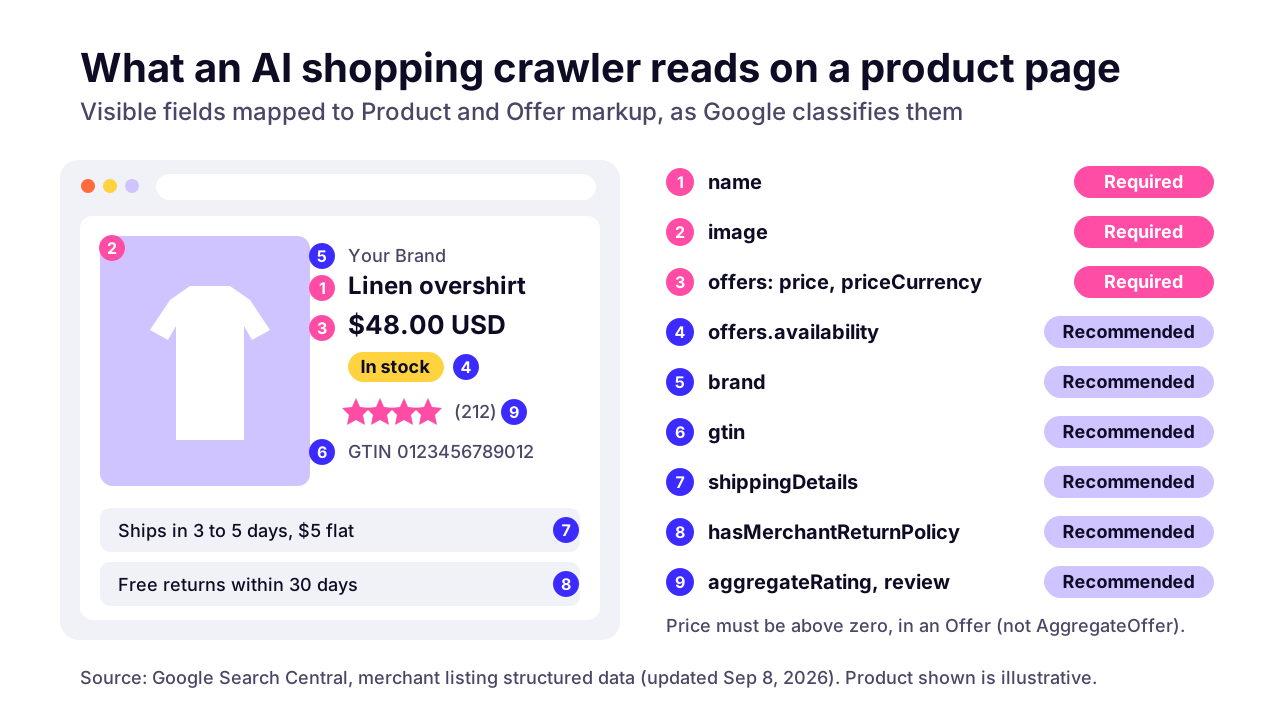 (opens the full-size chart in a new tab)
Is your robots.txt blocking AI shopping assistants?
Check that OAI-SearchBot is allowed, because it's the crawler ChatGPT search uses to surface sites. GPTBot is a separate crawler for model training, and you can block it without dropping out of ChatGPT search. Then check your CDN and security plugins, because robots.txt is only half the gate.
OAI-SearchBot
- Owner
- OpenAI
- What it does
- Surfaces sites in ChatGPT search
- Block it?
- No, if you want ChatGPT shoppers
GPTBot
- Owner
- OpenAI
- What it does
- Collects content for model training
- Block it?
- Your call; ChatGPT search doesn't depend on it
ChatGPT-User
- Owner
- OpenAI
- What it does
- Fetches a page when a user asks; not automatic crawling
- Block it?
- OpenAI says robots.txt rules may not apply to it
Googlebot
- Owner
- What it does
- Crawls for Search, including AI Mode and AI Overviews
- Block it?
- No, unless you want out of Google entirely
Google-Extended
- Owner
- What it does
- A control token for Gemini training and grounding
- Block it?
- Your call; Google says Search inclusion isn't affected
PerplexityBot
- Owner
- Perplexity
- What it does
- Surfaces and links sites in Perplexity; not used for training
- Block it?
- No, if you want Perplexity shoppers
OpenAI says robots.txt changes take about 24 hours to reach its systems. Google's crawler documentation says Google-Extended "does not impact a site's inclusion in Google Search." And Perplexity's bot documentation notes that its user-triggered fetcher, Perplexity-User, generally ignores robots.txt, since a person asked for the page.
Most guides stop at robots.txt, which is a request that polite bots honor. Your CDN, firewall or WordPress security plugin decides what actually gets through, and it can say no while robots.txt says yes. Cloudflare's AI bot settings now sort bots into three groups (Search, Agent, Training), each with its own block rule. From September 15, 2026, new domains start with Training and Agent bots blocked on pages that show ads.
We check this on every store we take on, and we've caught it on our own site. Arrowbin's pages are server-rendered. When we tested our own site on October 14, 2026, our robots.txt explicitly welcomed eleven AI crawlers, GPTBot among them, yet requests sent with GPTBot's user agent got a 403 from Cloudflare. Robots.txt said yes. The edge said no.
To test your own store, request a product page with curl and the crawler's user agent string, then look at the status code. A 403 or a challenge page means something in front of your site is blocking it. A user-agent test isn't proof, because real crawlers come from published IP ranges, so confirm in your CDN's security event log. It's a quick job for whoever runs your hosting and CDN setup.
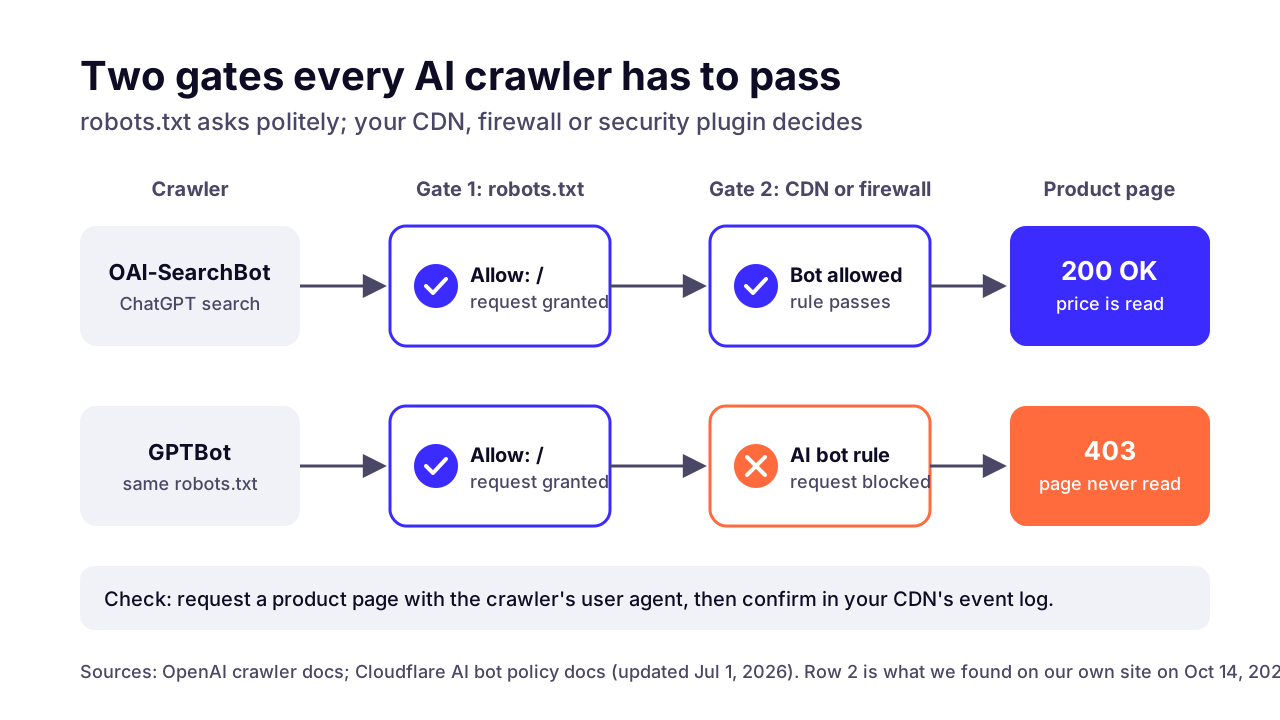 (opens the full-size chart in a new tab)
What are ACP and UCP, and does a small store need them?
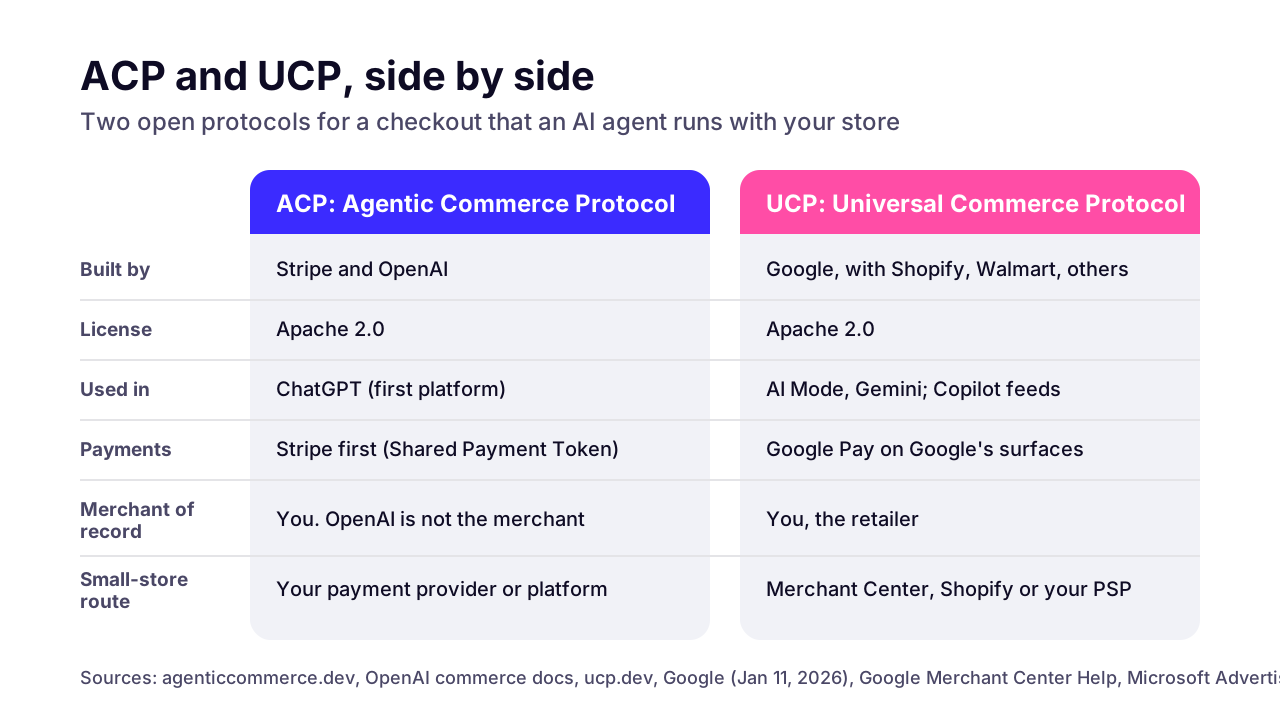
ACP and UCP are open protocols that let an AI agent run a checkout with a merchant. ACP comes from Stripe and OpenAI; Google launched UCP with Shopify and other retailers. Most small stores will get them through their platform or payment provider rather than by building them.
The Agentic Commerce Protocol is open source under Apache 2.0, was developed by Stripe and OpenAI, and names Stripe as the first compatible payment provider. ChatGPT was the first platform to use it. OpenAI's key concepts page is clear that OpenAI isn't the merchant of record: you bring your own payment provider, calculate tax and decide whether to accept each order.
The Universal Commerce Protocol is also Apache 2.0. Google built it with retailers including Shopify and Walmart, and the UCP site now lists Amazon and Microsoft among its co-developers too. It covers the whole order, from catalog search through checkout to order management, and it already powers Google's checkout in AI Mode and Gemini for select merchants.
In our view, a store doing a few hundred orders a month shouldn't build either protocol by hand this year. Your platform or payment provider is adding support (Microsoft already lists PayPal and Stripe routes into Copilot Checkout), and the specs keep moving. Wait for the button in your dashboard.
A custom build starts to make sense with a large catalog, B2B prices that differ per customer, or checkout rules no plugin handles, such as made-to-order goods or split shipments. Then it's a normal integration project. You map your catalog and order system to the spec, keep your own database as the source of truth, and put one protocol layer in front that you can swap later. We'd treat it as a custom checkout and feed integration and start with your payment provider's docs.
Model Context Protocol (MCP) comes up here too. UCP treats MCP as one of several ways an agent can talk to a store, next to plain REST, so an MCP server on its own won't get you into AI shopping results. An assistant that answers questions about your own catalog or a customer's orders is a different project, closer to AI integrations for your store. Our guide to what an AI agent costs a small business prices that kind of build.
If you are deciding which store jobs to hand to AI first, such as order-status replies or product questions, start with where to start with AI automation.
 (opens the full-size chart in a new tab)
What should a WooCommerce or custom store do this quarter?
Make product pages server-rendered, complete your Product and Offer markup and let the right crawlers in at robots.txt and the CDN. Then get a clean feed into Google Merchant Center, apply to OpenAI's merchant program, and keep price and stock right everywhere.
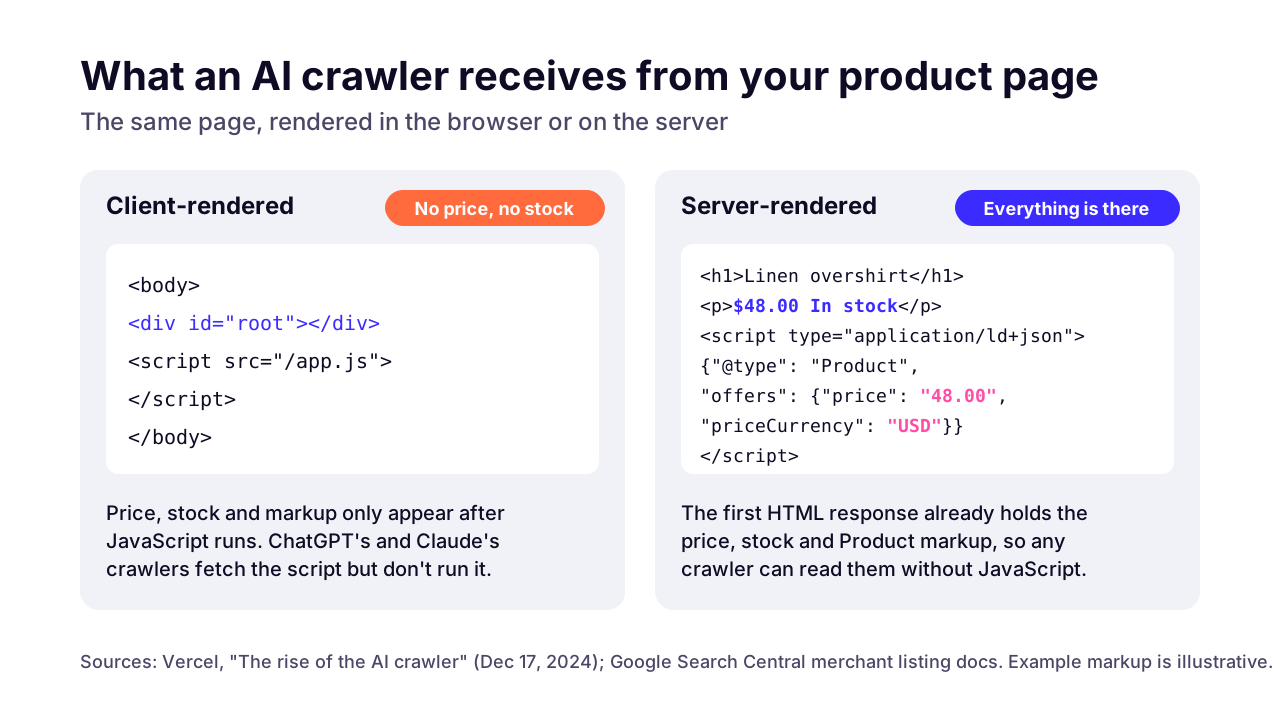
Start with a two-minute test. Open a product page, view the raw source (not the inspector, which shows the page after JavaScript runs) and search for the price. If it isn't there, AI crawlers that don't run JavaScript won't see it either.
That's not a guess. Vercel's December 2024 crawler study found that none of the major AI crawlers rendered JavaScript: ChatGPT's and Claude's crawlers fetched script files without running them, while Gemini rides on Googlebot, which does render. Google's own merchant listing docs warn that dynamically generated markup can make Shopping crawls "less frequent and less reliable."
Plain WooCommerce builds product pages in PHP on the server, so the price is usually in the source already. The trouble spots we look for are elsewhere: a caching layer serving yesterday's price, two plugins each printing their own Product markup with different numbers, and the variable-product price range covered above. If you're weighing a move off WooCommerce anyway, our guide to moving WooCommerce to a server-rendered store covers the trade-offs.
Headless and custom React storefronts are the opposite case. If the price arrives from an API call in the browser, most AI crawlers never see it, and the fix is server rendering. Arrowbin's own site is served that way, and it's how we build stores. If you're still deciding, weigh the costs of going headless first.
 (opens the full-size chart in a new tab)
This is the checklist we work through, roughly in order. Effort is our estimate for a typical small store: S is a day or less, M a few days, L a week or more.
Find price and stock in the raw source of five product pages
- Why it matters
- Crawlers that don't run JavaScript only see the raw HTML
- Effort (our estimate)
- S
- Who does it
- Owner
Server-render product pages, or prerender them
- Why it matters
- Puts the price and stock in the first response
- Effort (our estimate)
- M to L on a client-rendered build
- Who does it
- Developer
Keep one Product block per page, with a complete Offer
- Why it matters
- Google requires the Offer; duplicate blocks send mixed signals
- Effort (our estimate)
- S to M
- Who does it
- Developer
Fill in GTIN and brand in the markup and the feed
- Why it matters
- Google recommends both; OpenAI's feed requires brand
- Effort (our estimate)
- M
- Who does it
- Owner and developer
Publish shipping and returns pages and mark them up
- Why it matters
- Your markup and feeds should point at the same numbers
- Effort (our estimate)
- S
- Who does it
- Owner
Allow the search crawlers (OAI-SearchBot, Googlebot, PerplexityBot); decide on GPTBot and Google-Extended
- Why it matters
- Search crawlers decide whether you appear at all
- Effort (our estimate)
- S
- Who does it
- Owner
Check bot rules in your CDN, firewall or security plugin
- Why it matters
- They can block what robots.txt allows
- Effort (our estimate)
- S
- Who does it
- Owner or developer
Set up a Google Merchant Center feed
- Why it matters
- Covers AI Mode and Gemini, and OpenAI accepts the same format
- Effort (our estimate)
- S to M
- Who does it
- Owner
Add Microsoft Merchant Center if you sell to US buyers
- Why it matters
- Your route into Copilot and Copilot Checkout
- Effort (our estimate)
- S to M
- Who does it
- Owner
Apply at chatgpt.com/merchants
- Why it matters
- Direct feed access is approval-only
- Effort (our estimate)
- S
- Who does it
- Owner
Refresh feeds daily and push price and stock changes as they happen
- Why it matters
- Stale data shows shoppers the wrong price
- Effort (our estimate)
- M
- Who does it
- Developer
How do you measure sales from AI assistants?
Use the AI Assistant channel in Google Analytics 4, which groups visits from assistants such as ChatGPT or Gemini, and compare its conversion rate with your other channels. Expect it to undercount.
Google's channel definitions describe AI Assistant as traffic from sources like ChatGPT, Gemini, Deepseek, Copilot or Grok. It excludes Google's AI Overviews and AI Mode, so shoppers who arrive from AI Mode still show up under organic search. You can also tag your own links with the medium ai-assistant, and GA4 will file them in that channel.
The undercount comes from how people shop. Someone reads a recommendation in ChatGPT on their phone, searches your brand name on a laptop that evening, and buys. Last-click reporting hands that sale to organic search or direct.
Two cheap habits help. Keep the tracking parameters on your feed URLs consistent, so feed clicks are easy to spot. And add "an AI assistant" as an answer to a post-purchase "How did you hear about us?" question.
Keep expectations modest. We haven't found an independently checked figure for how much revenue AI assistants send small stores, so we won't quote one. Your own GA4 data, watched over a few months, is the number that matters.
What are the risks of selling through AI assistants?
The main risks are wrong prices or stock reaching shoppers through stale data, fraud on orders an agent starts, and rules that change under you, as OpenAI's March 2026 reversal showed.
Stale data is the one you'll meet first. OpenAI's feed spec says sale and availability dates don't schedule anything, so you have to send the new price when a sale starts or ends and update stock when an item sells out. If your feed refreshes nightly and you sell out at noon, an assistant can keep recommending that item for hours. For anything that sells fast, push changes as they happen.
With agent checkout, you stay the merchant of record under ACP and UCP alike. Chargebacks and fraud checks stay with you too. Run agent-started orders through your normal fraud rules, and don't wave them through because a big-name assistant sent them.
Then there's change. Instant Checkout went from launch to deprioritized in about six months, and the newest official page on Perplexity's merchant program we could find dates from 2024. Programs open and close quickly, and terms shift, so keep your own product database as the single source of truth and generate every feed from it. If a channel shuts down, you switch off one feed and carry on.
Which of these fixes pays off first?
Start with what you control. View the source of a few product pages, run the user-agent test against your CDN, and fill the gaps in your Product and Offer markup. That work pays off in Google whatever happens to ChatGPT's merchant program.
Next, get a clean feed into Google Merchant Center, apply to OpenAI's program, and add Microsoft Merchant Center if you sell to US buyers. Agent checkout can wait until your platform or payment provider offers it.
If your store renders prices in the browser, or you're on WooCommerce and thinking about a server-rendered rebuild, we can help you build a store AI assistants can read. Send a product URL through our contact page and we'll tell you what an AI crawler sees on it.
Key takeaways
- 01Since March 2026, OpenAI lets merchants use their own checkout and focuses ChatGPT on product discovery, so being found and being accurate matter more than in-chat buying.
- 02Products reach AI assistants through crawled product pages, through product feeds, or through platform catalogs such as Shopify Catalog.
- 03You don't need Shopify, but you do need server-rendered product pages: in Vercel's 2024 crawler study, ChatGPT's and Claude's crawlers didn't run JavaScript.
- 04Complete Product and Offer markup (a price above zero with its currency, stock status, shipping, returns) helps in Google and mirrors what OpenAI's feed asks for.
- 05Allow OAI-SearchBot in robots.txt, then check your CDN, because the edge can block crawlers that robots.txt invites.
- 06OpenAI's direct feed is approval-only as of October 2026, so a clean Google Merchant Center feed is the best first step for most stores.
- 07Track the GA4 AI Assistant channel and expect it to undercount sales that started in an AI chat.

Written by
Md. Shishir Ahmed
Founder, Arrowbin
Founder of Arrowbin. Writes about shipping software, what it costs, and the decisions that decide whether a product works.