The short answer
Headless commerce is worth it when your store needs something a theme can't give you: several storefronts or channels fed from one catalog, content-heavy pages, or a front end your own developers control. For a store that sells in one market from one website with no developer on call, it usually isn't worth it yet, because a well-built theme gets you most of the speed for far less. Expect about 8–12 weeks to build (our estimate) plus a second system to host and maintain; Shopify's own developer docs say a headless storefront costs more to build and run than a theme.
On this page
If you run an online store on Shopify, WooCommerce or BigCommerce, someone has probably told you to go headless. It might have been an agency pitch, or a competitor's new site that loads like an app. This guide is for the owner or e-commerce lead who has to decide whether it would pay off, without wading through developer docs.
Some context. At Arrowbin we build custom Next.js storefronts and the admin panels behind them, so the storefront half of a headless project is our everyday work. You'd expect us to say yes to everyone.
For a lot of stores, we'd say wait. This is how to tell which group you're in.
What is headless commerce, in plain terms?
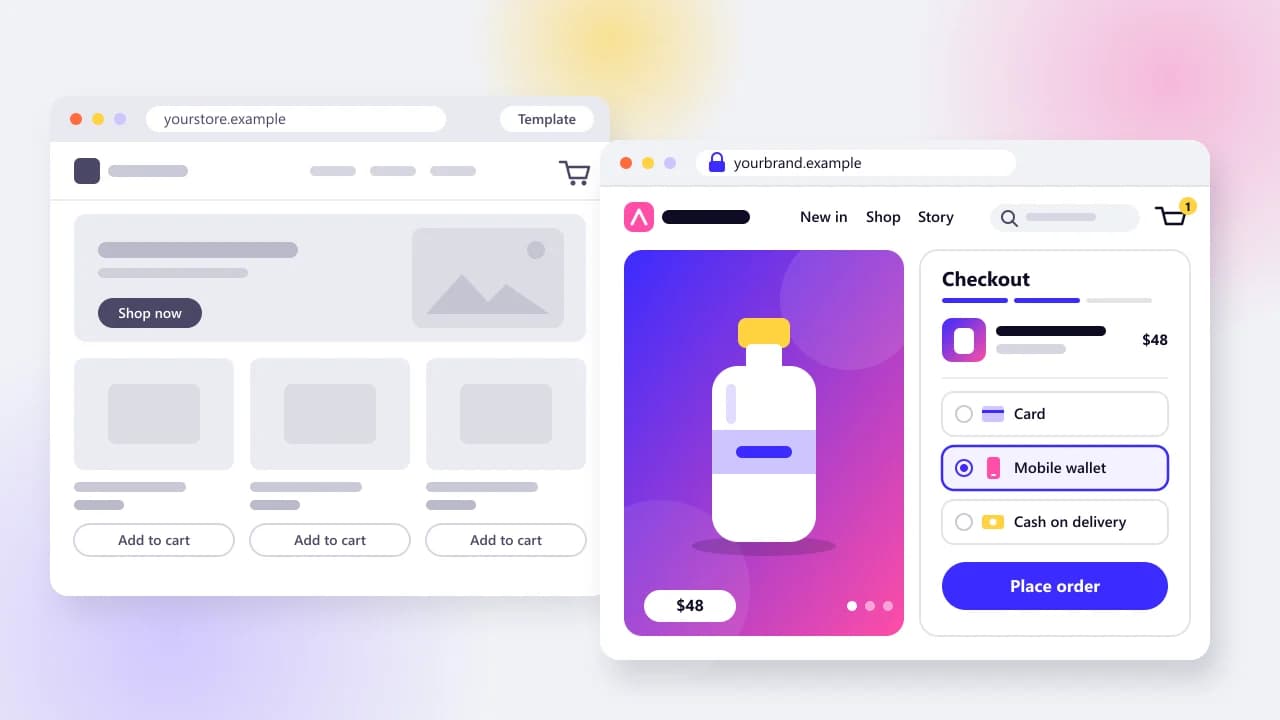
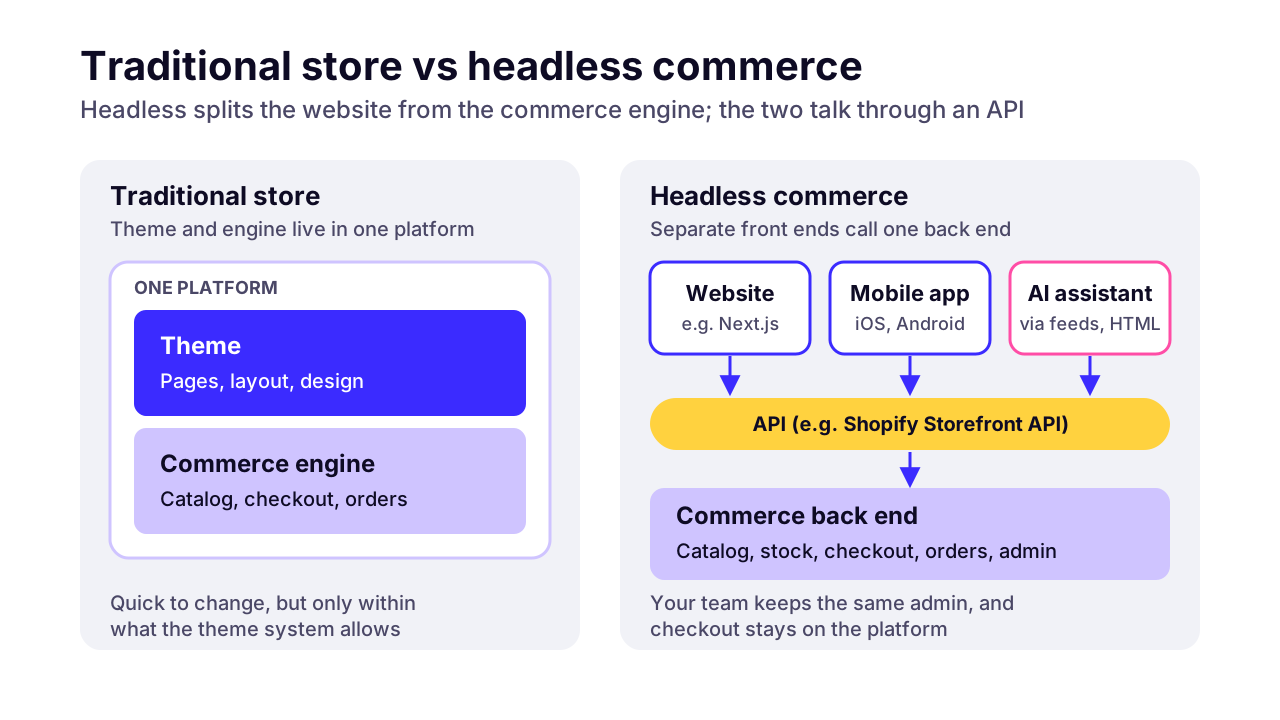
Headless commerce means your store's website (the 'head') is a separate application from the commerce engine that holds your products and orders. The two talk through APIs, so you can redesign or replace the website without touching the back office your team works in.
On a normal Shopify or WooCommerce store, one system does both jobs. The theme that draws your pages lives inside the same platform that runs checkout and stores orders. That's why theme changes are quick. It's also why you can only build what the theme system allows.
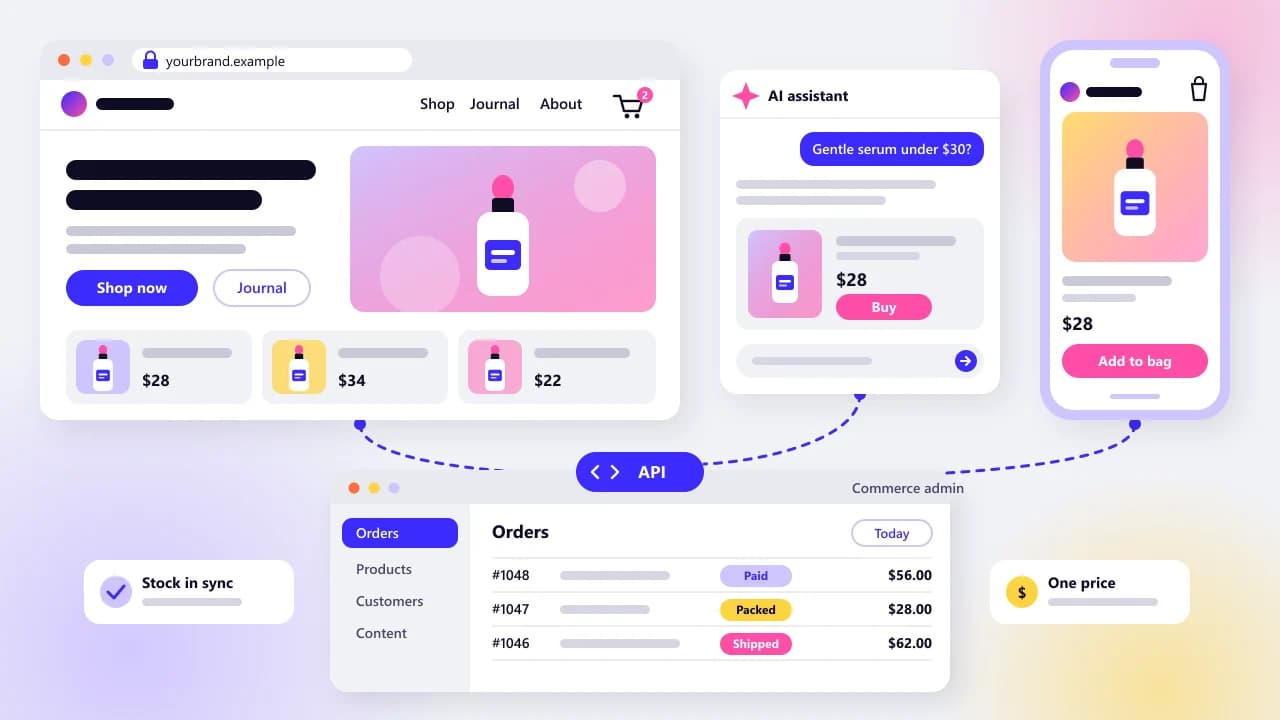
Go headless and the platform keeps the back office, from the catalog to checkout and customer accounts. Your storefront becomes its own app, usually built with a JavaScript framework such as Next.js and hosted wherever you choose. It asks the platform for data as pages load. Shopify's developer docs say its Storefront API 'serves products, collections, search, and the cart, and hands customers off to checkout.'
Two related terms come up in every pitch. Composable commerce goes further and splits the back end as well, so search, content or promotions can each come from a different vendor. MACH is the industry label for that style. commercetools, one of the main composable vendors, describes MACH as a mix of microservices, an API-first approach, cloud-native hosting and headless front ends.
 (opens the full-size chart in a new tab)
What does going headless actually change for your business?
Going headless changes who controls the storefront. You gain freedom over how the store looks and where you sell, and you take on a second system that needs its own hosting and its own developers. The back office your staff use every day mostly stays the same.
- Design: no theme limits. Any layout your designers can draw, your developers can build, so product builders and story-led pages stop being workarounds.
- Speed: you decide every script that loads. That matters, but it isn't automatic. A heavy headless build can be slower than a lean theme.
- Content: product pages and editorial can share one experience, with a headless CMS for the writing. WordPress can do that job if your editors already live in it.
- Storefronts and channels: one catalog can feed a second country's site, a sister brand, a mobile app or a screen in a shop.
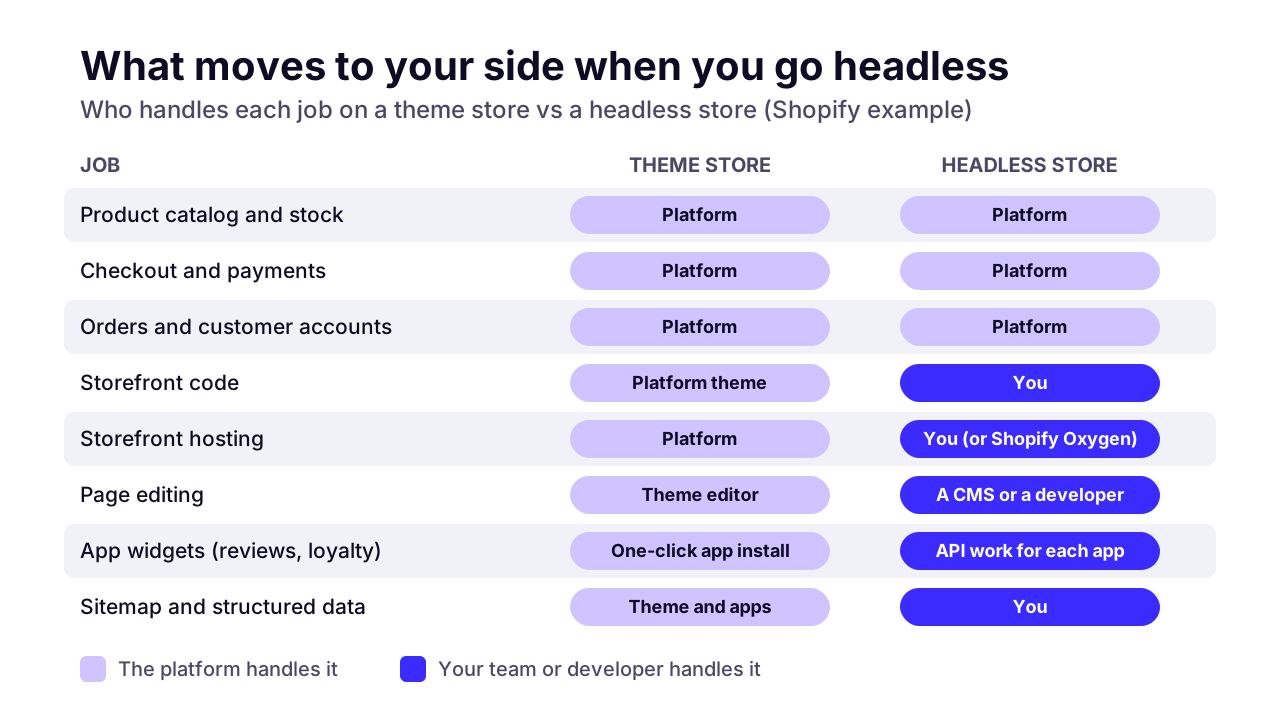
- Page editing: the theme editor your marketing team uses goes away. Edits happen in a CMS or visual editor that someone has to set up, or they go through a developer.
- Apps: most Shopify apps add their widgets through the theme. A headless storefront has no theme for them to plug into, so each one gets wired in through its own API, if it has one.
- Checkout: on headless Shopify, checkout stays Shopify's. That's a good thing, because it's the part you least want to own.
Speed is the benefit most pitches lead with, so read the research properly. A Google-commissioned study by 55 and Deloitte, written up on web.dev, tracked 37 brand sites in late 2019 and found that 'a 0.1 second improvement of mobile site speed increases conversion rates by 8.4% for retail sites'. The write-up also says every page across the journey had to improve for that effect to show.
Notice what that study does and doesn't say. It says speed pays. It doesn't say headless makes you fast. A theme store with fewer apps and smaller images can get a lot of the same gain for a fraction of the cost, and that's where I'd start.
 (opens the full-size chart in a new tab)
Is headless commerce worth it for a small store?
Usually not yet. If you sell in one market from one website and nobody on your team writes code, headless commerce adds a second system to pay for and look after, and it rarely fixes the problem you actually have.
Shopify says much the same in its own headless developer docs: 'A headless storefront costs more to build and run than a theme.' The same page tells developers to make sure the merchant 'has developers to maintain the storefront after launch' before committing. When the company selling the headless tools puts that warning up front, take it seriously.
Most small stores don't have an architecture problem. A slow theme is usually slow because of a pile of apps and oversized images. Weak conversion tends to come from the product page or the offer, or from shipping costs that appear too late. None of those need a new architecture.
Then there's time. Our planning estimate is 8–12 weeks to build a headless storefront, against 3–6 weeks for a theme-based Shopify store. Those extra weeks, and the budget behind them, could have gone into stock or photography or ads.
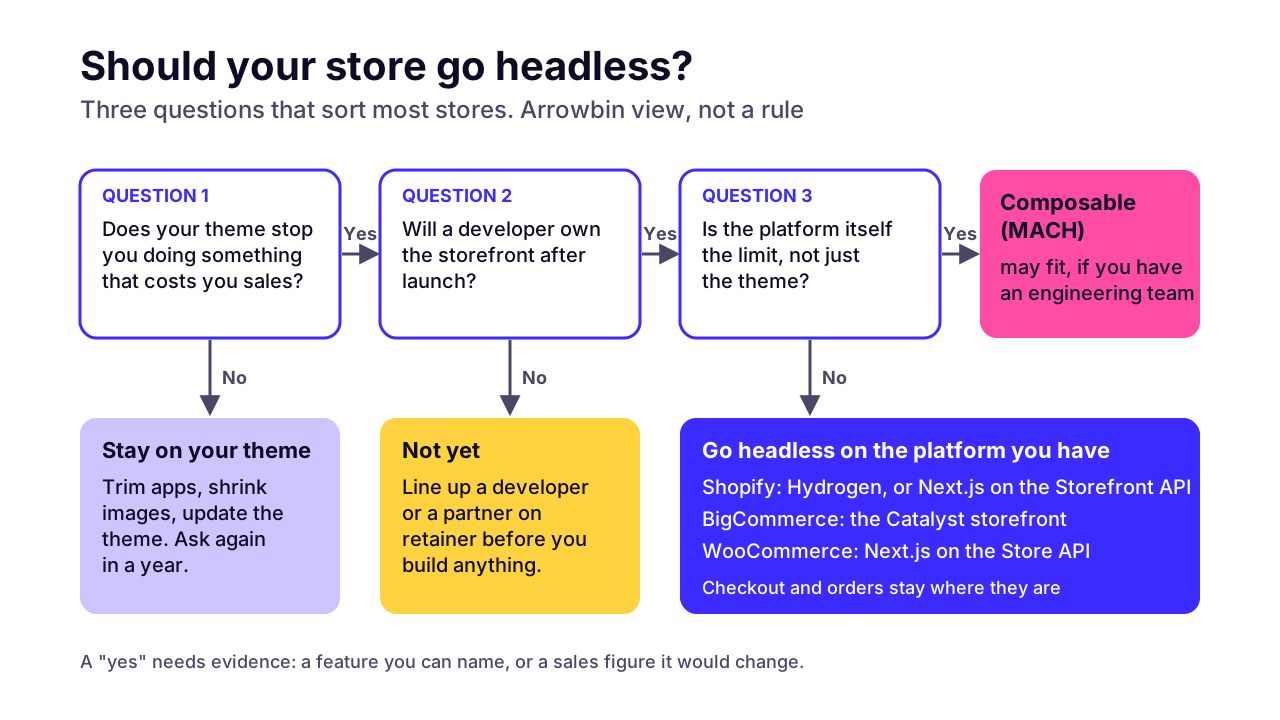
My test is simple. If you can't name the specific thing your theme stops you from doing, and roughly what it costs you in sales, you don't need headless yet. Do these first, in this order:
- Remove apps you don't use, and check which of the rest load scripts on every page.
- Compress and resize product images, and serve them in modern formats.
- Move to a current, well-supported theme if yours is several years old.
- Check Core Web Vitals for real visitors in Search Console before and after each change.
When does headless commerce pay off?
Headless commerce pays off when one catalog has to feed several front ends. It also earns its cost when content and products need to share one experience, or when your developers already spend more time fighting the theme than building features.
These are the situations where I'd take a headless proposal seriously:
- Several storefronts from one inventory: other countries, languages or sister brands. Shopify's pricing page shows every plan from Basic to Advanced includes one headless storefront, while Plus includes 25.
- Content-led brands, where buying guides, lookbooks or recipes bring in much of the traffic and need to sit right next to the products.
- A mobile app and a website that share one cart and one set of customer accounts.
- Buying flows a theme handles badly: product builders, bundles, made-to-order options or a trade portal.
- A development team, in-house or on retainer, that will own the storefront after launch.
Picture a skincare brand selling in the US, the UK and Australia. It runs a content hub that brings in much of its search traffic, and it has an app planned for next year. One catalog, three storefronts, heavy content and a second channel: that's the profile headless was built for.
Now picture a candle maker with one US site and two people on staff. A faster theme and better photos will do more for that business than any change of architecture. Same question, opposite answer.
What does headless commerce cost to build and run?
Headless commerce costs you three things: the build (8–12 weeks of work by our estimate), a monthly software bill (platform plan, front-end hosting, CMS, search), and the people who keep it running. The software is usually the smallest of the three.
The build
We don't quote one headless build price, because the same 8–12 weeks can cover one storefront or three. The range moves with every app that has to be rebuilt as an integration, and with the number of languages, custom features or pages of content to migrate. Our Shopify vs custom ecommerce comparison runs the three-year numbers for staying on Shopify against building your own store; headless sits between the two.
The platform
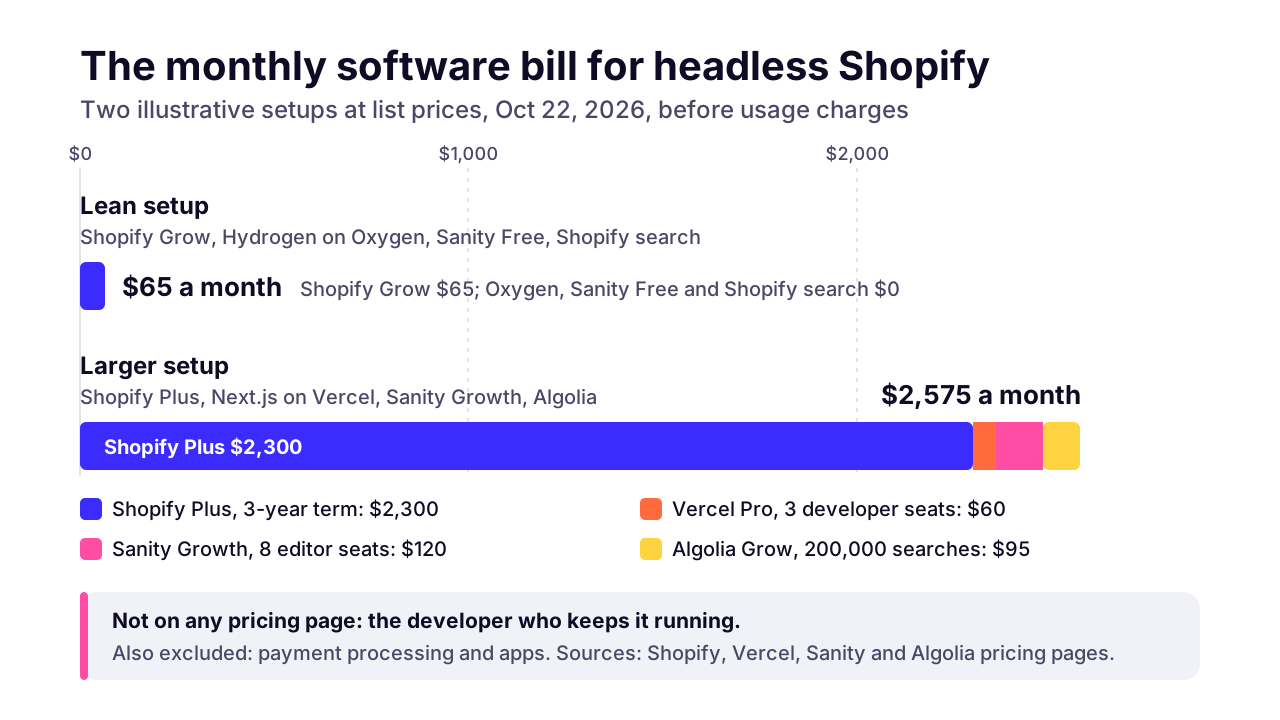
Every headless setup still pays for a commerce platform underneath. These are list prices in US dollars on monthly billing, taken from each vendor's own pricing page on October 22, 2026:
Shopify Basic / Grow / Advanced
- Price per month
- $25 / $65 / $399
- Headless detail
- 1 headless storefront on each plan
- Extra fee with an outside payment provider
- 2% / 1% / 0.6%
Shopify Plus
- Price per month
- From $2,300 on a 3-year term; $2,500 on a 1-year term
- Headless detail
- 25 headless storefronts
- Extra fee with an outside payment provider
- 0.2%
BigCommerce Core / Growth / Scale
- Price per month
- $39 / $105 / $399
- Headless detail
- Catalyst storefront for Next.js; extra storefronts are a paid add-on
- Extra fee with an outside payment provider
- 2.0% / 1.0% / 0.6% (Open Payment Providers)
BigCommerce Performance
- Price per month
- From $1,499, billed annually
- Headless detail
- Contracted plan
- Extra fee with an outside payment provider
- None (contracted terms)
WooCommerce
- Price per month
- No platform fee; you pay for hosting
- Headless detail
- Store API for the cart and checkout
- Extra fee with an outside payment provider
- None from WooCommerce
commercetools
- Price per month
- Quote only
- Headless detail
- Composable by design, priced by orders
- Extra fee with an outside payment provider
- Not published
Shopify's figures come from its pricing page and its Plus pricing page. Both show lower rates for yearly or longer terms, so check them before you budget.
BigCommerce's pricing page caps each smaller plan by yearly online sales and moves you up a plan when you pass the cap. Its outside-provider fee doesn't apply to its embedded payment providers. commercetools publishes no prices and asks you to contact sales.
WooCommerce promises selling without 'monthly platform fees', and that's true. You pay for hosting instead, and for someone to keep WordPress patched.
Front-end hosting, content and search
Hosting the storefront can cost nothing on Shopify. Its docs say Oxygen, Shopify's hosting for Hydrogen storefronts, 'is available at no extra charge on paid Shopify plans', though not on its Agentic plans. Put a Next.js front end on Vercel instead and its Pro plan is $20 a month per developer seat with a $20 usage credit, then pay as you go. The free Hobby plan is for non-commercial use only.
A CMS for your editors and a search service are the other usual lines. Sanity's pricing has a free plan for up to 20 seats and a Growth plan at $15 per seat a month. Algolia's Grow plan includes 10,000 searches a month, then charges $0.50 per extra 1,000.
 (opens the full-size chart in a new tab)
The team after launch
The biggest cost doesn't appear on any pricing page. A theme store can run for months with nobody touching code. A headless storefront is software you own, so framework upgrades and API version changes land on your desk, along with bugs and every editing tool your marketing team asks for.
At minimum you need a developer who knows the front-end framework, on staff or on retainer, plus someone watching uptime and errors. Our planning rule for keeping custom software healthy is 15–20% of its build cost each year, and our guide to software maintenance costs explains what that money pays for.
What are your options for going headless?
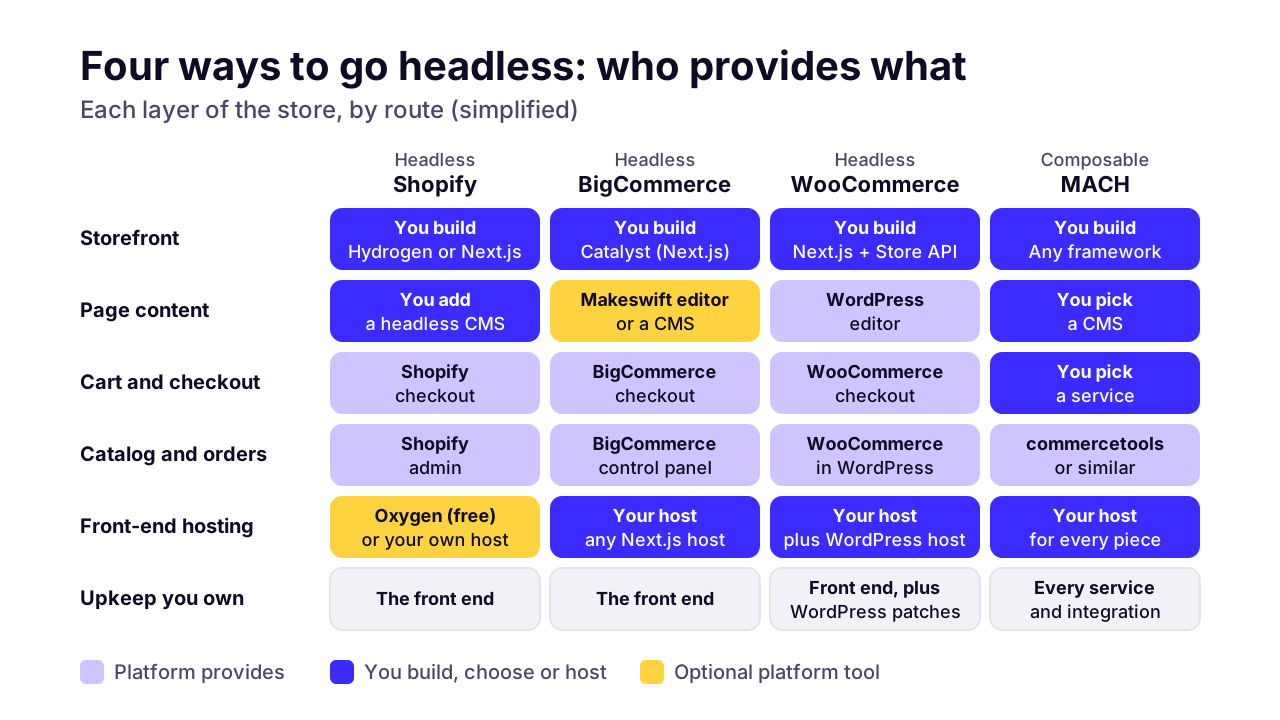
There are four common routes: headless Shopify (Hydrogen or a Next.js front end), headless BigCommerce with its Catalyst storefront, headless WooCommerce on its Store API, and composable commerce built from separate services. They differ mostly in how much of the back end you keep renting.
Headless Shopify
This is the route most Shopify brands mean when they say headless. Shopify keeps the admin and the checkout (payments included), and you build the storefront. On October 14, 2026 Shopify made its new Hydrogen generally available: it now 'works with any JavaScript framework', ships starters for React Router and Next.js, and can still run on Oxygen, 'which is still free'.
The Next.js starter is Vercel Shop, which Shopify's Hydrogen docs list as Vercel's Next.js 16 template, deployed to Vercel. You can also skip Hydrogen and call the Storefront API from any stack. For a Shopify brand this is the lowest-risk way in, because the parts that handle money don't move.
Headless BigCommerce
BigCommerce's answer is Catalyst, a storefront it describes as 'optimized for Next.js and React Server Components', with an optional visual editor called Makeswift. That editor matters more than it sounds. It gives your marketing team a way to change pages without a developer, which is the first thing most teams miss after going headless.
Headless WooCommerce
WooCommerce's Store API offers public endpoints for the cart and checkout, so a Next.js storefront can sit on top of an existing WooCommerce store. Products and orders stay in WordPress. You still keep WordPress and every plugin patched, and plugins that add their own front-end features won't appear on the new site.
Our WordPress to Next.js migration guide covers both halves of that decision: keeping WordPress as a headless CMS, and the three realistic routes for a WooCommerce store.
Composable commerce (MACH)
Composable means choosing each piece separately: a commerce engine such as commercetools, plus separate services for search, content, promotions or payments, joined by APIs. It's built for large retailers with engineering teams and quote-only contracts. For a growing brand I'd call it overkill, because the integration work becomes a permanent job.
 (opens the full-size chart in a new tab)
Does headless help you sell through AI shopping assistants?
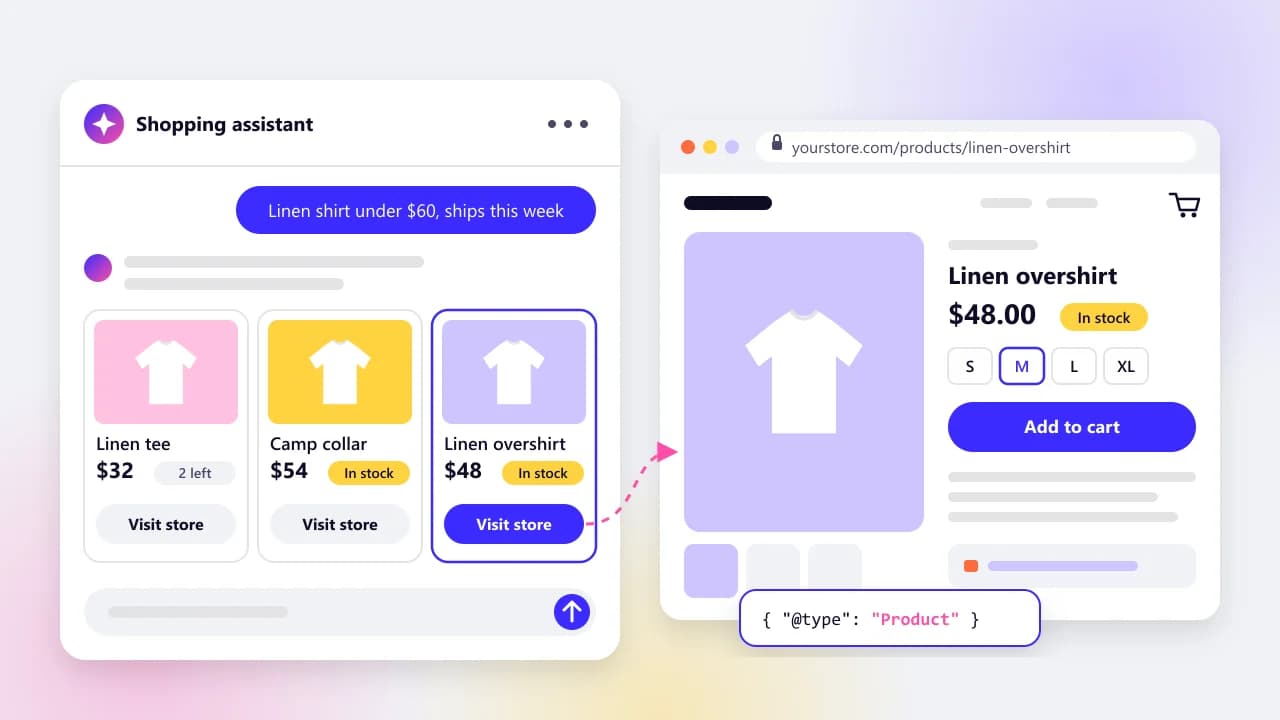
Headless can help, as long as the storefront is rendered on the server. AI shopping assistants read product data from feeds and from page HTML, and a headless front end that fills in prices with JavaScript in the browser hides them from most of those readers.
Vercel's study of AI crawlers (December 2024) found that 'none of the major AI crawlers currently render JavaScript'. Google's JavaScript SEO guide makes the broader point: 'not all bots can run JavaScript'.
There's an upside too. A headless store already has its whole catalog behind a clean API, which makes product feeds easier to build and keep in sync. Our guide to getting products into ChatGPT shopping covers feeds and structured data for any platform, plus the crawler settings that block assistants by accident.
What are the SEO and migration risks of going headless?
The main risks are pages search engines can't read because they render in the browser, old URLs that stop working, and tracking that breaks on launch day. All of them are preventable. All of them happen.
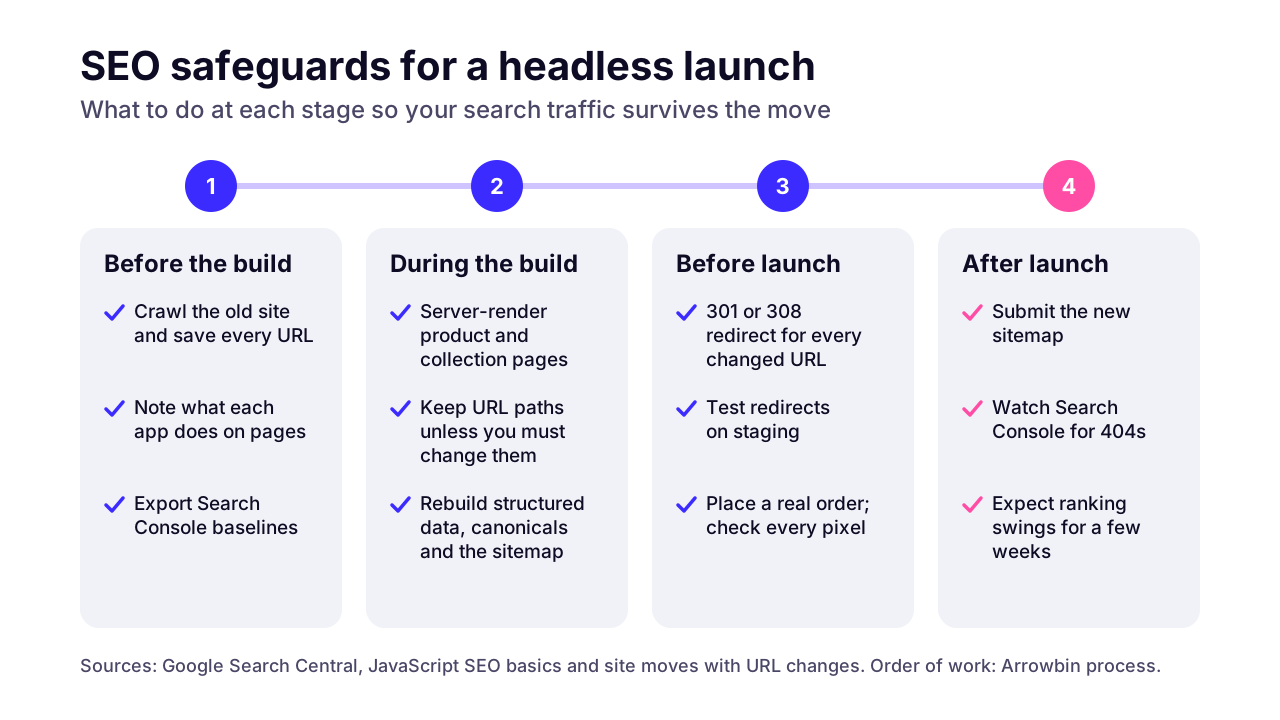
Rendering comes first. Google does run JavaScript, but through a queue: its guide to JavaScript SEO says a page 'may stay on this queue for a few seconds, but it can take longer than that', and calls server-side or pre-rendering 'still a great idea'. Insist that product and collection pages arrive as finished HTML.
URLs come next. A Shopify theme store has fixed paths such as /products/ and /collections/, and a headless build lets you change them. Don't, unless you have a reason. Every URL that changes needs a server-side permanent redirect (301 or 308), and even then Google's site move guidance says to 'expect temporary fluctuation in site ranking during the move'.
Then come the jobs a theme did without anyone noticing. On a headless storefront, each of these is code someone has to write and test:
- Product structured data with price and availability, so rich results and shopping listings keep working.
- Canonical tags and the XML sitemap, plus hreflang if you run storefronts for several countries.
- Review stars and their markup, which usually came from a theme app.
- Analytics and ad pixels, including the purchase event. Test a real order end to end before launch, not after.
When we plan a storefront move, we crawl the old site first and keep that list of URLs as the redirect checklist. After launch we watch Search Console for new 404s and dropped pages for several weeks, because problems show up there before they show up in sales.
 (opens the full-size chart in a new tab)
How do you decide whether your store should go headless?
Go headless when you can name a business problem a theme can't solve, you can fund a second system, and someone will own it after launch. If any of those is missing, improve the theme you have and ask again in a year.
Run through this checklist with your team. Each 'yes' should come with evidence, not a feeling:
- You can name the specific thing your theme stops you doing, and roughly what it costs you in sales.
- You run, or will soon run, more than one storefront: other countries, sister brands or an app.
- Content brings in a large share of your customers, and your current setup makes it hard to publish.
- You've already done the cheap fixes: app clean-up, lighter images, a current theme.
- A developer, in-house or on retainer, will own the storefront after launch.
- You can fund the build plus about 15–20% of its cost every year to run it.
- Your launch plan includes server rendering, a full redirect map and rebuilt tracking.
Five or more yeses and a headless build deserves a proper scoping. With three or four, start smaller: Shopify's headless overview points to Storefront Web Components and Buy Button JS for adding products to an existing site, which is a far smaller project. Fewer than three, stay on your theme.
 (opens the full-size chart in a new tab)
So what should you do first?
Write down the one thing your store can't do today and what it costs you. If the answer is speed, start with apps and images this week. If it's a second storefront, a content hub or an app, you're in headless territory, and the next step is a scoping session rather than a build.
When we assess a store for headless, we start with its Search Console data, then list every app and what it actually does, then sketch what the new storefront would have to rebuild. Sometimes the answer is a better theme. If a custom front end is the right call, we build custom e-commerce storefronts on Next.js.
Want a second opinion before anyone quotes you for a rebuild? Book a 30-minute call and bring your store URL and the one thing you can't do today. If the honest answer is "keep your theme", that's what you'll hear.
Key takeaways
- 01Headless commerce separates the storefront from the commerce engine; the back office and checkout usually stay on the platform.
- 02Most stores selling in one market with no developer on call shouldn't go headless yet; clean up apps and images first, then the theme.
- 03Headless pays off when one catalog feeds several storefronts or channels, when content drives sales, or when a team already fights the theme.
- 04The monthly software bill is modest (Oxygen hosting is free on paid Shopify plans); the build and the team after launch are the real costs.
- 05Every Shopify plan from Basic to Advanced includes one headless storefront, and Plus includes 25.
- 06Server rendering, a full redirect map and rebuilt tracking decide whether a headless launch keeps its search traffic.
- 07Since October 14, 2026, Shopify's Hydrogen works with any JavaScript framework, with a ready-made Next.js starter.

Written by
Md. Shishir Ahmed
Founder, Arrowbin
Founder of Arrowbin. Writes about shipping software, what it costs, and the decisions that decide whether a product works.