The short answer
Budget roughly 15–20% of the original build cost every year to keep custom software running, which comes to $9,000–$12,000 a year for a $60,000 SaaS MVP (an Arrowbin planning estimate, not an industry statistic). The money pays for four kinds of work: fixing bugs, adapting to platform and dependency changes, improving features people rely on, and preventive work like backups and security patches. Skipping it isn't a real option, because platforms set fixed deadlines: Google Play requires API level 36 for app updates from August 31, 2026; PostgreSQL 14 gets its final release on November 12, 2026.
On this page
Most software quotes answer one question: what will it cost to build? The bill that follows you for years gets a line at the bottom, if it gets one at all. This guide is about that second bill.
If you're about to sign for a build, you want the after-launch number before you commit. If you already own software, maybe built by a team that has since moved on, you're pricing a maintenance plan and want to know what's fair. We build software and run monthly maintenance plans, so we see both ends of it. If you haven't decided to build yet, weigh per-seat SaaS fees against a custom build first.
Every number links to its source or is labelled as our estimate. Deadlines are quoted as of October 15, 2026.
How much does software maintenance cost per year?
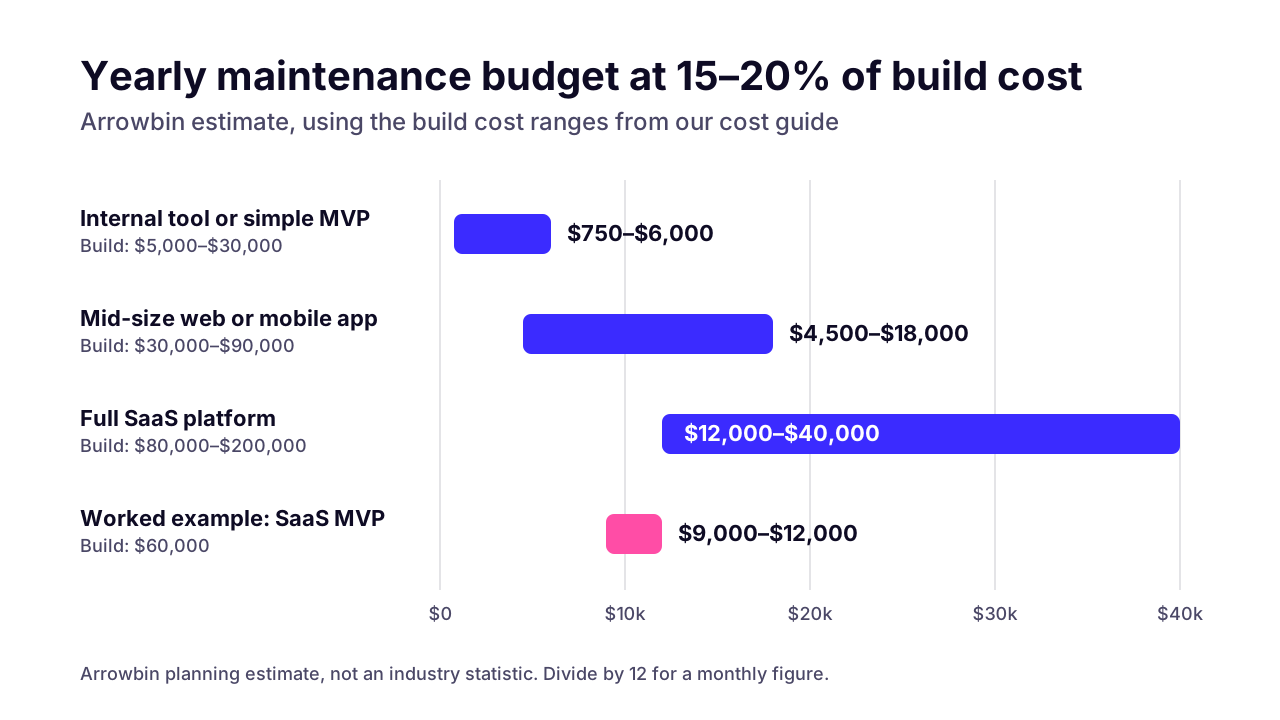
Budget roughly 15–20% of the original build cost each year. That's an Arrowbin planning estimate, the same band we use in our guide to what the original build costs, and it isn't an industry statistic.
The band is for owning the software, not only for engineering hours. It covers the upkeep work (fixes, updates, monitoring, support) plus the hosting and third-party services the product runs on. If one of those bills is big on its own, like a cloud bill for heavy traffic or SMS fees at volume, give it a separate line. Those costs grow with usage, not with the code.
Internal tool or simple MVP
- Build cost (cost guide)
- $5,000–$30,000
- Yearly budget at 15–20%
- $750–$6,000
- Roughly per month
- $60–$500
Mid-size web or mobile app
- Build cost (cost guide)
- $30,000–$90,000
- Yearly budget at 15–20%
- $4,500–$18,000
- Roughly per month
- $375–$1,500
Full SaaS platform
- Build cost (cost guide)
- $80,000–$200,000
- Yearly budget at 15–20%
- $12,000–$40,000
- Roughly per month
- $1,000–$3,300
Worked example: SaaS MVP
- Build cost (cost guide)
- $60,000
- Yearly budget at 15–20%
- $9,000–$12,000
- Roughly per month
- $750–$1,000
A $60,000 SaaS MVP works out to $9,000–$12,000 a year, or about $750–$1,000 a month. Remember the monthly figure. It's how maintenance is usually sold, and it's the number you'll hold quotes against.
 (opens the full-size chart in a new tab)
Where you land inside the band depends on the product. Plan for the top of it, or above, if you handle health or payment data, connect to lots of outside systems, ship on the web and both app stores, or are growing fast. AI agents belong there too, because the models under them get repriced and retired, as our guide to AI agent costs shows. The bottom fits a stable internal tool that 20 staff use and nobody has asked to change in a year.
What does software maintenance actually include?
Software maintenance is four kinds of work: fixing bugs, adapting to platform and dependency changes, improving features people already use, and preventive work (monitoring, backups, security patches). Engineers call them corrective, adaptive, perfective and preventive maintenance.
Most owners picture only the first kind. Bug fixes are the part you see. The adaptive and preventive work is invisible when it's done well, which is exactly why it's the first thing cut when money gets tight.
Corrective: fixing bugs
- Examples
- A checkout that fails for one card type, a report with wrong totals, a layout that breaks on a new phone
- How often it comes up
- Often in the first months after launch, then less
- What happens if you skip it
- Users live with workarounds for a while, then leave
Adaptive: keeping up with platforms
- Examples
- New iOS and Android SDK targets, a framework major version, a payment API version change, a database end of life
- How often it comes up
- Several times a year, often on fixed dates
- What happens if you skip it
- Store rejections, unsupported runtimes, broken integrations
Perfective: improving what exists
- Examples
- Faster search, a clearer onboarding step, the export your finance team keeps asking for
- How often it comes up
- Ongoing, at whatever pace you fund
- What happens if you skip it
- The product slowly falls behind what users expect
Preventive: reducing future risk
- Examples
- Uptime and error monitoring, security updates, backups with test restores, cleaning up fragile code
- How often it comes up
- Daily to monthly
- What happens if you skip it
- Small problems grow into outages, breaches or lost data
The frequencies in that table are our rough experience across web and mobile products, not measured data. Your mix will differ. A WooCommerce store spends more of its time on plugin updates; a native app spends more on store requirements.
Why can't you just skip software maintenance?
Because the platforms under your software change on fixed dates, and attackers move within hours once a flaw is public. In October 2026 PHP had to ship an emergency fix for two critical bugs, and AWS had already logged an attack attempt four days earlier. Software nobody updates eventually gets rejected by the app stores, stops receiving security fixes, or gets broken into.
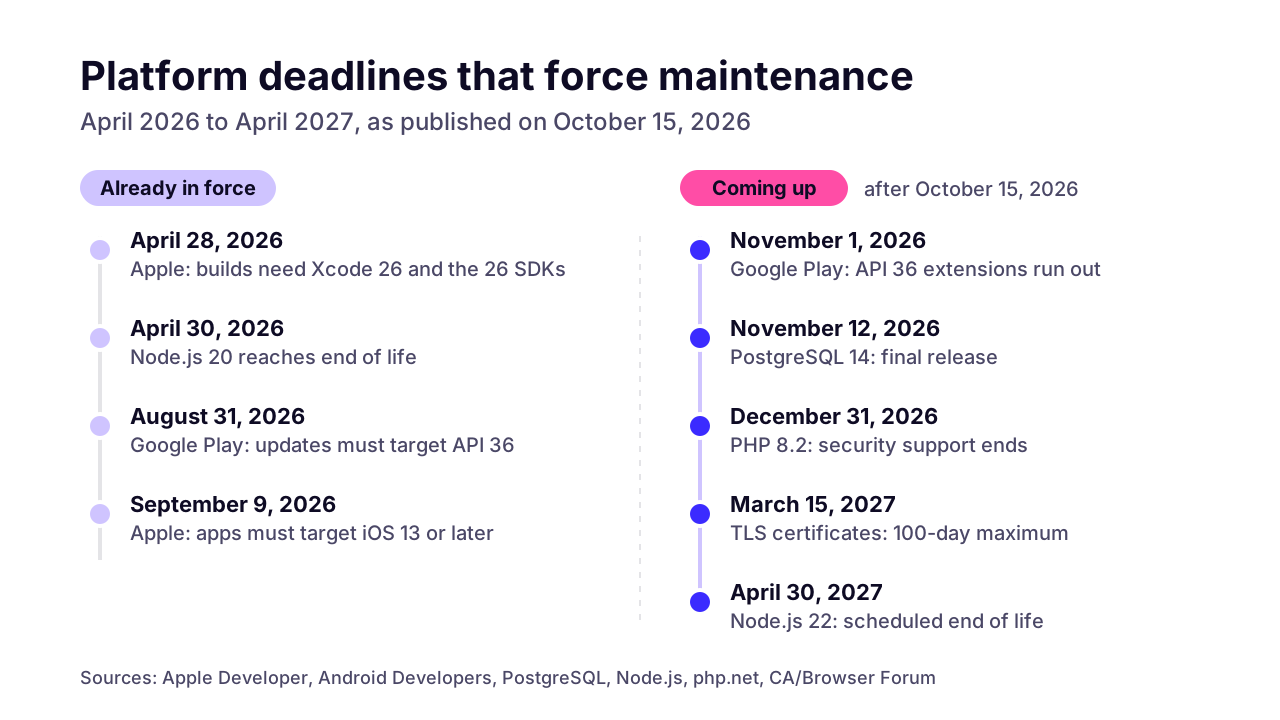
The dates below are quoted from each official page as of October 15, 2026.
Apple App Store
- Requirement or end of support
- Uploads must be built with Xcode 26 or later using an iOS 26 SDK (or the matching 26 SDK)
- Date
- Since April 28, 2026
- What it means for you
- Every iOS update, even a one-line fix, needs a build on current tools
- Source
- Apple Developer
Apple App Store
- Requirement or end of support
- iOS and iPadOS apps must target iOS 13 or later
- Date
- Since September 9, 2026
- What it means for you
- Apps still targeting very old iOS versions must raise the target first
- Source
- Apple Developer
Google Play
- Requirement or end of support
- New apps and app updates must target Android 16 (API level 36) or higher (Wear OS, TV, Automotive OS and XR apps have lower targets)
- Date
- From August 31, 2026; extensions to November 1, 2026 on request
- What it means for you
- You can't ship an update until the target is raised
- Source
- Android Developers
Google Play
- Requirement or end of support
- Existing apps must target Android 15 (API level 35) or higher to stay available to new users on newer Android versions
- Date
- From August 31, 2026
- What it means for you
- A neglected app disappears for new users on newer phones
- Source
- Android Developers
PostgreSQL 14
- Requirement or end of support
- Final release (each major version gets 5 years of support)
- Date
- November 12, 2026
- What it means for you
- No more bug or security fixes for databases on 14
- Source
- PostgreSQL
Node.js 20 (Iron)
- Requirement or end of support
- End of life
- Date
- April 30, 2026
- What it means for you
- No more security releases for apps still on it
- Source
- Node.js
Node.js 22 (Jod)
- Requirement or end of support
- Scheduled end of life (dates subject to change)
- Date
- April 30, 2027
- What it means for you
- Plan the move to Node.js 24 now
- Source
- Node.js
PHP 8.2
- Requirement or end of support
- End of security support
- Date
- December 31, 2026
- What it means for you
- WordPress or Laravel sites on 8.2 need a PHP upgrade, with plugin testing
- Source
- php.net
TLS certificates
- Requirement or end of support
- Maximum validity drops from 200 days to 100 days
- Date
- March 15, 2027
- What it means for you
- Certificate renewal has to be automated
- Source
- CA/Browser Forum
WordPress plugins and themes
- Requirement or end of support
- Weighted median time to first exploit: 5 hours; 46% of flaws had no fix at public disclosure
- Date
- 2025 data, report updated February 25, 2026
- What it means for you
- Security updates have to go out within hours, not at the next monthly check
- Source
- Patchstack
The app store rules bite hardest because they block releases. Apple's upcoming requirements page and Google's target API level requirements apply to every upload, so an app that misses them can't ship even a bug fix. Google also sidelines stale apps: one that targets Android 14 (API level 34) or lower is only offered on devices running that version or older.
Servers run on their own calendar. PostgreSQL's versioning policy supports each major version for 5 years, then stops. The Node.js previous releases page lists Node.js 20 as end of life and says production applications should only use Active LTS or Maintenance LTS releases.
The Node.js dates in the table come from the Release team's schedule, which notes they can change. The PHP date is from php.net's supported versions page.
Even TLS certificates have a schedule now. The CA/Browser Forum's Baseline Requirements cut the maximum certificate lifetime to 200 days on March 15, 2026, then to 100 days a year later. If anyone still renews a certificate by hand, that job has to become automatic.
 (opens the full-size chart in a new tab)
Security is the other clock. Patchstack's State of WordPress Security in 2026 counted 11,334 new vulnerabilities in the WordPress ecosystem in 2025, 42% more than the year before, and 91% of them were in plugins. In 46% of cases the developer hadn't shipped a fix by the time the flaw went public, and the weighted median time to first exploit was just 5 hours.
A monthly update window doesn't survive numbers like that. Someone has to be watching. The data covers WordPress only, but I see no reason to think attackers give npm or Composer packages more patience.
What drives software maintenance cost up or down?
Five things move the number most: the number of integrations, the number of platforms you ship on, how much of the code has automated tests, how old the dependencies are, and how fast the product is still changing. Sensitive data adds a sixth.
- Integrations. Every payment gateway, courier API or accounting sync ties you to someone else's roadmap. When they release a new API version or retire an endpoint, you pay to follow. Our courier integration guide is a worked example of what owning one involves after launch.
- Platforms. A web app has one release pipeline. Add iOS and Android and you have three, each with its own store rules and yearly SDK changes.
- Test coverage. With automated tests on the main flows, checking a dependency update is routine. Without them, every update means someone clicking through the app by hand, and things still slip through.
- Dependency age. Software one version behind is cheap to bring current. Software three major versions behind needs a project of its own.
- Rate of change. A product still finding its market changes every month, and every change adds code someone has to maintain. A finished internal tool barely changes.
- Data sensitivity. Health records or payment data bring audits and access reviews that a brochure site never needs.
Say you run two products that cost the same to build. One is a WooCommerce store with 30 plugins, two payment gateways and a courier integration. The other is a booking tool with one payment provider and no plugins. The store will cost more to keep, because more of its moving parts belong to other people. Codebase size matters less than people think.
Retainer, pay as you go, or an in-house developer: which costs less?
For most products after launch, a monthly retainer gives the most cover per dollar, because the routine work never stops. Pay as you go suits stable tools that rarely change. An in-house developer makes sense once you have a full-time stream of product work, not just upkeep.
Monthly retainer
- How you pay
- A fixed monthly fee for a defined scope and amount of work
- Response time
- Written into the plan as an SLA, with faster targets for critical issues
- Best for
- Products that take payments, hold customer data or run daily operations
- Watch-out
- Check what counts as critical and what happens to unused hours
Pay as you go
- How you pay
- Hourly or per ticket, only for work done
- Response time
- Best effort: you join the queue
- Best for
- Stable internal tools that rarely change
- Watch-out
- Nobody watches the system between tickets
In-house developer
- How you pay
- Salary plus benefits and overheads
- Response time
- Fast in office hours; one person can't cover nights, holidays or sick days
- Best for
- A full-time stream of product work
- Watch-out
- A single point of failure unless the system is documented
In-house plus a small retainer
- How you pay
- A salary plus a smaller monthly fee
- Response time
- Shared: the outside team takes alerts and cover
- Best for
- Teams with one or two developers
- Watch-out
- Agree in writing who gets paged first
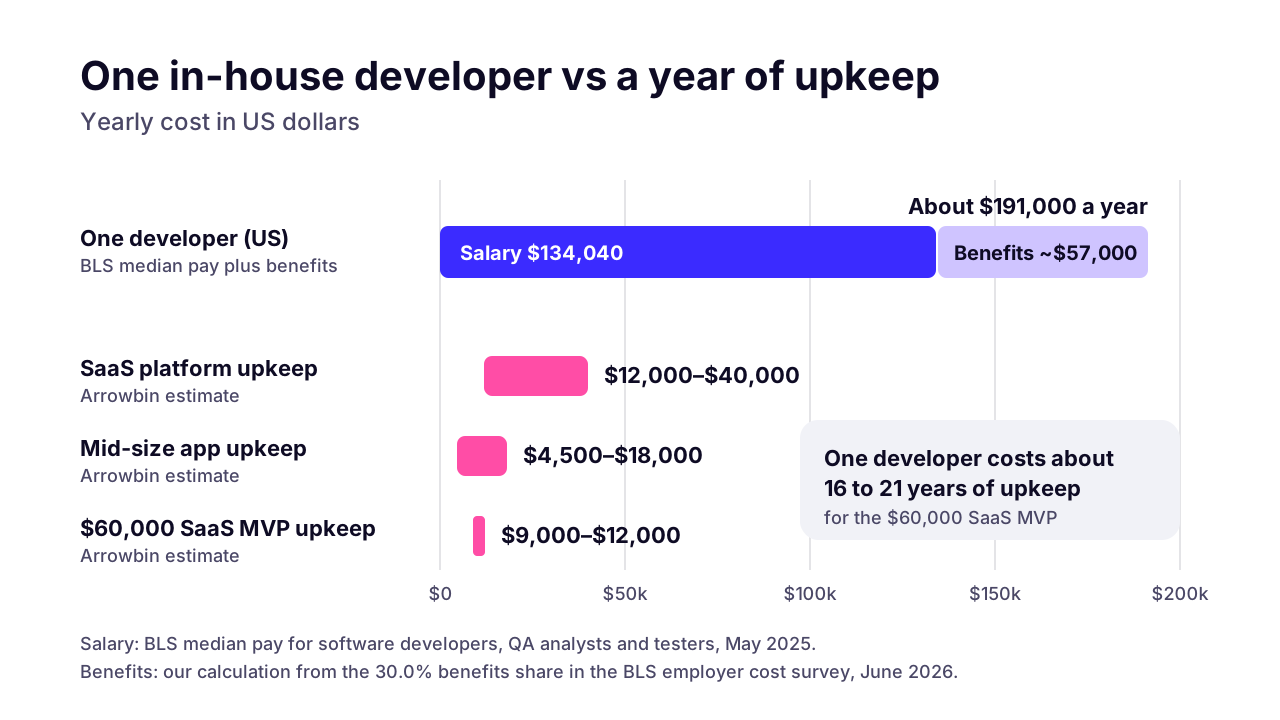
In-house looks cheap per hour and costs far more per year. The US Bureau of Labor Statistics puts median pay for software developers, QA analysts and testers at $134,040 a year in May 2025, and that's salary alone. For what developers earn in other countries, see our salary data by country.
In the BLS employer cost survey, benefits made up 30.0% of private-industry compensation costs in June 2026. Apply that share and one developer costs roughly $191,000 a year before overheads like equipment or recruiting. That's our arithmetic, not a BLS figure.
 (opens the full-size chart in a new tab)
Now hold that against the $9,000–$12,000 a year our band gives for a $60,000 SaaS MVP. One developer on a typical salary costs about as much as 16 to 21 years of that product's upkeep. Hire when you have more product work than one person can do, not because something needs patching.
Pay as you go has a hidden cost: nobody watches between tickets. That's fine for an internal tool a few staff use. For anything that takes payments, it's a poor fit. The deadlines and exploits above don't wait for a ticket.
What should a software maintenance plan include?
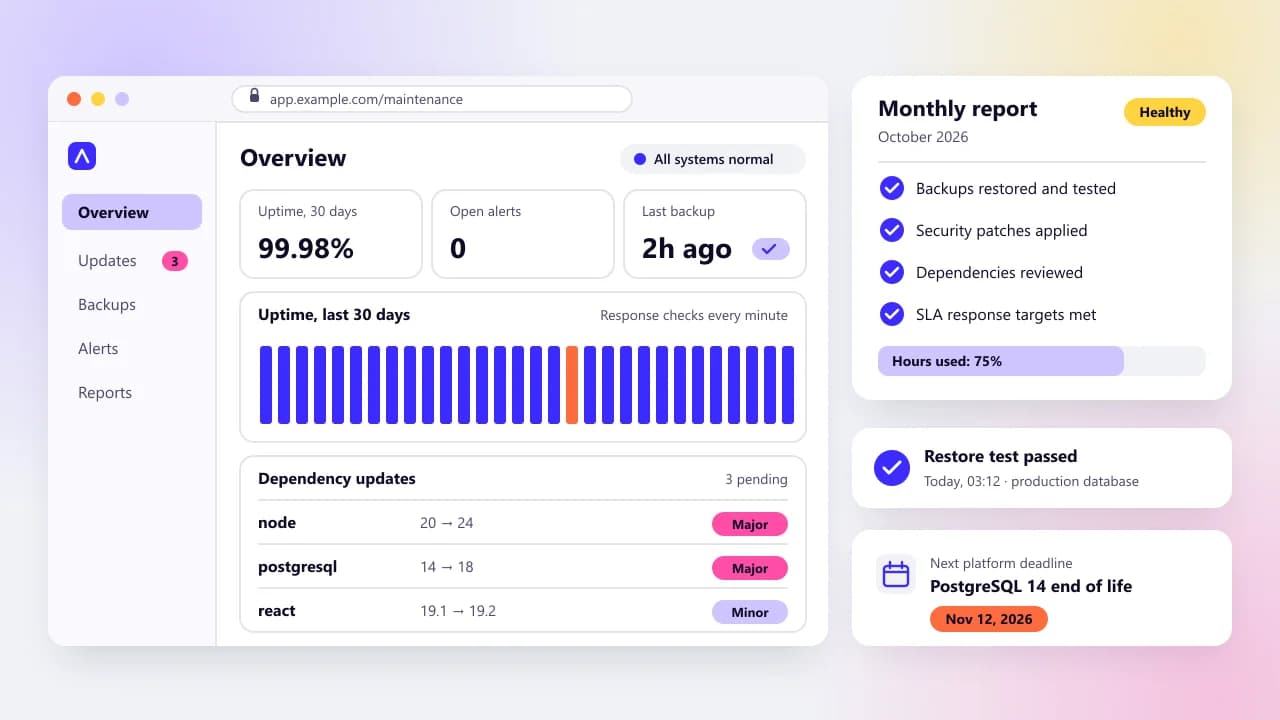
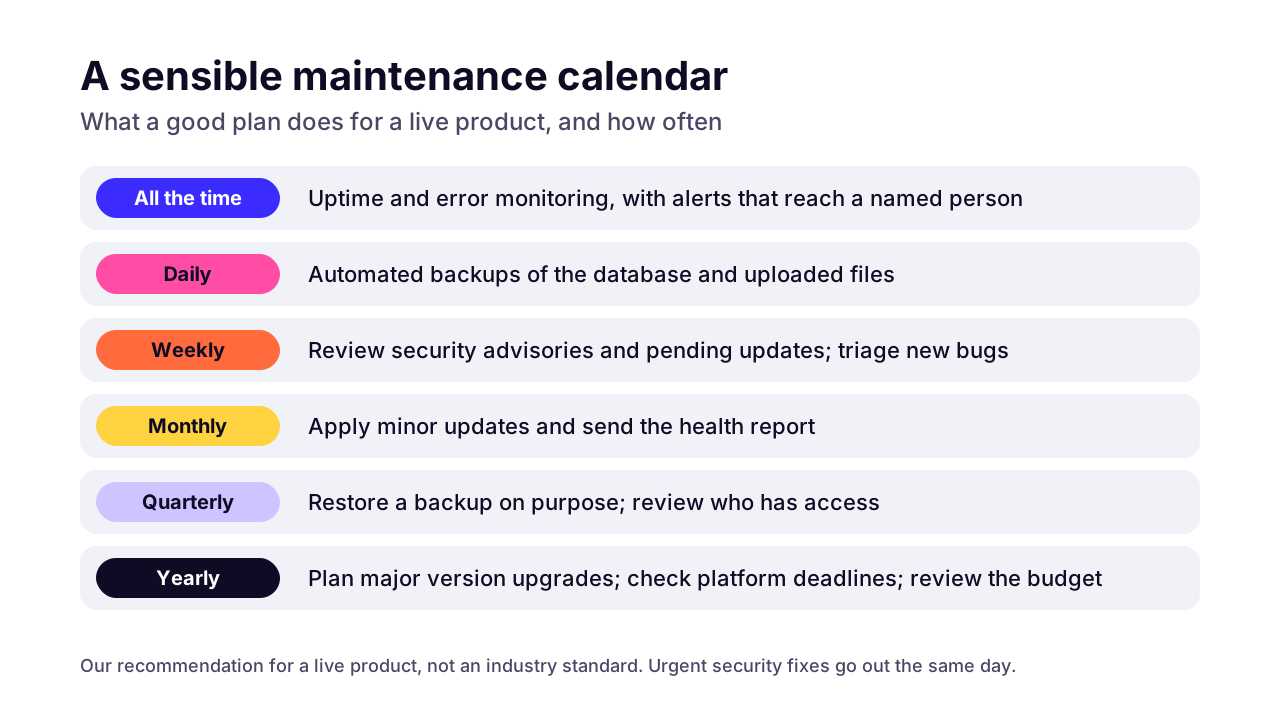
A maintenance plan should cover six things: monitoring with alerts, regular security patching, backups with tested restores, bug fixes, a monthly report, and a written response time for critical issues. If a plan you're quoted leaves one out, ask why.
- Uptime and error monitoring, with alerts that reach a named person rather than a shared inbox.
- Security and dependency updates on a schedule, plus same-day patches when a serious flaw is published.
- Backups that someone restores on purpose, on a schedule, so you know they work before you need them.
- Bug fixes, with a clear line between a bug and a new feature.
- A monthly report on what was updated, what broke and got fixed, and which platform deadlines are coming.
- A written response time for critical issues, and a written definition of critical.
- Access you own: the code repository, the hosting and app store accounts, the runbooks.
Ideally your monitoring, backups and hosting all run in accounts in your name. Then changing provider means handing over access, not moving servers.
 (opens the full-size chart in a new tab)
Read the response time line twice. A response target says how fast someone acknowledges the problem and starts on it. A resolution target says how fast it's fixed. Those are different promises, and the plan should say which one it makes for critical issues.
Be careful with anyone who guarantees a fix time for every bug. Some fixes depend on a payment gateway or a cloud provider that nobody on your side controls.
Questions to ask any maintenance provider
- What counts as a critical issue, and what is the response target for it?
- Who receives the alert at 2 a.m. on a Sunday?
- How do you test that backups restore, and how often?
- Which platform deadlines in the next 12 months affect my software?
- What happens to hours we don't use in a month?
- If we part ways, what do we get back, and how quickly?
How does the maintenance budget change over the first few years?
Year one usually carries more bug fixes, because real users find the edge cases testing missed. Later years shift toward updates and improvements, with a heavier year whenever a framework, runtime or database major version comes due. Keep 15–20% as the planning band and check it each year against what you actually spent.
Published year-by-year figures are rare. The best we've found is a benchmark from Wavect, a software agency, covering 24 SaaS products in the German-speaking DACH region. It reports median yearly spend of 24% of the build cost in year one, 21% in year two and 26% in year three.
Treat those numbers with care. The author calls the sample directional, the method isn't published, and these are SaaS businesses still shipping features. The shape is the useful part: a dip after year one, then a rise the author puts down to framework major versions, cloud growth and piled-up product requests. My view is that a SaaS product still adding features every month belongs at the top of our band or above it. Maintenance is only one line of that bill, though; our SaaS guide shows how SaaS running costs add up once payment fees, hosting and tool plans join it.
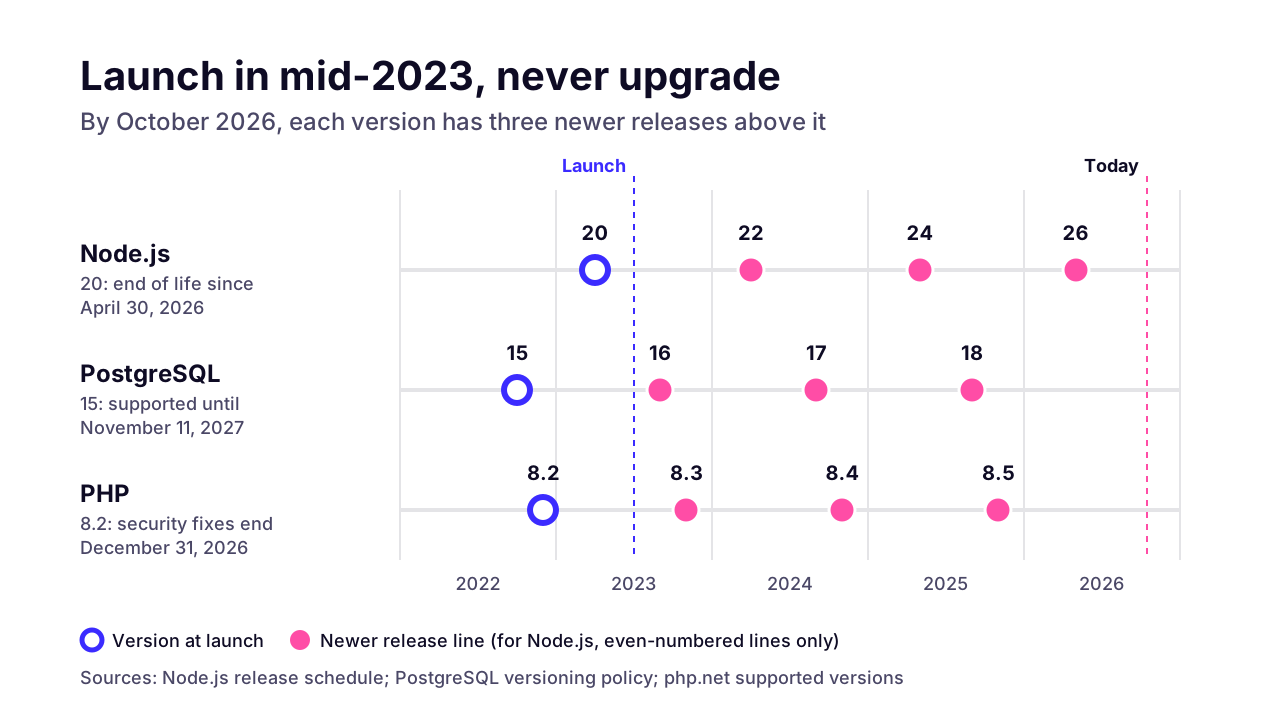
Major versions are the lumpy part. Say you launched in mid-2023 on Node.js 20, the newest even-numbered release line at the time. That runtime reached end of life on April 30, 2026. Three newer even-numbered majors have come out since. A PostgreSQL 15 database from the same launch now has three newer majors above it, and its support runs out on November 11, 2027.
 (opens the full-size chart in a new tab)
One major version at a time is routine. Three at once is a project, with breaking changes stacked on each other. Put one upgrade window a year into the budget and the lumps stay small.
What if the software is old or built by someone else?
Start with an audit of the code and infrastructure, fix the urgent risks first, then modernize step by step. A full rewrite is rarely the right first move.
When we take over software another team built, these are the first things we check:
- Who holds the keys: domain, hosting, code repository, app store accounts. Nothing else can start until access is sorted.
- Whether backups exist, and whether anyone has ever restored one.
- Which versions of the runtime, framework or database are running, and when each reaches end of life.
- Known vulnerabilities in dependencies, which npm audit or composer audit will list in minutes.
- Whether any automated tests exist, and how code reaches production.
- Secrets committed to the repository, such as API keys sitting in Git history.
The audit should end in a short ranked list. Urgent: an end-of-life runtime, exposed secrets, no working backup. Next: missing monitoring and manual deploys. Later: code quality and refactoring. Work through it in that order.
Expect the first year on inherited software to cost more than the 15–20% band, since the audit and the stabilizing work come before routine upkeep. How much more depends on what the audit finds.
Two special cases. If the code came out of an AI app builder, the checks are different, and we've written up what to look for in an AI-built codebase. If it's an old WordPress site that keeps breaking, price the patching against moving it to Next.js before you commit to either.
How can you lower maintenance costs without adding risk?
Keep routine work small and regular: update dependencies a little each month, automate tests on the flows that make money (sign-up, checkout and payment webhooks), ship each fix as one merged pull request, and delete plugins and packages you don't use. Patchstack's 2025 data found 91% of WordPress vulnerabilities in plugins, so a short plugin list is cheap insurance.
- Update a little, often. A minor version a month is routine work. Tools like Dependabot or Renovate open the update pull requests for you.
- Test the flows that make money. Automated tests on sign-up and checkout, plus the payment webhooks, catch the breakages that cost the most. Not every screen needs a test.
- Make deploys boring. When a fix ships with one merged pull request, patches go out the same day. When it takes an afternoon of manual steps, they wait.
- Delete what you don't use. Every plugin, package or cron job you've forgotten about is one more thing to patch.
- Write it down. A README covering setup and deploys, plus how to restore from backup, lets any competent engineer take over. You aren't tied to one person or one agency.
Don't cut monitoring, backups or security updates to save money. They're a small slice of the monthly bill, and they're the first things you'll wish you had when something breaks.
How do you work out your own maintenance budget?
Take your build cost and multiply it by 0.15 and 0.20. That's your yearly range, and dividing by 12 gives the monthly figure to hold any quote against. Then check the deadline table against what your software runs on. Anything that appears on it is your first job.
If you'd rather hand the routine to someone else, that's what our software maintenance and support plans are for. They're monthly retainers with a defined response SLA, and every plan includes monitoring, backups, bug fixes, a monthly health report, and security and dependency updates. On a 30-minute call we can check what your software runs on against the deadline table above.
Key takeaways
- 01Budget roughly 15–20% of the build cost per year to own custom software (Arrowbin estimate), which is $9,000–$12,000 a year for a $60,000 SaaS MVP.
- 02Maintenance is four kinds of work: fixing bugs, adapting to platform changes, improving existing features, and preventive work like backups and patches.
- 03Platform deadlines make upkeep non-optional: Google Play requires API level 36 for app updates from August 31, 2026, and PostgreSQL 14's final release is on November 12, 2026.
- 04Patchstack's 2025 data puts the weighted median time to first exploit for WordPress-ecosystem flaws at 5 hours, so patching can't wait for a quarterly check.
- 05A retainer suits most live products and pay as you go suits stable internal tools; an in-house hire makes sense once there's full-time product work.
- 06A good plan spells out monitoring, updates, tested backups, bug fixes, a monthly report and a written response time for critical issues.
- 07Upgrade one major version at a time; three at once turns routine upkeep into a project.

Written by
Md. Shishir Ahmed
Founder, Arrowbin
Founder of Arrowbin. Writes about shipping software, what it costs, and the decisions that decide whether a product works.