The short answer
Buy off-the-shelf software for jobs that work the same in every company, like accounting, payroll or a standard CRM; build custom when the workflow is your edge, seat fees grow with every hire, your tools can't share data, or you need to own the data. In our illustrative five-year example using vendors' list prices, a 40-person company paid less by keeping its SaaS tools ($82,140), while at 80 people, keeping the CRM and building a custom operations tool cost $122,067–$129,567 against $160,140. For most small businesses the best answer is a hybrid: buy the core and build only the missing piece.
On this page
If your business runs on a dozen subscriptions, three spreadsheets and one person who knows how they fit together, you've probably wondered whether it's time to build your own system. This post is for the owner or operations lead who has to make that call, with real prices instead of a pitch.
We build custom software at Arrowbin, so you'd expect me to say build. Mostly I won't. Accounting and payroll are solved problems. So are email and a standard CRM, and paying someone to solve them again is a poor use of money.
The case for custom is narrower than agencies make it sound. It's also stronger than SaaS vendors admit.
Custom software or off-the-shelf: which should a small business choose?
Choose off-the-shelf software when the job works the same way in most companies, such as accounting, payroll, email or a standard sales pipeline. Build custom when the workflow is part of what makes your business different, when per-seat fees climb with every hire, when your tools don't share data, or when you need to own the data and the rules.
For most businesses with 10 to 200 staff, the right answer is a mix: keep the standard tools and build the one piece that's missing. In the UK and Australia you'll hear custom software called bespoke software. The trade-offs don't change.
Upfront cost
- Off-the-shelf (SaaS)
- Low: a subscription plus setup time
- Custom software
- $5,000–$30,000 for an internal tool, $30,000–$90,000 for a mid-size app (Arrowbin estimates)
Ongoing cost
- Off-the-shelf (SaaS)
- Per seat or per tier, every month, rising with headcount and price increases
- Custom software
- Roughly 15–20% of the build cost a year (Arrowbin planning rule), mostly flat as headcount grows
Time to start
- Off-the-shelf (SaaS)
- Days to a few weeks (our view)
- Custom software
- 4–10 weeks for an internal tool, 3–6 months for a mid-size app (Arrowbin estimates)
Fit to your workflow
- Off-the-shelf (SaaS)
- You adapt to the product
- Custom software
- The product is built around how you work
Features
- Off-the-shelf (SaaS)
- Many, most of which you won't use
- Custom software
- Only what you need, plus what you add later
Integrations
- Off-the-shelf (SaaS)
- Built-in connectors and tools like Zapier
- Custom software
- Built for your systems, within what their APIs allow
Hosting, security and updates
- Off-the-shelf (SaaS)
- The vendor's job
- Custom software
- Yours or your developer's
Roadmap
- Off-the-shelf (SaaS)
- Set by the vendor for all its customers
- Custom software
- Set by you
Data ownership
- Off-the-shelf (SaaS)
- On the vendor's platform; exports are often CSV files
- Custom software
- Your database and your structure
Lock-in
- Off-the-shelf (SaaS)
- Easy to cancel; workflows and history are hard to move
- Custom software
- No vendor, but you depend on the code and whoever knows it
Main risk
- Off-the-shelf (SaaS)
- Price rises, plan changes, features removed
- Custom software
- Budget overrun, or one developer holding all the knowledge
Best for
- Off-the-shelf (SaaS)
- Accounting, payroll, email, a standard CRM
- Custom software
- The workflow that sets you apart, and the glue between tools
Two rows decide most cases: fit to your workflow, and how the ongoing cost grows. If the product fits and your seat count is small, buy it. If your team spends its day working around the tool, keep reading.
What does off-the-shelf software do better than custom?
Off-the-shelf software wins on speed, on upfront cost and on all the running work you never see. For jobs that are the same in every company, it's almost always the right call.
Take payroll. Tax tables and filing rules change regularly, and a payroll vendor spreads the cost of keeping up across all its customers. A custom payroll system would have you paying for that work alone. Accounting is the same story, and so is email.
I'd put a standard sales CRM on that list for most small teams too. Pipelines and email tracking are well-trodden ground, and the big products do them well. If your complaint about your CRM is one missing report, build the report. Don't rebuild the CRM.
Speed matters as well. You can trial most SaaS tools this afternoon and have a team on one next week. Our own estimate for even a small internal tool is 4–10 weeks, which is a long wait if a product would have done the job.
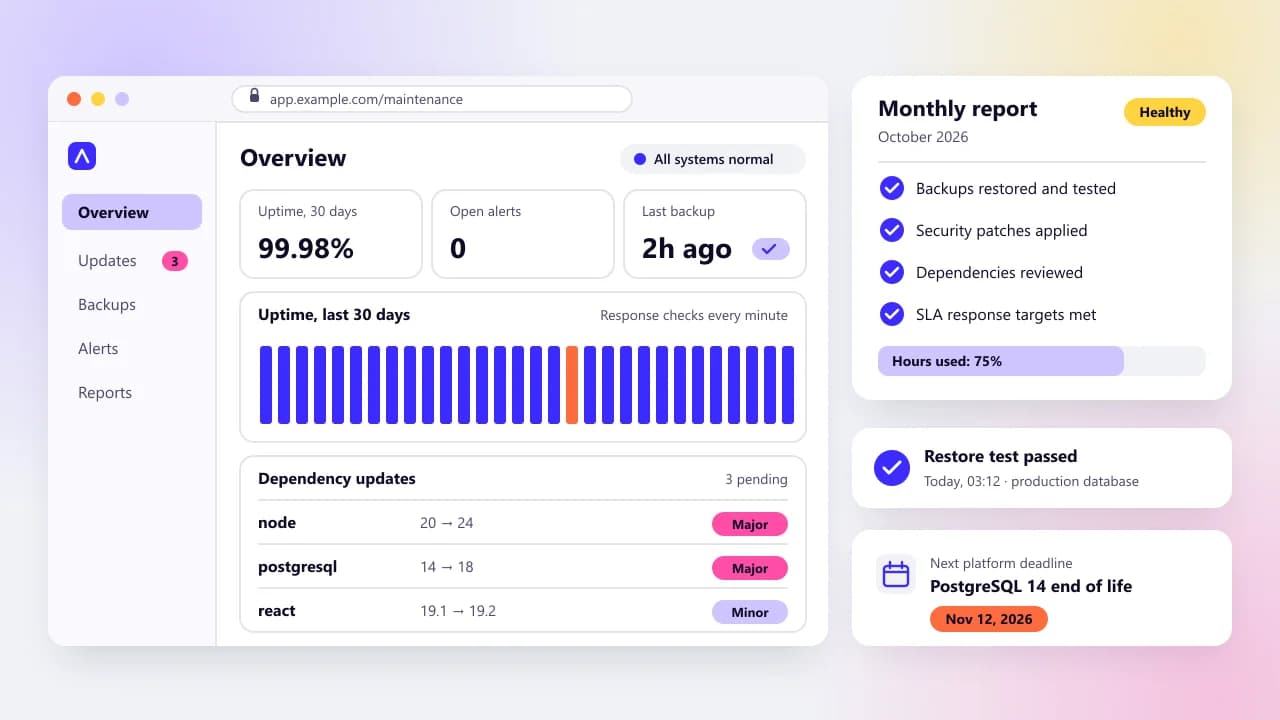
Then there's the work nobody sees. The vendor hosts the product, patches it, backs it up and keeps it running. On a custom system those jobs become yours or your developer's, and our guide to what software maintenance costs each year explains what that upkeep pays for.
Off-the-shelf also comes with a crowd. Reviews tell you what breaks, and thousands of other customers have already hit the odd cases. A custom build has one customer: you.
When is custom software worth building?
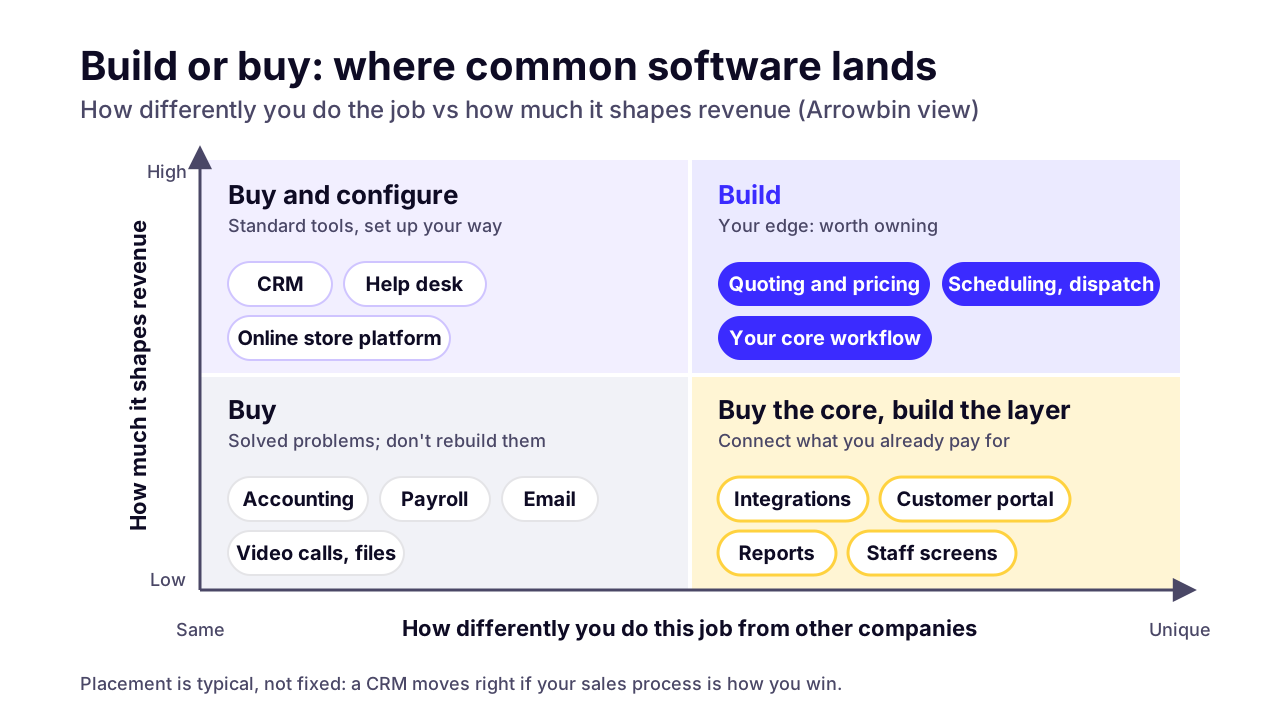
Custom software is worth building in four situations: the workflow is your edge, seat fees grow faster than the value, your tools can't share data cleanly, or you need to own the data and the logic. One of these alone rarely justifies a build. Two or more usually do.
- Your workflow is the edge. If the way you quote, schedule, price or deliver is why customers pick you, a generic tool will flatten it into everyone else's process. That's where custom earns the most.
- Seat fees pile up. Per-seat pricing grows with every hire, including people who only need one screen. A technician who updates a job twice a day costs you the same seat as your heaviest user.
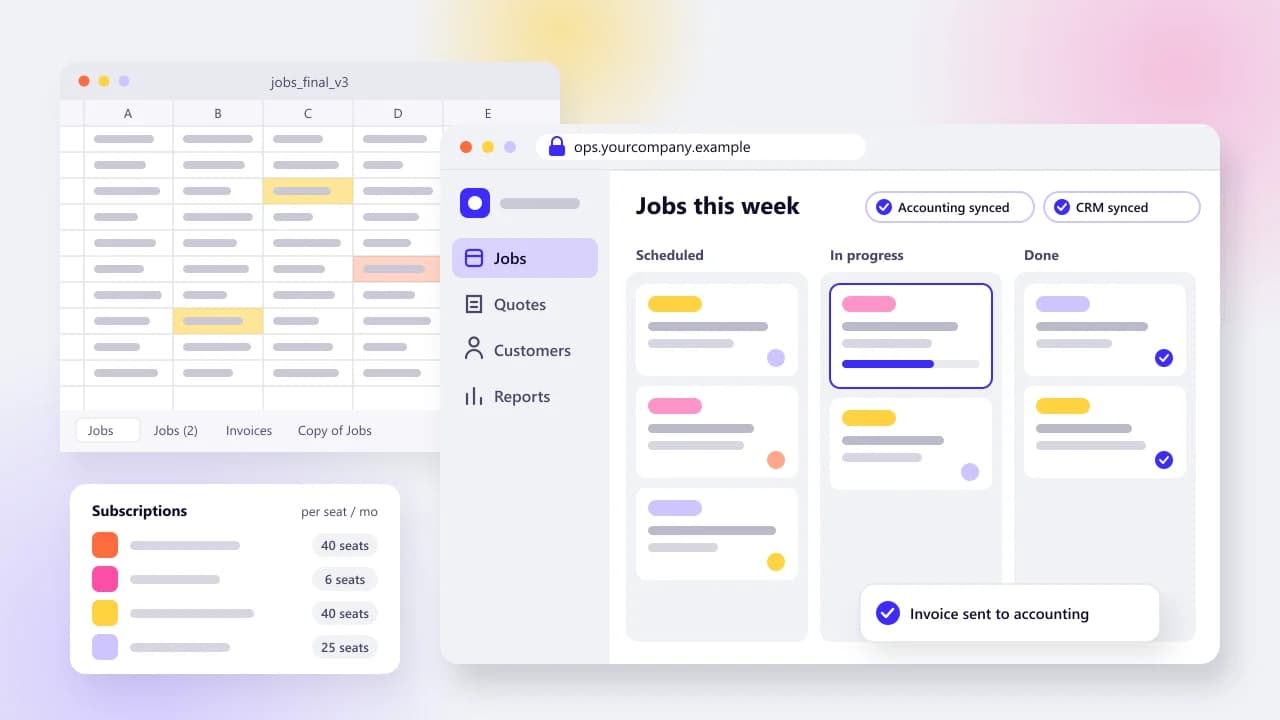
- Your tools don't talk to each other. When the same customer gets typed into the CRM, the job tracker and the invoice, someone is paying in hours. Connectors help until your rules get specific.
- You need to own the data and the rules. Some businesses can't spread customer records across six vendors, or need permissions and audit trails that no product offers.
Our clearest examples are admin systems we've built for online stores. Silent Lifestyle BD's order queue has staff call each customer before an order is confirmed, with its own statuses such as on hold and returned. Maneel Club's admin can ban phone numbers that place fake orders. Neither is exotic code, but both are how those businesses actually run.
That's the test. Custom pays when it encodes how you work, not when it copies a product you could rent.
 (opens the full-size chart in a new tab)
How do per-seat fees change the math as your team grows?
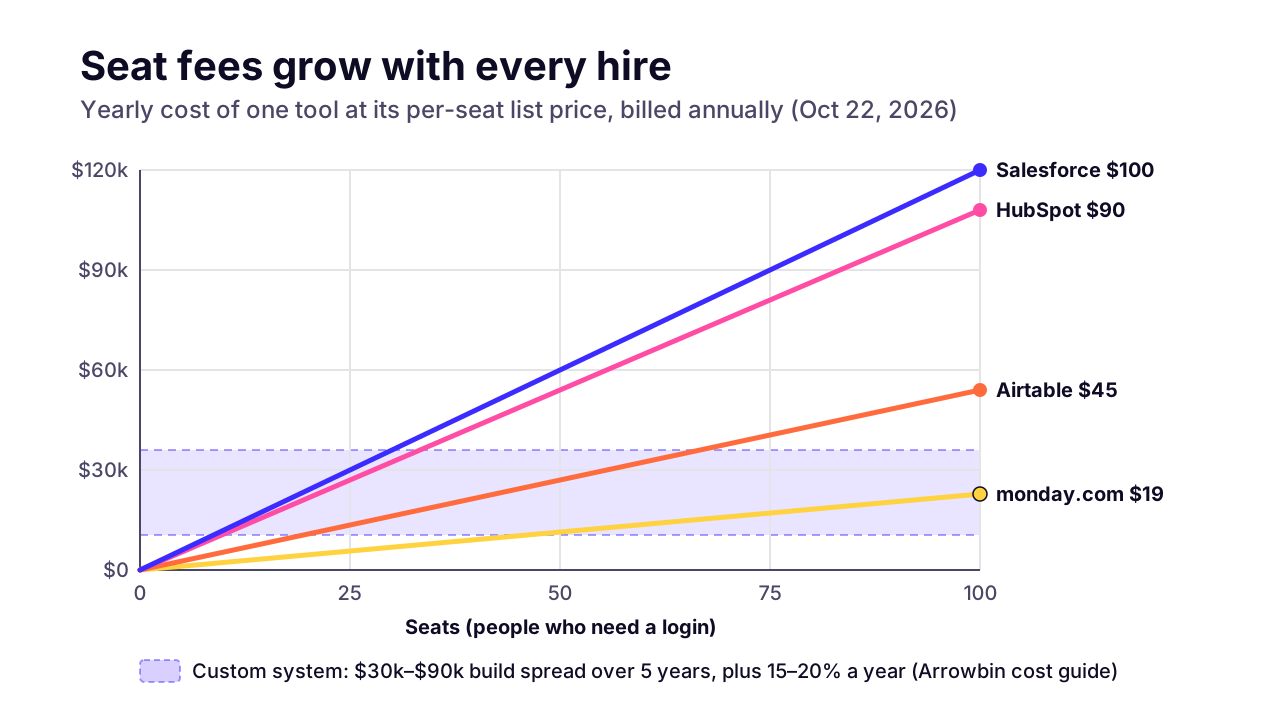
Per-seat fees grow in a straight line with headcount, while a custom system's cost tracks what it does rather than how many people log in. At 10 seats that rarely matters. At 50 or 100 it can decide the question.
These are list prices from each vendor's own pricing page, opened on October 22, 2026, all for annual billing:
- monday.com work management Pro: $19 a seat a month, per monday.com's pricing page. Plans start at 3 users, and teams over 40 users are invited to request a quote.
- Airtable Business: $45 a user a month, per Airtable's pricing page. Its Team plan is $20.
- HubSpot Sales Hub Professional: $90 a seat a month on an annual commitment ($100 paid monthly), plus a required one-time onboarding fee of $1,500, per HubSpot's pricing page.
- Salesforce Pro Suite: $100 a user a month, billed annually, per Salesforce's pricing page.
monday.com Pro, $19
- 10 seats a year
- $2,280
- 25 seats a year
- $5,700
- 50 seats a year
- $11,400
- 100 seats a year
- $22,800
Airtable Business, $45
- 10 seats a year
- $5,400
- 25 seats a year
- $13,500
- 50 seats a year
- $27,000
- 100 seats a year
- $54,000
HubSpot Sales Hub Pro, $90
- 10 seats a year
- $10,800
- 25 seats a year
- $27,000
- 50 seats a year
- $54,000
- 100 seats a year
- $108,000
Salesforce Pro Suite, $100
- 10 seats a year
- $12,000
- 25 seats a year
- $30,000
- 50 seats a year
- $60,000
- 100 seats a year
- $120,000
Larger teams can often negotiate, so treat the right-hand columns as list-price math rather than what you'd pay. The direction is the point: every hire adds a line to the bill.
Two things push these numbers up over time. Prices rise: Vertice, which tracks software prices across more than $75 billion of spend it manages, put SaaS inflation at 12.7% in August 2026, with an early September reading of 14.3%. Seats also go to waste. Zylo's 2026 SaaS Management Index found organizations leave an average of 36% of their SaaS licenses unused.
Check your own admin panels before anything else. Inactive seats are the cheapest saving you'll find this year, and cutting them makes any build-vs-buy comparison honest.
 (opens the full-size chart in a new tab)
What do custom and off-the-shelf cost over five years?
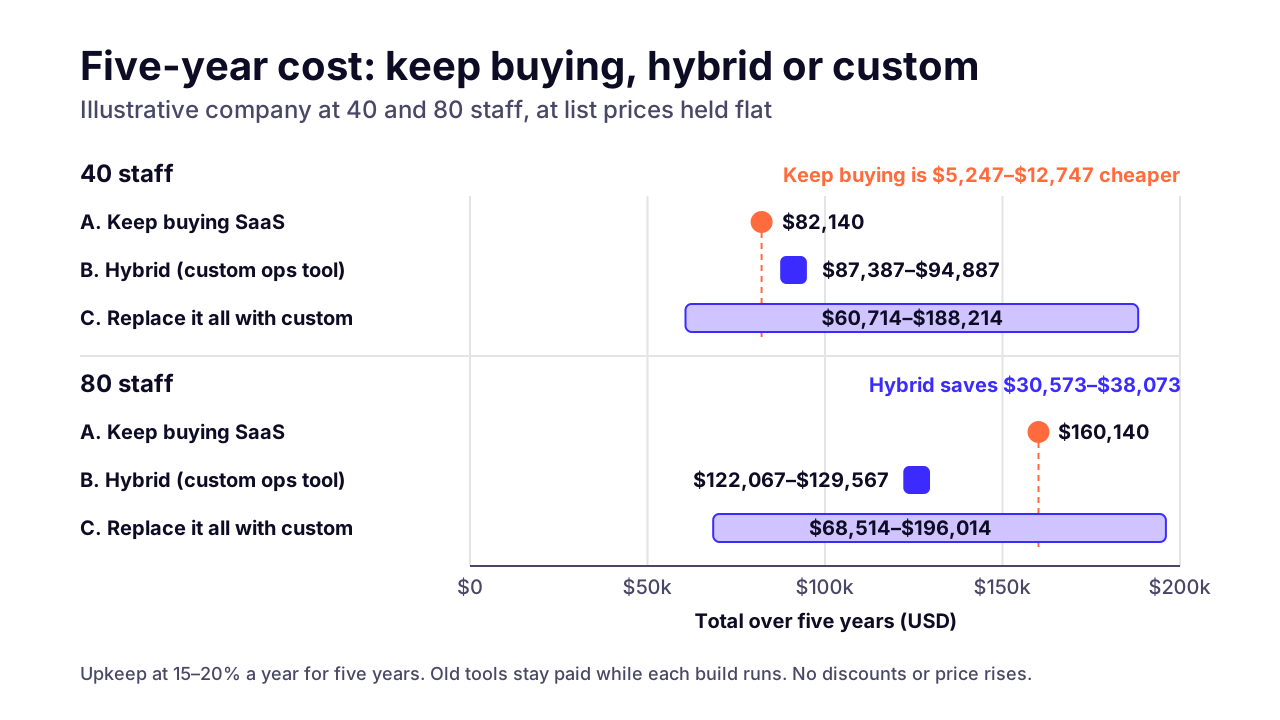
In our worked example, a 40-person company pays less by keeping its SaaS tools, and the same company at 80 people saves about $30,000–$38,000 over five years by keeping its CRM and building a custom operations tool. Replacing everything with custom is the widest bet of all.
This is an illustrative model, not a quote. These are the assumptions, so you can swap in your own:
- A hypothetical company with 40 staff, 6 of them in sales. Then the same company at 80 staff, with 12 in sales.
- Operations run in monday.com Pro with a seat for everyone, sales in HubSpot Sales Hub Professional, and the two are glued together with Zapier's Team plan at $69 a month billed annually, its entry tier on Zapier's pricing page.
- List prices stay flat for five years: no discounts, no price rises.
- Accounting and payroll cost the same in every option, as does email, so they're left out.
- Build costs come only from the published tiers in our guide to what custom software costs. Upkeep is that guide's 15–20% of the build cost a year, counted for all five years.
- Each build option keeps paying for the tools it replaces while it's built: six months for the full replacement, three for the hybrid.
A. Keep buying: monday.com plus HubSpot, glued with Zapier
- 40 staff
- $82,140
- 80 staff
- $160,140
B. Hybrid: keep HubSpot, build a custom operations tool ($30,000 build)
- 40 staff
- $87,387–$94,887
- 80 staff
- $122,067–$129,567
C. Replace all three with one custom system ($30,000–$90,000 build)
- 40 staff
- $60,714–$188,214
- 80 staff
- $68,514–$196,014
At 40 staff, buying wins on fees. The hybrid costs about $5,200–$12,700 more over five years, and I'd only build it if the tool did something monday.com can't.
At 80 staff the picture flips. The monday.com line doubles while the custom tool costs the same, so the hybrid comes out $30,573–$38,073 cheaper. A team that size would ask monday.com for a quote, and a volume discount would narrow that gap.
Option C is the one I'd be wary of. Its low end looks cheap, but it means rebuilding a sales CRM, which is exactly the commodity work SaaS does well. Its high end is the most expensive line in the table.
For the hybrid, I priced the build at $30,000, the top of the guide's internal-tool tier, because the tool has to sync with the CRM and the accounting system. A simpler tool would cost less.
 (opens the full-size chart in a new tab)
The model leaves out the number that usually decides it: staff time. O*NET, which publishes Bureau of Labor Statistics wage data, puts the 2025 US median for general office clerks at $21.64 an hour.
At that wage, every hour a week one person spends copying data between tools costs about $1,080 a year before payroll taxes. If three people each lose four hours a week to it, that's about $13,000 a year. Saving even a fifth of that for five years is enough to flip the 40-person result.
Count those hours honestly before you build. They're the one input only you can measure.
What hidden costs come with each option?
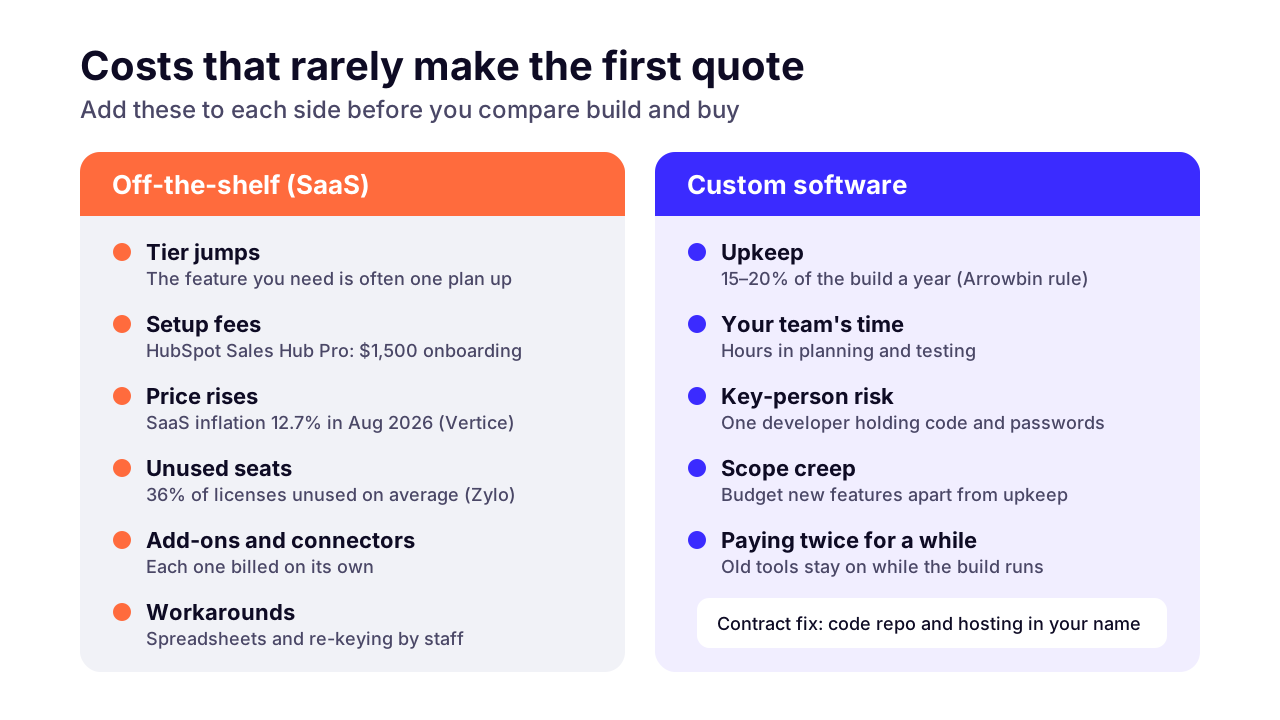
Off-the-shelf software hides its costs in tier jumps, add-ons and the workarounds people build beside it. Custom software hides them in upkeep, in your own team's time, and in depending on whoever knows the code.
On the off-the-shelf side, watch for these:
- Tier jumps. The feature you need is often one plan up, and every seat moves with it.
- Setup fees, like the $1,500 onboarding HubSpot requires for Sales Hub Professional.
- Add-ons and connectors, each billed on its own.
- Workarounds: the spreadsheet next to the tool, and the person who keeps it alive.
- Exit cost. An export usually gives you records, not your automations, permissions or history in a form you can reuse.
On the custom side:
- Upkeep. Plan for 15–20% of the build cost a year to cover hosting and fixes. Skipping it is how custom systems rot.
- Your team's time. Someone who knows the workflow has to spend hours in planning and testing, because nobody else can tell a developer how your business really works.
- Key-person risk. If one freelancer holds the code, the passwords and the knowledge, you don't own your system in any practical sense.
- Scope creep. Once people see what's possible, the wish list grows. Budget new features separately from upkeep.
The fix for key-person risk is contractual and dull. The code lives in a repository your company owns, hosting sits in your name, and handover notes are a deliverable. Our guide on how to choose a software development company covers what to put in that contract.
 (opens the full-size chart in a new tab)
Can you keep your off-the-shelf tools and build only what's missing?
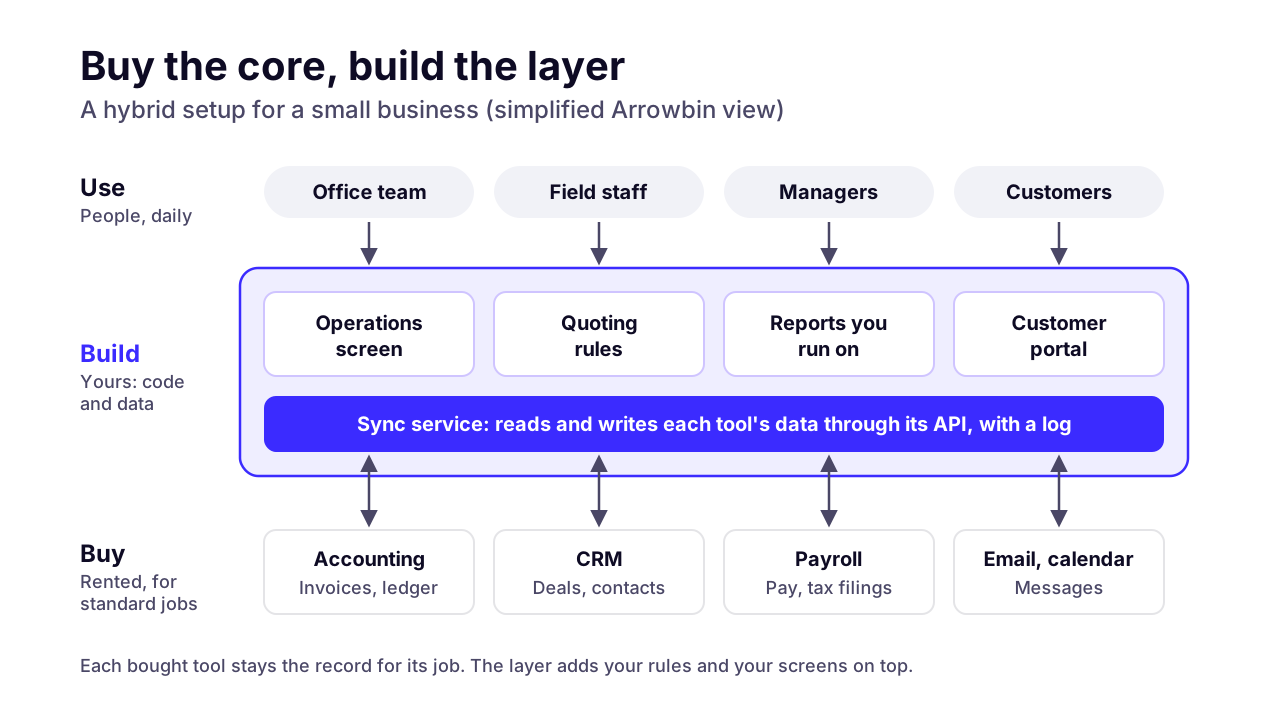
Yes, and for most small businesses that's the best route. Keep the standard tools for what they do well, and build a thin custom layer for the part that's specific to you: an integration, a customer portal, an operations screen or the reports nobody sells.
What makes this work is the API, a documented door that lets other software read and write a product's data. Most business SaaS tools have one. A custom layer can pull a won deal from your CRM, create the job, and send the invoice to your accounting system without anyone typing the customer twice.
Typical hybrid projects look like this:
- An integration that keeps customer records and invoices in sync between tools that don't connect, or connect badly.
- A customer portal on top of your existing systems, so clients can check status or download documents without emailing you.
- A quoting or pricing tool that follows your rules, then writes the deal into the CRM.
- A simple screen for staff who only need one task. Read the vendor's license terms first, because some don't allow API access to stand in for paid seats.
- Reporting that joins data from several tools into the numbers you actually run the business on.
The hybrid has a running cost of its own. Each integration depends on someone else's API, and APIs change. Plan for that in upkeep, and log every sync so you can see when one fails.
Before you commission anything, consider testing the workflow in a no-code tool first. Airtable's Team plan is $20 a user a month billed annually, per its pricing page. It's per seat again, so it won't stay cheap as you grow, but a month of real use shows exactly what to build.
If the missing piece is an AI agent, the same logic applies. Our breakdown of what an AI agent costs a small business compares buying one, wiring one up in a no-code tool and commissioning a custom one, with published prices.
 (opens the full-size chart in a new tab)
How do you know you've outgrown off-the-shelf software?
You've outgrown off-the-shelf software when the workarounds cost more than the tool. It shows up as a handful of signs, and if two or more of these are true, a custom build deserves a proper quote:
- The same data gets typed into two or more tools every day.
- A spreadsheet next to the tool holds the real process, and one person understands it.
- You pay full seats for people who use one or two screens.
- The feature you need sits on a tier that costs several times more per seat.
- Your seat count is likely to double within three years.
- Customers choose you partly for how you work, and the tool forces you to work like everyone else.
- You need permissions, audit trails or data rules the product can't give you.
- You can fund the build plus 15–20% of it every year, and someone on your side can own the project.
There are good reasons to keep buying, too. Keep buying if the tool covers most of what you need and the gaps are annoyances rather than costs. Keep buying if the job is a commodity.
And keep buying if nobody on your side has time to own a build. An unowned custom project fails slowly, and it's expensive the whole way down.
What do we recommend for most small businesses?
Buy the commodity tools, connect them properly, and build custom only for the workflow that makes you money or the seat bill that grows fastest. Start with one tool, not a platform.
If I were advising a 40-person company today, I'd list every subscription with its seat count and an owner, then cancel the unused seats. Next I'd find the one process that eats the most staff hours, and ask whether a connector, a better setup or a no-code prototype fixes it. Only if none of those work would I scope a custom build, starting with the smallest version that removes that pain.
Order matters here. A small first build the team relies on is worth more than a grand replacement plan that never ships.
When it is time to build, that's the work our custom software development team does: internal tools and integrations, plus the custom layer on top of the systems you already pay for. You own the code.
Want a straight read on your own stack first? Book a 30-minute call and bring your list of tools and seat counts. If the answer is to keep buying, you'll hear it from us.
Key takeaways
- 01Buy off-the-shelf software for commodity jobs that work the same everywhere, from payroll to a standard CRM.
- 02Build custom when the workflow is your edge, seat fees grow with every hire, your tools can't share data, or you need to own the data and the rules.
- 03Per-seat fees grow in a straight line with headcount; on October 22, 2026, list prices ran from $19 a seat (monday.com Pro) to $100 a user (Salesforce Pro Suite) a month, billed annually.
- 04In our illustrative five-year model, keeping SaaS was cheaper at 40 staff, while keeping the CRM and building a custom operations tool saved $30,573–$38,073 at 80 staff.
- 05Staff time spent re-keying data can outweigh the license bill: each hour a week costs about $1,080 a year at the median US office-clerk wage.
- 06For most businesses with 10 to 200 staff, the hybrid route of buying the core and building the layer on top is the best fit.
- 07Custom software needs roughly 15–20% of its build cost a year in upkeep, a code repository you own, and someone on your side who owns the project.

Written by
Md. Shishir Ahmed
Founder, Arrowbin
Founder of Arrowbin. Writes about shipping software, what it costs, and the decisions that decide whether a product works.