The short answer
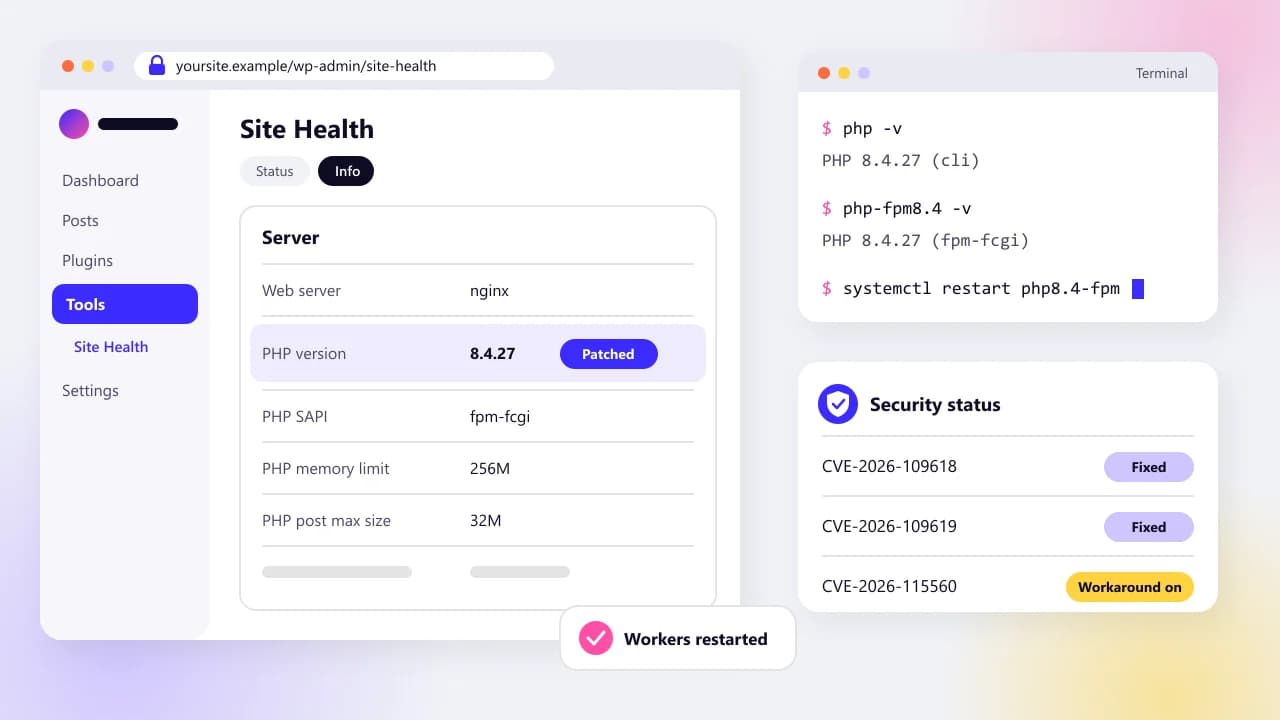
PHP2Shell is a pair of critical bugs in PHP itself (CVE-2026-109618 and CVE-2026-109619) that can let an attacker run code on a web server without logging in. The fix is PHP 8.5.12, 8.4.27, 8.3.36 or 8.2.35, or your Linux distribution's patched package, followed by a full restart of PHP. Also turn off session upload progress, which closes the related CVE-2026-115560, and check your logs for signs of a break-in going back to October 17, 2026.
On this page
On October 21, 2026, PHP shipped an emergency fix for two bugs that let a stranger run their own commands on a web server, no password needed. Two days later it warned about a third. If your website runs on WordPress, WooCommerce, Laravel, Drupal, Joomla or Magento, it runs on PHP, and this is about your site.
This guide is for the people who own those sites. Most of you don't manage a server, so each step says who does what: what you can check yourself in a browser, what to ask your host, and the exact commands for whoever looks after the server. Every fact comes from a named source, mostly PHP's own advisories, CISA, the Linux distributions and the hosting companies. It reflects what was public on October 25, 2026.
If you only have ten minutes, do these in order:
- Find your PHP version. In WordPress, go to Tools > Site Health > Info and open Server.
- Make sure it's 8.5.12, 8.4.27, 8.3.36 or 8.2.35 or later, or that your host or Linux distribution has confirmed the patch in writing.
- If you run the server, install the update and restart PHP fully. A reload isn't enough.
- Turn off
session.upload_progress.enabledin php.ini or the PHP-FPM pool. A.user.inifile won't do it. - Check for signs of a break-in going back to October 17.
- If you're on PHP 8.1 or older, plan the upgrade now.
What is PHP2Shell, in plain English?
PHP2Shell is the nickname for two critical bugs in PHP itself, CVE-2026-109618 and CVE-2026-109619, that can let an attacker run commands on a web server without logging in. PHP fixed both on October 21, 2026, and says every PHP installation that serves web pages is at risk until it's updated.
PHP is the programming language underneath WordPress and most of the content systems small businesses use. These bugs aren't in WordPress or a plugin. They sit in the part of PHP that reads incoming requests and manages memory, which nearly every page load touches. That's why the PHP Foundation called them hard to fix without breaking compatibility, and why updating WordPress, a theme or a security plugin does nothing for them.
Both bugs score 9.2 out of 10 on PHP's own advisories (CVE-2026-109618 and CVE-2026-109619). You may have seen 10.0 quoted. That figure came from the leak before release, and the PHP Foundation says it was wrong. The US National Vulnerability Database scores the first one 9.8 on its older scale. Any of those numbers means drop what you're doing.
The CVE records credit researchers at Calif, Wiz and OpenAI. The roots go back further: a developer working for the PHP Foundation spotted the first signs of the memory problem in 2024, while fixing a finding from a security audit. The Foundation admits the fix then stalled for months, until Calif showed a working attack in August 2026.
A third, much narrower bug followed on October 23: CVE-2026-115560, in a PHP feature called session upload progress. It needs an unusual setup, it isn't fixed yet, and one setting switches it off. We cover it in its own section below.
How does a PHP2Shell attack work?
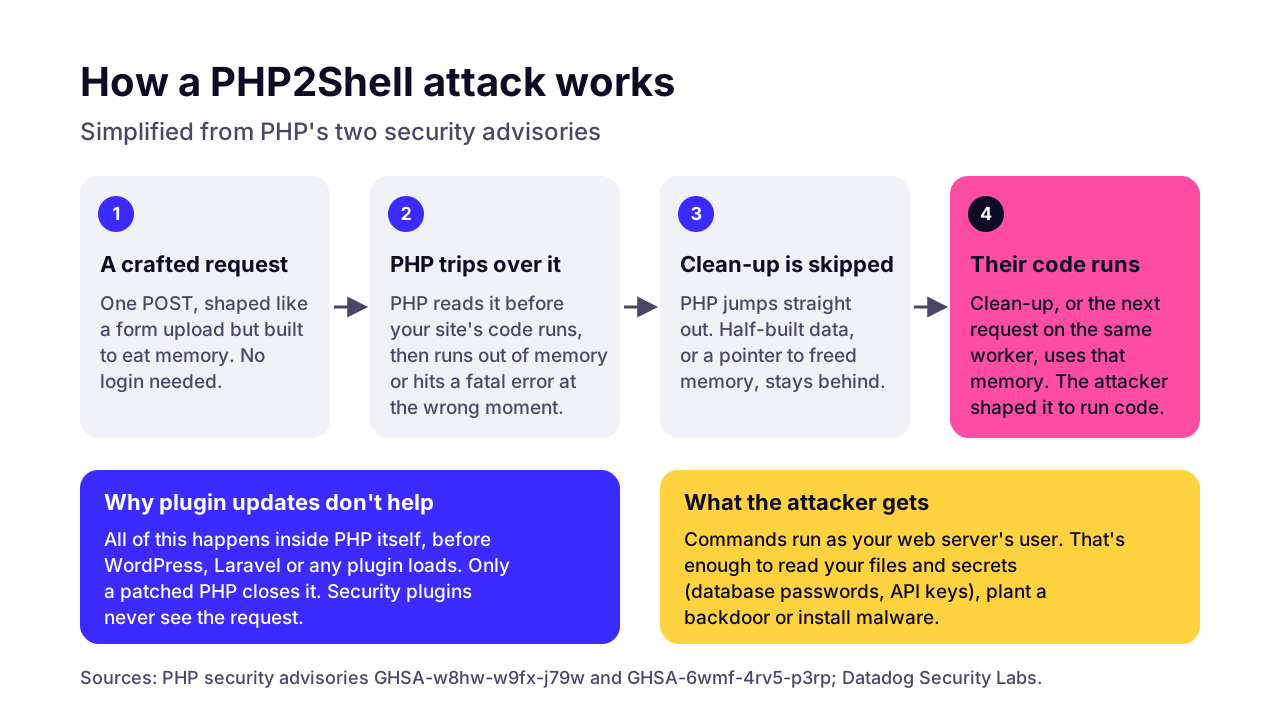
A PHP2Shell attack sends one specially built request that makes PHP run out of memory, or hit a fatal error, at exactly the wrong moment. PHP then reuses memory the attacker has shaped, and the attacker's command runs. All of it happens while PHP is still reading the request, before your website's own code starts.
 (opens the full-size chart in a new tab)
CVE-2026-109618 abuses the way PHP handles running out of memory. The attack request looks like a form upload (what developers call a multipart request), stuffed with hundreds of parts, each carrying piles of headers or deeply nested field names. PHP's advisory explains that several of its size checks could be sidestepped, so a request small enough to pass post_max_size could still exhaust memory_limit. When that happens, PHP jumps straight out of what it was doing. Some of its internal data is left half built, and the clean-up step later treats it as real.
CVE-2026-109619 is the same family of mistake with a twist. A fatal error at the wrong point leaves PHP holding a pointer to memory it has already freed. The next request handled by the same PHP worker then uses that memory. One of the confirmed paths goes through session upload progress, which is switched on by default and works even if your site never uses sessions.
PHP rates Apache with mod_php as the highest risk. There, its advisory says, remote code execution was demonstrated with PHP's default limits, before any application code ran. PHP-FPM is exposed too: the session path was validated against it, and the PHP Foundation says the memory bug was confirmed on FPM through application code. FrankenPHP, php-cgi and LiteSpeed are on PHP's affected list as well.
Two details catch people out. Hiding errors doesn't help: PHP's advisory says changing error_reporting or turning off display_errors gives no protection. And a normal response doesn't mean nothing happened. In Datadog's lab tests, a refined exploit returned HTTP 200 and the worker kept running.
Once in, the attacker runs commands as your web server's user. That's usually enough to read your configuration files, which hold database passwords and API keys. Wiz also showed that the bug can leak chunks of server memory back to the attacker inside a session cookie, and those chunks can contain passwords and tokens. Wiz demonstrated a full takeover, before login, against the official WordPress, Drupal and Joomla container images in its lab.
What happened, and when?
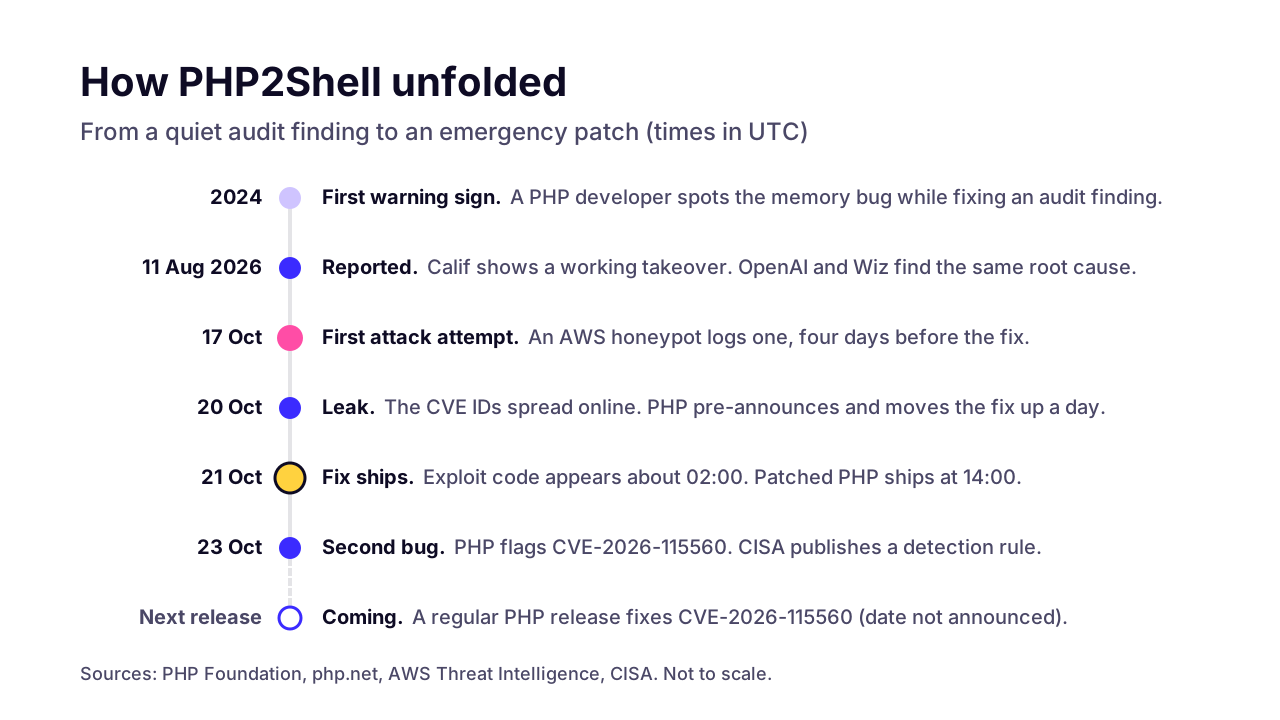
The bugs were reported privately in August 2026, leaked on October 20, and fixed on October 21. Attack attempts started before the fix. AWS logged one on October 17, and public exploit code appeared in the early hours of October 21.
 (opens the full-size chart in a new tab)
- August 11, 2026: Calif reports a working remote takeover to PHP. OpenAI independently reports the same root cause, and Wiz follows on August 24.
- October 17: an AWS honeypot records an exploitation attempt, four days before the fix. AWS says it's unclear whether it would have worked, and tells customers to investigate from that date.
- October 20, around 15:00 UTC: the two CVE numbers leak online with a wrong score. PHP publishes an advance notice and brings the release forward a day. That evening, Calif accidentally publishes a video of its exploit working, and copies spread.
- October 21: exploit code starts circulating around 02:00 UTC. Cloudflare switches on blocking rules at 03:02 UTC. PHP releases 8.5.12, 8.4.27, 8.3.36 and 8.2.35 at about 14:00 UTC, and CISA tells everyone to patch immediately.
- October 23: PHP discloses CVE-2026-115560. CISA publishes a detection rule. Palo Alto's Unit 42 reports an intrusion at a European government body where attackers reached password hashes within two hours.
Are attacks succeeding? Sources disagree. CISA said on October 21 that it hadn't seen a successful exploit. Rapid7 says each public exploit only works against a particular mix of operating system, PHP version and web server. CrowdStrike says most public code just crashes PHP. Unit 42's report says otherwise, and Sophos reported a botnet payload before walking back its claim of a successful compromise.
Our read: the public exploits are unreliable today, and that tends to change within weeks. Probing has already started. Treat your site as a target and patch it now, not when someone confirms a mass campaign.
Is my website affected by PHP2Shell?
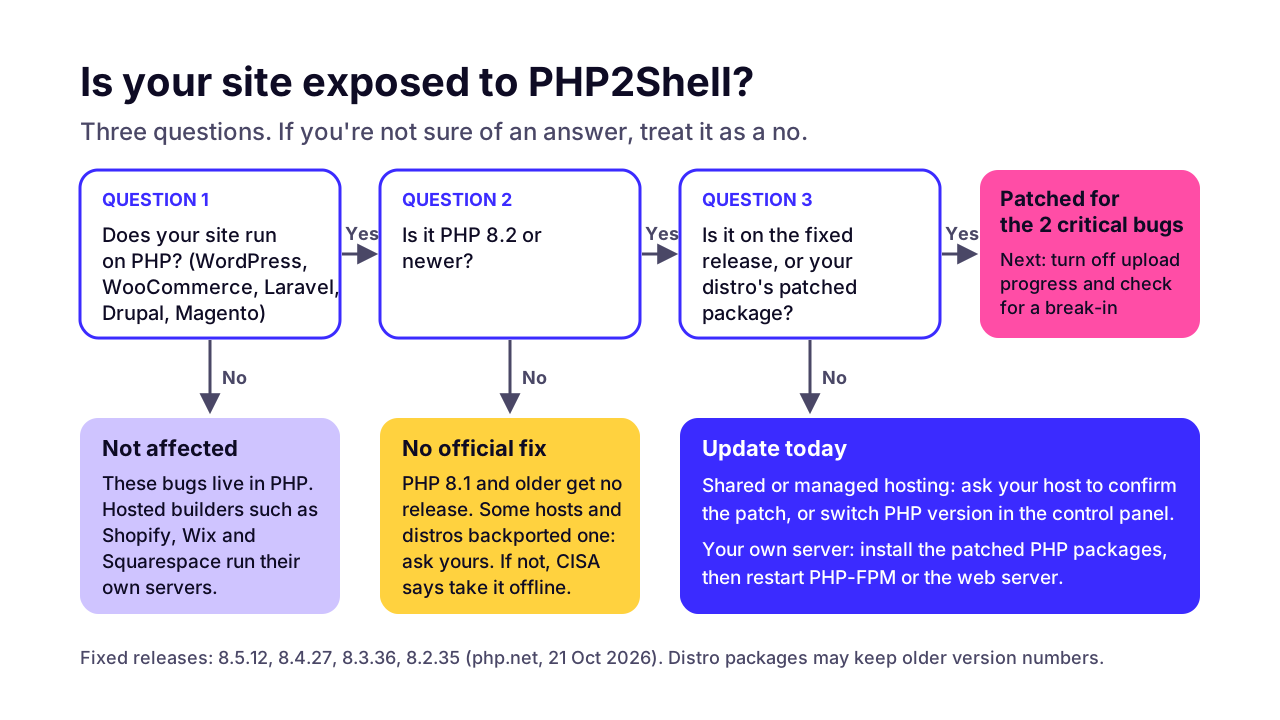
If your website runs on PHP and PHP hasn't been updated since October 21, 2026, assume it's affected. PHP says the risk covers every installation that serves web requests: Apache with mod_php, PHP-FPM, php-cgi, FrankenPHP and LiteSpeed.
 (opens the full-size chart in a new tab)
Sites that run on PHP include every WordPress and WooCommerce site, Drupal and Joomla sites, Magento and Adobe Commerce stores, and apps built with Laravel or Symfony. So do plenty of custom admin panels and booking systems built years ago. If you're not sure, ask whoever built the site, or look for .php at the end of page addresses or a wp-admin login page.
Sites on hosted builders such as Shopify, Wix and Squarespace have nothing to patch. The platform runs the servers. The same goes for sites that don't use PHP at all, like a Next.js or static site. But check the corners: a blog subdomain on WordPress, an old staging copy, or a forgotten microsite on the same hosting can still be exposed and still reach your data.
Old versions are affected too. PHP's advisories only list the branches it still supports (8.2 to 8.5), but the US vulnerability database tracks the bugs back to PHP 7.3 and 5.4, and watchTowr says it confirmed PHP 5 is affected. The UK's NCSC puts it bluntly: don't limit your search to outdated versions.
PHP also hides inside things that aren't websites. Firewalls and routers often run it under the hood, and so do some admin consoles. The Dutch NCSC keeps a list of affected vendor products on GitHub, and it's worth a look if your office runs network appliances.
The scale is large. Palo Alto Networks counted over 22.6 million internet-facing instances that are potentially vulnerable. Bitsight found only about a third of the PHP servers it could identify run 8.2 to 8.5, with PHP 7.4 the single most common branch.
How do I check which PHP version my site is running?
In WordPress, go to Tools > Site Health > Info and open the Server section: it shows the PHP version and the PHP SAPI (how PHP runs). Elsewhere, your hosting control panel, a phpinfo page or the command line will tell you. The version number alone can't always prove you're patched, because Linux distributions often fix bugs without changing it.
In WordPress
- Log in to wp-admin as an administrator.
- Go to Tools > Site Health, then click the Info tab.
- Open the Server section. Note the PHP version and the PHP SAPI line.
- A SAPI of
apache2handlermeans mod_php (PHP's highest-risk setup).fpm-fcgimeans PHP-FPM, andlitespeedmeans LiteSpeed.
WordPress's own guide to updating PHP uses the same screen. It reads the PHP version the website is actually using, which is the one that matters.
In your hosting control panel
On cPanel, the MultiPHP Manager page lists each domain's PHP version, and hosts running CloudLinux often have a Select PHP Version page instead. In Plesk, open the domain and look at PHP Settings. Choosing a version here only picks which installed PHP your site uses. It doesn't install updates, so a patched number still depends on your host having updated the packages.
With a phpinfo page
If you can upload files, create a file with a random name in your site's public folder, open it in a browser, then delete it straight away. It shows the PHP Version, the Server API (the same thing as the SAPI) and the Build Date. A build date of October 21, 2026 or later is a good sign. Hostinger and GoDaddy both point customers to that date, because their patched builds kept the old version number.
<?php phpinfo();Don't leave that file online. It lists your server's settings and file paths for anyone who finds it.
On the server
On a server you can log in to, php -v shows the command-line PHP. That's not always the PHP that serves your website, so check the PHP-FPM binary too. On Debian and Ubuntu it carries the version in its name.
php -v
php-fpm8.3 -v                # Debian/Ubuntu: use your version number
php-fpm -v                   # RHEL, AlmaLinux, Rocky
apachectl -M | grep -i php   # a php module here means Apache runs mod_php
My version number didn't change. Am I patched?
Maybe. Linux distributions backport security fixes into the version they shipped. Ubuntu 24.04's fixed package is 8.3.6-0ubuntu0.24.04.13, and its changelog lists both CVEs, even though upstream's fix is 8.3.36. Red Hat says plainly that the version number won't tell you if you're vulnerable. Search the package changelog for the CVE instead.
# Debian / Ubuntu (swap in your package name)
apt changelog php8.3-fpm | grep -m1 CVE-2026-109618

# RHEL / AlmaLinux / Rocky (Amazon Linux: php8.3-common, etc.)
rpm -q --changelog php-common | grep -m1 CVE-2026-109618
If the CVE shows up, the package has the fix. If nothing prints, it doesn't, or your vendor wrote the changelog differently, so check its advisory before you relax.
Which PHP versions fix PHP2Shell?
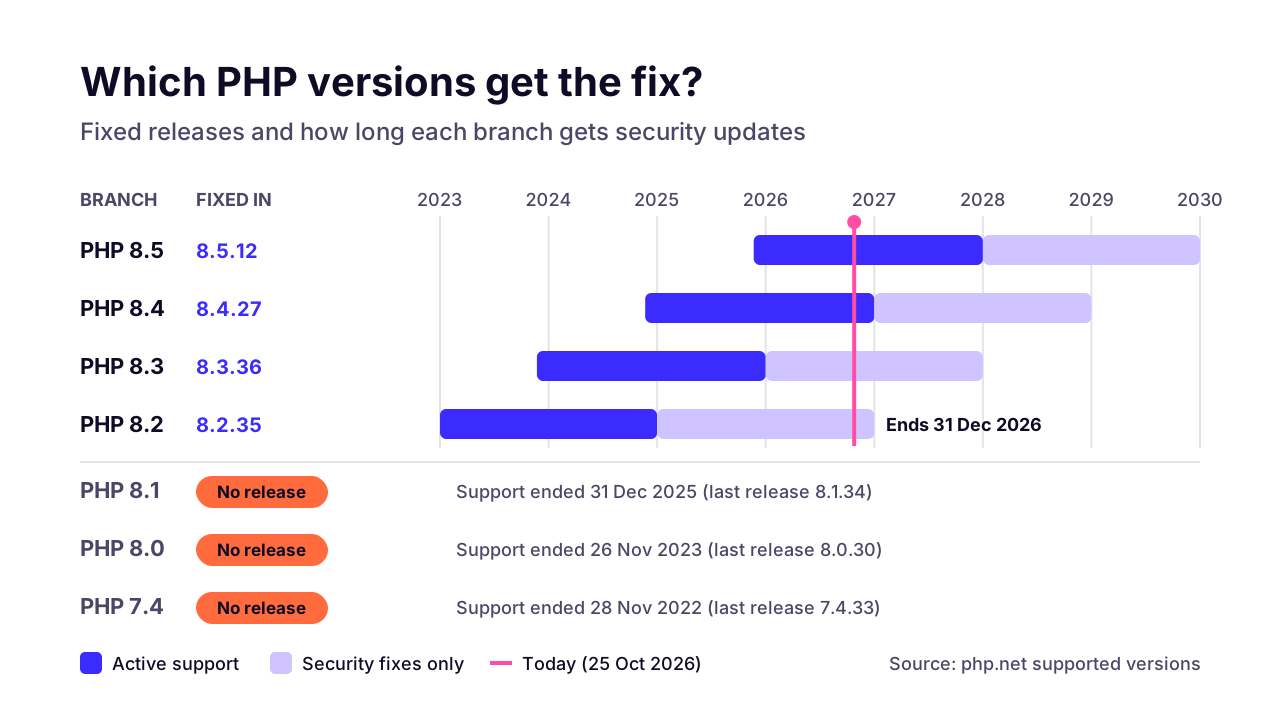
PHP 8.5.12, 8.4.27, 8.3.36 and 8.2.35 fix both critical bugs, and anything older in those branches is vulnerable. PHP 8.1 and older got no official release. PHP published source-only backports for 7.4, 8.0 and 8.1, which some distributions and hosts built into their own packages.
8.5
- Fixed in
- 8.5.12
- Security updates until
- Dec 31, 2029
- What it means for you
- Newest branch. Check your plugins support it
8.4
- Fixed in
- 8.4.27
- Security updates until
- Dec 31, 2028
- What it means for you
- A good long-term pick for most sites
8.3
- Fixed in
- 8.3.36
- Security updates until
- Dec 31, 2027
- What it means for you
- WordPress's recommended minimum
8.2
- Fixed in
- 8.2.35
- Security updates until
- Dec 31, 2026
- What it means for you
- Patched, but plan your upgrade now
8.1 and older
- Fixed in
- No official release
- Security updates until
- Already ended
- What it means for you
- Only vendor backports. Upgrade
 (opens the full-size chart in a new tab)
If your PHP came from your Linux distribution, the fixed version is whatever your vendor says it is. These are the fixed packages the main distributions published between October 21 and 23. Look up your exact release on the vendor's page, such as Ubuntu's CVE page, Debian's tracker or Red Hat's bulletin.
Ubuntu 24.04
- Fixed package
- php8.3 8.3.6-0ubuntu0.24.04.13
- Advisory
- USN-8948
Ubuntu 22.04
- Fixed package
- php8.1 8.1.2-1ubuntu2.28
- Advisory
- USN-8948
Ubuntu 20.04 (Ubuntu Pro)
- Fixed package
- php7.4 7.4.3-4ubuntu2.29+esm5
- Advisory
- USN-8948
Debian 13 (trixie)
- Fixed package
- php8.4 8.4.27-1~deb13u1
- Advisory
- DSA-6574-1
Debian 12 (bookworm)
- Fixed package
- php8.2 8.2.35-1~deb12u1
- Advisory
- DLA-4848-1
RHEL 9 (default php)
- Fixed package
- php 8.0.30-8.el9_8.1
- Advisory
- RHSA-2026:87151
RHEL 9 (php:8.4 stream)
- Fixed package
- No fix listed on Oct 23
- Advisory
- RHSB-2026-013
Amazon Linux 2023
- Fixed package
- php8.2 to php8.5 fixed; php8.1 no fix planned
- Advisory
- ALAS2023-2026-3301 to 3304
Alpine 3.21 to 3.23
- Fixed package
- 8.2.35, 8.3.36, 8.4.27, 8.5.12 (-r0)
- Advisory
- Alpine packages, Oct 22
One warning before you update. The new 8.4.27 and 8.5.12 releases carry other changes too, including stricter handling of running out of memory, and a few admins have reported side effects. One is a SimpleXML crash that can take down a PHP worker; 8.3.36 and older aren't affected, and a fix is on the way. Watch your error logs for a few days after updating. Rolling back to a vulnerable version is the wrong answer. Report the problem to your host or PHP instead.
How do I fix PHP2Shell on my hosting?
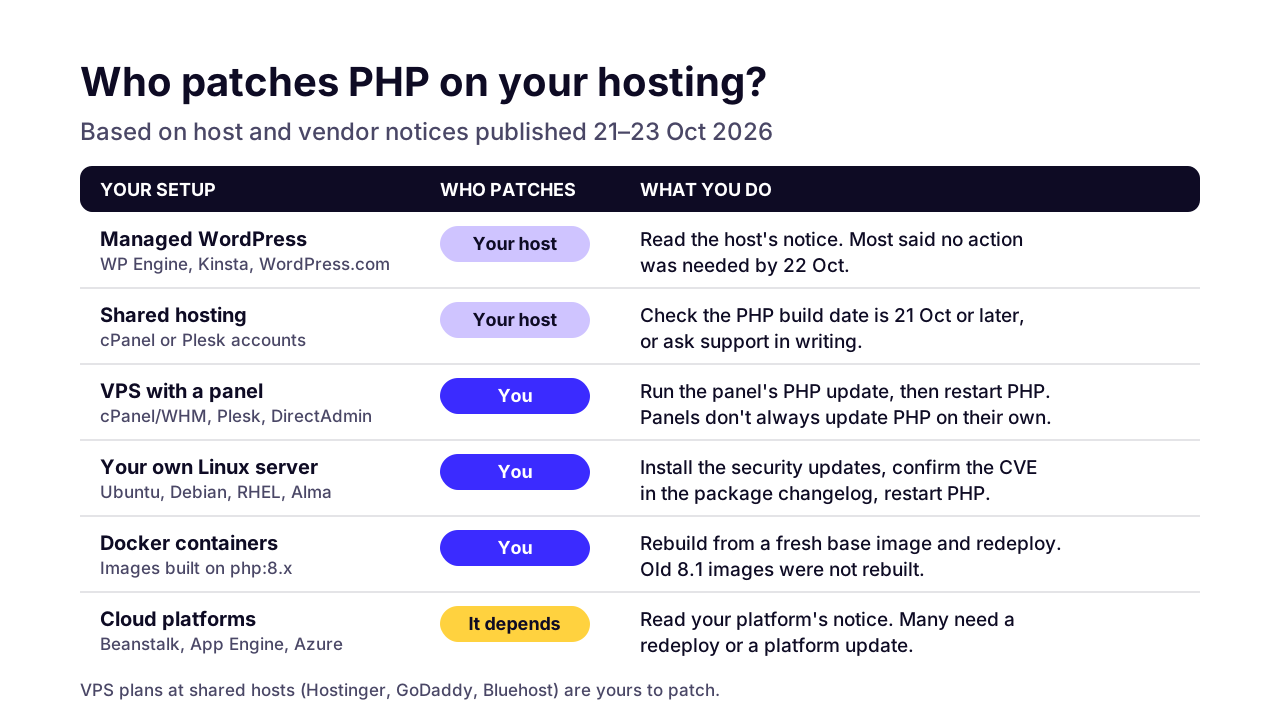
You fix PHP2Shell by installing the patched PHP for your setup and then restarting every PHP process. Who does that depends on your hosting. Managed hosts did it for their customers within a day or two. On a VPS or your own server, it's your job.
 (opens the full-size chart in a new tab)
Managed WordPress and app hosting
If you're on a managed host, read its notice and you're probably done. WP Engine and WordPress.com told customers no action was needed. Kinsta says all sites from PHP 7.4 to 8.5 are protected. SiteGround says the fixes are applied across all its servers. Pantheon and Cloudways reported the same, and Laravel Cloud patched every running app without a redeploy.
Shared hosting with cPanel or Plesk
Most shared hosts patched their own servers, but check the small print. Hostinger patched everything except VPS plans. GoDaddy patched its shared and managed WordPress hosting, but VPS owners have to patch themselves, and it warns the version number may not change. Bluehost said most of its platforms were up to date by October 23, while VPS and dedicated customers need to run updates.
Check the build date as described above. If you can't, ask support in writing. You can send this as it is:
Hi,

My site [your-domain.com] runs on PHP. PHP released security fixes on October 21, 2026 for CVE-2026-109618 and CVE-2026-109619 (PHP2Shell).

1. Does the PHP version serving my site include these fixes, and was PHP restarted afterwards?
2. Is session.upload_progress.enabled turned off, as PHP recommends for CVE-2026-115560?
3. Is my site behind a firewall rule for these CVEs?

Thank you.
A VPS with cPanel, Plesk or DirectAdmin
Control panel vendors shipped patched PHP on October 21, but they don't always install it for you. cPanel's EasyApache 4 release brought ea-php85 to ea-php82 up to the fixed versions and backported the fix into ea-php74, 80 and 81 without changing their numbers. It only arrives automatically if the server's operating system updates are set to automatic. Plesk shipped the fixes the same day, but automatic updates for PHP are off by default, so install them under Tools & Settings > Updates.
CloudLinux fixed its alt-php builds from 5.2 to 8.5 and says to upgrade them by name, because security-only update filters miss them. DirectAdmin's staff said PHP has to be rebuilt by hand unless its automatic build cron is on.
# cPanel / WHM on AlmaLinux or CloudLinux: EasyApache PHP
dnf upgrade 'ea-php*'

# CloudLinux alt-php builds
dnf upgrade 'alt-php*'

# DirectAdmin
da update && da build php
Your own Ubuntu or Debian server
Ubuntu and Debian shipped fixed packages on October 21. A normal system update installs them. Confirm the fix in the changelog, then restart PHP-FPM, and Apache too if it runs PHP. If you use Ondřej Surý's popular PHP repository, it carries fixed builds for every PHP version it publishes. Laravel Forge lists the minimum safe revisions for the old ones: 8.1.34-9, 1:8.0.30-25 and 1:7.4.33-31.
sudo apt update && sudo apt upgrade
apt changelog php8.3-fpm | grep -m1 CVE-2026-109618
sudo systemctl restart php8.3-fpm
sudo systemctl restart apache2   # only if Apache runs PHP (mod_php)
RHEL, AlmaLinux, Rocky or Amazon Linux
Red Hat's bulletin lists fixed packages for RHEL 10, 9 and 8, with AlmaLinux and Rocky following on October 22. As of October 23 it still showed the RHEL 9 php:8.4 module stream as affected, with no fix yet. Remi's repository published fixed builds on October 22. On Amazon Linux 2023, php8.2 to php8.5 are fixed, but php8.1 has no fix planned, so move off it.
sudo dnf updateinfo list updates security
sudo dnf upgrade 'php*'
rpm -q --changelog php-common | grep -m1 CVE-2026-109618
sudo systemctl restart php-fpm
sudo systemctl restart httpd   # only if Apache runs PHP (mod_php)
Docker containers
The official Docker php images for 8.5.12, 8.4.27, 8.3.36 and 8.2.35 were published on October 21. Rebuild your images so they pull the new base, then redeploy. A running container doesn't update itself. The php:8.1 tag hasn't been rebuilt since January, so an 8.1 image stays vulnerable.
docker build --pull -t your-app .
docker run --rm your-app php -v   # should show 8.4.27, 8.3.36, etc.
Cloud platforms
- AWS Elastic Beanstalk: patched platforms install only if managed platform updates are on, during your weekly window. The patched release also turned session upload progress back on, so set it off yourself (AWS bulletin).
- AWS Lightsail: AWS can't update running instances. Create a new instance from the updated blueprint and move your site over.
- Google App Engine standard (PHP 8.2+) is patched for you. App Engine flexible needs a redeploy, and Cloud Run needs a rebuild unless automatic base image updates are on.
- Azure App Service: the Linux images are fixed. Azure says the Windows PHP runtimes won't get a patch, so move those apps to Linux.
- Heroku: redeploy your app to pick up the fixed PHP.
- Laravel Forge: click Update PHP on each server. Forge's automatic security updates don't cover PHP, and servers on Ubuntu 20.04 or older can't be updated.
Restart PHP. Don't just reload it
Installing the package isn't the end. Red Hat says a reload isn't enough, because existing PHP workers can keep the bad state. Restart PHP-FPM, Apache, FrankenPHP or LiteSpeed fully, then check the version again in Site Health or phpinfo. On Debian, checkrestart from the debian-goodies package lists processes still running old code, and on RHEL dnf needs-restarting does the same.
What if I can't update PHP today?
If you can't update today, cut the attack paths with a few PHP settings and put a web firewall in front. PHP is clear that these are stopgaps: its release notes say there are no complete mitigations and that "updating is the only safe choice." If you're on PHP 8.1 or older, or simply can't update, CISA's advice is to take PHP systems offline until they're patched.
The settings PHP recommends:
- Turn off session upload progress:
session.upload_progress.enabled = 0. This blocks one of the confirmed attack paths and the newer CVE-2026-115560. - Keep request bodies small:
post_max_sizeof 8M if your site takes no uploads, 32M if it does. - On PHP 8.5 only, set
fatal_error_backtraces = 0. PHP says that feature was behind the strongest demonstrated attack. - For PHP-FPM,
pm.max_requests = 1makes every request use a fresh worker, so stale memory can't carry over. It costs speed, so treat it as temporary.
Where you set them matters. PHP says to use php.ini, the PHP-FPM pool or the web server config, which apply before PHP reads the request. Don't rely on a .user.ini file or ini_set() in your code: both apply too late. On shared hosting you usually can't edit these files, which is one more reason to ask your host.
session.upload_progress.enabled = 0
post_max_size = 32M
; PHP 8.5 only:
fatal_error_backtraces = 0php_admin_value[session.upload_progress.enabled] = 0php_admin_flag session.upload_progress.enabled offThe php_admin_ forms matter: PHP's FPM documentation says values set that way can't be overridden by ini_set(). Restart PHP afterwards. Changed settings only reach new processes.
What is CVE-2026-115560, and do I need to worry about it?
CVE-2026-115560 is a third, lower-risk bug that PHP disclosed on October 23, 2026, in the same session upload progress feature. It needs an unusual setup to exploit. It isn't fixed by the October 21 releases, and the setting from the previous section switches it off.
PHP's informational advisory spells out the conditions. The site's configuration sets the session serializer to php_binary or php_serialize, the code then switches it to php with ini_set() before starting a session, and upload progress is still on. PHP calls that unlikely in practice and says apps that never change the serializer at runtime can leave the feature on.
We'd still turn it off. Few sites use PHP's upload progress feature, it sits in the path of both PHP2Shell's session attack and this new bug, and PHP's own advisory for CVE-2026-109619 suggests keeping it off after patching if you don't need it. WordPress core doesn't use PHP sessions, so a WordPress site won't notice. The only thing that breaks is a custom upload progress bar built on this exact feature.
PHP plans to fix CVE-2026-115560 in its next regular release, with a full advisory then. It hasn't announced a date. If you already set session.upload_progress.enabled = 0 for PHP2Shell, PHP says you don't need to do anything more.
How do I know if my site was already hacked?
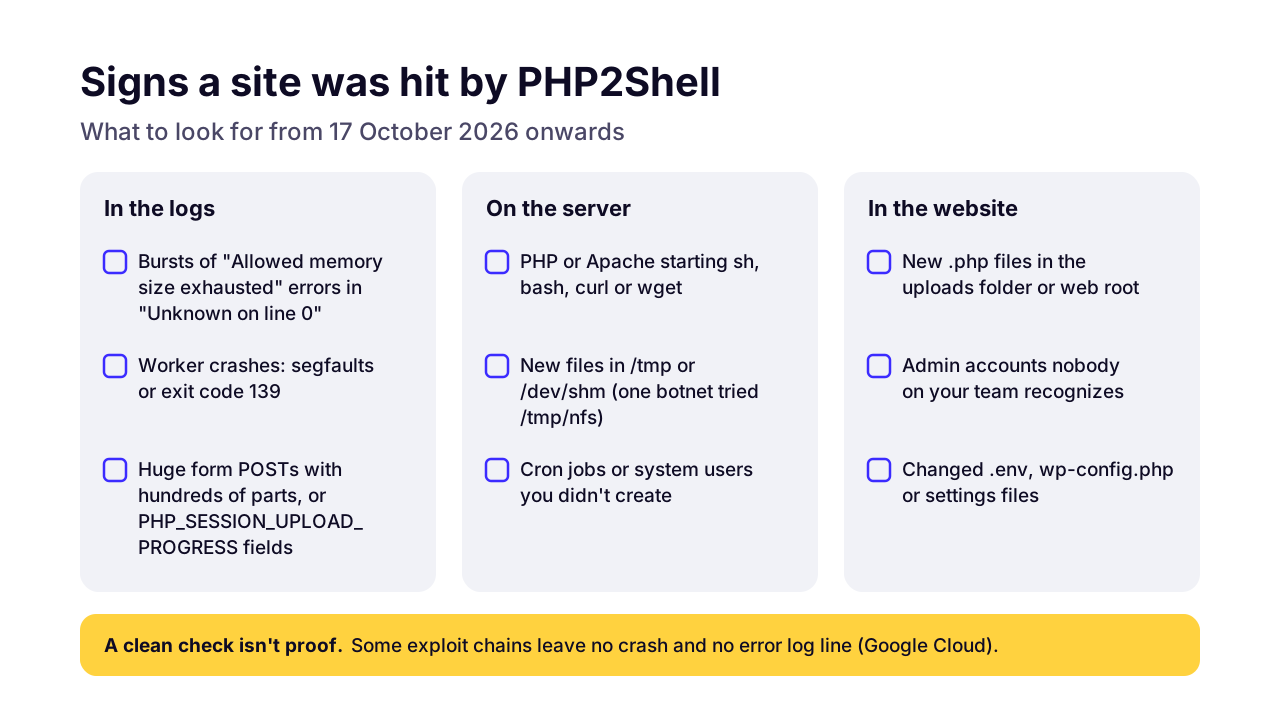
Look for bursts of out-of-memory errors that mention "Unknown on line 0", PHP worker crashes, web server processes starting shells or download tools, and new PHP files or admin accounts, going back to October 17, 2026. Finding nothing helps, but it isn't proof: some exploit chains leave no crash and no log line.
 (opens the full-size chart in a new tab)
"Unknown on line 0" is the useful clue. It means PHP failed before any of your scripts ran, which is exactly where these attacks happen. Normal memory errors point at a real file and line. Google Cloud's guidance adds unusually long session cookies, rapid bursts of 500 and 200 responses to the same page, and PHP-FPM workers exiting with code 139.
If you or your developer can log in to the server, these commands are a starting point. Log locations vary by host, so adjust the paths.
# Memory errors raised before any script ran
grep -h "Allowed memory size" /var/log/php*fpm*.log /var/log/apache2/error.log | grep "Unknown on line 0"

# Crashing Apache children
grep -c "Segmentation fault" /var/log/apache2/error.log

# PHP files created since October 17 under your web root
find /var/www -name '*.php' -newermt 2026-10-17

# Scheduled jobs for the web server user (apache or nginx on RHEL)
sudo crontab -u www-data -l

# WordPress administrators (needs WP-CLI)
wp user list --role=administrator
Some indicators are published. Sophos logged exploit traffic with the user agent php2shell-scan/109618 trying to drop a payload at /tmp/nfs, which it linked to a Mirai-style botnet. That attempt was blocked, but the markers are worth searching for. AWS published source IP addresses, but warns they belong to shared anonymizing networks, so a match isn't proof by itself. If you have a log platform, CISA's Sigma detection rule bundles these. CISA expects a medium to high rate of false alarms from it.
Free scanners exist, with caveats. Searchlight Cyber's open-source php2shell-scanner actively probes a site and forces memory errors, which will show up in your logs, and its notes admit false positives on patched 8.4.27 and 8.3.36. OpenAI's checker only reads the version a server advertises, which can't see backports. Pentest-Tools warns that a clean result from behind a firewall may only mean the firewall stopped the test. Only scan sites you own or have permission to test.
What to do if you find something
- Take the site offline or put it in maintenance mode, and keep a copy of the logs before anything rotates them away.
- Patch PHP before you bring anything back. Restoring a clean site onto vulnerable PHP just repeats the problem.
- Restore from a backup taken before October 17, or have someone clean the site file by file.
- Change every secret the site could read: database passwords, API keys, payment gateway keys, email passwords, the WordPress salts in wp-config.php and all admin passwords.
- Remove unknown admin users, cron jobs and SSH keys, then watch the logs closely for a few weeks.
- If customer data could have been exposed, check your legal duty to report it, and tell your payment provider if card data was involved.
Even with no sign of a break-in, if your site ran unpatched PHP on the open internet between October 17 and the day you patched, consider changing the API and payment keys stored in its config. That's our view, not an official rule. Wiz showed the bug can leak memory contents, and changing a key is cheap next to finding out later.
Will Cloudflare or another firewall protect my site?
A web application firewall helps, but it doesn't replace the patch. Most of the big providers shipped rules within a day (see the table). But attackers are already changing their payloads. And anyone who can reach your server directly skips the firewall entirely.
Cloudflare
- PHP2Shell rule
- PHP Remote Code Execution Attack rules 1 to 7 (managed and free rulesets)
- On by default?
- Yes on the free plan; paid plans should check they're set to block
AWS WAF
- PHP2Shell rule
- PHP2Shell_BODY rules in AWSManagedRulesPHPRuleSet
- On by default?
- Blocks, if your web ACL uses the PHP rule group
Akamai
- PHP2Shell rule
- Rule 3000991
- On by default?
- Not stated
Imperva Cloud WAF
- PHP2Shell rule
- Built in
- On by default?
- Yes, per Imperva
Fastly Next-Gen WAF
- PHP2Shell rule
- Virtual patch rule
- On by default?
- No, you opt in
Google Cloud Armor
- PHP2Shell rule
- Managed rules
- On by default?
- Yes, for active managed rules
The firewall only helps if all traffic goes through it. Patchstack points out that Cloudflare's rules only protect a server that accepts traffic exclusively from Cloudflare, so lock your origin server to Cloudflare's IP ranges if you rely on it. AWS calls its own rules a backup layer, not a replacement for upgrading PHP.
WordPress security plugins can't help here. They're written in PHP and load after PHP has already read the request, so the attack is over before the plugin runs. Sucuri makes the same point: updating WordPress or its plugins doesn't patch PHP.
I'm on PHP 7.4, 8.0 or 8.1. What now?
There's no official PHP release for your version. Check whether your host or Linux distribution shipped a backported fix, and move to PHP 8.3 or 8.4 as soon as you've tested your site on it. CISA goes further: it advises taking systems on PHP 8.1 or older offline until they're patched or upgraded.
Backports exist in more places than you'd think. cPanel, Plesk, CloudLinux, Ondřej Surý's repository, Remi's repository, Red Hat (for RHEL 8's php 7.4) and Ubuntu Pro (for 20.04's php 7.4) all shipped one. Others didn't. Amazon Linux 2023 has no fix planned for php8.1, the official Docker php:8.1 image wasn't rebuilt, and Azure's Windows PHP runtimes won't be patched.
A backport only buys time. PHP itself won't ship any other security fixes for these versions, and the next serious bug may not get a backport at all. WordPress recommends PHP 8.3 or newer, and its compatibility table lists PHP 8.2 to 8.5 as supported by WordPress 6.9 to 7.1. The usual blocker is an old plugin or theme, not WordPress itself.
This is how we'd run the upgrade on a WordPress site:
- Take a full backup of files and database, and check you can actually restore it.
- Copy the site to a staging environment. Many hosts offer one-click staging.
- Update WordPress and every plugin on staging first, theme included. Remove plugins you don't use.
- Switch staging to PHP 8.3 or 8.4 and click through the pages that make money: checkout, contact forms, bookings, logins and the admin screens your team uses.
- Check the PHP error log on staging for warnings and fatal errors, and fix or replace what breaks.
- Switch the live site, then watch the error log for a few days.
Skip the old PHP Compatibility Checker plugin. Its WordPress.org page says it's no longer maintained and only checks up to PHP 8.0. A developer can run the maintained PHPCompatibilityWP rules instead:
vendor/bin/phpcs -p wp-content --standard=PHPCompatibilityWP --runtime-set testVersion 8.3-Which version should you pick? If your plugins support it, PHP 8.4: it gets security fixes until the end of 2028. PHP 8.3 is the safer choice for a site with older plugins and is covered until the end of 2027. Avoid moving to 8.2 now: its support ends on December 31, 2026, so you'd be doing this again in two months.
If this has you wondering whether your site needs PHP at all, that's fair for a brochure site or a store with a small catalog. Our WordPress to Next.js migration guide covers when moving off makes sense and when it doesn't. For most WordPress sites, the right move this week is simply a patched, supported PHP.
So what should you do this week?
Patch first, then look back. Confirm your PHP is on a fixed release or a vendor-patched package, restart it, turn off session upload progress, and check for signs of a break-in from October 17 onwards. Then put a date in the calendar for moving off PHP 8.2 or older.
- Today: find your PHP version and handler, and send the message above to your host if you don't manage the server.
- Today: if you run the server, update PHP, confirm the CVE in the changelog and restart PHP fully.
- This week: set
session.upload_progress.enabled = 0in php.ini or the FPM pool, and switch on your firewall's PHP2Shell rules. - This week: check logs and files back to October 17, plus the admin user list, and change stored keys if the site was exposed.
- This month: test and move anything on PHP 8.2 or older to 8.3 or 8.4.
- Ongoing: watch for PHP's next regular release, which fixes CVE-2026-115560.
Keeping PHP and server software patched is the dull part of running a website, and it's the part that saves you in weeks like this one. It's also a real line in the budget, as our guide to software maintenance costs explains. If you'd rather hand it to someone, our maintenance and support team patches and upgrades PHP and WordPress sites, and our cloud and DevOps team can move you to hosting that gets these updates without you asking. Tell us about your site and we'll come back with what it needs.
Key takeaways
- 01PHP2Shell is two critical bugs in PHP itself, CVE-2026-109618 and CVE-2026-109619, that can let an attacker run code on a server without logging in.
- 02The fixed releases are PHP 8.5.12, 8.4.27, 8.3.36 and 8.2.35. Linux distributions backported the fix, so a patched package can keep an older version number.
- 03After updating, restart PHP-FPM or the web server fully. A reload can leave old workers running.
- 04Turn off session upload progress in php.ini or the FPM pool. It blocks one attack path and the newer CVE-2026-115560, and a .user.ini file won't do it.
- 05Updating WordPress, plugins or a security plugin doesn't fix PHP2Shell, and a web firewall only helps if all traffic passes through it.
- 06Check for signs of a break-in back to October 17, 2026, starting with memory errors that say Unknown on line 0.
- 07PHP 8.1 and older got no official fix, and PHP 8.2 loses support on December 31, 2026. Plan a move to 8.3 or 8.4.

Written by
Md. Shishir Ahmed
Founder, Arrowbin
Founder of Arrowbin. Writes about shipping software, what it costs, and the decisions that decide whether a product works.