The short answer
A vibe-coded app is production ready when strangers can't read or change other users' data, secret keys never reach the browser, payments are verified and processed once, errors alert a person, and a backup has actually been restored. Database access rules and leaked keys are behind the public incidents so far, so check those first. Fix the app in place when its data model is sound; rebuild only the part whose data model, auth or payment flow is wrong at the root.
On this page
Tools like Lovable, Bolt, v0, Replit or Cursor can take you from an idea to a working app in a weekend. That part is real, and I don't think anyone should feel bad about using them. The trouble starts later. Real users sign up, real money moves, and the database fills with data that belongs to people other than you.
This guide is for founders who built an MVP that way and now have a launch date, early customers or a nagging worry. We build and maintain production Next.js apps at Arrowbin, and these are the checks we run first when someone hands us an AI-built codebase. You can do most of them yourself.
What does 'production ready' mean for a vibe-coded app?
A production-ready app keeps each user's data private and takes payments correctly. It also survives errors and traffic spikes, and you can change it without breaking it. A demo only has to work on the happy path, once, while you watch.
Collins made vibe coding its Word of the Year for 2025 and describes it as 'the use of artificial intelligence prompted by natural language to write computer code'. Nothing in that says the code is bad. The gap is in what nobody asked for, because founders describe what an app should do for its users and rarely what it must refuse to do for everyone else. Nobody types 'and make sure user 41 can't read user 42's invoices', so the model doesn't build it.
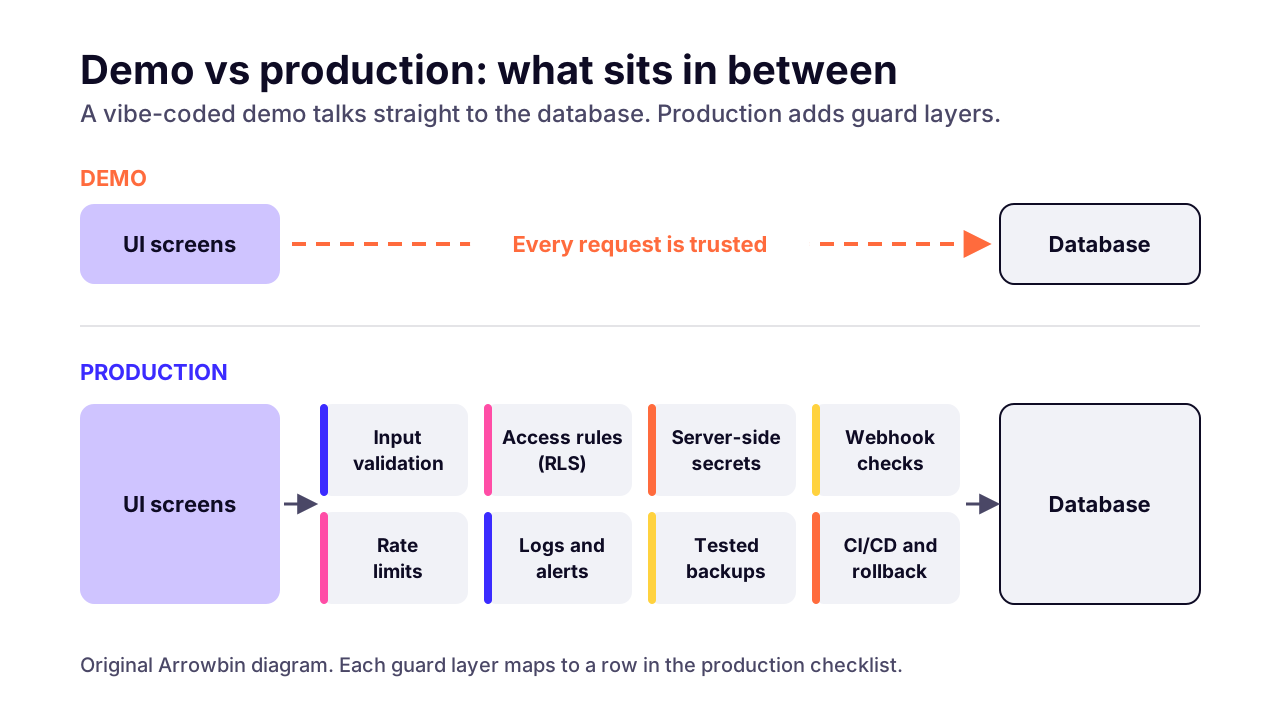
When we review an app for launch, we sort what's missing into five layers:
- Access control: who can read and change which rows, enforced by the database or server rather than by hiding buttons.
- Secrets: private API keys stay on the server and never ship in browser JavaScript.
- Payments: the server confirms each payment with the provider and handles every event exactly once.
- Reliability: errors get caught and routed to a person, and there's a backup you've tested.
- Change safety: tests, a separate development database and a deploy you can roll back.
 (opens the full-size chart in a new tab)
What usually breaks when an AI-built app gets real users?
The usual failures are data that anyone can read, secret keys shipped to the browser, payment events processed twice, and no way to see or undo errors. The first two are behind the public incidents so far.
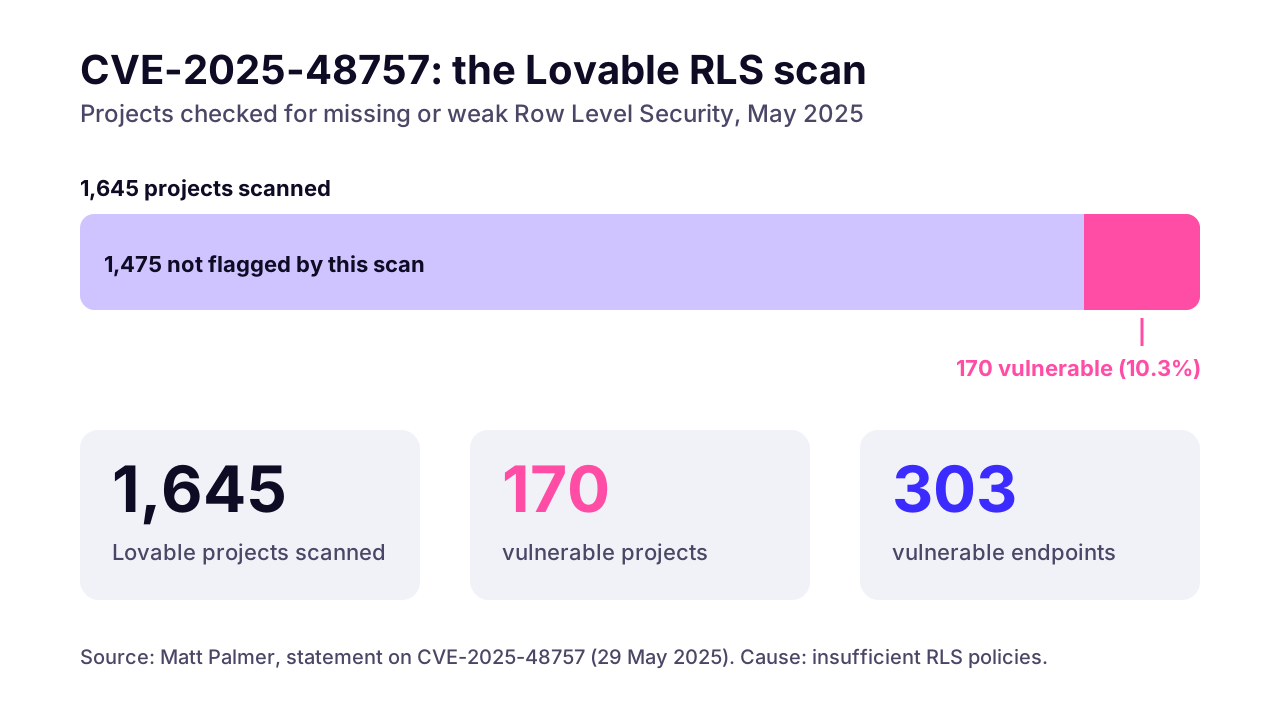
- Matt Palmer's statement on CVE-2025-48757 (May 2025) reports that 170 of 1,645 Lovable projects scanned, about 10.3%, had 303 vulnerable endpoints between them, caused by missing or weak Row Level Security.
- In February 2026, Wiz researchers found that Moltbook, a vibe-coded social platform for AI agents, had a Supabase key in its client-side JavaScript and no RLS policies. That exposed 1.5 million API authentication tokens and 35,000 email addresses, with write access too. The team fixed it within hours of being told.
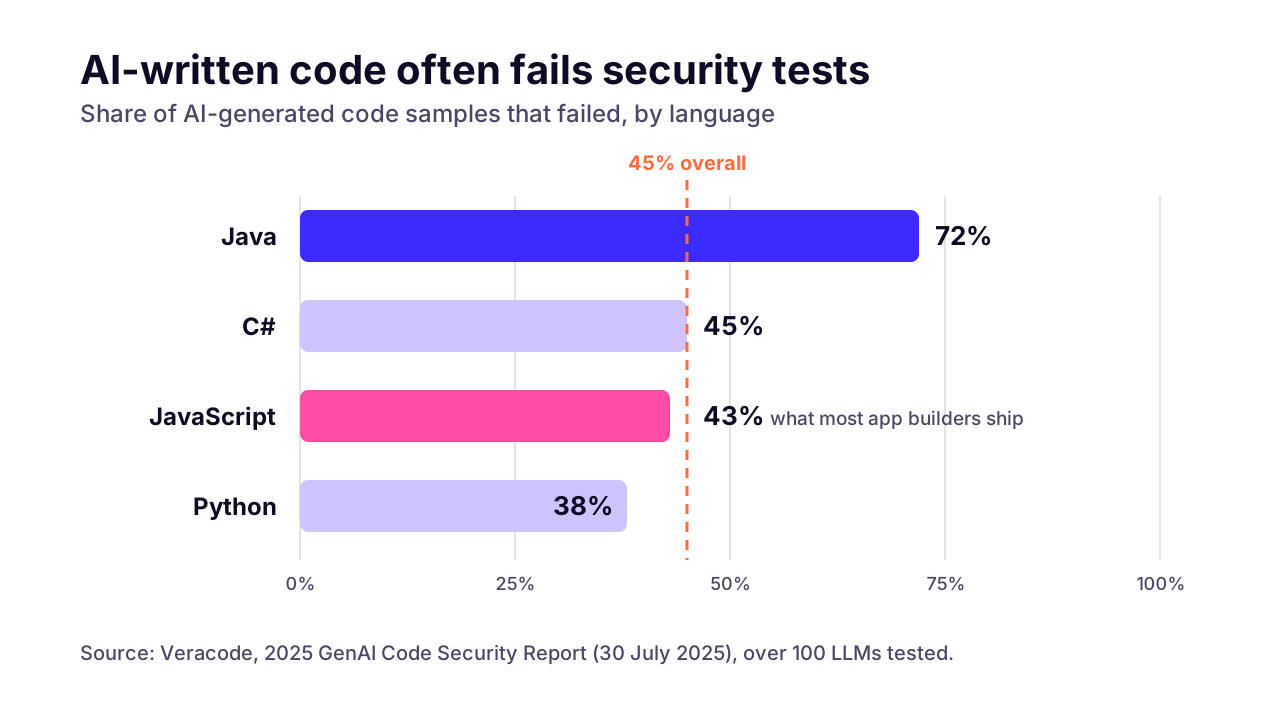
- Veracode's 2025 GenAI Code Security Report tested over 100 language models and found that 45% of code samples failed security tests, introducing OWASP Top 10 flaws. Cross-site scripting went undefended in 86% of the relevant samples.
- Broken access control is number one in the OWASP Top 10 for 2025. The Lovable and Moltbook cases are both that kind of bug.
In Veracode's tests, Java fared worst at 72%. JavaScript, which is what most of these app builders ship to the browser, came in at 43%. That's close to one sample in two. The code reads fluently, which makes the flaws easy to miss.
 (opens the full-size chart in a new tab)
Payment and reliability bugs make fewer headlines because they don't leak anything. They cost money quietly. An order ships twice. A subscription renews at the payment provider but never in your database. A checkout fails for one card type and nobody notices for days.
How do you check whether your database is exposed?
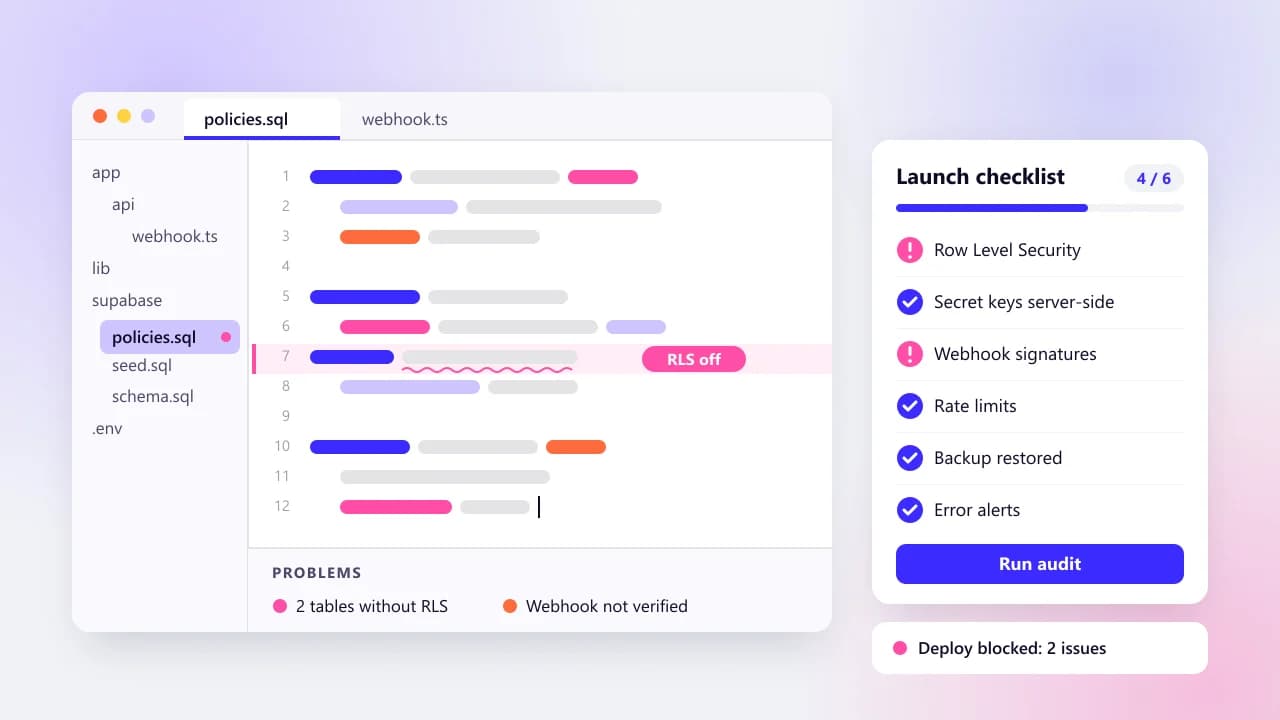
If you use Supabase, every table in an exposed schema needs Row Level Security switched on and a policy that matches who should see each row. Supabase's own RLS guide is blunt about the alternative: 'A table in an exposed schema without RLS is readable and writable by any role with a grant on it.'
Founders often panic about the wrong key. The publishable key (the older name is the anon key) is meant to be public. Supabase's API keys page says it's safe to put in a web page and that it 'only reaches what Row Level Security allows'. The dangerous one is the secret key, formerly service_role, which 'bypasses every Row Level Security policy you have'. It must never sit in a browser, a shipped app or your Git repo.
To check your own project, go in this order:
- List tables with RLS off. In the Supabase SQL editor, run: select tablename from pg_tables where schemaname = 'public' and rowsecurity = false; Every table it returns needs attention.
- Read each policy, not only whether one exists. A select policy with using (true) on a table of personal data lets everyone read everything, which is about as bad as RLS being off.
- Test as a logged-out visitor. In your browser's developer tools, copy one of the app's data requests as cURL, strip the user's login token, and run it. You should get nothing private back.
- Test as a second user. Create two accounts, sign in as the first, and request a record that belongs to the second by changing its ID in the request. If it loads, the policy is wrong.
- Search the live site for secret keys. Look through the JavaScript your site loads for 'service_role', 'sk_live' and 'secret'. In Next.js any variable starting with NEXT_PUBLIC_ is inlined into browser code, and in Vite the same goes for VITE_.
 (opens the full-size chart in a new tab)
Firebase has the same problem under another name. Its security rules do the job RLS does, and Google's rules guidance says of the open 'allow read, write: if true' ruleset: 'NEVER use this ruleset in production; it allows anyone to overwrite your entire database.' A rule that only checks auth != null means any logged-in user can read every record.
In fairness to the platforms, they now scan for this. Lovable's security docs describe a scan on publish that checks database access rules, and the same page says the tools 'cannot guarantee complete security'. A scanner is a smoke alarm. You still want someone to walk through the building.
What's on a production-readiness checklist for a vibe-coded app?
Start with who can see what (access rules, secrets, auth), then money (payments, validation), then everything that keeps the app running once it's live. The table follows roughly that order of risk. It's the list we work through before launch.
Fix sizes are our estimates, not quotes. S means under a day. M means a few days. L means a week or more.
Database access rules (RLS)
- What to check
- RLS is on for every exposed table, with policies that match who should see each row
- How to check it yourself
- Run the RLS query above, then the logged-out and second-user tests
- Fix size (our estimate)
- M
- Blocks launch?
- Yes
Secrets in browser code
- What to check
- No private API keys in client JavaScript or public env variables
- How to check it yourself
- Search the live site's JavaScript for 'sk_' and 'secret'
- Fix size (our estimate)
- S
- Blocks launch?
- Yes
Database secret key
- What to check
- The Supabase secret or service_role key is used only in server code
- How to check it yourself
- Search the repo for 'service_role'; no NEXT_PUBLIC_ or VITE_ variable should hold it
- Fix size (our estimate)
- S
- Blocks launch?
- Yes
Auth redirect URLs
- What to check
- Only your real domains are allowed, with no wildcards in production
- How to check it yourself
- Open the URL configuration page in your auth provider's dashboard
- Fix size (our estimate)
- S
- Blocks launch?
- Yes
Password reset and email verification
- What to check
- Reset links stop working after one use, and new accounts confirm their email
- How to check it yourself
- Reset a test account's password, then try the same link again
- Fix size (our estimate)
- S
- Blocks launch?
- Yes
Payment webhooks
- What to check
- Signatures are verified and each event ID is processed once
- How to check it yourself
- Resend one test event twice; the order should update once
- Fix size (our estimate)
- M
- Blocks launch?
- Yes
Server-side validation
- What to check
- Prices and roles are checked on the server, not only in the form
- How to check it yourself
- Edit a request in developer tools (change the price) and resend it
- Fix size (our estimate)
- M
- Blocks launch?
- Yes
Rate limiting
- What to check
- Every auth endpoint has a per-IP limit, as do forms and AI calls
- How to check it yourself
- Script 50 quick login attempts; you should start getting HTTP 429
- Fix size (our estimate)
- S
- Blocks launch?
- Before you run ads
Errors on external calls
- What to check
- Calls to outside services (payments, email, AI) time out and show a clear message
- How to check it yourself
- Put an invalid API key in a staging copy and walk through the flow
- Fix size (our estimate)
- M
- Blocks launch?
- No, first month
Logging and alerts
- What to check
- Errors reach an error tracker, and a named person gets notified
- How to check it yourself
- Trigger a test error in production and see who hears about it
- Fix size (our estimate)
- S
- Blocks launch?
- Yes
Backups and restore
- What to check
- Automatic backups exist, and at least one has been restored
- How to check it yourself
- Restore the latest backup into a scratch project and compare row counts
- Fix size (our estimate)
- S to M
- Blocks launch?
- Yes
Separate dev and prod
- What to check
- Testing and prompting never touch the production database
- How to check it yourself
- Check which database URL your preview and local builds use
- Fix size (our estimate)
- M
- Blocks launch?
- Yes
Tests on critical paths
- What to check
- Checkout and the core workflow have automated tests
- How to check it yourself
- Ask what would catch a broken checkout; if the answer is 'a customer', there are none
- Fix size (our estimate)
- M to L
- Blocks launch?
- No, first month
Deploys and rollback
- What to check
- Every deploy comes from Git, and you can roll back in minutes
- How to check it yourself
- Check your host's dashboard for a one-click rollback
- Fix size (our estimate)
- S to M
- Blocks launch?
- No, first month
Two rows deserve a closer look. Payments first. Stripe's webhook documentation says endpoints 'might occasionally receive the same event more than once', that events can arrive out of order, and that live-mode deliveries are retried for up to three days. A handler that marks an order paid every time it hears 'payment succeeded', without checking whether it has already seen that event ID, will eventually ship something twice, and nobody notices until the stock count and the bank statement disagree. Skip the signature check and it can be fooled by a forged event.
bKash and SSLCommerz work the same way, as does any gateway that calls your server back. Confirm the payment with the provider from your server, record the transaction ID, and process it once. If the app bills subscriptions, our guide to what a production SaaS costs to run covers the payment and hosting fees that come with it.
Then backups. A backup you have never restored is a guess. Restore last night's copy into a scratch project once, count the rows in your main tables, and write down how long it took. That number is your real recovery time.
Should you fix the vibe-coded app or rebuild it?
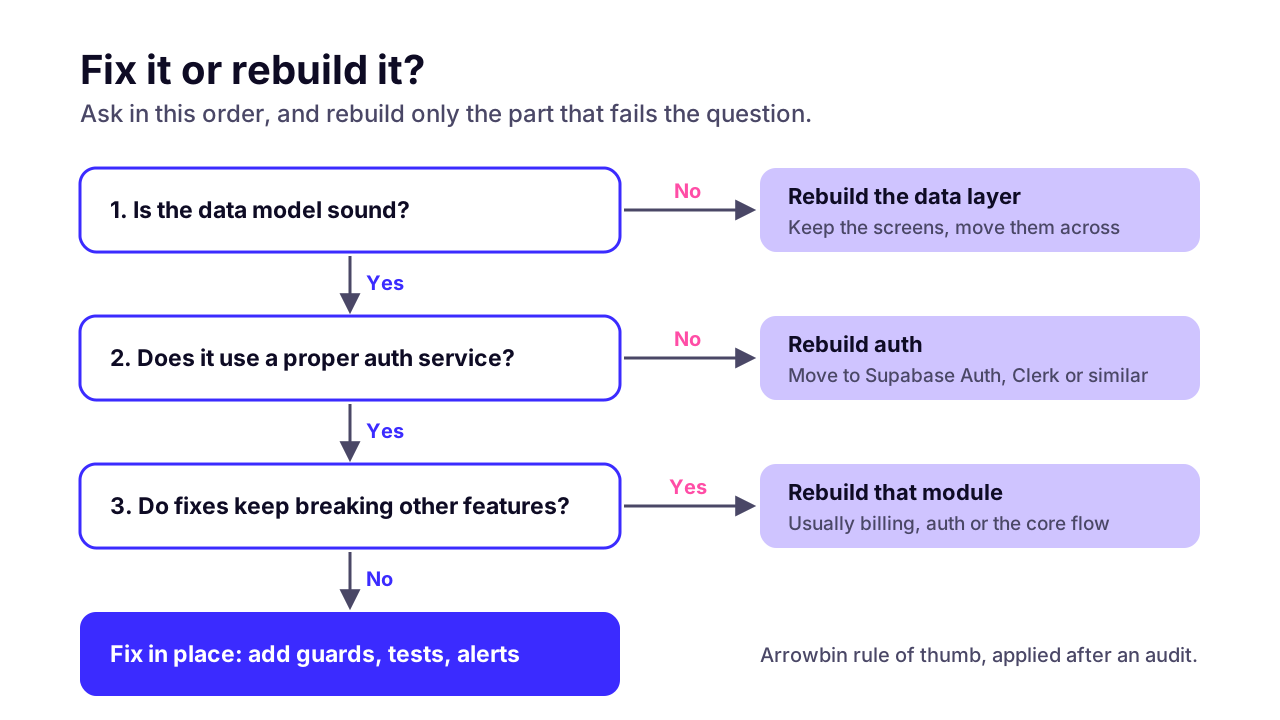
Fix it when the data model is sound and the problems are missing guards. Rebuild the affected part when the data model, auth or payment flow is wrong at the root, because patches on a wrong model keep breaking.
I rarely think 'throw it all away' is the right call. The screens an AI tool generates are often fine, and they're the cheapest part to keep. What decides it is underneath.
Data model
- Points to fixing it
- Tables match real things (users, orders, teams) and every row has a clear owner
- Points to rebuilding that part
- The same data lives in several places, or key records are JSON blobs with no owner ID
Auth
- Points to fixing it
- Uses a proper auth service such as Supabase Auth, Firebase Auth or Clerk
- Points to rebuilding that part
- Home-made login, passwords stored in a table, or roles checked only in the browser
Business rules
- Points to fixing it
- Each rule (pricing, permissions) lives in one place
- Points to rebuilding that part
- The same rule is copied into many components with small differences
Tests
- Points to fixing it
- Some tests exist, or the code is simple enough to add them
- Points to rebuilding that part
- No tests, and the code is too tangled to test without rewriting it
Module size
- Points to fixing it
- Features sit in separate files and routes
- Points to rebuilding that part
- One huge page or function handles most of the app
Platform lock-in
- Points to fixing it
- A standard stack you can host anywhere, like Next.js with Postgres
- Points to rebuilding that part
- Core logic depends on a builder feature you can't export, and it blocks a requirement
Who maintains it
- Points to fixing it
- A developer can read it and explain it within a day or two
- Points to rebuilding that part
- Nobody can explain how a core flow works, including the tool that wrote it
Count the right-hand column. One or two rebuild signals usually means rebuilding one module, say auth or billing, and keeping the rest. Four or more, and the cleaner path is often a fresh data layer with the existing screens moved across. That's a rule of thumb. Apply it after an audit, never before.
 (opens the full-size chart in a new tab)
When should a founder stop prompting and hire an engineer?
Bring in an engineer before you charge money or store sensitive data, and any time each new feature breaks an old one. Prompting your way out of a security gap is slow, because the tool that left the gap doesn't know it's there, and you may not either.
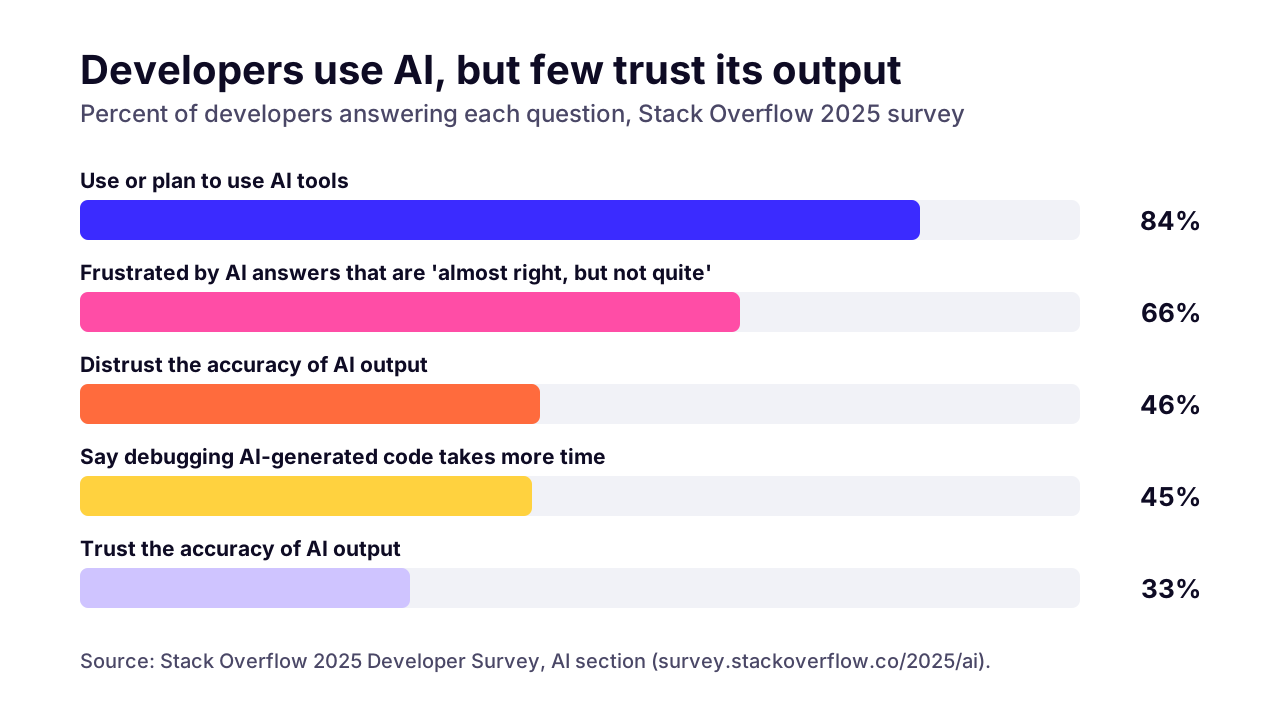
Professional developers are wary too. In the Stack Overflow 2025 Developer Survey, 84% of respondents used or planned to use AI tools, yet 46% distrusted the accuracy of the output and only 33% trusted it. The top frustration, named by 66%, was AI answers that are 'almost right, but not quite'. And 72% said vibe coding isn't part of their professional work.
Almost right is fine for a landing page. It isn't fine for a permission check.
 (opens the full-size chart in a new tab)
These are the triggers we'd treat as 'get a human in now':
- You're about to take payments, or start a free trial that converts to paid.
- You store personal data: addresses, health details, ID documents, anything you'd hate to see in a breach notice.
- You work in a regulated area such as health, finance or education.
- A business customer has sent you a security questionnaire.
- A second person is about to start changing the code.
- Every new feature breaks something that used to work.
Keep using the AI tools for what they're good at: trying new screens, mocking a flow to show a customer, drafting a component. The difference is that drafts now go through review first. If you're still at the idea stage, our guides on how long an MVP takes to build properly and what an MVP costs cover the other route.
What does a production hardening project look like?
A sensible hardening project starts with a short, read-only audit and fixes launch blockers first. Then it adds the tests and deploy pipeline that keep later changes safe. Nobody should be rewriting your app on day one.
- Audit. Read everything without changing anything, and rank the findings by risk in plain English.
- Launch blockers. Fix the 'Yes' rows from the checklist, which are usually small, separate changes.
- Tests and CI. Add automated tests for sign-in and checkout first, then the core workflow, and run them on every push so a broken change can't reach production.
- Observability. Wire up error tracking and uptime alerts that reach a person who will act on them.
- Handover. A short document: how to run it, where secrets live, how to roll back, and what was left for later.
The audit is the step people want to skip. It's also the one that saves money, because it shows if the job is a week of guard rails or a rebuild of one module before anyone commits to a price.
What to ask before someone takes over your AI-built code
Ask how they'll audit it, what they'll fix first, how they'll prove the fixes work, and what you'll own at the end. Good answers are specific. Vague ones are a warning.
- Will you start with a written, read-only audit, and can I see an example of one?
- Which findings would you treat as launch blockers, and why those?
- How will you show me a fix works, for example with a test or a replayed request?
- Will you keep my current stack? If not, what's the reason?
- Who will do the work, and will it be the same people next month?
- Do I keep full ownership of the repo and every account it runs on?
- What will I get at handover?
Our guide on how to vet a development partner covers the rest of the process.
How do you keep a vibe-coded app safe after launch?
Treat every AI-written change like any other pull request: someone reviews it, tests run on it, and it deploys through the pipeline, never straight from a chat window to production. Then keep dependencies patched and test your backups on a schedule.
- Review the diff, not the summary. AI tools describe their changes generously, so read anything touching auth or payments line by line.
- Don't let a prompt change production data or policies directly. Make the change against a development database, then promote it.
- Update dependencies monthly, and sooner for security advisories. Software supply chain failures sit at number three in the OWASP 2025 list.
- Restore a backup once a month and note how long it took.
- Send alerts somewhere a person actually looks, like a team chat channel or SMS.
None of this stops once the app is cleaned up. It's a running cost, and our guide to the ongoing cost of owning cleaned-up code shows how to budget for it each year.
If you'd rather not own that routine, it's what ongoing maintenance and support covers. We can also set up your deploy pipeline and monitoring as a one-off and hand it back to your team.
What can you check in your app today?
Five database checks take minutes and cover the failures behind the public Lovable and Moltbook incidents: list the tables with Row Level Security off, read each policy, request private data as a logged-out visitor, request a second user's record by changing its ID, and search your live JavaScript for secret keys. Then fix the launch blockers, including payment webhooks, error alerts and a tested backup restore, before you take another payment.
If the list turns up more than you want to fix alone, that's the work we do when we turn a prototype into production software. We'd start with the read-only audit, and a 30-minute call with the repo link is enough to scope it.
Key takeaways
- 01A vibe-coded app is production ready once someone has checked its data access rules and secret keys, its payment handling, and whether a backup can actually be restored.
- 02Missing database access rules are the most serious common gap; the public Lovable and Moltbook incidents both came down to Row Level Security.
- 03The Supabase publishable key is meant to be public, while the secret key must never reach a browser, a shipped app or Git.
- 04Payment webhooks need a signature check and a record of processed event IDs, because providers resend events.
- 05Fix in place when the data model is sound; rebuild only the module whose data model, auth or payment flow is wrong at the root.
- 06Bring in an engineer before you charge money or store sensitive data, and keep AI tools for drafts that go through review.
- 07Restore a backup at least once before launch. Until you do, you don't know your recovery time.

Written by
Md. Shishir Ahmed
Founder, Arrowbin
Founder of Arrowbin. Writes about shipping software, what it costs, and the decisions that decide whether a product works.