The short answer
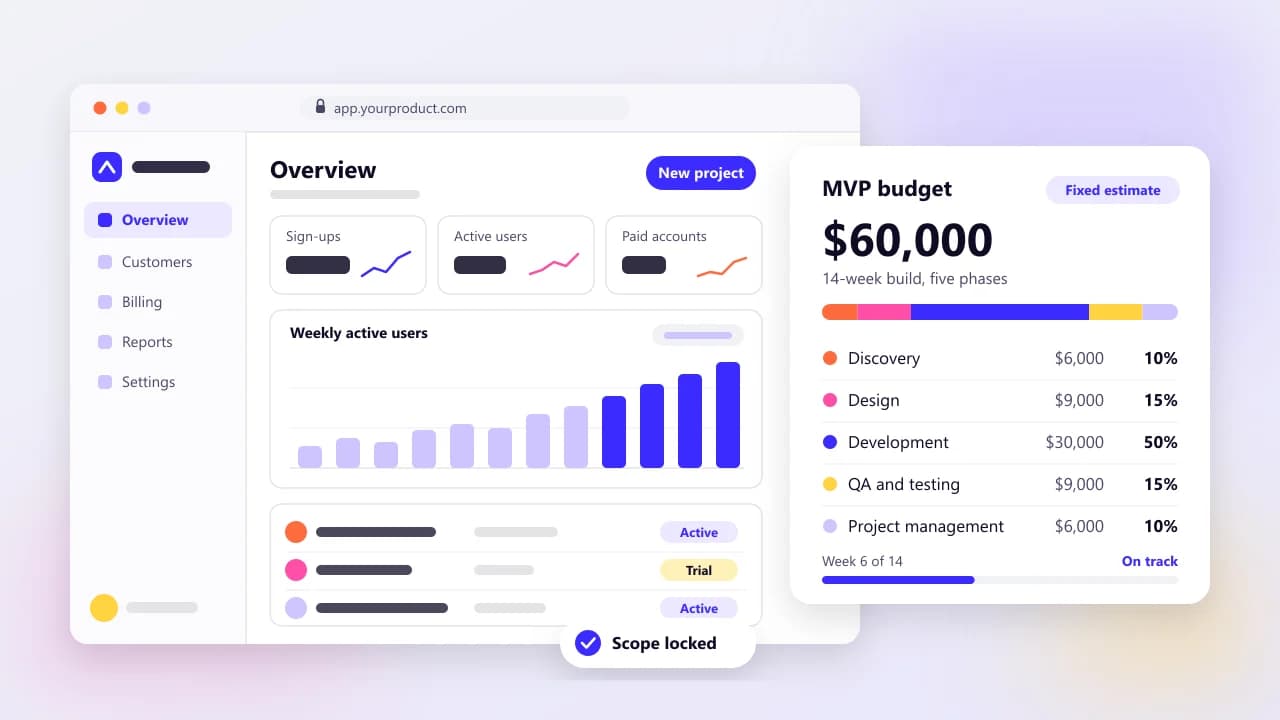
A focused SaaS MVP comes to around $60,000 in Arrowbin's illustrative 14-week example, and a full multi-tenant SaaS platform costs $80,000–$200,000 over 5–9 months on our estimates. The jump comes from SaaS-only work such as tenant isolation and subscription billing, and later from enterprise extras like SSO and audit logs. After launch, plan on 15–20% of the build cost a year for maintenance plus hosting and tool plans, and give payment fees their own line because they grow with revenue: on published US prices, Stripe takes about 4.2% of a $50 monthly plan.
On this page
The SaaS budgets that worry me are the ones that stop at the build quote. A subscription product keeps costing money after launch. Every charge pays a fee. Every new customer adds a little load, and sooner or later a bigger prospect sends you a security questionnaire.
I wrote this for founders and SMB owners planning a SaaS product, including teams turning an internal tool into something they can sell. We build SaaS products at Arrowbin, so the build figures below are our own published estimates. The running costs are worked out from vendors' price pages as listed on October 15, 2026, with the sums shown so you can redo them with your own numbers.
How much does SaaS development cost in 2026?
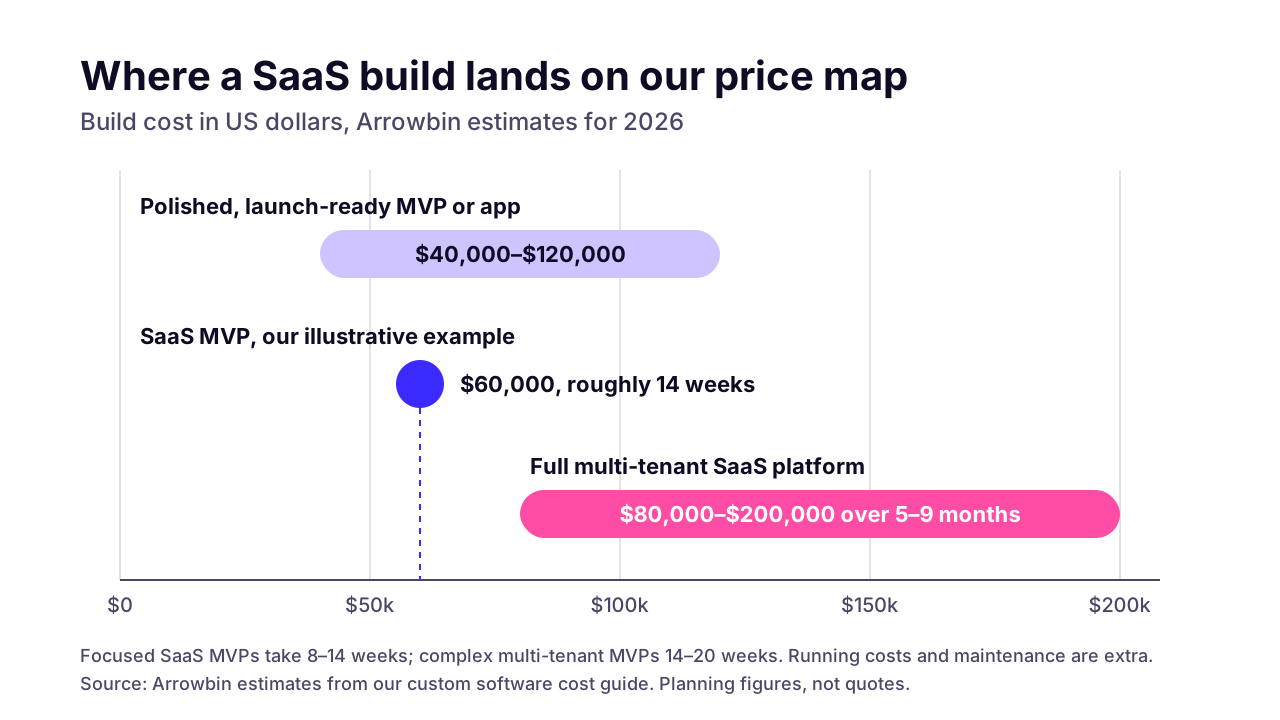
Using Arrowbin's published estimates, a focused SaaS MVP comes to around $60,000 in our illustrative 14-week example, and a full multi-tenant SaaS platform runs $80,000–$200,000 over 5–9 months. Maintenance and running costs come on top of both build numbers.
SaaS MVP
- What's usually in it
- One core workflow, sign-up and login, billing, a simple onboarding flow and an admin view
- Build cost (Arrowbin estimate)
- Around $60,000 in our illustrative example; our wider band for a polished, launch-ready MVP or app is $40,000–$120,000
- Typical timeline
- 8–14 weeks for a focused MVP; 14–20 weeks for a complex multi-tenant one
Full platform (v1 for bigger customers)
- What's usually in it
- Teams and roles plus analytics; deeper admin tooling; integrations; SSO and audit logs once buyers ask
- Build cost (Arrowbin estimate)
- $80,000–$200,000 in total
- Typical timeline
- 5–9 months
Scale
- What's usually in it
- Hardening the architecture and billing for real traffic, then the features paying customers request
- Build cost (Arrowbin estimate)
- 15–20% of the build cost a year for maintenance plus hosting and tool plans, with payment fees and new features as separate lines
- Typical timeline
- Ongoing
Read the platform range as the cost of the whole product at that stage. Most teams get there in phases: an MVP first, then the pieces paying customers ask for. Timelines follow the same shape. A focused SaaS MVP usually takes 8–14 weeks, a complex multi-tenant MVP takes 14–20, and our $60,000 example sits at roughly 14. For how those weeks are spent, see the week-by-week MVP timeline in our schedule guide.
These are planning figures, not quotes. Our full custom software cost guide covers the other tiers and shows where the $60,000 goes, phase by phase.
 (opens the full-size chart in a new tab)
Why does SaaS cost more than a regular web app?
A SaaS costs more because many customers share one system and pay for it every month. That setup needs tenant isolation and subscription billing from the start. Later it needs roles and admin tooling, plus the reliability people expect from something they pay for. Almost none of it shows up in a demo.
A web app for one company has one set of users and one pile of data. Put a hundred companies on the same code and the same database and the rules change. The table lists the parts that exist because of that, with our view of when each one is needed.
Tenant isolation
- Why a SaaS needs it
- Customer A must never see customer B's data, even by accident
- MVP or later
- Day one
- Why it adds cost
- Every query and background job has to carry the tenant ID, and tests have to prove nothing leaks
Sign-up, login and 2FA
- Why a SaaS needs it
- Self-serve accounts are how most SaaS customers arrive
- MVP or later
- Day one
- Why it adds cost
- Password resets and email checks need building and testing; a good auth library does most of it
Subscription billing
- Why a SaaS needs it
- Plans and trials, plus retrying failed cards (dunning) and sending invoices
- MVP or later
- Day one
- Why it adds cost
- Billing runs on webhooks from the payment provider, and each edge case (proration, refunds, cancellations) has to be handled exactly once
Admin view
- Why a SaaS needs it
- Your team has to look up accounts and fix data when support tickets come in
- MVP or later
- Day one, kept simple
- Why it adds cost
- It's a second app with its own permissions that no customer ever sees
Teams and roles
- Why a SaaS needs it
- Customers want to invite colleagues with less access than the owner
- MVP or later
- Later, when customers ask
- Why it adds cost
- Permission checks spread into every screen and API route
Product analytics
- Why a SaaS needs it
- You need to know which features paying customers actually use
- MVP or later
- A light version early
- Why it adds cost
- Event tracking plus dashboards someone keeps accurate
Audit logs
- Why a SaaS needs it
- Bigger customers ask who changed what, and when
- MVP or later
- Later (earlier for regulated data)
- Why it adds cost
- An append-only record of sensitive actions that customers can search and export
SSO (SAML or OIDC)
- Why a SaaS needs it
- Enterprise buyers want staff to sign in through Okta or Microsoft Entra
- MVP or later
- When enterprise buyers ask
- Why it adds cost
- Setup and testing per customer, or a per-connection fee if you buy it
Public API and webhooks
- Why a SaaS needs it
- Customers want to connect your product to their own tools
- MVP or later
- Later
- Why it adds cost
- Versioning and API keys, plus docs that stay current
White-labelling
- Why a SaaS needs it
- Resellers want their own brand and domain on it
- MVP or later
- Later
- Why it adds cost
- Custom domains, per-tenant theming and per-tenant email settings
Monitoring, alerts and daily backups
- Why a SaaS needs it
- Paying customers notice downtime before you do
- MVP or later
- Day one
- Why it adds cost
- Setup time plus monthly tooling fees (priced in the running-cost section)
Compliance work, such as SOC 2 readiness
- Why a SaaS needs it
- Enterprise security reviews ask for evidence of your controls
- MVP or later
- Later
- Why it adds cost
- Written policies and evidence of your controls, plus the audit firm's fee
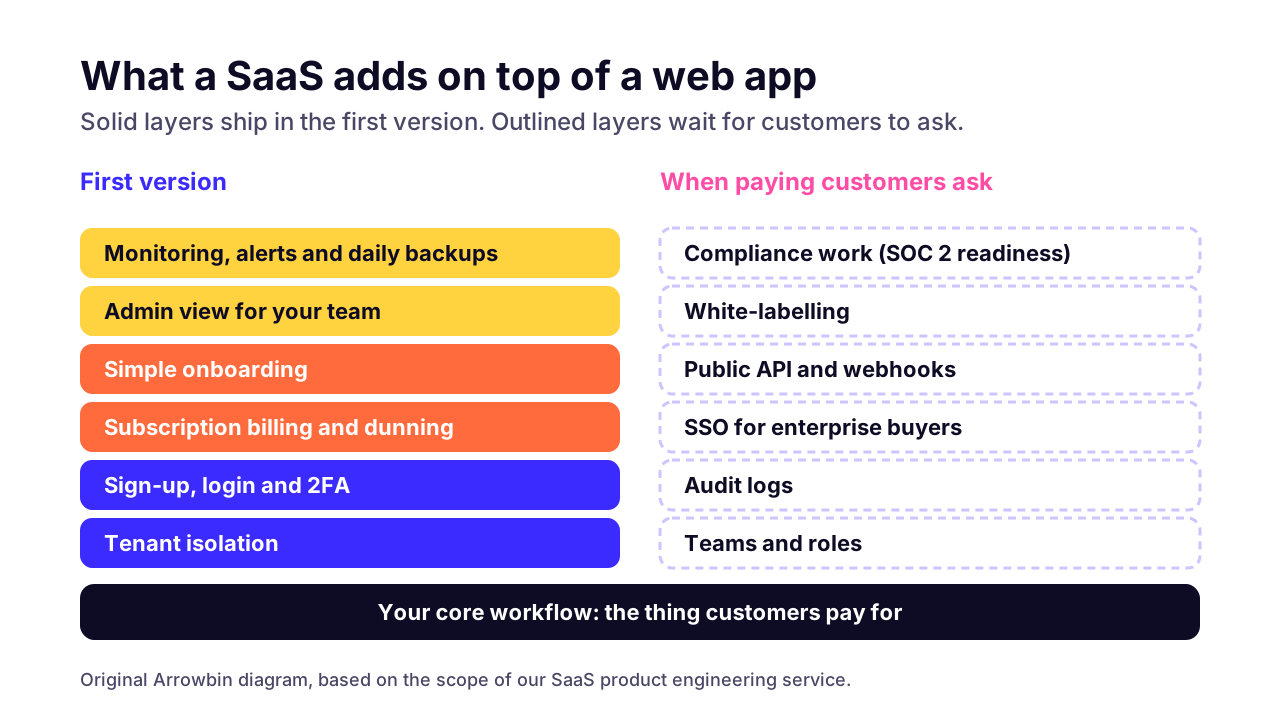
None of these rows is hard on its own. The cost comes from how they touch each other. Billing changes what a user is allowed to do, roles decide who can change billing, and every one of them has to respect the tenant boundary.
 (opens the full-size chart in a new tab)
What goes into the first version, and what can wait?
Your core workflow, sign-up and login, and billing go in from day one, usually with a simple onboarding flow and an admin view. Teams and roles, public APIs, SSO, white-labelling and native apps can usually wait until paying customers ask for them.
Billing on day one surprises some founders. I'd still insist on it. A customer who pays is the only test of a SaaS idea I fully trust, and bolting billing onto a free product later means moving every existing account onto a plan.
Tenant isolation can't wait either. Adding a Team page in month six is a normal feature. Adding a tenant ID to every table and stored file once real customer data exists is a migration that touches everything, and a mistake there shows one customer's data to another.
For everything else, wait for a signal from someone who pays you:
- Teams and roles: a customer asks to invite a colleague who shouldn't see billing.
- SSO: a deal stalls in a security review because the buyer's IT team wants staff to sign in through their identity provider.
- Public API: several customers ask to connect the same tool, and copying data across by hand is costing them time.
- White-labelling: a reseller or agency wants to sell the product under its own brand.
- Native apps: your analytics show people opening the web app on their phones every day.
If you're working out that first version's budget line by line, our guide on how to budget the first version covers the formula and what to cut. I won't repeat it here.
What does it cost to run a SaaS product each month?
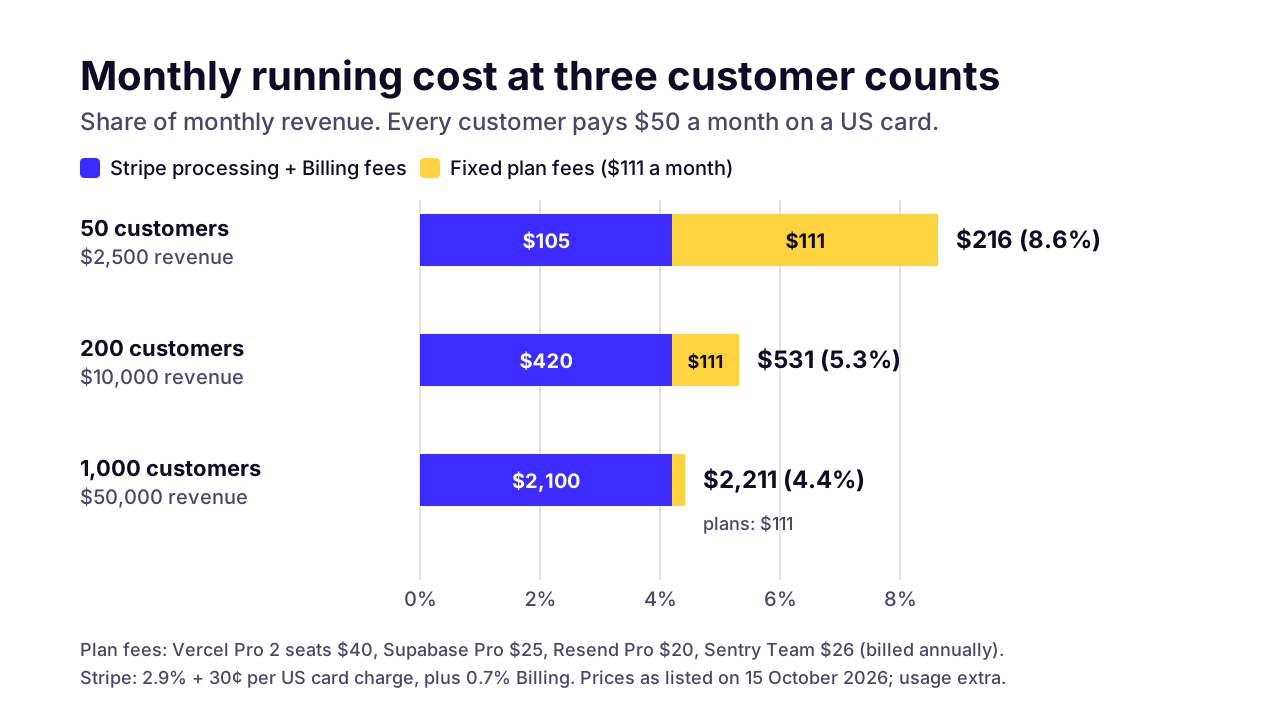
Expect two kinds of running cost: payment and billing fees that grow with revenue, and monthly plans for hosting and tools that start small and grow with usage. For a SaaS with 200 customers on a $50 plan, the published prices below add up to about $531 a month before usage-based charges.
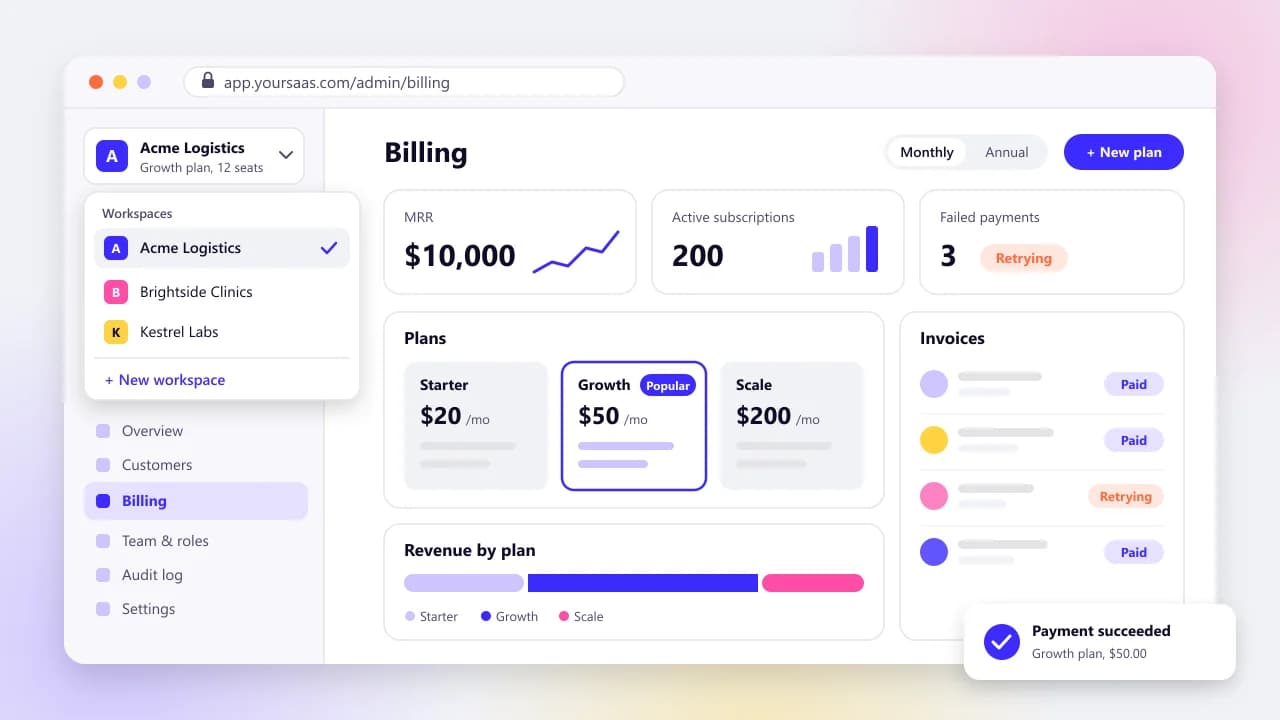
Take a hypothetical B2B SaaS with 200 customers paying $50 a month, all on US cards. That's $10,000 of monthly recurring revenue. Two developers deploy it on Vercel, the database lives on Supabase, transactional email goes through Resend and errors go to Sentry. Those are common picks for the stack we use. They aren't the only sensible ones, so swap in your own vendors and redo the sums.
Stripe card processing
- Price as listed on October 15, 2026
- 2.9% + 30¢ per successful domestic card charge
- Assumption
- 200 charges of $50
- Monthly cost
- $350
Stripe Billing
- Price as listed on October 15, 2026
- 0.7% of Billing volume, pay as you go
- Assumption
- $10,000 billed
- Monthly cost
- $70
Vercel Pro
- Price as listed on October 15, 2026
- $20 a month per developer seat, with $20 of included credit
- Assumption
- 2 seats, usage within the credit
- Monthly cost
- $40
Supabase Pro
- Price as listed on October 15, 2026
- From $25 a month, with $10 of compute credits
- Assumption
- One project on the base plan
- Monthly cost
- $25
Resend Pro
- Price as listed on October 15, 2026
- $20 a month for 50,000 emails
- Assumption
- Under 50,000 emails
- Monthly cost
- $20
Sentry Team
- Price as listed on October 15, 2026
- $26 a month, billed annually
- Assumption
- Under the plan's error quota
- Monthly cost
- $26
Total
- Price as listed on October 15, 2026
- Assumption
- $10,000 of monthly revenue
- Monthly cost
- $531 (5.3% of revenue)
Stripe's pricing page lists 2.9% + 30¢ per successful transaction for domestic cards, and Stripe Billing on pay-as-you-go adds 0.7% of Billing volume with no recurring fee. On a $50 charge that's $1.75 plus 35¢. Call it $2.10 per customer per month.
Hosting is cheap at this size. Vercel's pricing puts Pro at $20 a month per developer seat, with a $20 included credit to use across resources. Don't run a paying product on the free Hobby plan, though. Vercel says Hobby is for personal, non-commercial use.
Supabase Pro starts at $25 a month and includes $10 of compute credits, an 8 GB disk per project and 100,000 monthly active users. Its free projects pause after a week of inactivity. Fine for a prototype. An awkward surprise for a customer.
Resend lists Pro at $20 a month for 50,000 emails, and Sentry's Team plan is $26 a month when billed annually. Both have free tiers that can carry a pilot: Resend's caps you at 100 emails a day, and Sentry's Developer plan is limited to one user.
Treat the $531 as a floor. Data transfer beyond Vercel's included 1 TB, more database compute, extra disk, SMS, a status page or a support inbox all come on top, and they depend on how people use your product. File-heavy products can make hosting the biggest line. That's why our hosting and DevOps for SaaS work starts by sizing usage before anyone picks a plan.
Run the same plans for 50 customers, then 200, then 1,000, and the mix changes. At 50 customers the fixed plans are just over half the bill. At 1,000, Stripe is about 95% of it, and the total settles near 4.4% of revenue.
 (opens the full-size chart in a new tab)
How much of your SaaS revenue goes to Stripe?
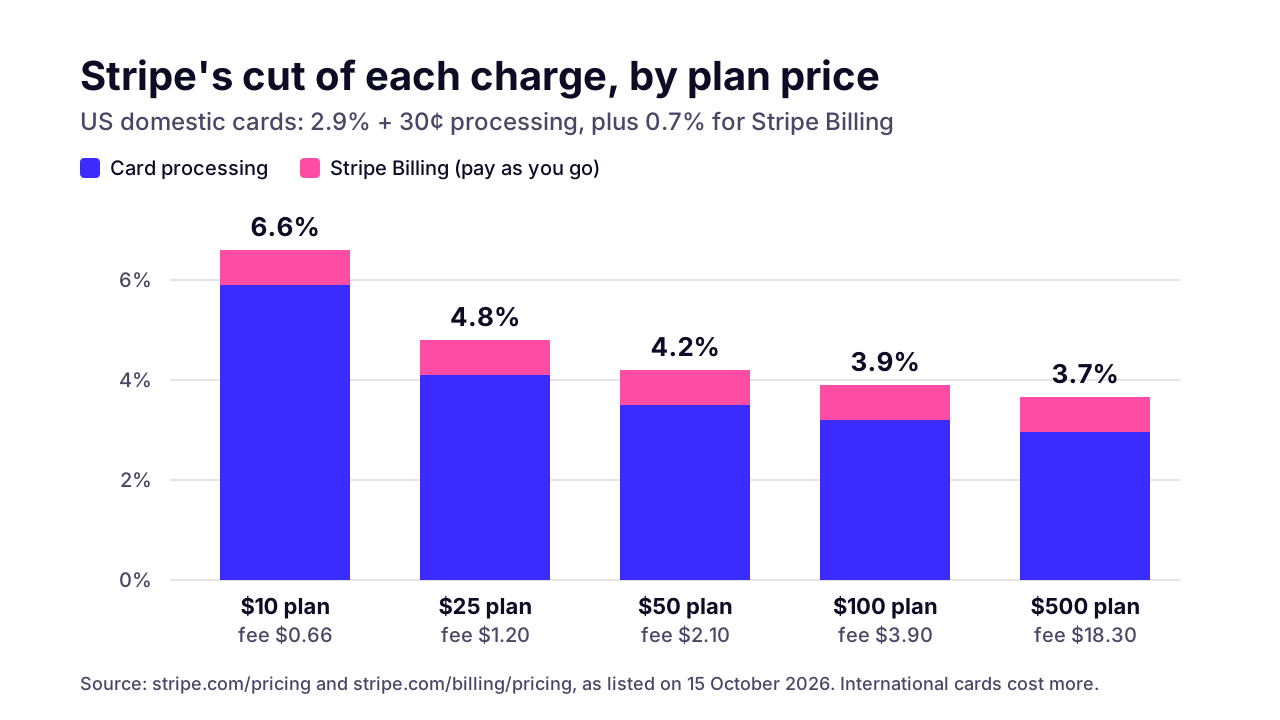
On US cards with Stripe Billing's pay-as-you-go plan, Stripe takes 3.6% of each charge plus 30¢. That works out to 4.2% of a $50 monthly plan, and more on cheaper plans or international cards.
The fixed 30¢ is the part people miss. On a $10 plan it's 3% of the charge by itself, so Stripe's total cut comes to 6.6%. On a $500 plan it barely registers and you pay about 3.7%. If you're still choosing price points, that's a small argument against very cheap monthly plans.
 (opens the full-size chart in a new tab)
Annual billing helps for the same reason. One $600 charge a year pays the 30¢ once instead of twelve times, which cuts a $50 customer's yearly fees from $25.20 to $21.90. Small per customer. Across a thousand customers it's $3,300 a year.
International customers cost more to charge. Stripe adds 1.5% for international cards and another 1% when currency conversion is required:
US card, charged in US dollars
- Stripe fees on a $50 charge (with Billing)
- $2.10
- Share of the charge
- 4.2%
International card
- Stripe fees on a $50 charge (with Billing)
- $2.85
- Share of the charge
- 5.7%
International card with currency conversion
- Stripe fees on a $50 charge (with Billing)
- $3.35
- Share of the charge
- 6.7%
Two more lines for the spreadsheet. Stripe charges $15 for each dispute you receive. And Stripe sells Billing on an annual contract from $620 a month, but at 0.7% pay-as-you-go only reaches that cost at about $88,600 of monthly Billing volume. An early SaaS should stay on pay-as-you-go.
What pushes a SaaS budget from MVP toward the platform range?
Mostly two things: more roles and integrations, and enterprise requirements such as SSO and audit logs. Deeper reporting and compliance work for regulated data push it further. Each one adds build and test time, and they tend to arrive together once you start selling to bigger companies.
Roles are the sneaky one. An owner and a member is a couple of checks. Five roles with custom permissions per workspace is a permissions system, and it reaches into every screen and API route.
Integrations cost more than their size suggests. Each one needs its own auth and retry logic, plus a plan for the day the other company's API goes down or changes shape.
SSO is where enterprise readiness starts to show up as a monthly bill. If you buy it instead of building it, WorkOS lists Single Sign-On at $125 per connection a month for the first 15 connections. A connection is one group of users signing in through an identity provider such as Okta or Microsoft Entra, so ten enterprise customers on SSO would cost $1,250 a month. For most B2B products I'd still buy it. SAML is fiddly, and every customer's identity provider is set up a little differently.
Audit logs look simple and aren't. Bigger customers want an append-only record of who changed what and when, which they can search and export, and it has to cover what your own admin team does too.
Compliance is the biggest jump. Under the AICPA's SOC 2 framework, a SOC 2 report covers an examination of a service organization's controls relevant to security, availability, processing integrity, confidentiality or privacy. The engineering side (access reviews, logging, tested backups, change control) is work a development team can scope. The audit fee is set by the audit firm, so get quotes before you promise a customer a date.
Your vendors' plans move with you, too. Supabase's Team plan starts at $599 a month against $25 for Pro, and it's the tier where SOC2 and ISO 27001 appear on its pricing page. If a customer's security review asks for your database provider's reports, that's the plan you'd be on.
How much should you budget after launch?
Plan roughly 15–20% of the build cost a year to own the product (an Arrowbin estimate). That band covers maintenance plus the hosting and tool plans; payment fees, heavy usage and the features paying customers ask for get their own lines. On the $60,000 example, the band is $9,000–$12,000 a year.
On a SaaS, maintenance means dependency and security updates, database upgrades, keeping up with your payment provider's API changes, and fixing what real customers find. None of it is optional once people pay you monthly. Our guide to software maintenance costs breaks that work down, along with the 2026 platform deadlines behind it.
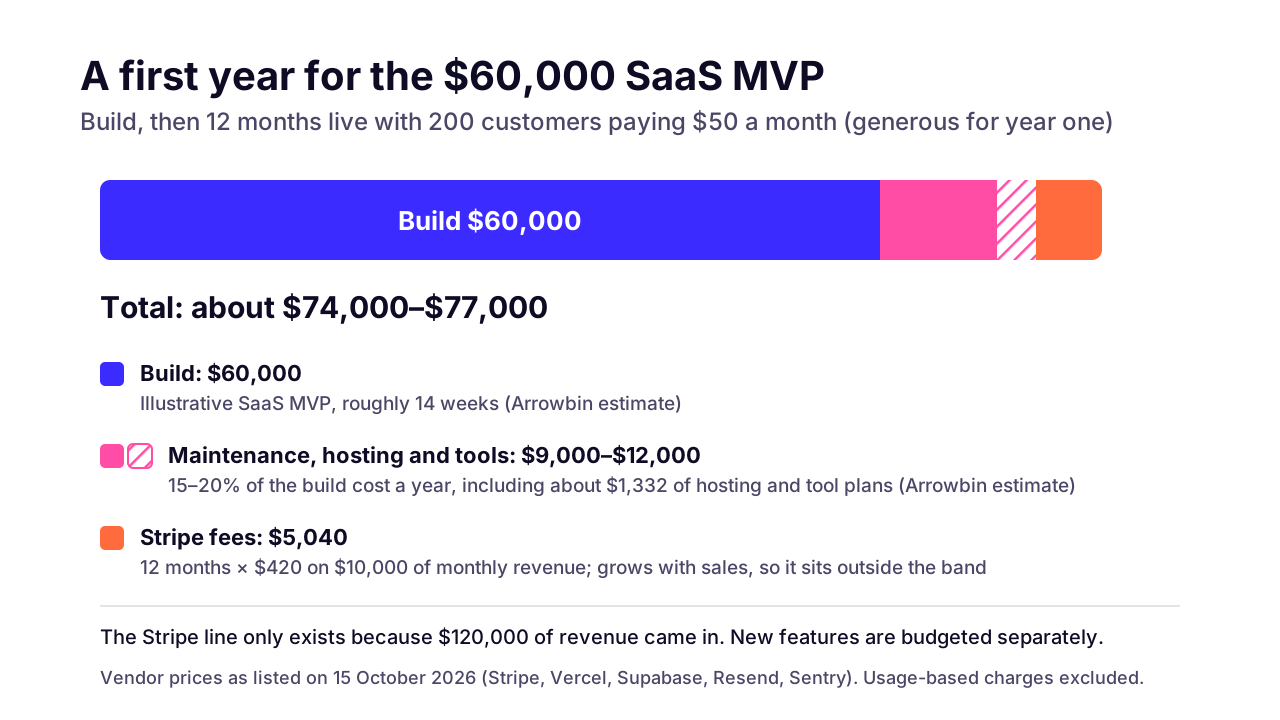
Put a first year together for the $60,000 example and it looks like the chart below. We assumed 200 customers at $50 for all twelve months, which is generous for a first year. The $1,332 of plan fees from the running-cost table ($111 × 12) sits inside the maintenance band, the way our cost guide counts hosting. Stripe's $5,040 ($420 × 12) gets its own line, because it grows with revenue rather than with the code.
 (opens the full-size chart in a new tab)
Add it up: $60,000 for the build, $9,000–$12,000 for the band, plus $5,040 in Stripe fees. That's roughly $74,000–$77,000 for the year. The Stripe line only exists because $120,000 of revenue came in, so model fees against expected revenue rather than as a fixed overhead.
Keep new features in a separate budget. Paying customers will ask for things, and the requests that win renewals are worth building. We scope those as small projects so they don't quietly eat the maintenance money.
Which tech stack keeps SaaS costs predictable?
A widely used stack keeps hiring and hosting predictable. For us that's usually Next.js and Node.js with PostgreSQL, Redis for caching and queues, Stripe for billing, and AWS or Vercel for hosting. The stack matters less than keeping the architecture simple early.
For multi-tenancy we nearly always start with one shared PostgreSQL database, a tenant ID on every row, and row-level security as a second lock behind the application code. PostgreSQL's row security docs say that if no policy exists for a table, a default-deny policy is used, so a forgotten rule fails closed.
A database per customer sounds safer. It also multiplies the migrations and backups you have to run, so we keep it for customers whose contract requires it.
Skip microservices for an early SaaS. One well-structured app with a job queue is cheaper to build and host, and far easier to debug when something breaks. You can split it later along the lines real load shows you.
Two habits keep the bills predictable. Set spend limits from day one; Vercel gives new teams a default on-demand usage budget of $200, which you can change. And tag background jobs and heavy queries with the tenant, so when one customer's usage spikes you can see it and price for it.
What if you're building a SaaS from outside Stripe's supported countries?
Check payment availability before you write any billing code. Bangladesh isn't on Stripe's supported list, so founders there often form a company in a supported country (Stripe Atlas offers a US company) or use another billing provider.
On October 15, 2026, Stripe's global availability page listed India as Preview and didn't list Bangladesh at all. The same page says Atlas lets you 'Incorporate a US company from anywhere in the world', and that once Stripe supports your country you can sell to customers anywhere.
The answer shapes the build as well as the paperwork. Webhooks, invoices, tax handling, payout currency: all of it depends on which provider and which legal entity you end up with, so settle it before billing work starts. We'll build against whichever provider you choose, but we don't give legal or tax advice. Talk to an accountant who works with founders in your country.
If you also sell to customers inside Bangladesh, local payments are a separate integration with their own fees and flows. Our guide to bKash and SSLCommerz integration covers that side. If the product is a mobile app, see Bangladeshi app prices in Taka and dollars.
How do you get an accurate SaaS quote?
Bring your core workflow, your pricing model (per seat, usage-based or flat), the integrations you can't launch without, and who your first customers are. A short paid discovery turns that into a fixed price for the MVP.
The pricing model matters more than people think. A flat monthly plan is the simplest billing you can build. Per-seat pricing needs seat counts and proration. Usage-based pricing needs metering; Stripe's pricing page says basic usage-based billing through its Meters API is included up to 100M events a month, but you still have to record every billable event reliably.
Your first customers matter just as much. If they're small teams, you can leave SSO and audit logs for later. If your first deal is a bank, they can't, and the budget moves toward the platform range before you've launched.
When you're ready, our SaaS product engineering team can run that discovery with you, and you own all of it from day one: code, accounts, infrastructure. Your pricing model is the first thing we'll ask about on a 30-minute call, and it's the quickest route to a real number.
Key takeaways
- 01On Arrowbin's estimates, a full multi-tenant SaaS platform costs $80,000–$200,000 over 5–9 months, and our illustrative SaaS MVP is $60,000 over roughly 14 weeks.
- 02SaaS-only work is what moves a budget from MVP toward platform: tenant isolation and billing first, enterprise extras such as SSO and audit logs later.
- 03Tenant isolation and billing belong in the first version; most other SaaS features can wait until paying customers ask for them.
- 04On US cards, Stripe processing plus Stripe Billing takes 4.2% of a $50 monthly charge, more on cheap plans and international cards.
- 05A small SaaS stack (two Vercel Pro seats, Supabase Pro, Resend Pro, Sentry Team) starts around $111 a month in plan fees, before usage.
- 06Budget 15–20% of the build cost a year for maintenance plus hosting and tool plans (Arrowbin estimate), and give payment fees and new features their own lines.
- 07If Stripe doesn't support your country, settle the payment provider and company setup before any billing work starts.

Written by
Md. Shishir Ahmed
Founder, Arrowbin
Founder of Arrowbin. Writes about shipping software, what it costs, and the decisions that decide whether a product works.