The short answer
Start by automating the job your team does most often, the same way each time, where a mistake is cheap to catch and the information is already written down. For most small businesses that's inbox triage or invoice and document entry, not a customer-facing chatbot. Score each candidate from 1 to 5 on volume, repetitiveness, error cost and data availability, multiply the four, and start with the highest. Keep a person approving anything that reaches a customer or moves money until a month of results says otherwise.
On this page
This guide is for owners and managers of businesses with roughly 3 to 100 people who've tried ChatGPT or Claude and now want to know which jobs are worth handing to AI. Most lists of ideas stop at the list. We'd rather help you pick one.
We build AI automation for small businesses, and the order below is the one we use when scoping a first project. Cost has its own guide. This one covers where to start and where a person has to stay involved.
What should a small business automate with AI first?
A small business should first automate the job its team repeats most often, in the same way, where a mistake gets caught before a customer sees it. For most that means sorting the inbox or typing invoice and document data into another system.
Those jobs are dull, and that's why they work. They happen dozens of times a week, the right answer is usually obvious to a person, and a wrong guess lands in an internal queue instead of in front of a customer.
A customer-facing chatbot looks more impressive. It also talks to the public on day one, the worst place to learn how your automation fails.
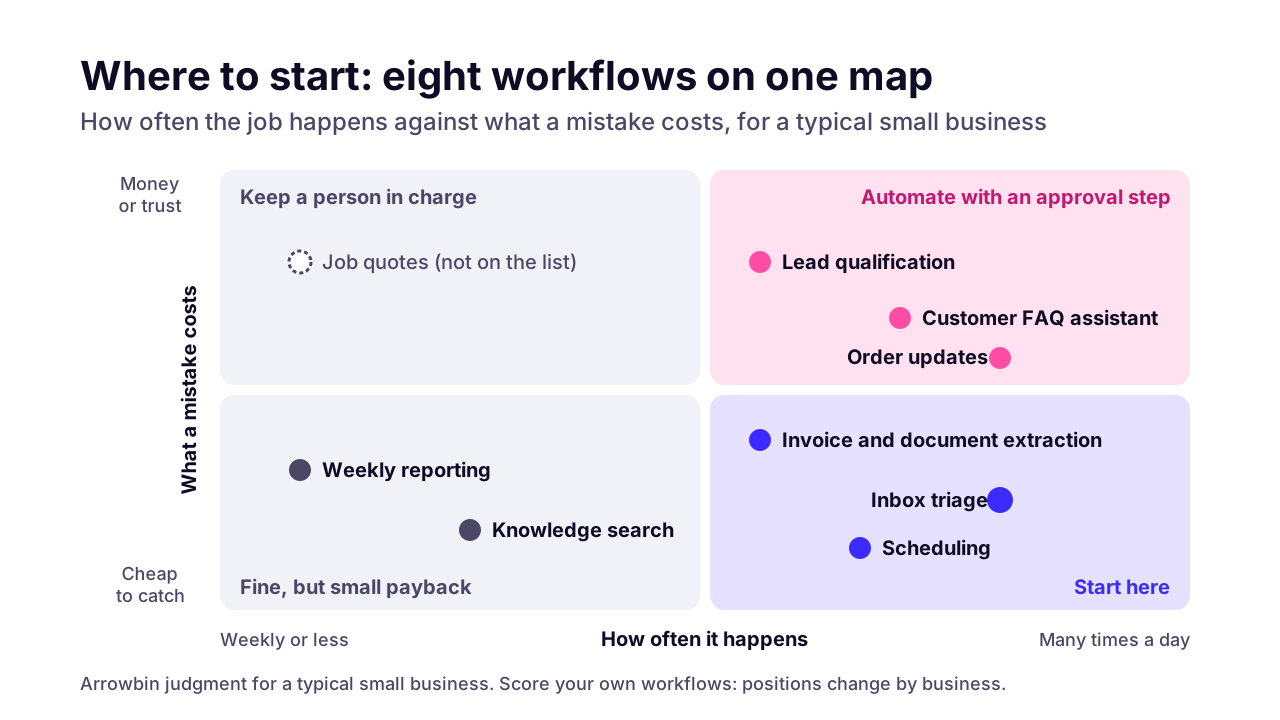 (opens the full-size chart in a new tab)
The map is our judgment for a typical small business, and yours will move things around. A dental practice lives on its calendar. An online store's busiest queue is often 'where's my order?'. The scoring section below turns this into numbers for your own workflows.
What is AI automation, and how is it different from ordinary automation?
AI automation is a workflow with at least one step where a language model reads something messy, such as an email, a scanned invoice or a chat message, and turns it into a decision or structured data. Ordinary automation only follows fixed rules, like 'when a form is submitted, send this email'.
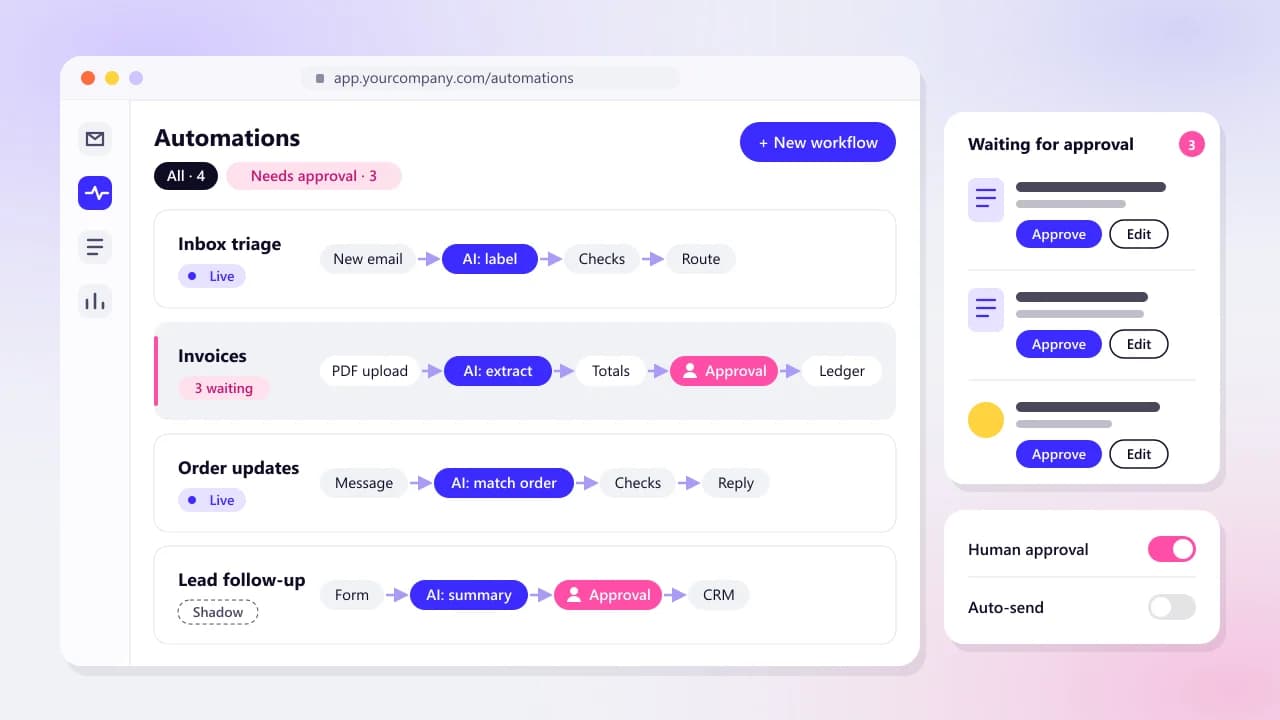
In a good automation the AI step is small. Everything around it is plain workflow: a trigger, some checks, a point where a person can approve, the action itself, a log. When an automation goes wrong, the cause is usually a missing check or a missing log rather than the model.
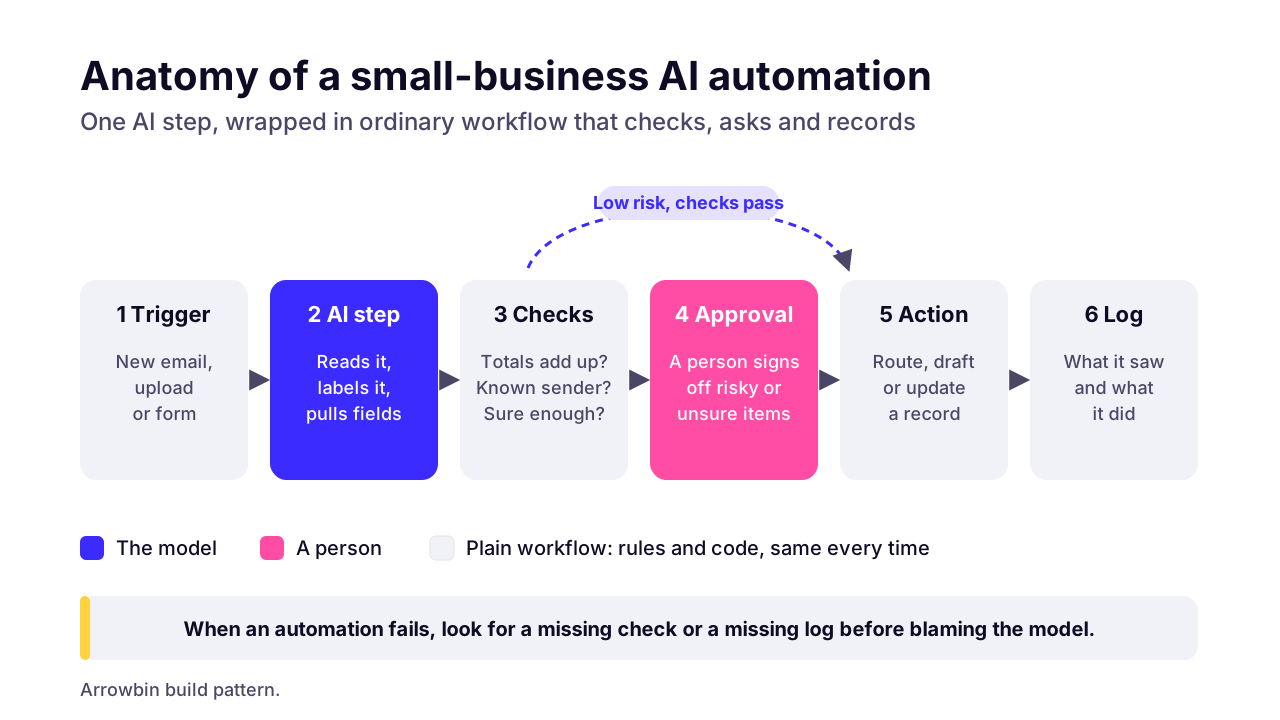 (opens the full-size chart in a new tab)
That's also why your first automation doesn't need to be an AI agent. An agent picks its own next steps; a workflow with one AI step does the same thing every time. Start predictable, and add freedom once you've watched it work on your real data.
Which workflows can a small business automate with AI in 2026?
Eight workflows are dependable enough for a small business to automate in 2026: inbox triage, document and invoice extraction, a customer FAQ assistant grounded in your own documents, lead qualification, scheduling, reporting, internal knowledge search and e-commerce order updates. Each saves a different kind of time and fails in a different way.
Inbox triage
- What it saves
- Reading and routing every message by hand
- Main risk
- Urgent mail misrouted; hidden instructions inside an email
- Human step
- A person sends replies and clears the 'unsure' pile
- Buy or build
- Buy or workflow tool; custom if routing needs your own data
Document and invoice extraction
- What it saves
- Retyping fields and line items into accounting
- Main risk
- Wrong amount or supplier posted
- Human step
- A person approves before anything is posted or paid
- Buy or build
- Buy for standard invoices; build for unusual documents
Customer FAQ assistant on your docs
- What it saves
- Repeat questions, including out of hours
- Main risk
- A confident wrong answer about price or policy
- Human step
- Hand-off to a person; weekly transcript review
- Buy or build
- Buy your helpdesk's assistant; build if answers need live data
Lead qualification
- What it saves
- The first reply and the usual qualifying questions
- Main risk
- Turning away a good lead, or promising a price
- Human step
- A salesperson decides; the AI never quotes
- Buy or build
- Workflow tool or a CRM feature
Scheduling
- What it saves
- Back-and-forth over times
- Main risk
- Double booking or the wrong time zone
- Human step
- A person confirms anything unusual
- Buy or build
- Buy a booking tool
Reporting
- What it saves
- Pulling numbers and writing the weekly summary
- Main risk
- A wrong number stated with confidence
- Human step
- The owner reads it before anyone else does
- Buy or build
- Workflow tool or a small custom job
Internal knowledge search
- What it saves
- Hunting through old procedures and past work
- Main risk
- Staff seeing files they shouldn't; stale documents
- Human step
- Answers cite a source; staff open it for anything important
- Buy or build
- Buy for a small document set; build when permissions matter
E-commerce order updates
- What it saves
- 'Where is my order?' replies
- Main risk
- Showing one customer another customer's order
- Human step
- Refunds and address changes go to a person
- Buy or build
- Platform rules plus a custom matching step
Inbox triage
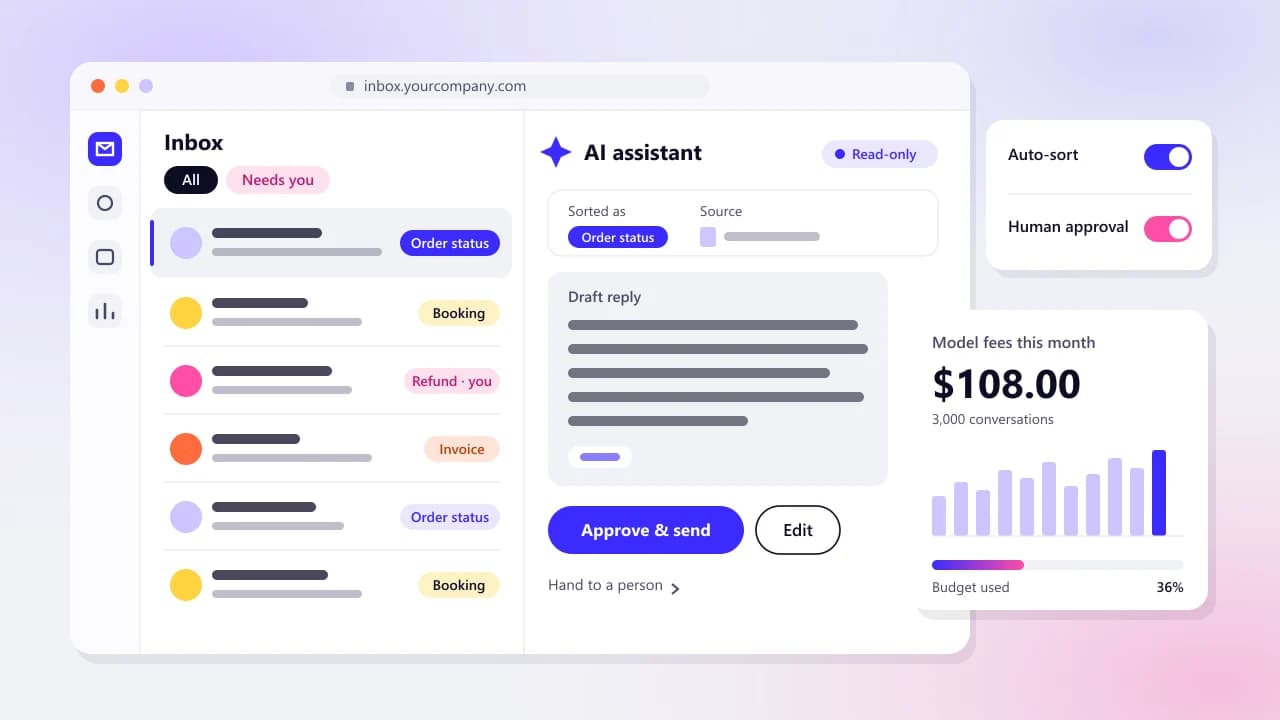
Inbox triage reads each incoming email, gives it one label from a short list, pulls out details such as an order number, and sends it to the right person. Keep the list short and always include 'unsure', so the model has somewhere honest to put the odd ones.
The risk people miss is that an email is text written by a stranger. OWASP's guidance on prompt injection describes indirect injection as an LLM accepting input from external sources, and one of its example scenarios is an email assistant manipulated by a crafted message. So an inbox automation may label and draft, but it shouldn't send, delete or forward outside the business on its own.
Document and invoice extraction
Document extraction turns a PDF or a phone photo into fields your accounting system can take. Ready-made models exist: Microsoft's prebuilt invoice model pulls key fields and line items from invoices (and from utility bills and purchase orders) into structured JSON, and covers invoices in 27 languages.
The engineering is in the checks after extraction. Do the line items add up to the total? Is the supplier one you already know? Does the bank account match the one on file? Anything that fails goes to a person. Nothing gets paid without one.
Customer FAQ assistant on your own documents
An FAQ assistant answers customers from your own help pages and policies instead of the model's general knowledge. Helpdesks sell this now. Intercom's explainer for its Fin agent says it can learn from your help center articles and other sources such as PDFs or webpages, and will always hand off when that's the safest option for the customer.
The assistant can only be as good as the documents behind it. If your refund page contradicts your terms, it will quote one of them with total confidence. Fix the documents first, then read a sample of chats weekly.
Lead qualification
Lead qualification replies to a new inquiry within minutes, asks the questions your salesperson always asks (budget, timing, location), and passes a short summary to a person. The AI shouldn't quote prices or turn anyone away. It sorts. A person decides.
Scheduling
Booking tools already find free slots. The AI part is reading requests like 'any morning next week except Wednesday' and offering times that fit. Buy this almost every time. Build only when bookings follow rules a booking tool can't express, like matching a job to a technician with the right certificate.
Reporting
A reporting automation pulls last week's numbers from your store, accounts or analytics and writes a short summary for the owner. One rule matters more than the rest: let code or a spreadsheet do the sums, and let the model describe numbers it's been handed. Language models explain a table well and add one up badly.
Internal knowledge search
Knowledge search lets staff ask 'how do we handle a warranty claim?' and get an answer from your own procedures, with a link to the source. For a small set of documents an off-the-shelf tool may be enough: Google's notebook tool (its help center calls it Gemini Notebook) answers from the sources you add, with in-line citations.
Build your own when different staff should see different documents. Permissions are where these projects get hard, because a search tool that ignores them will happily summarize the payroll file for whoever asks.
E-commerce order updates
Order updates answer 'where's my order?' by matching a customer's message to an order and reading its courier status. Part of this needs no AI at all. Shopify's help center lists Shopify Flow as a free automation app on four plans, Basic through Plus, and plain rules handle tagging and notifications well.
The AI step is reading a free-text message and finding the right order. Get that wrong and you've shown one customer another customer's address. Match on order number plus email, and send anything involving a refund, a cancellation or an address change to a person.
If the store's own data is a mess, fix your store's back end first. Getting your products recommended inside AI assistants is a different job, covered in our guide to getting products into AI shopping answers.
How do you score your own workflows to find the first one?
Score each candidate workflow from 1 to 5 on four factors: how often it happens, how repetitive it is, how cheap a mistake is, and how available the data is. Multiply the four scores and start with the highest. Error cost is scored backwards, so a job where mistakes are cheap gets a 5.
We multiply instead of adding on purpose. With addition, huge volume can hide a dangerous error cost. With multiplication a single 1 drags the whole score down, which is exactly what a filter should do. The maximum is 625.
Volume
- Scores 1
- A few times a month
- Scores 3
- A few times a day
- Scores 5
- Dozens of times a day
- How to check it
- Count it for two weeks
Repetitiveness
- Scores 1
- Every case is different
- Scores 3
- Same shape, frequent exceptions
- Scores 5
- Same steps almost every time
- How to check it
- Sort 20 recent cases into 'usual' and 'odd'
Error cost (scored backwards)
- Scores 1
- A mistake costs money, a customer or a legal problem
- Scores 3
- A mistake costs an apology and some rework
- Scores 5
- Cheap, and caught before anyone outside sees it
- How to check it
- Name the worst realistic mistake and who sees it first
Data availability
- Scores 1
- The know-how lives in one person's head
- Scores 3
- Scattered across email and shared drives
- Scores 5
- Written down and reachable through a tool or API
- How to check it
- List where every input comes from
Our rule of thumb: above 150 is a good first candidate. Between 60 and 150 can wait, or needs a tighter human step. Below 60, leave it with a person for now. These cut-offs are our judgment, not a standard, so adjust them once you've scored a few.
A worked example, with made-up scores to show the method. Say you run a 20-person heating and plumbing company and you're weighing three jobs:
- Sorting customer emails: volume 5, repetitiveness 4, error cost 4, data 4. Score 320.
- Entering supplier invoices: volume 3, repetitiveness 5, error cost 3, data 5. Score 225.
- Writing job quotes: volume 3, repetitiveness 2, error cost 1, data 2. Score 12.
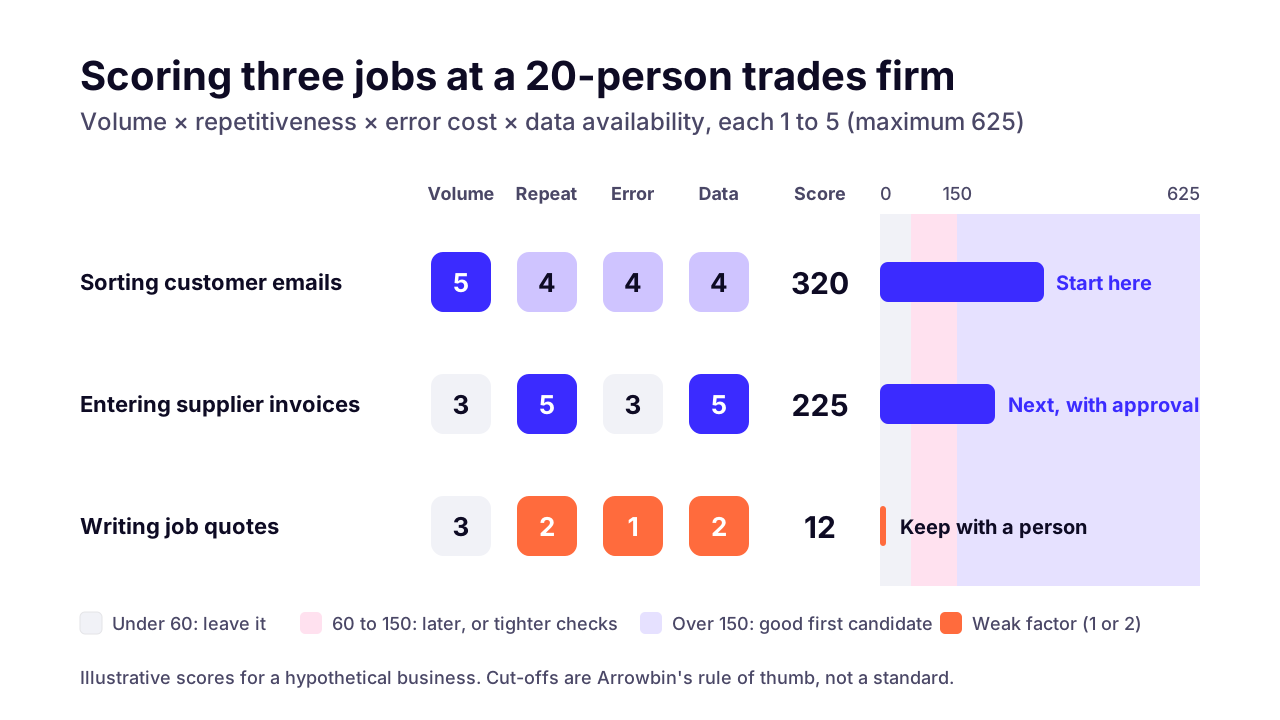 (opens the full-size chart in a new tab)
Email sorting goes first. Invoices come next, with a person approving every posting. Quotes stay with a person, because one wrong price is a promise you have to keep.
Note why quotes failed. They scored low on two factors at once (error cost and repetitiveness), which is the usual pattern for work that only looks automatable from a distance.
Where does a person need to approve what the AI does?
A person should approve anything that leaves the business, moves money, changes a record you can't easily undo, or acts on text written by a stranger. Everything else can run on its own once a month of results shows it's accurate.
Think of it as a four-rung ladder. A new automation starts at the bottom and climbs one rung at a time, only when its results say it's safe.
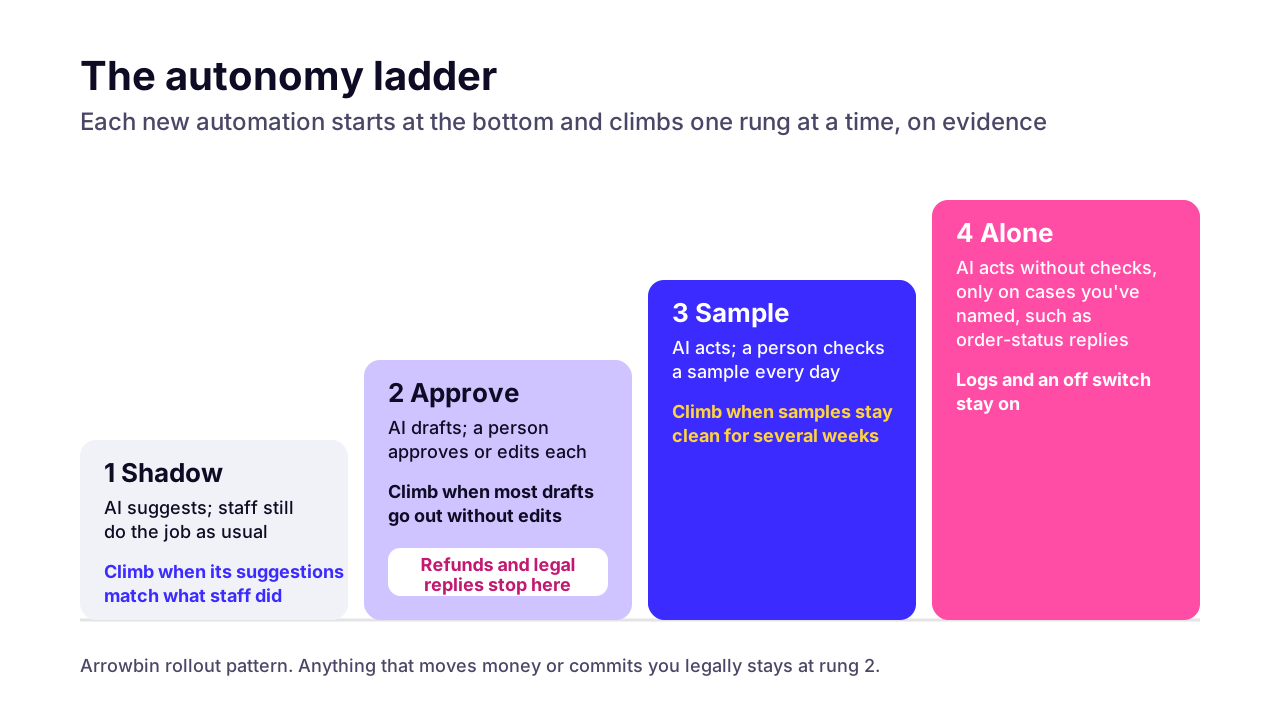 (opens the full-size chart in a new tab)
- Shadow: the AI suggests, staff do the job as usual, and you compare the two. Nothing the AI produces reaches anyone.
- Approve: the AI drafts, and a person approves or edits each item before it goes anywhere.
- Sample: the AI acts on its own and a person checks a sample every day.
- Alone: the AI acts without checks, but only on a short list of cases you've named, such as order-status replies.
Some jobs should never climb past 'approve'. Refunds, anything legally binding and replies to angry customers are the obvious ones. OWASP's prompt-injection guidance lists least-privilege access and human approval for high-risk actions among its mitigations, and both apply to a five-person firm as much as a bank.
In plain terms: give it the narrowest access that does the job, and make the risky buttons need a human hand.
Should you buy a tool, use a workflow builder, or build custom?
Buy when the workflow lives inside one tool you already pay for, such as your helpdesk, store platform or accounting software. Use a workflow builder like n8n, Zapier or Make when the job crosses a few apps that have connectors, and build custom when it has to reach your own database, follow unusual rules or keep data away from more vendors.
Two patterns stand out in the table above. Scheduling and FAQ answers are largely solved by products, so building them yourself rarely pays. Document extraction and anything that writes to your own systems are where custom work earns its keep, because the hard part is the checks and the integration.
Price is the other half of the decision. Our guide to what an AI agent costs to build and run works through subscriptions, workflow-tool plans and custom builds using published prices.
If you go custom, most of the effort is custom integration work with the systems you already run. Logging and permissions go in on the first day.
One more opinion. A workflow builder is the right first step for plenty of small businesses, but someone has to own it. A flow built by a freelancer who's since moved on becomes a liability the first time a connected app changes. For tools beyond AI, our guide to when building your own software pays off runs the same decision with five-year numbers.
How do you start AI automation without risking customers or data?
Start with one workflow, written down as it works today and tested in shadow mode against real past examples before it touches anything. Check the provider's data terms and limit the automation's access before it goes live.
This is the pre-flight list we run before any automation goes live:
- Write the current process down step by step, exceptions included. If you can't describe it, the automation can't do it.
- Collect 50 to 100 real past examples with the outcome you'd want. They become your test set and outlive the first version.
- Give the automation its own account with the narrowest access that works: read the inbox but not delete from it, draft in accounting but not post.
- Check where the data goes. Read the provider's terms on retention and training, and keep anything you wouldn't email to a stranger out of tools you haven't vetted.
- Log what goes in, what comes out and every action taken, so you can answer 'why did it do that?' a month later.
- Build an off switch, and make sure the person who owns the workflow knows where it is.
- Name an owner who checks results weekly and updates the instructions when your prices, products or policies change.
Expect the shadow phase to feel slow. It's also the cheapest place to discover that the AI misreads one supplier's invoices or your customers' slang.
What shouldn't a small business automate with AI yet?
Keep work with a high cost of error and lots of judgment calls with a person for now, such as quotes, legal or medical advice, hiring or handling complaints. The same goes for anything you only do a few times a month: rare jobs seldom pay back the setup and testing time.
Small businesses that decided against AI say much the same. A July 2026 brief from the Federal Reserve Bank of San Francisco reports that non-adopters cited concerns about accuracy and intellectual property, the importance of human interaction to their business, and a lack of perceived relevance to their operations.
Those are sound reasons. If customers pay you partly for the human contact, don't automate it away.
Some problems look like automation jobs but are really process problems: a shared inbox nobody owns, prices that live in one person's head, a product catalog full of duplicates. Fix those first. AI on top of a mess gives you a faster mess.
How many small businesses use AI so far?
Fewer than the headlines suggest. A May 2026 US Census Bureau analysis found business use of AI hovered between 17% and 20% from December 2025 to May 2026, with fewer than 20% of firms with four or fewer employees using it and no significant change among firms under 20 employees. In retail, around 14% were using AI.
In the UK, the Office for National Statistics reported in July 2026 that 28% of businesses with 0 to 9 employees used at least one AI technology, against 49% of those with 250 or more. Among firms with 10 or more employees, large language models were the most used AI technology, at 18%.
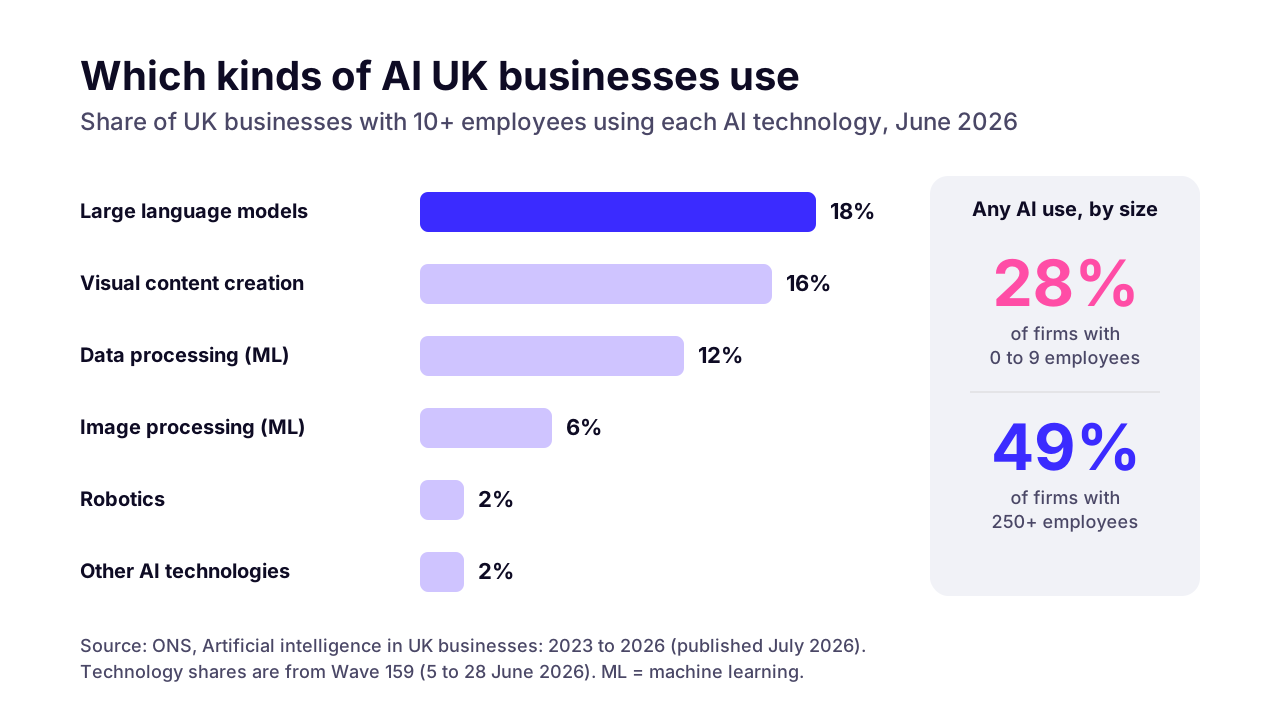 (opens the full-size chart in a new tab)
So most small businesses haven't started, and you're not behind. The same ONS article notes that earlier analysis found difficulty identifying business use cases was among the most common barriers to adoption. Cost and a lack of expertise came next. The scoring sheet above exists for exactly that problem.
What can you do this week?
Pick three jobs your team repeats every week, score them on the four factors, and run the top one in shadow mode against 50 past examples. If a tool you already pay for covers it, switch that on first. If none does, a custom build is worth pricing.
That's the order our AI automation for small businesses work follows: score the candidates, prove the first one on your real data, and keep a person approving until the numbers say otherwise. If you'd like a second opinion on your scores, book a 30-minute call and bring the list.
Key takeaways
- 01Start with the job your team repeats most, done the same way each time, where mistakes are cheap to catch and the information is already written down.
- 02For most small businesses the best first automation is inbox triage or invoice and document entry, not a customer-facing chatbot.
- 03Score each candidate from 1 to 5 on four factors (volume, repetitiveness, error cost, data availability) and multiply, so one weak factor sinks the workflow.
- 04A dependable automation is mostly plain workflow with one AI step, plus checks, an approval point and a log.
- 05Climb the autonomy ladder one rung at a time: shadow, approve, sample, then acting alone on cases you've named.
- 06Keep a person approving anything that reaches customers, moves money or acts on text written by strangers.
- 07Buy when the job lives inside one tool you already pay for; build custom when it touches your own systems or follows unusual rules.

Written by
Md. Shishir Ahmed
Founder, Arrowbin
Founder of Arrowbin. Writes about shipping software, what it costs, and the decisions that decide whether a product works.