On this page
Native mobile app development is building an app for one operating system, iOS or Android, with the languages, tools and SDK that the platform's maker provides. That means Swift and Xcode for iPhone, and Kotlin and Android Studio for Android. Because the code talks directly to the operating system, native apps get the best performance, the fullest access to the device and the most familiar feel. The price is two separate codebases for two platforms.
This guide covers what a beginner needs and what a decision maker needs. You will see why native matters, how native apps are built, which languages and tools each platform uses, and how native compares with cross-platform, hybrid and progressive web apps. It ends with a practical way to decide which approach fits your product and budget.
Arrowbin is a software studio that builds iOS and Android apps for startups and growing businesses, mostly from one codebase with React Native or Flutter. That gives us a clear view of when native pays off and when it is money you do not need to spend.
Why native mobile app development matters
Native mobile app development matters because it is the closest fit between your app and the phone. You get the best speed, every device feature and an interface that behaves the way users expect. If your product depends on feel or hardware, that fit is hard to fake.
What a native app gives you
A native app is compiled for one platform and calls that platform's APIs directly, with no translation layer in between. Every advantage below comes from that directness.
- Performance: Code runs as the platform intends, so launch times, scrolling and animation are as fast as the device allows.
- Day-one access to new features: When Apple or Google ships a new OS version, the native SDK supports it immediately. Framework-based teams wait for their tooling to catch up.
- Full device access: Camera, sensors, Bluetooth, background processing, widgets and push notifications are all available through official APIs.
- A familiar interface: Native components follow Apple's Human Interface Guidelines or Google's Material Design, so navigation and gestures feel right without extra work.
- Security tooling: Apple's Keychain and Android's Keystore protect credentials and keys. Other approaches can reach them through libraries, but native uses them first-hand.
- On-device AI: Core ML on iOS and ML Kit on Android run models on the phone with low latency and without a network round trip.
Native development trades budget for control: you pay twice, and you get everything the platform offers.
Products that lean on location, audio, messaging and background work are the classic native territory. Google Maps, Spotify and WhatsApp are commonly cited examples. Banking, health and camera-centric apps tend to benefit most, because small gaps in speed or device access show up as complaints.
What native costs you
Native means two codebases, two skill sets and two release tracks. You need Kotlin or Java engineers for Android and Swift engineers for iOS, or one team that is strong at both. Every feature gets designed, built and tested twice, and every bug fix ships twice.
Building and maintaining separate apps is the main reason many teams look elsewhere. A single cross-platform codebase typically saves 30–40% of the build cost compared with two native apps. There is also a hardware catch: iOS apps can only be built on a Mac, so a Windows-only team needs to buy or rent one.
How native mobile app development works
A native app is built with each platform's own language, UI toolkit and IDE, then tested on real devices and released through the App Store and Google Play. The steps are the same on both platforms, but the tools are different.
Languages, SDKs and IDEs by platform
Each platform has one preferred modern language and one older language that still lives in many codebases.
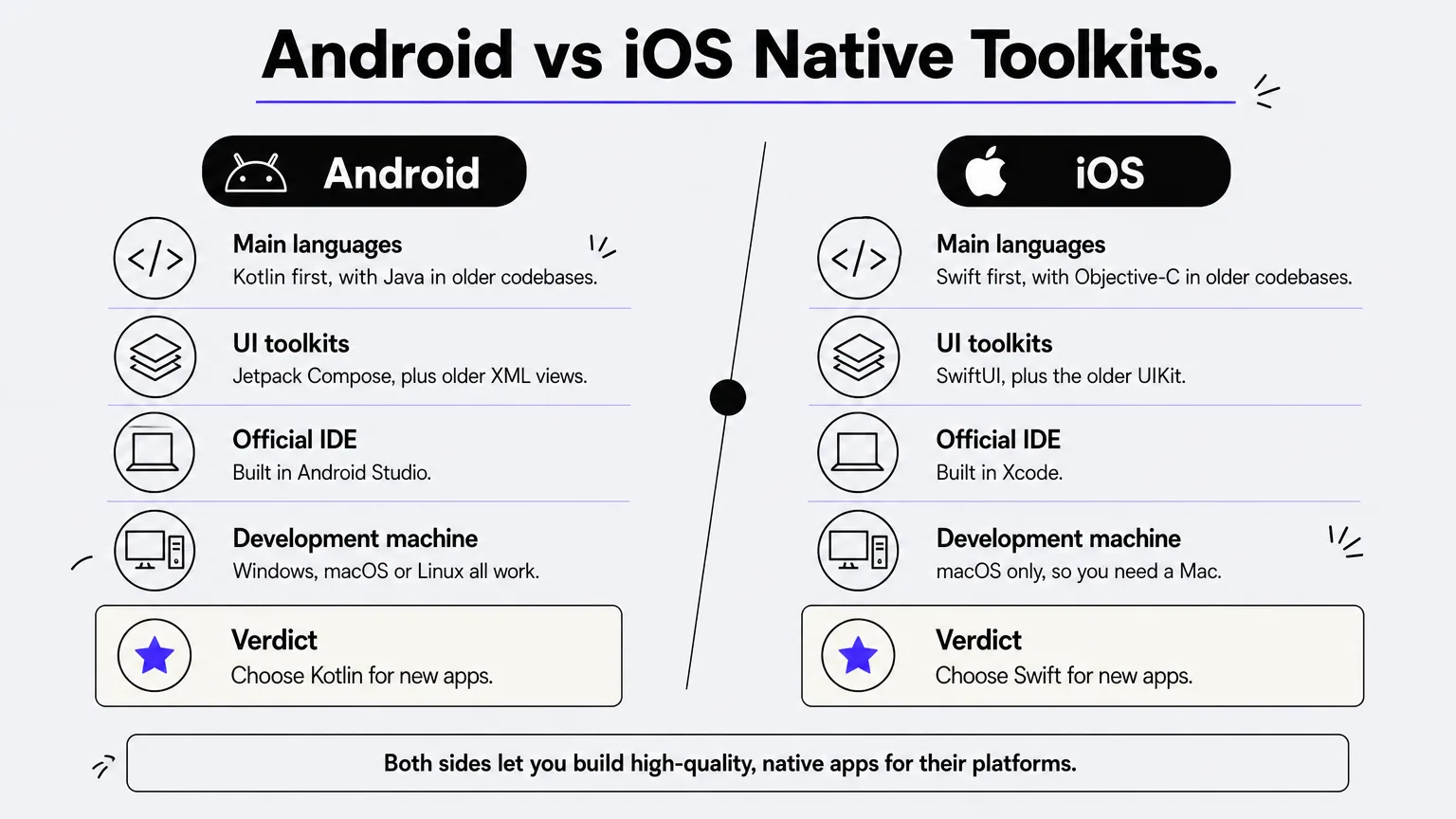
| Android | iOS | |
|---|---|---|
| Main languages | Kotlin, Java | Swift, Objective-C |
| UI toolkits | Jetpack Compose, XML views | SwiftUI, UIKit |
| IDE | Android Studio | Xcode |
| Development machine | Windows, macOS or Linux | macOS only |
| Store | Google Play | App Store |
For a new project, choose Kotlin for Android and Swift for iOS. Google added official Kotlin support for Android in 2017, and Apple introduced Swift in 2014 as the modern successor to Objective-C. Java and Objective-C matter mainly when you inherit an older app. Both of the modern UI toolkits, Jetpack Compose and SwiftUI, are declarative, which means you describe what the screen should look like and the framework handles updates.
For a new native app, pick Kotlin and Swift unless an existing codebase forces your hand.
The build process from scope to store
Whatever the platform, a native build follows roughly the same path:
- Define the scope. List the core features, the platforms, the oldest OS versions you will support and the devices that matter.
- Design for each platform. Follow Material Design on Android and the Human Interface Guidelines on iOS, and test a clickable prototype with real users.
- Build in short sprints. Engineers work in Kotlin and Swift, connect to your backend and APIs, and demo working software regularly.
- Test on real devices. Use simulators for speed, then real phones for performance, battery and edge cases. Automated suites such as Espresso on Android and XCTest on iOS catch regressions.
- Submit to the stores. Prepare screenshots, privacy details and release notes, then go through each store's review.
- Monitor and iterate. Track crashes and usage, then ship updates as new OS versions arrive.
Most apps also need a backend for accounts, data and payments. That work is the same whether the front end is native or not, so budget for it separately.
Accounts, review and release
You need a developer account on each store. Apple's Developer Program costs $99 per year, and Google Play charges a one-time registration fee of $25. Register both accounts under your own company name, not a contractor's, so you own the app and can change vendors later.
Store review is the least predictable step. Expect anywhere from a day to a week, and longer if the reviewer flags a privacy or payment-rule problem. Plan a buffer before any launch date you have promised to customers.
Native vs cross-platform, hybrid and PWA apps
Native apps use one codebase per platform. Cross-platform apps share one codebase across iOS and Android, hybrid apps wrap a website in an app shell, and PWAs run in the browser. "Mobile app" is the umbrella term, and native is one way to build one.
How the four approaches differ
The table sets the approaches side by side on the points that decide most projects.
| Approach | Codebase | Performance | Device access | Relative cost | Best for |
|---|---|---|---|---|---|
| Native | One per platform | Highest | Complete, from day one | Highest | Hardware-heavy or performance-critical apps |
| Cross-platform (React Native, Flutter, .NET MAUI) | One shared | Near-native for most apps | Broad, through plugins | Typically 30–40% below two native apps | Most business apps and MVPs |
| Hybrid (web view in an app shell) | One web codebase | Lowest of the app options | Through plugins | Low | Simple content or internal tools |
| PWA | One website | Bound by the browser | Limited, especially on iOS | Lowest | Reach through the browser, no store listing |
The real question is rarely "native or not" but "which parts of my app need to be native."
Where cross-platform has caught up
React Native (Meta, JavaScript and TypeScript), Flutter (Google, Dart) and .NET MAUI (Microsoft, C#) all produce apps that use real native UI elements or a fast custom renderer. React Native is still relevant: it is backed by Meta, ships the Hermes engine by default and is used in production by large consumer apps. Flutter's Impeller renderer delivers smooth animation, and React Native's newer architecture narrows the old speed gap.
The gap has not vanished. Intensive 3D, custom camera pipelines, advanced Bluetooth work and brand-new OS features may still require native modules. Teams that choose cross-platform should plan for occasional native code inside the shared app.
Why hybrid apps and PWAs rarely replace native
Hybrid apps wrap web pages in a native shell. They are cheap to build, but complex screens can feel sluggish and the result rarely feels truly native. They suit simple content or internal tools.
PWAs are not more popular because they come with real limits. They do not appear in store search, and on iOS many device features are limited or missing, including parts of push notifications and background work. Users also look for apps on the home screen and in the stores, so discovery and engagement are weaker. A PWA is a good low-cost complement to an app, but rarely a full replacement.
How to decide between native and cross-platform
Choose native when the app's value depends on hardware, speed or platform-specific polish. Choose cross-platform when you need both platforms, a fast launch and a controlled budget, which describes most business apps.
Choose native when
Native is the right call in these situations:
- Your app depends on advanced hardware access, such as custom camera processing, AR, or heavy Bluetooth and sensor use.
- You run on-device machine learning with strict latency needs.
- You build a game or graphics-heavy tool where every frame counts.
- You target one platform only, so a second codebase is never needed.
- You need new OS features on day one, because they are core to your product.
Choose cross-platform when
Cross-platform fits when your priorities look like this:
- You want iOS and Android at launch with one team and one backlog.
- You are validating an MVP and expect the product to change after the first user feedback.
- Your app is mostly forms, lists, accounts, payments and content, which every modern framework handles well.
- You want cloud AI features such as chat assistants or recommendations, which are plain API calls on any approach.
- You need a lower long-term maintenance load, with one set of fixes and releases.
A worked cost example
Say two native apps would cost $50,000 together (an illustrative figure, not a quote). At the typical 30–40% saving, a single cross-platform build lands at roughly $30,000 to $35,000, because $50,000 × 0.6 is $30,000 and × 0.7 is $35,000. The difference of $15,000 to $20,000 can pay for a year of iteration after launch.
For reference, Arrowbin's mobile app service, built on React Native or Flutter, usually puts a polished MVP between $12,000 and $40,000, depending on features and integrations. A focused MVP typically reaches the stores in 10–16 weeks, and a fixed estimate follows once the core feature set is defined. You keep the source code, the store accounts and the app data. If a feature really does need native code, the free scoping call is the place to find that out before you commit.
Picking the right approach for your app
Native mobile app development gives you the strongest performance, the deepest device access and the most polished platform feel, at the cost of two codebases and a higher budget. Cross-platform frameworks have closed most of the gap for everyday business apps, and they cost about a third less to build and maintain. Hybrid apps and PWAs fit narrower cases.
Decide by looking at your product, not at trends. If hardware, latency or day-one OS features define your value, go native. If you need both platforms fast and your app is mostly screens and data, go cross-platform and reserve native code for the few places it matters.
If you are weighing the two and want a straight answer on scope, timeline and cost, book a free call with Arrowbin and a senior engineer will walk you through the options for your app.