On this page
Workflow automation in a CRM means the system carries out routine steps for you when something happens, such as assigning a new lead, sending a follow-up email, or creating a task when a deal stalls. Every workflow follows one pattern. A trigger starts it, conditions decide the path, and actions do the work. You write the rule once, and the CRM applies it to every record, every time, without anyone having to remember.
This guide covers why CRM workflow automation is worth the effort, how to set up your first workflow, which examples work for sales, marketing and follow-up, how to choose a CRM with workflow automation, and how to measure results. You can read it top to bottom or jump to the part you need.
Arrowbin is a software studio that builds custom software and AI automation for growing companies. Teams often start with the built-in rules of their CRM and later need something those rules cannot do. The advice below is what we would tell you before any build starts.
Why CRM workflow automation matters
CRM workflow automation matters because a CRM only helps when someone acts on what it records, and people forget, get busy and work differently from each other. A workflow makes the next step happen every time, within seconds, and keeps the record accurate while it does.
Faster, more consistent follow-up
Speed is the clearest win. When a lead submits a form, a workflow can create the record, assign an owner and notify them before anyone has opened their inbox. Consistency follows. Every lead of the same type gets the same treatment, no matter who is on holiday or how crowded the week is.
Take a worked example. Your team gets 200 new leads a month, and each one takes three minutes to enter, assign and acknowledge by hand. That is 600 minutes, or 10 hours a month, spent on admin before any selling happens. A routing workflow cuts that to near zero, and those hours go back to calls.
A CRM records what happened, and a workflow makes sure the next step happens.
Cleaner data and fewer dropped leads
Automation also protects data quality. Workflows can update fields, stamp dates, log emails and flag duplicates, so your reports reflect reality instead of whatever someone remembered to type. A stalled deal can trigger an alert, so fewer leads go quiet just because nobody noticed.
Where it falls short
Workflows do not fix a weak process. Automating a messy handoff only makes the mess faster. Poor data also breaks any rule that depends on it, and too much automation produces robotic messages that customers ignore. Start with steps that are already clear and repetitive.
How to set up CRM workflow automation
To set up CRM workflow automation, pick one repetitive process, write it as a trigger, condition and action, build it in your CRM's workflow builder, test it with dummy records, and then switch it on. Start small. One working workflow teaches you more than ten half-planned ones.
The three parts of every workflow
Whatever CRM you use, the builder asks for the same three things. Knowing them first makes any interface easier to read.
| Part | Question it answers | Example |
|---|---|---|
| Trigger | What starts it? | A form is submitted, or a deal enters "Proposal sent" |
| Condition | Which path does it take? | Company size is above 50, or lead source is "Pricing page" |
| Action | What happens? | Assign an owner, send an email, create a task, update a field |
Conditions are optional, but they are what separates a smart workflow from a blunt one. Branching lets high-value leads go to a senior rep while smaller ones enter an email sequence.
Steps to build your first workflow
Follow these steps in order. Skipping the first three is the most common reason a workflow misbehaves later.
- Choose one repetitive process with a clear owner, such as new lead handling.
- Write it in one sentence: "When X happens, if Y is true, do Z."
- Check that the fields it depends on (lead source, company size, owner) are filled in consistently.
- Build it in the workflow builder, or in a connecting tool if your CRM lacks the trigger you need.
- Test with dummy records, including awkward cases like a missing email address.
- Turn it on, read the run logs for two weeks, and adjust.
Here is the lead example written out. When a contact form is submitted and the company has more than 50 employees, assign the lead to a senior rep, create a call task due the next business day, and send a short acknowledgment email. Otherwise, add the contact to a nurture sequence. Testing with dummy records takes an hour and saves you from emailing real customers by mistake.
Write the workflow as one plain sentence before you open the builder.
CRM workflow automation examples that pay off
The best CRM workflow automation examples handle a step that is frequent, rule-based and easy to forget. Lead routing, stalled-deal alerts, welcome emails and ticket triage all qualify, and they work for almost any team that sells or supports customers.
Examples at a glance
This table covers the workflows most teams build first.
| Workflow | Trigger | Actions |
|---|---|---|
| Lead routing | New form submission | Create record, assign rep by region or size, notify rep |
| Welcome series | Contact subscribes | Send three emails over a week, tag by interest |
| Lead score handoff | Score passes a set threshold | Move lead to sales, create a call task |
| Stalled-deal alert | No activity for 7 days | Notify owner, create a follow-up task |
| Ticket triage | New support request | Classify by topic, route to the right queue, log on the contact |
| Onboarding start | Deal marked won | Create onboarding tasks, notify the success team, send a welcome email |
Sales teams usually get value fastest from the first and fourth rows. Marketing teams lean on the welcome series and score handoff, which keeps sales and marketing working from the same record.
A follow-up workflow in detail
Follow-up is where most deals leak, so it is worth seeing one end to end. Suppose your rep sends a proposal. On day 0, the deal moves to "Proposal sent". On day 3, if the contact has not replied, the CRM creates a task for the rep to call. On day 7, it sends a short check-in email from the rep's address. On day 10, with still no reply, it moves the deal to "Stalled" and notifies the manager.
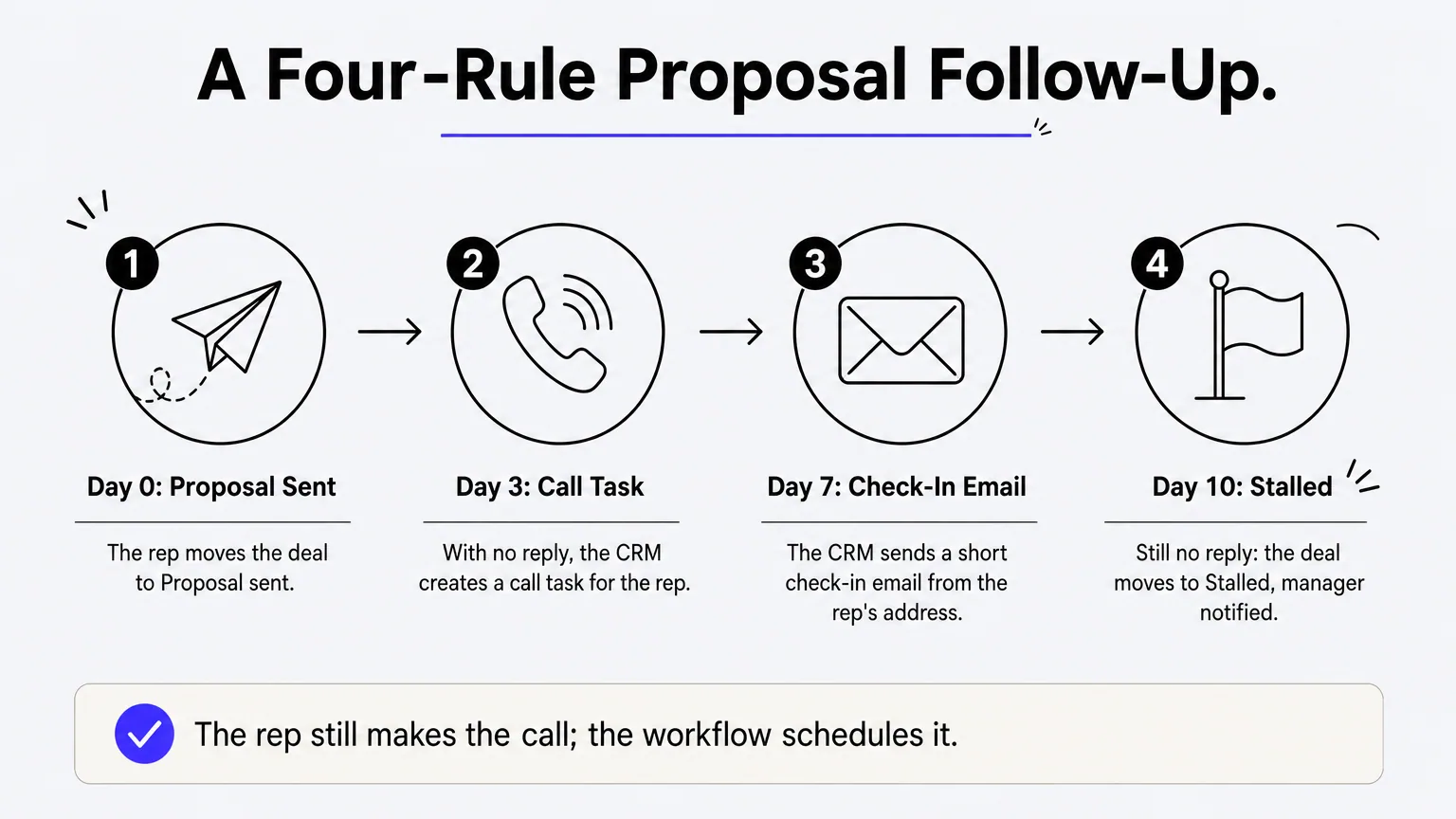
That is four rules, and none of them needs a person to remember anything. The rep still makes the call, which is the part that needs judgment. The workflow only guarantees the call gets scheduled.
How to choose a CRM with workflow automation
Choose a CRM with workflow automation by checking whether it can trigger on the events you care about, branch on your own fields, and connect to your other systems. HubSpot, Salesforce and Pipedrive all ship workflow builders, so the real differences are plan limits, depth and cost.
Three ways to get workflow automation
You have three routes, and most teams end up combining two of them.
| Option | Best for | Watch for |
|---|---|---|
| Built-in workflows | Standard processes inside one CRM | Plan limits, few triggers outside the CRM |
| Connector platform | Linking the CRM to forms, billing and chat | Per-run costs, one more tool to maintain |
| Custom-built | Unusual logic, many systems, strict data control | Higher upfront cost, needs a capable partner |
Advanced automation features often sit on higher plans, so check which tier includes the workflows you need before you commit.
Questions to ask before you pick
Put these to any vendor, or to yourself if you are building.
- Can it trigger on events from outside the CRM, such as a payment or a product signup?
- Does it support branching and custom fields, not just fixed templates?
- Are there run logs and error alerts, so a broken workflow does not fail silently?
- Is pricing per seat, per run, or per workflow, and what does your volume cost?
- Can you export your data and rules if you leave?
When a custom build makes sense
Build custom when your process does not fit the standard triggers, when the logic spans several systems, or when data must stay in your control. Arrowbin builds workflow automation systems as part of its custom software work, from about $8,000 for a focused tool, with a fixed estimate, no per-seat license fees and a usable first version in 6 to 12 weeks. For AI-assisted steps such as reading incoming messages or extracting call data, our AI automation service typically starts around $10,000 to $15,000 including a year of running costs, with a prototype in 2 to 3 weeks.

As for whether AI will replace the CRM, AI is becoming a layer inside it. It drafts notes, scores leads and fills fields, while the CRM stays the system of record that workflows run on.
Pick the CRM whose triggers match your process, then add custom work only where it falls short.
How to measure results and avoid mistakes
Measure a workflow by comparing a few numbers before and after it goes live, and avoid mistakes by automating only clear processes, keeping messages human and watching the logs. Give each workflow 30 to 60 days before judging it.
Numbers worth tracking
Pick metrics that match the workflow's job. Speed to first response and lead-to-meeting rate tell you whether routing and follow-up work. Overdue tasks show whether reminders are landing. The share of records edited by hand shows whether data automation is holding. For the lead example, 10 hours saved a month is a real figure you can check against your own team's time.
Mistakes that cause most failures
These show up again and again.
- Automating a process nobody has agreed on.
- Sending too many emails, so contacts unsubscribe.
- Building loops, where one workflow triggers another endlessly.
- Leaving no owner, so nobody fixes a broken rule.
- Skipping error alerts, so failures go unseen for weeks.
Review each workflow quarterly. Products, pricing and territories change, and rules written last year quietly go stale.
A workflow without an owner and a review date will eventually do the wrong thing quietly.
Start with one workflow
CRM workflow automation is a simple idea. A trigger fires, conditions pick the path, and actions do the repetitive work, so follow-up happens every time and your data stays clean. Pick one process, write it as a sentence, build it, test it, and measure it before you add the next.
If your CRM cannot do what your process needs, or you want AI handling messages and data entry, that is where a custom build helps. You can book a free 30-minute call with Arrowbin and a senior engineer will tell you what your workflow needs, how long it takes and what it costs.