On this page
To find out who is hiring product designer talent near you, start with LinkedIn Jobs and Indeed for volume, Built In for tech companies, Dribbble and UI UX Jobs Board for design-only listings, Glassdoor or ZipRecruiter for pay checks, and company career pages for roles that never reach a board. A good source has three things: fresh listings, filters for location and seniority, and pay or level shown up front. LinkedIn suits designers who lean on their network. Indeed suits anyone who wants the widest net. Built In suits designers who want tech employers with posted pay ranges.
The hard part is not finding listings. It is the noise. A plain "product designer" search returns product managers, developers and marketing roles. The same job appears on five boards, and some listings stay online long after the role is filled. Titles also vary, so a "UX/UI Designer" role may be the exact job you want.
This article ranks six places to look, explains what each one shows, and gives the searches that work. Our UI/UX design work sits in the same team as engineering at Arrowbin. If you are on the other side and need to hire one, the last section points you to a faster option.
1. LinkedIn Jobs
LinkedIn Jobs is the best first stop when you want volume and a route to a real person. It suits mid-level and senior designers who keep a current profile and know someone inside the companies they want.
What you will find
Companies hiring product designers post here at every size, from seed-stage startups to large enterprises. You can filter by date posted, experience level and remote, hybrid or on-site. Many listings accept applications inside LinkedIn, while others send you to the employer's site. Titles vary, so search several:
- Product Designer
- Senior Product Designer
- Staff Product Designer
- UX/UI Designer
- Lead Product Designer
How to search it well
Start with your city and a radius, then repeat the search with remote switched on. Put each title in quotes and sort by most recent. A listing that is three days old gets far more attention than one that is three months old.
Save every search as a job alert so new listings reach you daily. When a listing names a recruiter or hiring manager, send a two-line note with a link to your most relevant case study.
Save every title variant as an alert and let new listings come to you.
2. Indeed
Indeed gives you the broadest net. It is best for designers who want to apply quickly, compare pay, and see roles from smaller employers that skip LinkedIn.
What you will find
Indeed collects direct postings and listings from employer sites, and many show a pay range. Some are marked "Easily apply," while others hand you off with "Apply on company site." Sponsored listings are mixed in with the rest. The weak spot is relevance. Searching "product designer" often returns product managers, product developers and marketing roles because the word "product" matches everywhere.
Filters worth using:
- Pay, when the employer lists it
- Date posted
- Remote or hybrid
- Job type, such as full-time or contract
How to search it well
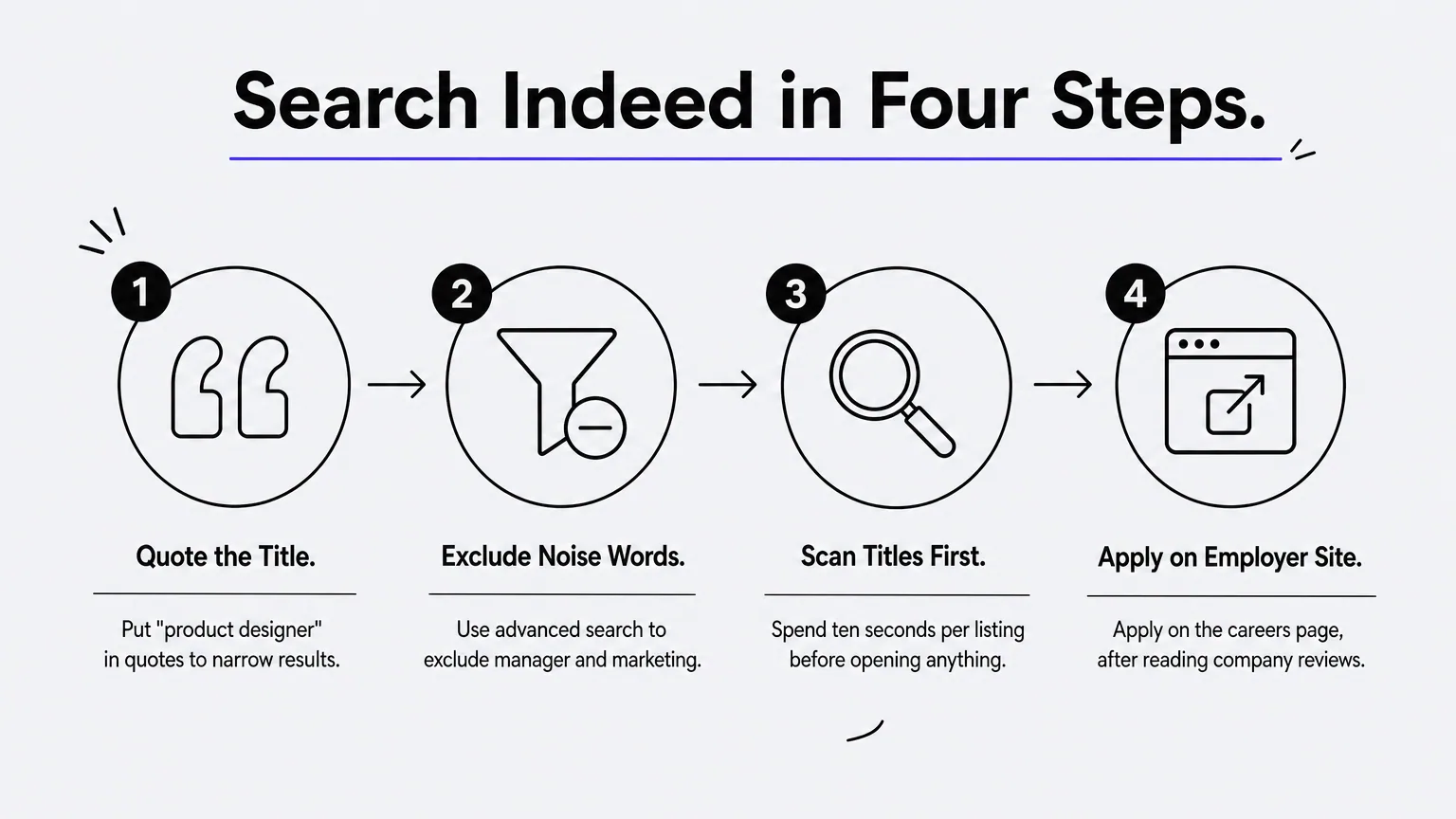
Put "product designer" in quotes, then use advanced search to exclude words such as manager or marketing. Scan titles before you open anything. Ten seconds per listing beats reading ten job descriptions that were never design roles.
When a listing says to apply on the company site, treat it as a free lead to the employer's careers page. Apply there, and read the company's reviews on Indeed first so you know what the team is like.
Quote the job title and exclude manager and marketing, or Indeed buries you in noise.
3. Built In
Built In suits designers who target tech and startup employers. Its local sites list roles with level, work arrangement and pay where employers share it. Versions exist for several U.S. cities and regions, including Colorado, New York and San Francisco.
What you will find
Each listing carries an experience level from entry to expert, a work arrangement tag, and a short list of top skills. Pay shows up often. Posted ranges vary widely by level, company and city. Mid-level roles often sit around $95,000 to $120,000, and staff or principal roles can list well above $200,000.
Recent listings cluster in fintech, healthtech and AI-focused software. Many ask for Figma plus AI-assisted prototyping, so name the AI tools you use in your resume and portfolio.
How to search it well
Pick the site for your city, filter by experience level, then filter again for remote. Remote roles often appear on a local site tied to a state or region.
Use the "top companies hiring" lists on each site to build a target list of employers. Then check those companies' career pages directly, which is the sixth place on this list.
Built In shows level and pay up front, so you can skip roles that do not fit.
4. Dribbble and UI UX Jobs Board
Design-only boards suit designers with a strong portfolio who are open to remote or international roles. Every listing is a design role, so you waste less time filtering out unrelated jobs.
What you will find
Dribbble's job board lists product design roles from many countries, including senior, lead and director positions. UI UX Jobs Board covers UX, product design and UX research, and many listings show the employment type and pay range. Both attract startups and agencies that want designers who already publish their work.
One warning. Some boards keep old listings visible after they close, and UI UX Jobs Board marks them as expired. Check the posting date and the status label before you spend an hour tailoring an application.
How to search it well
Use the location filter first, then repeat the search for remote roles. Remote listings may come from another country with different hours or legal requirements, so read the fine print.
Before you apply, make sure your Dribbble or portfolio site is current. Lead with one case study that matches the role, such as a B2B workflow for a B2B listing or a checkout redesign for a commerce listing.
A design board saves time only if you skip expired listings and match your case study to the role.
5. Glassdoor, ZipRecruiter and HiringCafe
These three suit designers who want pay and employer context before applying, or filters that the big boards lack. Use them as a second pass after LinkedIn and Indeed, not as your only source.
What you will find
Each one has a different strength. The table shows where each fits.
| Site | Best for | Watch out for |
|---|---|---|
| Glassdoor | Company ratings, salary reports, employer reviews | Fewer listings than the larger boards |
| ZipRecruiter | Pages sorted by seniority, including new grad roles | Wide pay ranges when titles are matched loosely |
| HiringCafe | Filter-heavy browsing with pay and work arrangement shown | Confirm each role on the employer's own page |
How to search it well
Use Glassdoor before you apply, not after. If a listing shows $95,000 to $115,000, check what the company's current and past designers report, and read the reviews for signs of high turnover on the design team.
Early-career designers should expect the hardest search. Entry-level product design roles draw the most applicants, so apply to contract and associate titles too, such as "Associate Product Designer," and lean on portfolio projects with real constraints.
Use these sites to check pay and reviews, not to replace your main sources.
6. Company career pages and design studios
Career pages are the most current and reliable source, because the listing comes straight from the employer. They suit designers who build a target list of 15 to 20 companies and check it on a schedule.
What you will find
Product companies post roles here before, or instead of, paying for a board listing. Software studios and agencies post here too, including contract roles. Some contracts, such as a six-month engagement, convert to permanent positions. Roles at studios are often client-facing, so your portfolio should show you can work with stakeholders as well as design screens.
Good places to build your list:
- Products you already use and admire
- The company lists on Built In
- LinkedIn company pages you follow for new-job alerts
- Studios whose case studies match the work you want
How to search it well
Run a short weekly routine. Checking 15 career pages at about two minutes each takes 30 minutes. Do it on the same day every week, apply to the best two or three matches, and write each application for that company.
Many employers read applications as they arrive, so a first-week application gets seen more often than a late one. If a company has no open design role, follow it and check again next week.
A list of 15 companies you check weekly beats a hundred boards you scan at random.
Where to start this week
Pick two broad sources, one tech-focused source, and a list of 15 career pages. Set alerts for each title variant, filter by your city and by remote, and apply within the first week of a posting. Check pay and reviews before you invest in a tailored application. That routine covers most roles that are currently open.
If you are on the hiring side instead, this list also shows where your competition posts. Hiring a product designer takes time, and a studio can cover the design work while you search. Arrowbin runs UI/UX projects from research to dev-ready Figma files, typically in four to eight weeks, with a fixed estimate and full ownership of the files. Talk to Arrowbin about your product design needs to scope the work.